Cloud storage matters because it lets you keep files away from a single device, reach them from other authorized devices, collaborate more easily, expand capacity, and use provider-managed security and recovery features. Those benefits are significant, but cloud storage is not automatically the same thing as a complete backup or a guarantee against data loss.
What cloud storage actually does
Cloud storage keeps data on remote infrastructure that you reach over a network instead of relying only on the storage inside one computer, phone, or local server. The standard cloud model includes broad network access and rapid elasticity, which helps explain why cloud services can make stored data available across devices and expand capacity without requiring you to install new local hardware.
Three related terms are often treated as if they mean the same thing: cloud storage, file synchronization, and cloud backup. They overlap, but their primary jobs are different. A storage service gives files a remote home. Synchronization, or sync, keeps selected copies aligned across locations. Backup focuses on retaining recoverable copies so data can be restored after loss or damage. That distinction matters because a change or deletion that synchronizes successfully can still be the wrong change.
The practical differences are easiest to see side by side.
| Feature | Cloud storage | File synchronization | Cloud backup |
|---|---|---|---|
| Primary purpose | Keep files or data on remotely managed storage. | Keep selected files consistent between locations or devices. | Maintain recoverable copies for restoration after loss or damage. |
| Typical behavior | Files are stored remotely and reached through an app, browser, API, or mounted storage service. | A change made in one synchronized location is propagated to other synchronized copies. | Copies or snapshots are retained according to a backup schedule or recovery policy. |
| Recovery role | May provide trash, version history, replication, or other recovery features depending on the service and configuration. | Helps keep working copies current, but can also propagate unwanted changes or deletions. | Designed specifically to restore data after deletion, corruption, malware, device failure, or another covered incident. |
| Main limitation | Remote storage alone does not guarantee an independent recovery copy. | Synchronization is not inherently a historical backup. | Recovery depends on what is backed up, how often copies are made, retention rules, and whether the backups remain accessible after an incident. |
This is why a normal cloud folder should not automatically be described as a backup. A current Dropbox explanation similarly separates storage, sync, and backup by purpose: storage emphasizes access, sync mirrors working files, and backup is built around recovery. Cloud storage and cloud backup serve different primary jobs, even when one provider offers both.
Access files across devices and locations
One of the clearest benefits appears when the device in front of you is not the device where a file was first created. If a document is stored only on a desktop computer at home, leaving that computer behind can also mean leaving the document behind. Store the document in an appropriate cloud service, and an authorized phone, laptop, tablet, or workstation can usually reach the remote copy through the service’s supported interface.
This does not mean every cloud file is available at every moment. Access still depends on factors such as your account permissions, the provider’s availability, the device you are using, and whether the file has been made available offline. Files that exist only online also depend on network connectivity. If a cloud service seems unreachable from one device, it is worth ruling out common internet connection problems before assuming the remote copy is unavailable.
Synchronization can make multi-device work feel more continuous. A file edited on one authorized device may appear with the latest changes on another after the service finishes syncing. The useful part is not simply that the file is “in the cloud.” It is that the remote copy becomes a common reference point rather than leaving each device with an unrelated version.
For important work, check what the service does when a connection drops. Some applications keep a local offline copy and reconcile changes later, while others require an active connection for particular files or features. A practitioner managing shared data also needs to consider conflicts when two users change the same file before synchronization completes.
Share and collaborate from one source
Cloud storage can reduce the familiar problem of emailing a file back and forth until several people are working on attachments with names such as final, final-2, and final-revised. When collaborators have controlled access to one cloud-hosted file or folder, they can work from a common source instead of maintaining unrelated copies.
Modern cloud-storage systems commonly pair remote storage with sharing controls and collaborative applications. Microsoft describes cloud storage as supporting access, editing, sharing, synchronization, and collaboration across distributed teams, while also noting that the exact capabilities depend on the storage model and service. Shared cloud files can support real-time collaboration and synchronization rather than requiring every update to be sent manually.
The collaboration benefit also creates a permissions problem that local-only storage may not have. A shared link that is too broad, a folder inherited by the wrong group, or an account that should have been removed can expose more data than intended. Sharing is therefore most useful when access is granted to the people who need it and removed when they no longer do.
For organizations, this turns permissions into part of information management. A team should know who owns a shared location, which users can edit versus only view, and how access is reviewed when roles change. The convenience comes from a common source of data, not from making that source universally accessible.
Keep data resilient when local hardware fails
A failed laptop is much less disruptive when the only copy of an important file was not stored on that laptop. Keeping data remotely can separate the survival of the file from the survival of one disk, computer, office, or other local storage device.
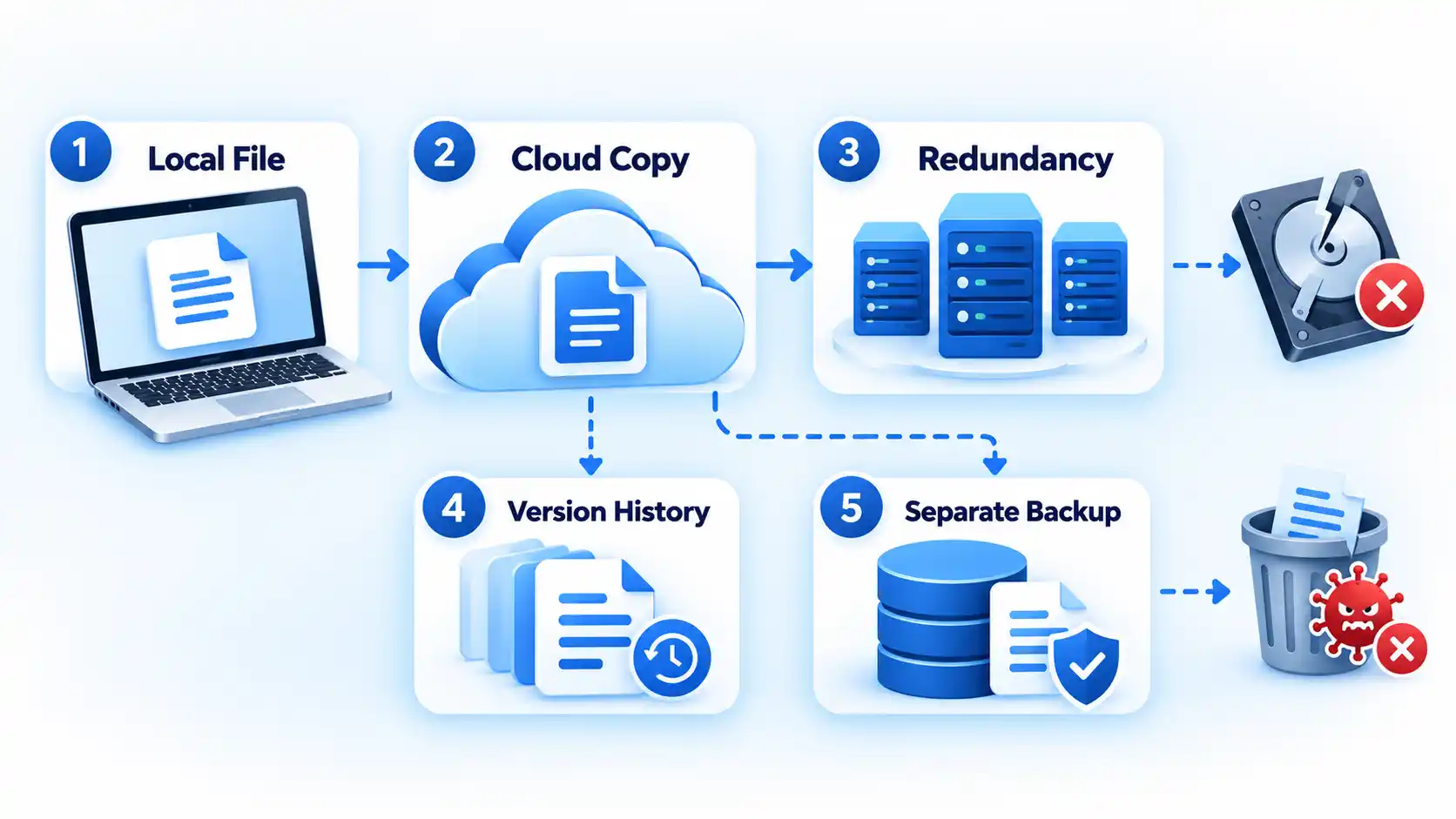
Cloud providers can add another layer of resilience through redundancy, which means storing data or data fragments across multiple physical systems rather than trusting one storage device. For example, Google Cloud documents that its Cloud Storage service uses redundant storage and integrity checks, with the exact availability behavior depending on the storage class and location configuration. Redundancy is used to protect stored data from infrastructure failures, but redundancy should not be confused with immunity from every form of data loss.
That distinction fixes an important misconception. Provider-side redundancy can help when hardware or an availability zone fails, yet it does not by itself protect you from every account takeover, mistaken deletion, malicious deletion, bad synchronization, application error, or configuration mistake. If an unwanted change is accepted as legitimate and propagated everywhere, redundant copies can faithfully preserve the unwanted state.
Version history, soft deletion, snapshots, immutable storage, and separate backups can provide different recovery paths, depending on the service. The relevant question is not simply, “Is this file in the cloud?” It is, “What recoverable copy will still exist if the live copy is deleted, encrypted, corrupted, or changed incorrectly?”
For high-value business data, recovery planning should be designed around that failure question. CISA recommends maintaining protected backups, testing recovery, considering offline or cloud-to-cloud copies, enabling version controls where appropriate, and using delete protection or object-locking capabilities for storage that may be targeted by ransomware. Backups should remain recoverable even when production data is compromised.
Businesses may also use automation or multiple cloud environments as parts of a wider resilience strategy. Earlier backup and cloud-storage trends discuss automation, security, and multi-cloud use, but these approaches still depend on sound recovery design rather than the assumption that any remote copy is automatically safe.
Scale storage without replacing local hardware
Local storage has a physical limit. When a laptop drive, network-attached storage device, or server array fills up, expanding it can mean buying drives, replacing equipment, installing hardware, migrating data, and maintaining the new capacity. Cloud storage changes that operational model by making capacity a service that can often be increased without replacing the user’s local hardware.
Scalability is a core cloud characteristic. NIST describes rapid elasticity as the ability to provision and release computing resources as demand changes. For storage, that means an individual or organization can increase remote capacity without first installing the equivalent amount of physical storage on site. Rapid elasticity is part of the established cloud-computing model.
This can also reduce infrastructure-management work. IBM notes that a cloud provider manages the storage infrastructure while the customer consumes the service, which can reduce the need to procure and maintain equivalent on-premises hardware. Provider-managed storage can shift hardware management away from the customer.
Scalable does not mean free or economically superior in every case. Consumer plans may charge by storage tier, while business and infrastructure services can price capacity, requests, data retrieval, transfer, redundancy, support, or other features differently. A workload that grows quickly can therefore become more expensive even though expanding it is technically easy.
The useful decision is to compare the cost and operational burden of the cloud service with the real alternative. For a small user, that alternative might be purchasing another local drive. For a company, it may include servers, redundant storage, facilities, power, administration, replacement cycles, backup infrastructure, and staff time. Cloud storage is valuable when flexible capacity and reduced local management outweigh its ongoing cost and other constraints.
Use centralized security and recovery controls
Cloud storage can give users and administrators security controls that are difficult to reproduce consistently across scattered USB drives, personal devices, and unmanaged file copies. Depending on the service, these can include encryption, account access controls, multifactor authentication, centralized permissions, logging, version history, deletion recovery, and administrative policies.
The important qualification is that the provider does not take over every security responsibility. In Microsoft’s shared-responsibility model, customers retain responsibility for their data, accounts, identities, configurations, endpoints, and access management even when the provider operates the underlying cloud infrastructure.
Consider a shared folder used by a project team. The cloud provider may secure the physical data center and supply authentication and permission tools, but someone still has to decide who should be allowed into the folder. If a former contractor keeps an active account or a public link remains enabled, the existence of provider-side security does not correct that access decision automatically.
The same principle applies to account protection. Multifactor authentication (MFA) adds another authentication factor beyond a password and can reduce the risk that a stolen password alone grants access. Strong account recovery settings, carefully scoped permissions, supported encryption features, and prompt removal of unused accounts all affect the real security of cloud-stored data.
Recovery controls deserve equal attention. CISA’s ransomware guidance specifically calls out cloud shared responsibility, frequent backups, version control, delete protection, and object lock as relevant protections. These are not reasons to assume that every cloud-storage product includes every control. They are reasons to examine the controls available for the data that matters and configure them deliberately.
What cloud storage does not replace
The five benefits are strongest when their boundaries are clear. Cloud storage can improve access, collaboration, resilience, scalability, and centralized control, but it does not remove the need to decide how important data will be protected and recovered.
- It does not automatically replace an independent backup. A synchronized cloud folder may propagate unwanted changes, while recovery depends on retention, versioning, backup scope, and whether a protected copy survives the incident.
- It does not remove internet and service dependencies. Online-only data can become temporarily inaccessible because of local connectivity problems, provider outages, authentication failures, or account restrictions.
- It does not transfer all security responsibility to the provider. Users and organizations still need to manage identities, permissions, endpoints, configurations, and recovery settings appropriate to their risk.
- It does not make every workload cheaper. The financial result depends on capacity, usage, transfer patterns, service tier, operational overhead, and the cost of the alternative infrastructure.
- It does not remove privacy, compliance, or data-location considerations. Organizations handling regulated or sensitive information need to evaluate the provider, service configuration, contractual terms, applicable requirements, and where necessary the geographic handling of data.
The practical reason to use cloud storage is therefore not that it makes data impossible to lose. Its value is that it can remove dependence on one device, simplify controlled sharing, add infrastructure resilience and recovery options, scale capacity more easily, and centralize useful security controls. Treat those capabilities as parts of a broader data-management and backup strategy, and the advantages become much more reliable.

💬 Comments