Salesforce automation lets you trigger routine sales and customer relationship management tasks when records, dates, or business conditions change. Practical examples include routing leads, creating follow-up tasks, reacting to opportunity-stage changes, handling approvals, creating renewals, controlling duplicates, flagging pipeline risks, and managing quote workflows.
Salesforce now refers to Sales Cloud as Agentforce Sales, formerly Sales Cloud. The product still centers on sales records and processes such as leads, opportunities, accounts, forecasting, and sales territories.
What Salesforce Automation Means in 2026
Salesforce automation is the use of rules, flows, triggers, approvals, and related platform features to make the CRM respond automatically when something happens. Instead of asking a salesperson or administrator to repeat the same record update, reminder, assignment, or notification manually, Salesforce can carry out that action when defined conditions are met.
For example, suppose a sales opportunity moves from Qualification to Proposal. That record change can start automation that creates a follow-up task, updates another record, sends a notification, or initiates another supported process.
Flow Builder is central to this model. Salesforce documents Flow Builder as a tool for automating routine work such as creating follow-up tasks, sending reminder emails, and updating records.
There are several Flow patterns. A screen flow includes an interface that guides a user through a process. An autolaunched flow runs in the background without its own user interface. Triggered flows start because something happens, such as a record changing, a scheduled time arriving, or a platform event occurring. Salesforce’s triggered-flow documentation also distinguishes timing options for record-triggered flows, including immediate actions, asynchronous work, and scheduled paths.
For broader context, a customer relationship management system stores and organizes the customer and prospect records on which these automated workflows depend.
Salesforce Automation Examples at a Glance
The examples below cover different points in a typical sales process. The trigger, automation mechanism, and result are not always the same. Some tasks use Flow, while others rely on dedicated Salesforce features such as assignment rules or duplicate rules.
| Automation example | Typical trigger | Salesforce mechanism | Automated result | Main caution |
|---|---|---|---|---|
| Lead routing | New or updated lead | Assignment rules, queues, or Flow | Lead goes to the appropriate owner or team | Bad criteria can misroute records |
| Follow-up tasks | Record event or scheduled condition | Flow Builder | Task or reminder is created | Loose conditions can create unnecessary tasks |
| Opportunity-stage actions | Stage changes | Record-triggered Flow | Related actions run automatically | Broad triggers can cause unintended repeat actions |
| Deal approvals | Deal meets approval conditions | Flow Approval Processes | Approval work is routed to designated reviewers | Important decisions may still require human review |
| Renewal creation | Opportunity closes or reaches another milestone | Flow Builder | Renewal opportunity or related task is created | Dates and contract data must be reliable |
| Duplicate control | Record is created or edited | Matching and duplicate rules | Potential duplicates are identified, warned about, or blocked | Matching criteria can produce false positives or miss unusual duplicates |
| Pipeline and forecast alerts | Pipeline data or defined conditions change | Flow, forecasting, or Einstein features | Sales users receive signals about records requiring attention | Some AI features depend on edition or licensing |
| Quotes and sales documents | Opportunity or quote reaches a defined point | Quotes, Flow, approvals, or integrations | Quote or document work moves to the next stage | Native and third-party capabilities should not be confused |
8 Practical Salesforce Automation Examples
1. Route New Leads to the Right Owner or Queue
Lead routing is one of the clearest examples of CRM automation. Instead of asking a manager to inspect every incoming lead and decide who should own it, Salesforce can evaluate predefined criteria and assign the lead automatically.
Salesforce’s lead assignment rules specify how leads are assigned to users or queues. A queue is a shared record pool whose members can take ownership according to the organization’s process.
A company might route leads by geography, product interest, business unit, or another field collected on the lead record. Flow can also be used where the process needs logic beyond a straightforward assignment rule.
The limitation is straightforward: automation follows the data and criteria it receives. If an important field is missing or the routing logic does not match the real sales process, a valid lead can still reach the wrong owner. Test routing rules against representative records before relying on them in production.
2. Create Follow-Up Tasks and Reminders Automatically
Sales teams often have repeatable follow-up points. A rep might need to contact a prospect after a meeting, check in after a proposal, or revisit an account after a defined interval.
Flow Builder can turn those conditions into automatic tasks or reminders. Salesforce specifically identifies follow-up task creation and reminder emails as routine work that Flow can automate.
Time does not have to be the immediate trigger. Salesforce supports scheduled paths in record-triggered flows, which can run later based on dates and times associated with the triggering record.
The benefit is consistency: the rule does not depend on someone remembering every recurring follow-up. The risk is over-automation. If the entry conditions are too broad, users can receive duplicate or low-value tasks that make the task list harder to manage.
3. Trigger Actions When an Opportunity Changes Stage
An opportunity stage represents where a deal sits in the sales process, which makes a stage change a useful automation trigger.
Salesforce gives a direct example in its Flow training: when an opportunity stage changes, a flow can send a custom message to an external system. Record-triggered flows can also create, update, or delete related records, call subflows, and invoke supported actions.
Imagine an opportunity entering a Proposal stage. One automation might create a task for the account executive while another updates a field used in reporting. A later stage could trigger a different action.
The practitioner-level concern is trigger design. An automation intended to react to a meaningful stage transition should not run unnecessarily every time the record is edited. Precise entry conditions reduce extra executions and the chance of duplicate actions.
4. Route Discounts or Deals for Approval
Not every sales action should happen without human intervention. Approval automation is useful because it can automate routing while preserving a deliberate decision point.
For example, a business may require additional review when a discount crosses an internal threshold or when a deal contains unusual commercial terms. Instead of forwarding the record manually between managers, an approval process can determine the path and place the approval step in front of the appropriate reviewer.
Salesforce’s current Flow Approval Processes organize approval work through stages, steps, and flows. Salesforce documents approval steps that require user intervention and background steps that can run without user interaction.
That distinction matters. Automation does not have to eliminate human judgment. It can remove the administrative work of deciding who reviews something next while leaving the financial or commercial decision with an authorized employee.
5. Create Renewal Opportunities After a Deal Closes
Some sales processes naturally repeat after an initial deal. Subscriptions, service contracts, maintenance arrangements, and other renewable relationships may need a new opportunity before the current agreement ends.
Salesforce identifies this directly as a Flow use case: when an opportunity closes, a flow can create a renewal opportunity.
The automation can carry forward whatever approved record data the organization has decided the new opportunity requires. A separate scheduled action could later remind the owner to begin renewal work before a relevant date.
The weak point is source data. An automated renewal based on an incorrect end date, account relationship, product term, or owner simply creates the wrong record faster. Renewal automation should therefore depend on fields with clear ownership and validation.
6. Detect and Control Duplicate CRM Records
Automation quality depends heavily on data quality. If one customer appears under several slightly different records, routing, reporting, forecasting, and follow-up workflows can all become less reliable.
Salesforce matching rules define how possible duplicates are identified, while duplicate rules determine what happens when a match is found. Salesforce allows duplicate-management configurations that can warn users or block duplicate creation, and it provides standard matching and duplicate rules for business accounts, person accounts, contacts, and leads. Its duplicate-management documentation explains these controls.
Duplicate detection should not be treated as a complete data-cleansing strategy. Wider data hygiene can also include standardizing formats, validating values, updating stale information, and removing duplicate records.
The practical limitation is matching accuracy. Rules that are too strict may miss duplicates, while broad matching criteria can flag records that represent different people or businesses. Matching logic therefore needs to reflect the structure and quality of the organization’s actual data.
7. Flag Stalled Deals and Forecast Risks
Sales automation can also help teams surface records that deserve attention rather than simply updating them.
A straightforward rules-based process might create a task or notification when an opportunity meets a condition such as an overdue next step or an internally defined period without progress.
Salesforce also offers AI-assisted sales capabilities. Sales Cloud Einstein includes features such as lead scoring, opportunity scoring, and forecasting prediction. Salesforce documents edition and licensing requirements for Sales Cloud Einstein, so these features should not be treated as universally available in every Salesforce organization.
This creates an important distinction between deterministic automation and predictive analysis. A rule such as “create a task when a required next step is missing” behaves according to conditions an administrator defines. An Einstein score or forecast prediction is produced from Salesforce’s analytical models and available CRM data. Those mechanisms should not be described as interchangeable.
8. Automate Quotes and Sales Documents
Quote and document workflows often combine Salesforce records with approvals, products, pricing information, and sometimes an external document platform.
Salesforce’s quote functionality allows quotes to be created from opportunities. An opportunity can have multiple associated quotes, but only one quote can be synchronized with the opportunity at a time. When synchronized, changes to quote line items and opportunity products are reflected between the two records. Salesforce documents the supported behavior and editions in its quote-management documentation.
Automation around this process might move a record for review, update related data, trigger an approval, or pass information to another system. Teams that extend Salesforce into document workflows may also evaluate salesforce automation software by PandaDoc, but a third-party integration should be assessed separately from Salesforce’s native Flow, quote, and approval capabilities.
The main design question is therefore not simply whether a document can be automated. It is which system owns the source data, which system generates or manages the document, which approvals must happen, and which system should receive the resulting status.
How Salesforce Flow Fits These Examples
Flow Builder acts as an orchestration layer for many Salesforce automation scenarios. The underlying pattern remains understandable even when a production flow becomes complex.
An event starts the flow. Conditions determine whether and how the flow continues. Decision logic can route execution down different paths, and actions can create or update records, send notifications, call another flow, or interact with supported external systems.
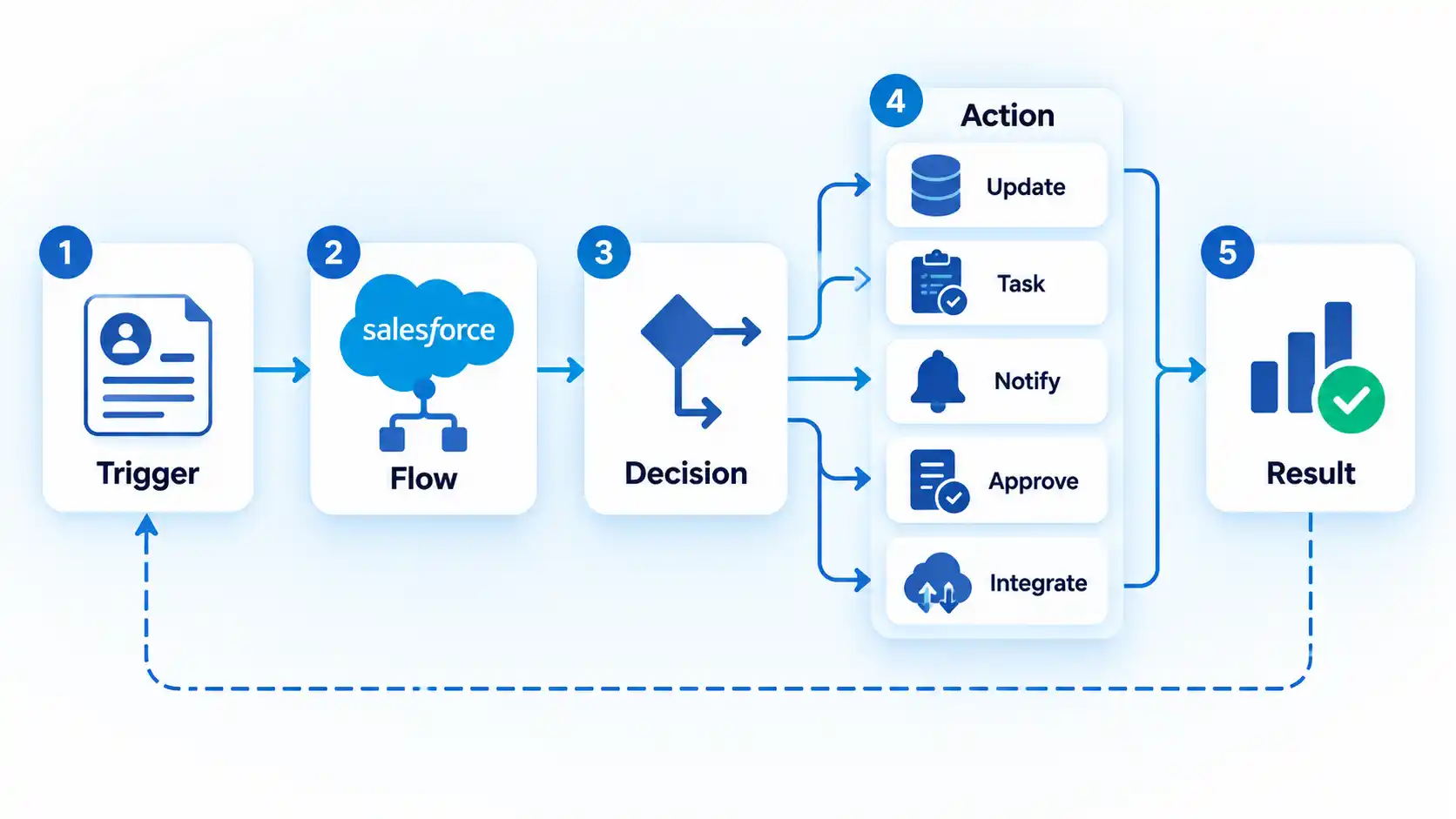
Salesforce distinguishes several Flow patterns. Screen flows guide users through an interface. Autolaunched flows run in the background when invoked. Triggered flows start from events such as a record change, schedule, or platform event.
That means several examples in this article can share the same underlying model without being identical automations. A stage-change workflow may use a record-triggered flow. A reminder may use a scheduled path. An approval may involve a Flow Approval Process. Reusable background logic may be invoked from another flow.
Salesforce also has automation mechanisms outside Flow. Assignment rules remain useful for defined routing, while matching and duplicate rules handle duplicate-record behavior. Choosing the right mechanism matters because recreating every specialized platform feature as custom Flow logic can add unnecessary maintenance.
Salesforce supports several automation patterns, and the choice between record-triggered, screen, and autolaunched flows depends on what starts the process and whether a user needs to interact with it.
Process Builder and Workflow Rules Are Legacy Automation
Older Salesforce material frequently refers to Workflow Rules and Process Builder. That guidance now needs an important qualification.
Warning
Salesforce ended support and updates for Workflow Rules and Process Builder on December 31, 2025. Existing automations can continue to run, but Salesforce recommends Flow Builder for new automation and migration of active legacy rules and processes.
Salesforce confirmed the change in an April 2026 support article. Existing Workflow Rules and Process Builder processes continue to execute after the support date, but Salesforce no longer provides customer support or bug fixes for those features. Salesforce recommends a migration plan and provides a Migrate to Flow tool. See the Workflow Rules and Process Builder end-of-support notice.
This does not mean an administrator should blindly convert every legacy automation and activate the replacement in production. Existing automation can depend on execution order, related automations, field updates, scheduled actions, integrations, and business assumptions that need testing before the older process is deactivated.
Production automation also needs predictable handling for Flow failures, duplicate executions, and permission errors so that a partially completed workflow does not leave CRM data in an unexpected state.
What Should You Automate First?
A strong starting point is usually a process that is frequent, predictable, based on trustworthy data, and costly enough in manual work or inconsistency to justify automation.
Start by examining the business process rather than the automation tool. A CRM strategy should define how customer data and sales workflows are supposed to work before automation begins enforcing those decisions.
Useful questions include:
- Does the event happen often? A repeated task is usually a stronger automation candidate than a rare exception.
- Can you define the trigger clearly? “When Stage changes to Closed Won” is more precise than “when the deal looks promising.”
- Is the input data trustworthy? A precise flow cannot compensate for unreliable dates, ownership fields, statuses, or customer records.
- What happens when the automation is wrong? Automatically creating an internal task has a different risk profile from automatically approving a large discount or sending information to another system.
- Does the decision require judgment? Automation can route a deal to an approver without making the approval decision itself.
- Can someone detect and investigate a failure? Ownership, monitoring, and error handling matter after deployment as much as during configuration.
This is also where broader workflow automation principles become useful. A process should be understood before its manual steps are converted into automatic ones.
Flow covers a wide range of declarative automation, but requirements involving complex processing or custom logic can raise the question of Salesforce Flow versus Apex .
Salesforce Automation Still Needs Guardrails
Automation removes repetitive manual work, but it can also repeat process mistakes consistently. A useful Salesforce automation design therefore needs controls around the automation itself.
Use precise entry conditions. Record-triggered flows support entry conditions and different execution timings. Restricting a flow to the records and changes that actually matter reduces unnecessary work and the chance of repeating the same action.
Test realistic paths. A successful happy-path test does not show how automation behaves when required data is missing, a user lacks permission, a related record does not exist, or another automation affects the same record.
Understand execution relationships. Several flows, validation rules, Apex triggers, managed packages, and other automations can affect the same record. A change made by one process can become the input to another.
Protect permissions and sensitive data. Automation should operate within the organization’s access model rather than becoming an informal workaround for it. Users, integrations, and execution contexts should have the access required for their intended tasks and no more than necessary.
Assign ownership. Someone should be responsible for understanding why an automation exists, what records it affects, and what should happen when the underlying business process changes.
Document dependencies. Record what starts the automation, which data it relies on, what downstream actions it invokes, and which other systems or automations may depend on its output. That information becomes especially important when a future administrator changes or retires the process.
Finally, check feature availability before designing around a particular capability. Salesforce editions, add-ons, permissions, and product licensing can affect which Flow, AI, quote, approval, and integration features are available in a particular organization.
Final Takeaway
Salesforce automation works best when it turns a clearly defined business event into a predictable action. Lead routing, follow-up tasks, opportunity-stage workflows, approvals, renewals, duplicate controls, pipeline signals, and quote workflows are practical examples, but each depends on accurate data and carefully defined conditions.
For new Salesforce automation in 2026, Flow Builder is the main platform to understand. Native features such as assignment rules, duplicate rules, approvals, and quoting still have specific roles, while Workflow Rules and Process Builder should now be treated as legacy automation that needs a deliberate migration plan.

💬 Comments