Software subscriptions are easy to justify one at a time.
£10 a month for cloud storage. £20 for an AI tool. £40 for security software. Another £30 for design, £50 for project management, then a few smaller subscriptions that barely seem worth thinking about.
The problem appears when you add them together.
Software has shifted decisively toward recurring billing, which means many of us no longer buy a program once and use it for five years. We maintain a collection of monthly and annual subscriptions instead. For businesses, freelancers and even individual users, those recurring software costs can become a meaningful part of the monthly budget.
The obvious response is to start cancelling things. That can save money, but it can also be a bad trade if you remove software that genuinely saves time or helps you work.
A better approach is to make the subscriptions you keep work harder.
Start by Finding Out What You Actually Pay For
Before looking for cheaper software, work out what you already have.
This is less obvious than it sounds.
Subscriptions can be spread across credit cards, PayPal, app stores, business accounts and individual employee expenses. Annual subscriptions are particularly easy to forget because they disappear from view for eleven months before suddenly renewing.
Make a simple list containing:
- Software name
- Purpose
- Monthly or annual price
- Renewal date
- Number of users
- Current pricing plan
- How frequently it is actually used
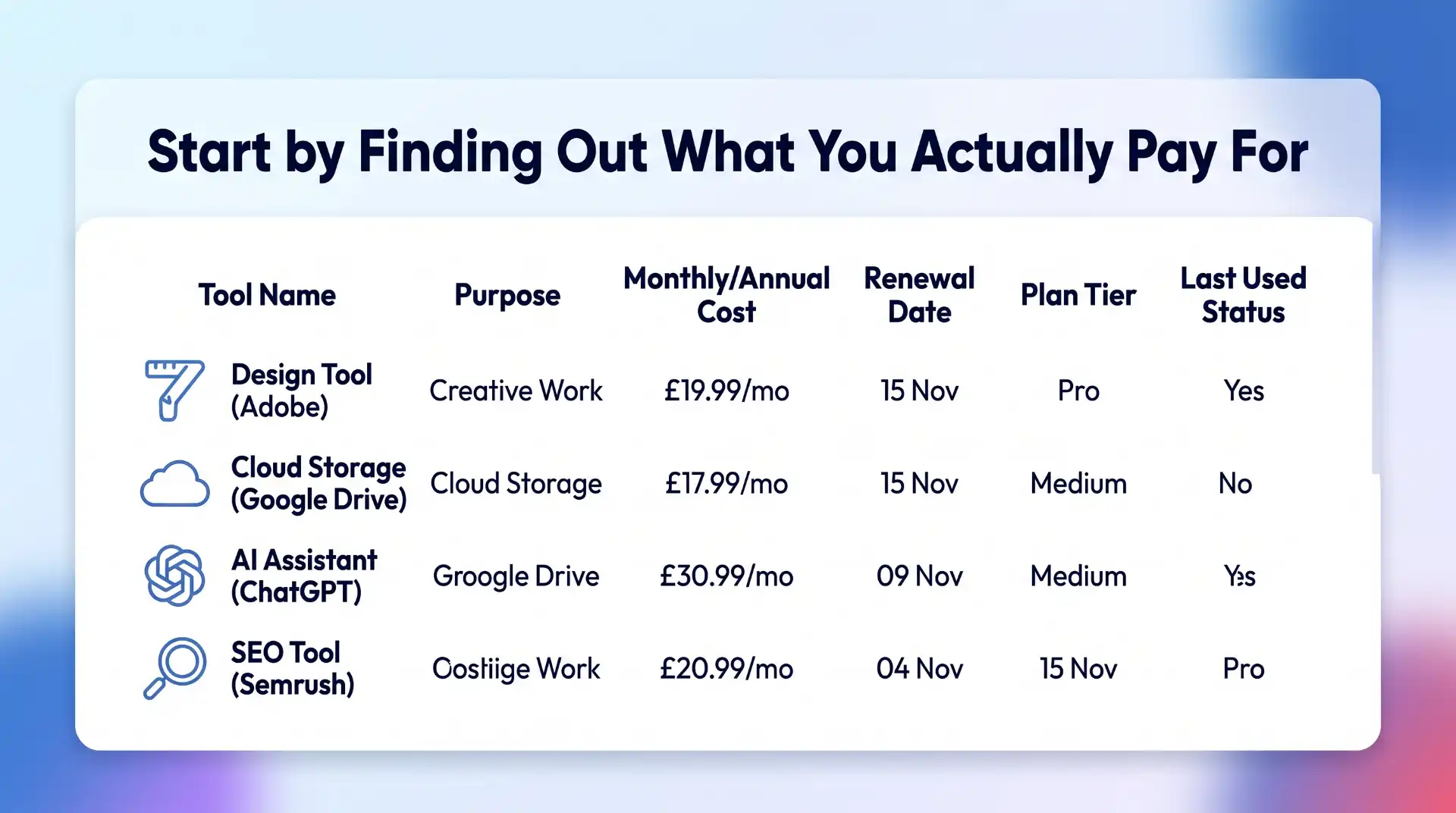
You do not need specialist subscription management software to do this. A spreadsheet is enough.
The important part is getting everything into one place.
You may find three categories almost immediately: software you use constantly, software you occasionally need, and software you forgot you were paying for.
The third category is the easiest place to start cutting.
Cancel Software You No Longer Use
Unused subscriptions are the least controversial saving.
Perhaps you needed a video editor for one project. You tested an AI research tool for a month. You signed up for a stock image service while redesigning a website.
The project ended. The subscription didn’t.
Small monthly payments are especially good at surviving unnoticed. A £12 subscription does not feel urgent enough to investigate, but £12 every month is £144 a year.
Multiply that across five or ten forgotten services and the numbers stop looking insignificant.
Before cancelling, check whether you have files or data stored in the platform that need to be exported. Once that is done, remove subscriptions with no current purpose.
There is no clever optimisation here. Stop paying for things you do not use.
Look for Overlapping Features
The next step requires a little more thought.
Software products rarely stay in their original lanes. Project management tools add document editing. Email platforms add CRM features. Design applications add AI image generation. SEO suites add content tools. AI platforms add research, coding and file analysis.
That means your software subscriptions may now overlap considerably.
Imagine paying separately for:
- A meeting transcription tool
- An AI assistant
- A writing tool
- A research platform
- A document summariser
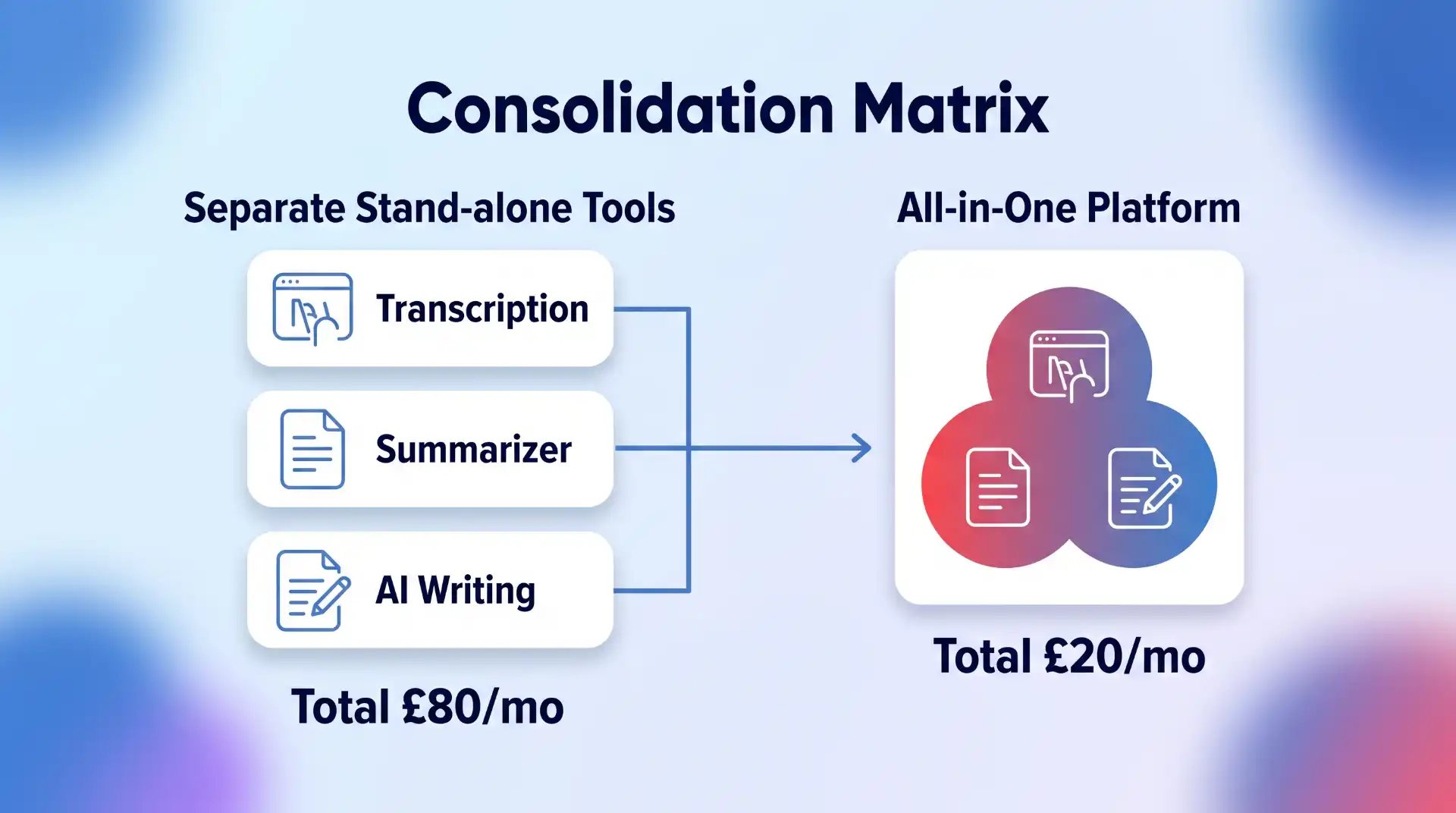
Two years ago, that might have made sense.
Today, one or two products may cover most of those jobs.
Go through the software you use and look at what each platform can actually do now, not what it could do when you first subscribed.
You might find that an existing subscription has quietly made another one redundant.
Do Not Replace Good Software Just Because Something Cheaper Exists
There is a trap at the other end of software cost cutting.
The cheapest subscription is not automatically the best value.
Suppose you pay £50 a month for software that saves five hours of work. Replacing it with a £20 alternative that adds two hours of manual work is unlikely to be a sensible saving.
Time has a cost too.
When comparing software subscriptions, consider:
- Reliability
- Time saved
- Ease of use
- Integrations
- Support
- Security
- Export options
- Collaboration features
- Training required
- Switching costs
This is especially important for software deeply embedded in a workflow.
Moving from one password manager to another is relatively manageable. Migrating a company CRM, automation stack or email marketing system can be considerably more disruptive.
Save money where the difference is largely financial. Be more cautious where the cheaper option creates operational problems.
Compare Monthly and Annual Software Plans
Once you know a product is staying, check how you are paying for it.
Many software companies charge less when customers pay annually rather than monthly.
The discount can be worthwhile, but only if you are confident you will use the software for most or all of the next year.
This creates a useful rule:
Use monthly billing while testing. Switch to annual billing once the software has proved itself.
Monthly plans cost more, but the flexibility has value when you are still deciding whether a product belongs in your workflow.
Annual billing makes more sense for established subscriptions.
If you have used the same software every week for three years and have no intention of replacing it, paying the monthly premium purely for flexibility probably achieves very little.
Check the actual saving before committing. Some annual discounts are substantial. Others barely justify paying twelve months upfront.
Compare the Real Annual Cost
Software pricing pages can make comparisons unnecessarily difficult.
One service advertises “$9.99 per month” but requires annual payment. Another charges £14 monthly with no commitment. A third has a cheap starting plan but locks important functionality behind the next tier.
Compare the cost you will realistically pay over twelve months.
For example:
Software A: £10 per month billed annually = £120 upfront
Software B: £13 per month = £156 annually
Software C: £8 entry plan, but £16 for the features you need = £192 annually
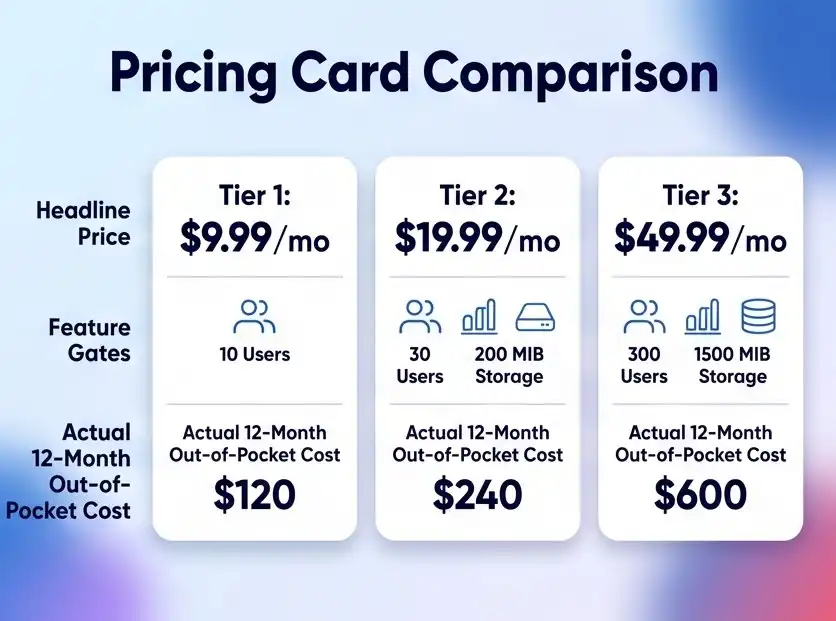
Software A is cheapest in that example, but only if you are comfortable committing for the year.
The headline monthly price is not enough.
Look at the plan you actually need, billing frequency, taxes where applicable, user limits and any usage charges.
Review Your Pricing Tier
You may not need to change software at all.
You may simply be on the wrong plan.
Upgrades tend to happen for specific reasons. A team needs one premium feature. Storage reaches a limit. A business needs more users. An email list grows.
Months later, circumstances change but the expensive plan remains.
Look at the tier below your current subscription and ask what you would genuinely lose by downgrading.
Pay particular attention to:
- Storage
- Usage allowances
- Number of users
- AI credits
- Export limits
- Automations
- Integrations
- Reporting
- Support levels
If you use premium features every day, keep them.
If you are paying an extra £40 a month for something nobody remembers using, downgrade.
Check Per-User Software Costs
Per-seat pricing can become expensive quickly.
A tool that costs £25 per user looks reasonable for a team of three. At 30 users, it becomes £750 every month.
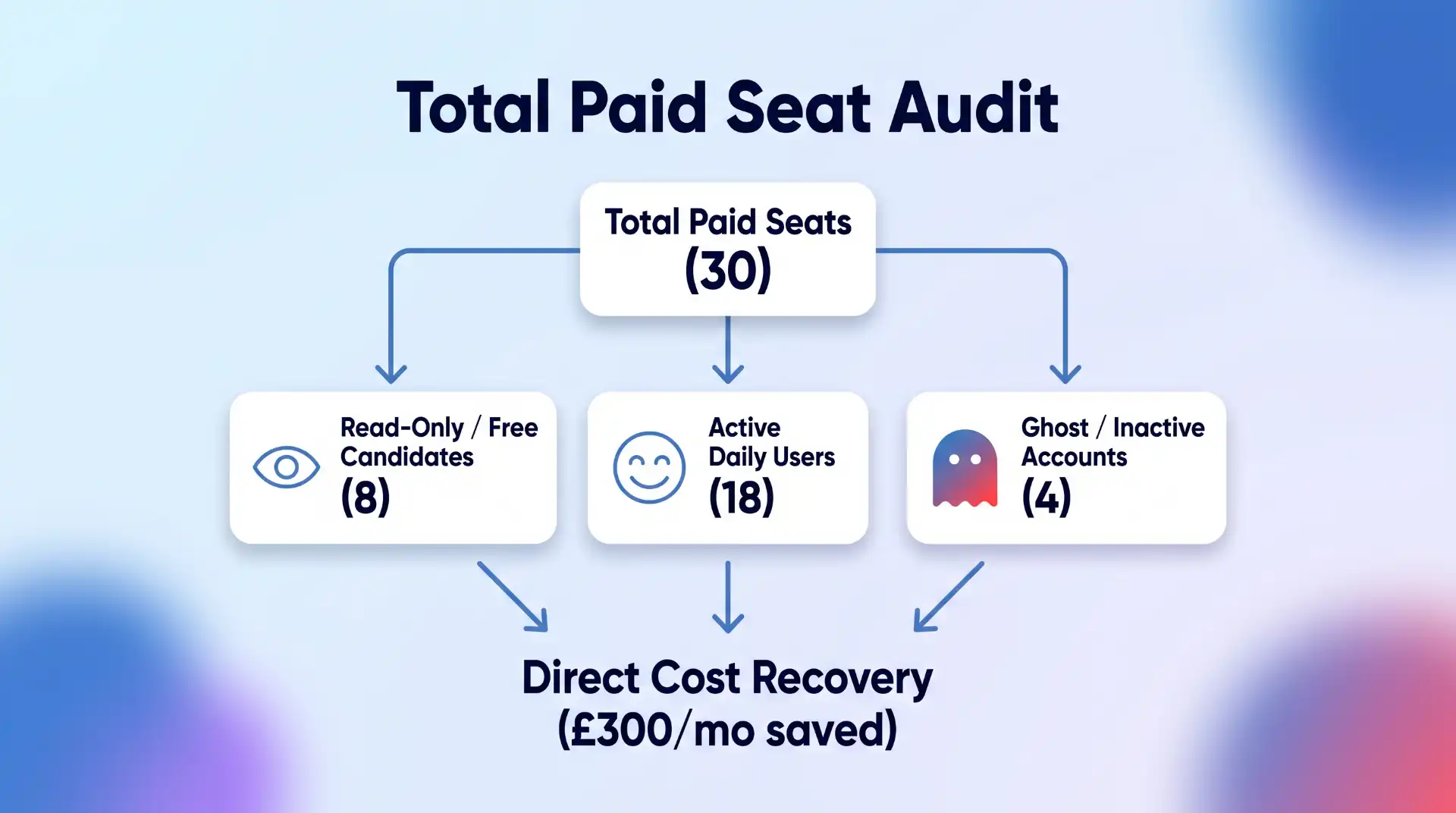
Regularly check who actually needs a paid account.
Former employees, temporary contractors and inactive team members sometimes remain on paid licences long after they stop using the software.
You may also find that some users only need view access or a free account.
For each major platform, compare the number of paid seats with the number of active users.
This is one of the simplest ways businesses can reduce software subscription costs without affecting productivity at all.
Be Careful With AI Subscription Creep
AI software deserves special attention because this market is moving unusually quickly.
It is easy to accumulate separate subscriptions for:
- Writing
- Research
- Coding
- Image generation
- Video
- Presentations
- Transcription
- Meeting notes
- Search
- Data analysis
The problem is that these categories increasingly overlap.
An AI platform you already pay for may have added a feature that makes a separate subscription unnecessary. Likewise, the specialist product may still be significantly better and worth keeping.
The point is not to consolidate everything automatically.
It is to keep checking.
AI tools can change considerably within a few months, so treating the software stack as something you review once a year may be too slow.
Compare Alternatives Before Every Major Renewal
Renewal dates create a natural opportunity to check the market.
If a software subscription costs £20 a month, you may decide that extensive comparison shopping is not worth your time.
If it costs £2,000 a year, the calculation changes.
Before renewing an expensive subscription, check:
- What does the current plan cost now?
- Has the price increased?
- Are you still using all the features?
- What do competing products offer?
- Would switching create significant migration costs?
- Is there a lower tier that now meets your needs?
Software markets change quickly.
The product that represented exceptional value three years ago may no longer be the obvious choice.
Equally, switching simply because a competitor is £5 cheaper is rarely worthwhile. Look at the whole package.
Look for Software Discounts Before Buying
Once you have decided which software you actually want, check whether you need to pay the full advertised price.
Depending on the product, there may be:
- Annual billing discounts
- Introductory offers
- Student pricing
- Startup programmes
- Nonprofit discounts
- Partner promotions
- Seasonal sales
- Bundled plans
- Cashback offers
This step should come after choosing the software.
Buying the wrong product because it has a 30% discount is not saving money.
But if you were going to purchase the subscription anyway, there is little reason to ignore an available saving.
Platforms such as Rewardio offer cashback on software and digital subscriptions across categories including AI tools, marketing software, hosting, VPNs and other online services. Checking for cashback before going directly to the software provider can reduce the effective cost of a subscription without requiring you to switch to a different product.
That can be particularly useful for recurring software you already know you need.
Understand the Difference Between a Discount and Cashback
These are not quite the same thing.
A traditional software discount reduces the purchase price before you pay.
Cashback generally means you make an eligible purchase and receive part of the transaction value back afterwards.
For example, imagine a subscription costs £100.
A 20% discount might reduce the checkout price to £80.
A 20% cashback offer could mean paying £100 initially and receiving £20 back later, subject to the terms of the offer.
The economic result can be similar, but the process is different.
Always check:
- Eligibility
- Whether the offer applies to new or existing customers
- Whether cashback is one-time or recurring
- Minimum payout requirements
- Tracking requirements
- Excluded plans or products
Do not assume every offer works the same way.
Check Whether You Are Paying More Through an App Store
Some software subscriptions can be purchased either directly from the provider or through an app marketplace.
Compare the options.
Pricing, available plans and billing arrangements may differ depending on where the subscription originates.
Buying directly can sometimes give you more control over account management, billing and promotions.
There are also situations where an app-store subscription is more convenient, particularly if you actively manage multiple subscriptions through one account.
Convenience has value. Just make sure you know what you are paying for it.
Use Free Plans Strategically
Free software is not only for people who cannot afford paid tools.
Sometimes the free tier genuinely covers everything you need.
This is particularly common with:
- Password managers
- Cloud storage
- Project management
- Design tools
- VPNs
- Analytics
- Note-taking apps
- Developer tools
The mistake is assuming that “premium” automatically means “appropriate.”
For example, if you are choosing security software or a VPN, the decision should be based primarily on whether the product provides the privacy, performance and security features you need. BlogTheTech’s guide to Android VPNs is a good example of a category where both free and paid options can make sense depending on what you expect from the software.
Start with your requirements.
Then determine whether the paid tier actually solves a problem the free version does not.
Cancel Free Trials Properly
Free trials are useful because they reduce the risk of testing software.
They also have a tendency to become permanent subscriptions.
Whenever you begin a trial, immediately record:
- Trial end date
- Renewal price
- Cancellation deadline
- Whether payment details were required
Set a reminder several days before the trial converts.
That gives you time to decide properly rather than discovering the charge after it happens.
If you already know within two days that you do not want the product, cancel it immediately. Many services allow you to continue using the remaining trial period after cancellation.
Negotiate Business Software Contracts
Consumers generally pay the listed software price.
Businesses often have more room to negotiate, particularly when buying multiple licences or higher-value subscriptions.
If you are dealing with sales rather than simply entering card details at checkout, ask.
Questions worth raising include:
- Is there a discount for annual payment?
- Is there a better price for multiple seats?
- Can unused features be removed?
- Are there startup or small-business plans?
- Is there a retention offer available?
- What happens if we reduce our seat count?
- Can the renewal price be fixed?
The larger the contract, the more worthwhile this becomes.
Do not assume the initial quote is necessarily the final commercial offer.
Watch Out for Introductory Pricing
A cheap first year can disguise a much more expensive long-term subscription.
Hosting companies, security software providers and other digital services sometimes advertise substantial introductory discounts.
There is nothing wrong with taking the deal.
Just check what happens afterwards.
If a service costs £30 in year one and renews at £120, think of it as a £120 subscription with a first-year promotion, not a permanently cheap £30 product.
Put the renewal date and standard price in your subscription list.
That prevents next year’s invoice from becoming an unpleasant surprise.
Do Not Ignore Software Bundles
Bundling can save money when you genuinely need several products from the same provider.
Perhaps one subscription combines:
- Cloud storage
- Office software
- Video calls
Or:
- VPN
- Password management
- Security monitoring
Or:
- Design
- Photography
- Video editing
Compare the bundled price with buying the components separately.
But apply the same rule as every other discount: only count features you would otherwise pay for.
A £50 bundle containing £200 worth of software is not a bargain if you only use one application that would cost £20 on its own.
Calculate the Cost Per Use
For smaller subscriptions, a useful test is to look at cost per use.
Suppose you pay £25 per month for a tool.
If you use it every working day, the cost per use is tiny.
If you open it twice a month, you are effectively paying £12.50 every time you use it.
That does not automatically mean you should cancel it. Specialist software used occasionally can still provide substantial value.
But cost per use forces you to think about whether the subscription model makes sense.
If you only need something occasionally, look for:
- Pay-as-you-go alternatives
- Monthly cancellation
- Free versions
- One-time purchase software
- Open-source alternatives
A permanent recurring subscription is not always the right purchasing model.
Schedule a Software Subscription Audit Twice a Year
Software costs become difficult to control when nobody revisits them.
Put a recurring review in your calendar every six months.
During the review:
- Cancel unused software
- Remove inactive users
- Check for duplicate functionality
- Compare pricing tiers
- Review expensive renewals
- Check annual versus monthly pricing
- Evaluate new alternatives
- Remove unnecessary AI subscriptions
- Check available discounts and cashback
- Update renewal dates
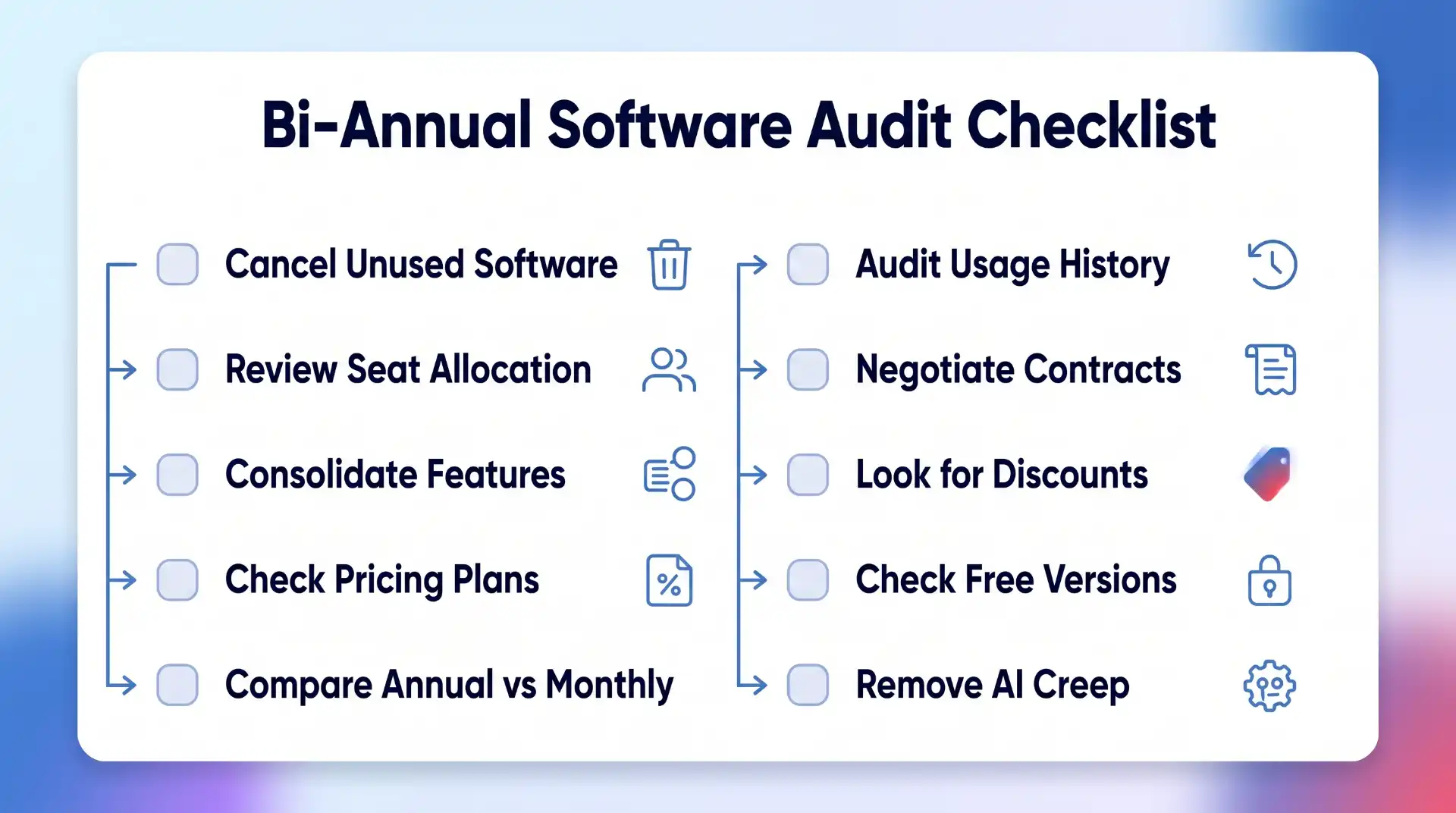
For a business with a large technology stack, quarterly reviews may make more sense.
The process does not need to become bureaucratic.
You are simply asking whether each recurring payment still deserves to recur.
The Goal Is Better Value, Not Fewer Subscriptions
There is nothing inherently wrong with paying for a lot of software.
A developer may need several professional tools. A marketer might rely on paid SEO, analytics, design and email platforms. A business may run almost entirely on cloud applications.
Those subscriptions can be excellent investments.
The waste appears when software remains on the bill after it stops providing enough value.
So do not judge your software stack by how short you can make it.
Judge it by how much useful work you get for what you spend.
Keep the tools that save time, protect your data or help you earn money. Cancel the ones you forgot about. Consolidate genuine overlap. Use annual pricing where commitment makes sense. Compare competitors before major renewals. Check discounts and cashback before paying full price.
Software subscriptions are unlikely to disappear.
That makes learning how to manage them properly increasingly important.
A few small changes across several recurring subscriptions can produce meaningful annual savings, without giving up any of the technology you actually rely on.

💬 Comments