Shopify is generally the better fit when you want the platform to handle more of the hosting and technical infrastructure, while WooCommerce is better suited to stores that want deeper control over WordPress, hosting, code, and extensions. Neither platform is automatically cheaper or more scalable for every store because the real answer depends on your payment setup, technical resources, customization needs, and operating costs.
Quick Take
Choose Shopify if reducing infrastructure work matters more than controlling the underlying stack. Choose WooCommerce if you are comfortable managing WordPress and hosting, or have technical help, and want more freedom over how the store is built and extended.
The important difference is not simply that Shopify charges a subscription while WooCommerce software is free. The two platforms assign responsibility differently. Shopify bundles more of the commerce infrastructure into one managed service. WooCommerce gives you an open-source ecommerce system for WordPress, but you decide how the surrounding hosting, security, extensions, development, and maintenance fit together.
Shopify vs WooCommerce at a Glance
Before comparing individual features, it helps to understand what you are actually choosing. Shopify is a hosted ecommerce platform, meaning Shopify operates the underlying hosting as part of the service. WooCommerce is open-source ecommerce software that runs on WordPress and on hosting selected by the store owner.
| Feature | Shopify | WooCommerce |
|---|---|---|
| Platform model | Hosted ecommerce platform | Open-source ecommerce software for WordPress |
| Hosting | Included with the Shopify plan | Chosen and paid for separately |
| Core platform cost | Recurring subscription | Core WooCommerce software is free |
| Technical control | Theme, app, and code customization within Shopify’s platform boundaries | Control over WordPress, source code, hosting, themes, plugins, and server environment |
| Payment costs | Depend on plan, country, Shopify Payments availability, and payment provider | Depend mainly on the selected payment processor and its country-specific fees |
| Maintenance | More core infrastructure is managed by Shopify | More responsibility sits with the merchant, host, developer, and extension vendors |
| Support model | Central Shopify support plus separate third-party app and theme support where applicable | WooCommerce, hosting, theme, plugin, and developer support may all be involved |
The table does not produce a universal winner because several advantages come with corresponding trade-offs. More control also means more technical responsibility. Having more infrastructure managed for you reduces that workload but places more of the store inside the platform’s boundaries.
The Biggest Difference Is Who Manages the Technical Stack
Imagine that your store becomes slow during a major sale. With Shopify, you are not expected to choose or administer the underlying web server. With a self-hosted WooCommerce store, the hosting environment is part of your technical stack, so the hosting provider, server resources, caching, theme, plugins, and custom code can all become relevant when performance problems appear.
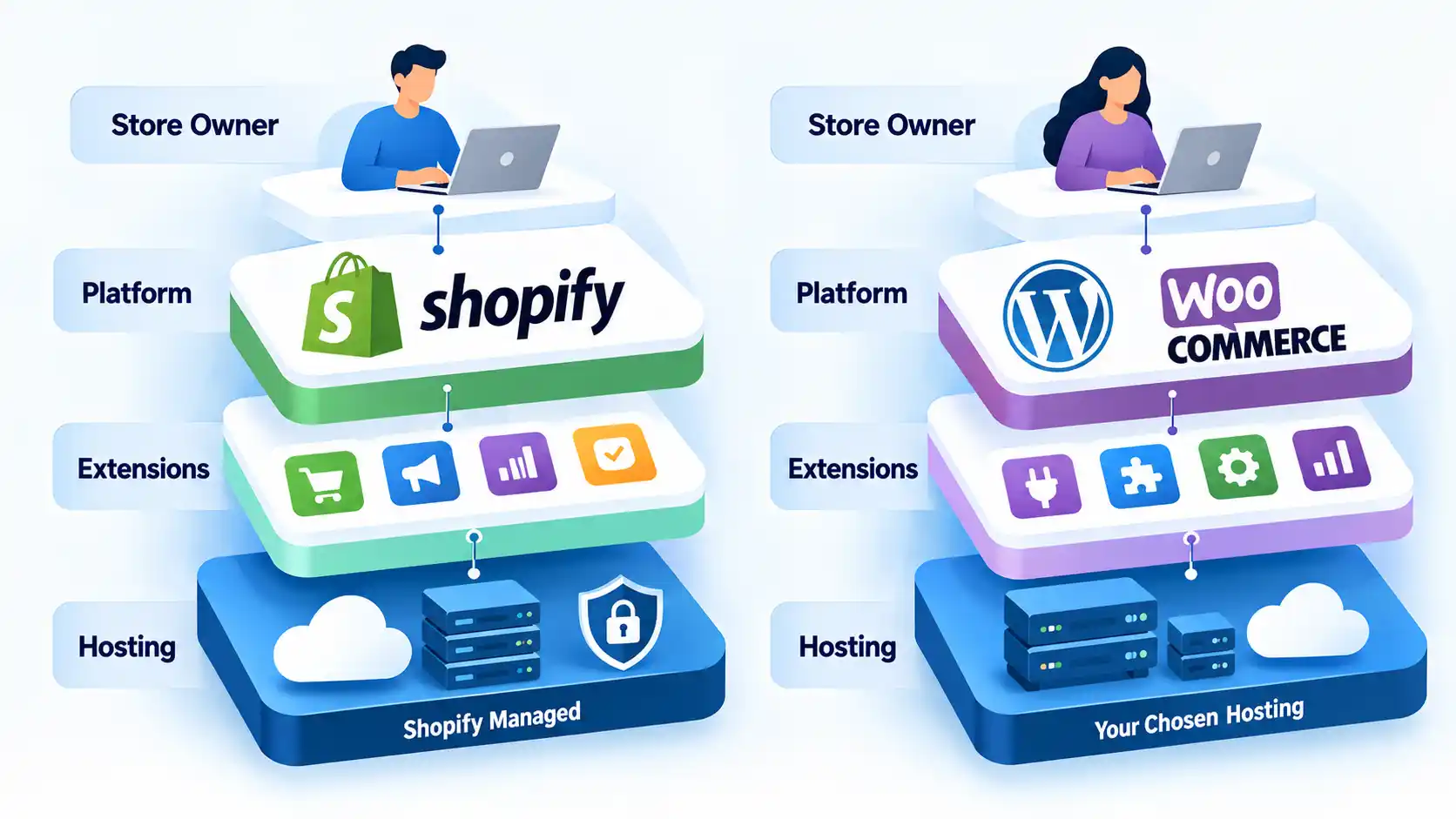
This distinction is often described as hosted versus self-hosted ecommerce. A hosted platform bundles the underlying web infrastructure into the service. A self-hosted system lets you choose more of that infrastructure yourself. That architectural difference is central to a broader hosted versus self-hosted ecommerce comparison because it affects cost, maintenance, troubleshooting, flexibility, and the skills needed to run the store.
Shopify states that its plans include secure commerce hosting, unlimited bandwidth, and a TLS/SSL certificate for domains added to Shopify. TLS, or Transport Layer Security, is the technology that encrypts data sent between a visitor’s browser and the website. A store also receives a myshopify.com address. If you want a branded domain, you can buy one or connect a domain you already own rather than treating domain registration as automatically included with the subscription. If you are choosing a new address, the same naming principles used when selecting an SEO-friendly domain name still apply.
WooCommerce takes the other approach. The core software is free and open source, but you select the hosting environment and decide how much responsibility stays with your host, developers, and internal team. That flexibility can help when your store needs an unusual server configuration or deep code-level control, but infrastructure decisions do not disappear simply because the WooCommerce plugin itself is free.
Cost: Subscription Price Is Only Part of the Bill
A useful cost comparison starts with everything required to operate the store, not just the price displayed beside the software. Shopify has a recurring platform subscription. WooCommerce has no recurring fee for its core plugin, but a working store still needs hosting and may require paid themes, extensions, development, backups, security services, or specialist support.
Shopify cost structure
Shopify’s pricing is plan- and country-dependent. Its current Nigeria pricing page bundles hosting with the subscription and lists third-party payment-provider fees of 2% on Basic, 1% on Grow, and 0.6% on Advanced. Shopify also states that pricing and payment options can vary by market, so those figures should not be treated as universal rates. Check the current Shopify pricing for the relevant market before building a budget.
The platform subscription is also not the only possible cost. Payment processing, apps, premium themes, a custom domain, point-of-sale features, and specialist development can add separate charges.
WooCommerce cost structure
WooCommerce describes its core platform as free and open source, with no monthly core-platform subscription or platform revenue share. Its current WooCommerce pricing guidance estimates hosting at roughly $25 to $350 per month for most stores and notes that the amount changes with traffic and performance needs. That range is WooCommerce’s own estimate rather than a guaranteed market price.
A WooCommerce budget can also include a domain, payment processing, premium extensions, commercial themes, developer work, backups, security services, and higher-capacity hosting as the store grows. The flexibility is useful because you decide where to spend, but it also makes the final cost harder to express as one universal monthly number.
When evaluating a host, factors such as support, resource limits, reliability, backups, and scalability matter more than choosing the lowest advertised package. Those same considerations appear when evaluating a web hosting provider, although that linked article is specifically written around UK hosting.
For a fair comparison, estimate your likely cost over the same period and include the platform or hosting, payment processing, essential apps or extensions, premium theme costs, maintenance, and any development support. A low starting price can become less important if the store needs several paid additions or regular developer time.
Setup, Maintenance and Ease of Use
If you want to start selling without first choosing a hosting configuration, Shopify removes more setup decisions. You create the store inside Shopify, choose a theme, configure products and payments, and manage the business through the platform. Hosting and the core commerce infrastructure are already part of the service.
WooCommerce adds more moving parts because it runs inside WordPress. You need a WordPress environment, suitable hosting, WooCommerce itself, a compatible theme, and whichever extensions the store requires. Some hosting providers simplify this by managing parts of the setup, updates, backups, or staging environment, but the exact level of assistance depends on the provider.
The difference continues after launch. A Shopify merchant still maintains products, settings, apps, theme customizations, staff permissions, and business processes. The platform mainly removes much of the underlying server administration from the merchant’s workload.
With WooCommerce, software maintenance can involve WordPress core, WooCommerce, the theme, and multiple plugins. A plugin or theme update can expose compatibility problems elsewhere in the stack. WooCommerce’s plugin and theme conflict guidance recommends updating software and, when troubleshooting, isolating themes and plugins to identify the component causing a problem. It also recommends performing conflict tests on a backup or staging copy rather than risking the live store.
This does not make WooCommerce unsuitable for newcomers. It does mean that a store owner should know who will handle updates, backups, plugin conflicts, and hosting problems before treating the platform as maintenance-free.
Customization, Ownership and Checkout Control
Customization is more than changing fonts and colors. The practical question is how deeply you need to alter the storefront, checkout, data model, or business logic, and whether those changes fit inside the platform’s supported architecture.
Shopify provides a visual theme editor for normal design changes and also supports code-level theme work. Shopify themes use Liquid, Shopify’s template language, together with HTML, CSS, JSON, and JavaScript. Shopify’s theme-code documentation therefore shows why describing Shopify as a purely drag-and-drop system is inaccurate.
There are still platform boundaries. Some checkout capabilities depend on the Shopify plan and Shopify’s checkout-extension system. Third-party apps can extend those capabilities; for example, Aftersell offers Shopify Plus checkout upsells and states that its checkout extensions require Shopify Plus. The link is an example of a commercial extension, not evidence that a store needs an upsell tool or that adding one will improve sales.
WooCommerce exposes more of the underlying system because WordPress and WooCommerce are open source. A development team can modify themes, create custom plugins, select its own hosting stack, and integrate outside systems. That can be useful for unusual workflows or proprietary integrations, but custom code and infrastructure also become things the business must maintain.
Technical control can also affect Shopify versus WooCommerce SEO because themes, URL behavior, structured content, redirects, performance tooling, and server-level access are not identical across the platforms. Those differences deserve a focused SEO comparison rather than a blanket claim that one platform automatically ranks better.
Payments and Transaction Fees
Both platforms can accept online payments, but the important question is which payment service is available where your business operates and what combination of fees applies. Comparing a single PayPal or card-processing percentage can therefore produce the wrong conclusion.
Shopify distinguishes payment-processing charges from third-party transaction fees. Its current third-party transaction-fee explains that fees can apply when an outside payment provider processes eligible transactions and that the rate depends on the Shopify plan. These charges are separate from any processing fee charged by the payment provider itself.
Shopify Payments changes that calculation, but the service is available only in supported countries and regions. Shopify’s payments eligibility guidance should therefore be checked before assuming that the payment setup advertised in another country will be available to your store.
WooCommerce does not add a Woo platform revenue-share percentage to every order. Instead, the merchant selects a payment processor and pays the fees associated with that service. WooPayments, Woo’s integrated payment service, currently uses pay-as-you-go transaction pricing with no setup or monthly fee. Its rates vary by market and payment method, and availability is geographically limited. WooCommerce documents those costs in its WooPayments fee guidance.
The better payment setup cannot be decided from the platform name alone. Before choosing either system, verify that your preferred provider works in your country, supports the currencies and payment methods your customers expect, and produces an acceptable total cost after both processor and platform charges are included.
Apps, Plugins and Outside Development
Neither platform has to provide every feature in its core product. Shopify uses apps, while WooCommerce uses WordPress plugins and WooCommerce extensions to add functions such as subscriptions, advanced shipping, product customization, accounting integrations, loyalty tools, and marketing features.
Raw marketplace counts are a poor way to choose between them because the ecosystems are organized differently. The Shopify App Store currently advertises more than 16,000 apps. WooCommerce has its own extension marketplace but also operates inside the much broader WordPress plugin ecosystem. The practical question is not which directory contains the larger headline number, but whether the extension you need is maintained, compatible with your store, and supported by a vendor you are prepared to depend on.
Extensions introduce dependencies as well as features. An app or plugin can have its own subscription, update cycle, support team, performance impact, or compatibility limits. Before adding one, consider whether the feature is necessary, who maintains it, what happens if it is discontinued, and whether the store can tolerate the additional dependency.
Custom development is another option when an off-the-shelf extension cannot cover a business requirement. A WooCommerce merchant, for example, can outsource WooCommerce development services for areas such as custom themes, plugins, integrations, migration, or maintenance. Outsourcing can reduce the internal workload, but it adds another supplier and should be included in the store’s operating cost.
Platform support and marketing support should also be kept separate. A merchant might contact Shopify, WooCommerce, or an extension developer for a product-specific technical problem while hiring a digital marketing agency for work such as search engine optimization or paid acquisition. A marketing provider should not be treated as a substitute for the platform’s technical support merely because it works with ecommerce businesses.
Performance and Scaling
Suppose a promotion suddenly sends a large number of customers to one product page and then to checkout. Both Shopify and WooCommerce can support substantial stores, but the merchant has different responsibilities when traffic and transaction volume increase.
Shopify abstracts most server-capacity decisions from the merchant. You are not normally choosing a web-server size or manually allocating memory because Shopify operates the underlying hosted commerce infrastructure. That can make growth operationally simpler for a team that does not want to administer servers.
WooCommerce gives the merchant more influence over that infrastructure. Its scaling guidance identifies traffic patterns, WooCommerce code, other themes and plugins, and server hardware as important scaling variables. WooCommerce also says stores should invest in suitable infrastructure and technical support as demands increase.
The useful conclusion is therefore not that Shopify scales while WooCommerce does not. Shopify reduces the amount of infrastructure scaling the merchant manages directly. WooCommerce can scale substantially, but hosting architecture, surrounding code, plugins, database workload, caching, and technical expertise become increasingly important as demand rises.
For a high-volume store, ask a more specific question: does the business want its ecommerce platform vendor to abstract most infrastructure work, or does it want enough control to engineer and tune that infrastructure itself?
Security, Updates and Backups
Security responsibility exists on both platforms, but it is divided differently. A hosted platform can maintain more of the underlying infrastructure, while a self-hosted store exposes more components that the merchant or its providers must keep secure and current.
Shopify manages the hosted platform and publishes compliance documentation for its services. Its current compliance reports include a Payment Card Industry Data Security Standard (PCI DSS) service-provider Attestation of Compliance valid from June 26, 2026 through June 26, 2027. PCI DSS is the security standard used by organizations that handle payment-card data.
That does not make every Shopify security issue Shopify’s responsibility. Merchants still control staff access, passwords, app permissions, domain accounts, content, customizations, and many business processes.
A WooCommerce merchant has a broader technical stack to maintain. WordPress, WooCommerce, themes, plugins, hosting, backups, administrator accounts, and custom code can all matter. Some managed hosts take responsibility for parts of that work, but the merchant should establish who performs updates, where backups are stored, how restore testing works, and how plugin or theme changes are tested before important releases.
Support: One Provider vs a Multi-Vendor Stack
Support is easiest to evaluate by asking a practical question: who do you contact when something specific stops working?
Shopify currently provides 24/7 chat support on all plans, with additional support options depending on the plan or service. Shopify also states that coding modifications can fall outside its support scope and that paid third-party themes are supported by their developers. The practical advantage is therefore a central support point for the core platform, not a promise that Shopify will repair every third-party customization.
WooCommerce has a more distributed support model. Woo provides documentation and support resources for its own products, while free core WooCommerce also has community support. Woo’s support documentation directs third-party theme and plugin issues to the relevant developers when those products were not purchased from WooCommerce.com.
A WooCommerce problem can therefore involve Woo, the hosting company, a theme developer, a plugin vendor, or your own developer depending on the cause. Experienced teams may prefer that flexibility because they can select specialists for each layer. A small business without technical help may place more value on the simpler escalation path of a more centrally managed platform.
Which option should you choose?
Choose Shopify for a more managed store
Avoid this if: your business requires deep server-level control, unusual back-end modifications, or a workflow that conflicts with Shopify’s platform boundaries.
Main trade-off: you reduce infrastructure responsibility but accept a recurring platform subscription and greater dependence on Shopify’s supported architecture, plan structure, and app ecosystem.
Choose WooCommerce for deeper stack control
Avoid this if: you do not want responsibility for selecting and maintaining hosting, WordPress, themes, plugins, backups, and the relationships between those components.
Main trade-off: you gain more control over the stack but also take responsibility for more technical and vendor decisions.
Other situations require a closer calculation. If payment-gateway availability is critical, verify your country and processor before committing to either platform. If you already employ WordPress developers and operate suitable infrastructure, WooCommerce’s maintenance burden may be much smaller for your business than it would be for a first-time store owner. If your team has no server expertise and wants to focus mostly on merchandising and operations, Shopify’s managed approach may remove work you would otherwise have to outsource.
Store size alone should not decide the platform. A large WooCommerce deployment can be viable with appropriate infrastructure and engineering, while a large Shopify store can still require substantial app, integration, theme, and operational work. Compare the technical model your team can support rather than assuming either platform has a simple size ceiling.
Switching platforms later is also not frictionless. Products, customer information, orders, redirects, integrations, themes, analytics, and checkout behavior can all require attention during a move. If you are considering a switch, migrating from WooCommerce to Shopify should be treated as an implementation project rather than a one-click extension of this comparison.
Bottom Line
Shopify and WooCommerce can both support serious ecommerce stores, but they suit different operating models. Shopify bundles more infrastructure into a managed platform and is a stronger fit when reducing technical administration is a priority. WooCommerce gives the merchant more direct control over WordPress, hosting, code, and extensions and is a stronger fit when that flexibility is worth the added maintenance responsibility.
Compare the platforms using your own payment country, required integrations, technical skills, expected development work, and full operating cost. That produces a more useful decision than choosing Shopify simply because it appears easier or WooCommerce simply because its core software is free.
