When a VPN disconnects, traffic may either stop or fall back to your normal internet connection. A working kill switch is designed to block that fallback, while a fail-open setup may let new traffic use your ordinary network route and public IP address.
Quick Take
- A VPN disconnect does not automatically mean data leaked. The result depends on what networking policy takes over after the tunnel fails.
- A fail-open configuration permits affected traffic to use ordinary networking, while fail-closed protection blocks that fallback until VPN protection returns.
- A kill switch does not stop the VPN from disconnecting. It controls whether covered traffic can leave outside the protected tunnel.
- DNS, IPv6, split-tunnel, and browser-related exposures can occur separately from a complete VPN disconnect, so they should not all be treated as the same failure.
What Happens the Moment the VPN Tunnel Drops
A VPN normally gives selected network traffic a route through an encrypted tunnel to a VPN server. When that tunnel disappears, the operating system and VPN software have to determine what should happen to traffic that would normally use it.
One possible outcome is fail open. This means ordinary networking is permitted again. New connections may use the device’s Wi-Fi, Ethernet, or mobile connection directly, just as they would if the VPN were not active. Websites reached through those new connections may then receive the public IP address associated with your normal internet connection rather than the VPN server.
The opposite behavior is fail closed. Instead of allowing protected traffic to fall back to the normal route, the device blocks it until the VPN connection returns or the blocking policy is deliberately disabled.
Suppose a laptop is connected to home Wi-Fi and its browser traffic is leaving through a VPN server. If the VPN tunnel fails, a fail-open configuration may let the browser establish its next connection directly through the internet service provider. With fail-closed protection, that new connection should fail rather than silently bypass the tunnel.
The behavior of an existing connection can be less predictable. Applications may retry requests, create a new connection, wait for the VPN to return, or time out. The practical privacy question is therefore whether traffic that was supposed to remain protected can establish a usable path outside the VPN after the tunnel is lost.
What a VPN Kill Switch Actually Does
A kill switch does not keep the VPN tunnel alive. Its job is to restrict networking when that tunnel is unavailable.
Mozilla describes its implementation as blocking the device’s network connection if Mozilla VPN becomes unstable or drops, with the aim of preventing the local IP address from being exposed. Mozilla’s kill-switch documentation is one example of fail-closed behavior implemented by a VPN application.
The enforcement can also come from the operating system. Android supports an Always-on VPN setting and a separate Block connections without VPN control. When configured together, Android can prevent connections that do not use the selected VPN.
Automatic reconnection is related but different. A reconnect feature tries to restore the VPN tunnel. A kill switch determines what traffic is permitted while that tunnel is missing. A VPN product can implement both, one, or neither depending on the platform and configuration.
Info
If your internet stops working immediately after a VPN failure, that may be the kill switch doing exactly what it was designed to do. Confirm the VPN and kill-switch state before treating the loss of connectivity as a separate network fault.
Standard Kill Switch vs Persistent Blocking
“Kill switch” does not describe one universal policy. Some implementations respond primarily to an unexpected VPN failure, while others enforce a VPN-required state even after a deliberate disconnect or restart.
Proton VPN, for example, currently distinguishes a standard mode from an advanced mode. Its standard kill switch is designed to activate when the VPN connection drops unexpectedly, while its advanced kill switch prevents internet access whenever Proton VPN is not connected and can remain active across restarts on supported platforms. These are Proton-specific implementation details, not universal VPN terminology.
The table below shows the conceptual distinction. Exact behavior still depends on the VPN application, operating system, and policy configuration.
| Behavior | Disconnect-triggered protection | Persistent VPN-required policy |
|---|---|---|
| Unexpected tunnel failure | Designed to block protected traffic when the VPN unexpectedly drops. | Blocks covered traffic because no permitted VPN tunnel is available. |
| Deliberate disconnect | May permit ordinary networking, depending on the implementation. | Normally continues blocking until the policy is disabled or the VPN reconnects. |
| Restart or reboot | Persistence depends on the product and platform. | Can remain enforced across restart when implemented as a persistent policy. |
| Intentional internet use without the VPN | May be possible after deliberately disconnecting. | Requires disabling the VPN-required policy or changing its configuration. |
This distinction is why pressing a VPN application’s Disconnect button is not always a valid test of an ordinary kill switch. Some products intentionally interpret a manual disconnect as permission to resume normal networking.
A VPN Disconnect Is Not the Only Kind of Leak
A complete tunnel failure is only one way traffic can end up somewhere you did not intend. A VPN may appear connected while a particular protocol, resolver, application, or address family follows a different path.
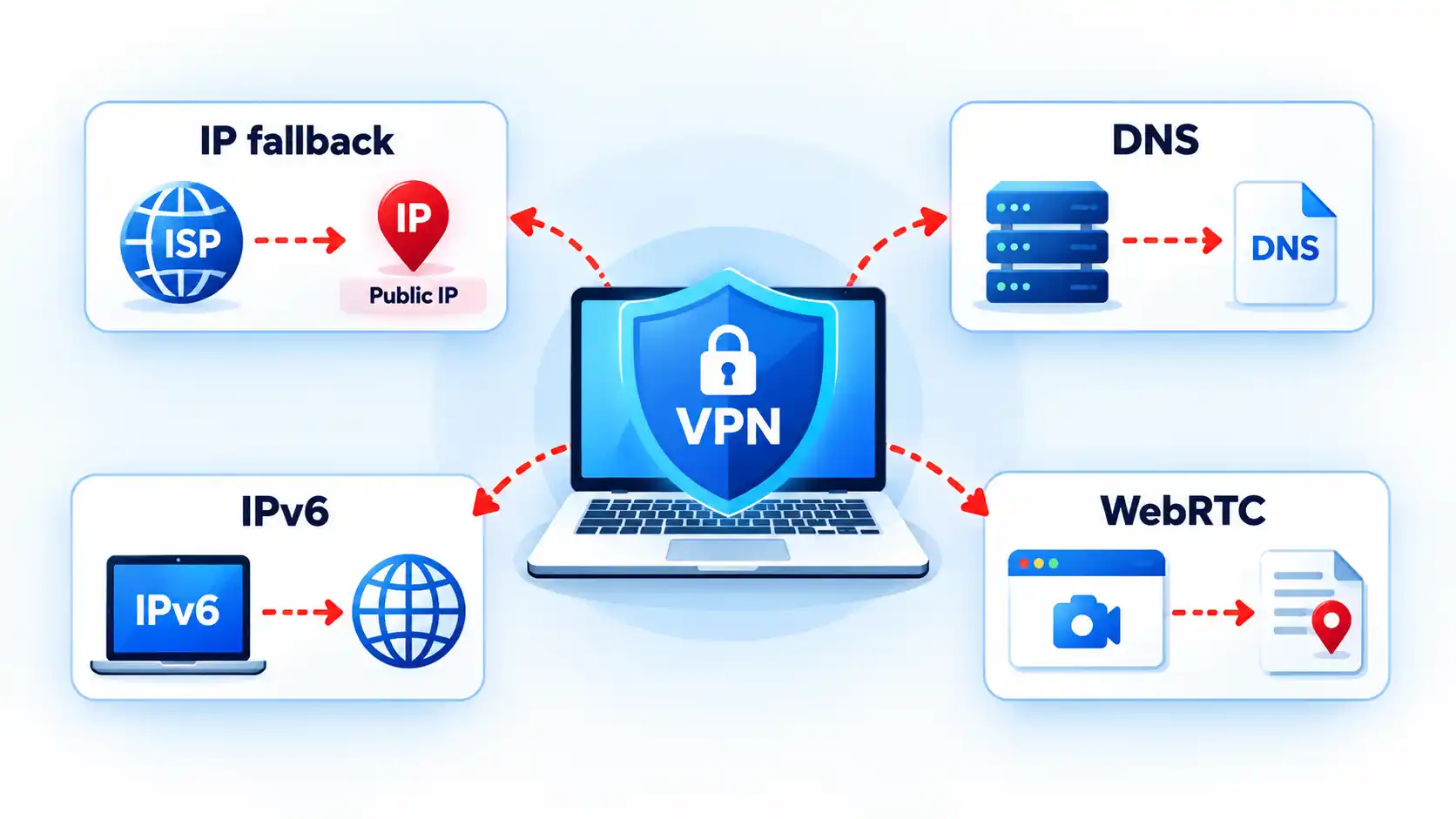
Public IP exposure after fallback
If the VPN tunnel disappears and ordinary routing resumes, a new connection can leave through the underlying internet connection. The remote service may then see the public IP address assigned to that normal route.
This is the failure people commonly mean when they say a kill switch prevented an “IP leak.” More precisely, traffic that was expected to remain protected obtained an ordinary route after the VPN stopped carrying it.
DNS leakage
The Domain Name System, or DNS, translates names such as example.com into network addresses. A DNS leak occurs when queries that were intended to follow the VPN’s protected DNS path instead use another resolver or network path outside that intended configuration.
Not every DNS server different from the VPN provider’s own resolver is automatically evidence of a leak. Some users deliberately configure another encrypted or third-party DNS service. The useful comparison is between the DNS path you intended and the one the device actually uses.
IPv6 bypass
Many networks support both Internet Protocol version 4, or IPv4, and Internet Protocol version 6, or IPv6. That dual-stack design can expose a routing mismatch if VPN software protects one address family but fails to apply the intended policy to the other.
The IETF’s RFC 7359 analysis of dual-stack VPN leakage describes traffic intended for a tunnel escaping through an unprotected IPv6 path when VPN software fails to handle IPv6 correctly. The document dates from 2014, so it should not be treated as evidence that current VPN applications generally have this defect.
The RFC’s IESG note also cautions that the broader leakage problem is not unique to IPv6. Similar exposure can arise whenever policy permits another unencrypted interface or route, including some split-tunnel configurations.
Browser and WebRTC address exposure
Browser networking creates a separate category of address information. Web Real-Time Communication, or WebRTC, uses Interactive Connectivity Establishment, or ICE, candidates when discovering possible paths for peer-to-peer communication.
MDN documents that an ICE candidate can contain the IP address associated with that candidate’s source. Whether the address revealed is relevant to your VPN privacy model depends on the browser, candidate type, VPN implementation, and network configuration. The presence of WebRTC address information does not by itself prove that the entire VPN tunnel failed.
These failure modes are related enough to examine together, but they should not be collapsed into one diagnosis. IP, DNS, IPv6, and WebRTC leaks have different causes and require different verification methods.
Split Tunneling Changes What “Leak” Means
Traffic outside the VPN is not necessarily leaking if you deliberately configured it to stay outside.
Split tunneling means only selected applications or destinations use the VPN while other traffic follows the device’s normal network path. Android’s per-app VPN controls, for example, can restrict VPN use to an allowed set of applications or deliberately exclude applications from it.
Imagine that a browser is configured to use the VPN but a game launcher is intentionally excluded. Seeing the normal public IP from the game launcher may be expected split-tunnel behavior. Seeing that same fallback from the protected browser after the tunnel fails would be a different result.
This is why a leak test should start by establishing what was supposed to be inside the tunnel. Without that baseline, expected exclusions can be mistaken for failures.
Kill switches and split tunneling can also interact differently across products. Proton documents that the combination is unsupported on most of its platforms, while its Windows app can use kill-switch protection with split tunneling so protected applications remain blocked if the VPN disconnects. Proton’s split-tunneling documentation illustrates why this behavior must be checked on the exact product and platform rather than assumed universally.
How to Test Whether Your Kill Switch Actually Works
A useful test compares the normal route, the protected route, and behavior during a VPN interruption. Use only harmless traffic because the purpose of the test is to discover whether unprotected fallback is possible.
Prerequisites
- Stop sensitive uploads, account activity, private messages, file transfers, and other traffic you would not want exposed during a failed test.
- Identify where your VPN application or operating system exposes its kill-switch or non-VPN blocking setting.
- Use a harmless public-IP or ordinary connectivity check that you can repeat before and after the tunnel interruption.
- Check your VPN provider’s documentation to determine which type of interruption is supposed to activate the protection mode you are testing.
- Record the normal state. With the VPN disconnected and no persistent blocking policy enabled, record the public IP address or other harmless network result shown through your normal internet connection. This is your fallback baseline.
- Connect the VPN. Establish the VPN normally, then repeat the same check. Confirm that the result now reflects the VPN route rather than the baseline connection before continuing.
- Confirm the protection mode. Verify that the kill switch or operating-system blocking control you intend to test is enabled. If the product has both disconnect-triggered and persistent modes, record which mode is active.
- Create only harmless observable traffic. Keep an ordinary webpage or non-sensitive connectivity check ready so you can tell whether networking continues. Do not use confidential logins, cloud uploads, private messages, or other sensitive transfers as test traffic.
- Trigger the supported failure condition. Use the provider’s documented test or failure method when one is available. Do not assume that clicking Disconnect tests a standard kill switch, because some implementations intentionally permit normal networking after a deliberate disconnect. Also do not disable Wi-Fi, Ethernet, or mobile data as a substitute for a VPN-tunnel failure, because removing the underlying internet connection cannot show whether traffic would have fallen back outside the tunnel.
- Observe the fallback behavior. While the VPN tunnel is unavailable but the underlying internet connection still exists, try the harmless connectivity check. For a fail-closed configuration covering that traffic, ordinary internet access should be blocked rather than silently returning through the baseline route.
- Reconnect and verify recovery. Restore the VPN connection, confirm that ordinary connectivity returns, and repeat the public-IP check. The observed address should again correspond to the VPN route rather than the baseline connection.
Verify the result
- Traffic that was supposed to remain VPN-protected did not continue through the ordinary route while the tunnel was unavailable.
- The underlying internet connection remained available during the failure test, so blocked traffic can reasonably be attributed to VPN protection rather than simply losing Wi-Fi, Ethernet, or mobile connectivity.
- Internet access returned normally after the VPN re-established its protected route.
- The post-reconnect public IP result again reflected the VPN endpoint rather than the normal baseline address.
Troubleshooting Kill-Switch and Reconnect Problems
The symptom usually indicates whether to investigate the kill-switch policy, the VPN connection itself, split tunneling, or the underlying network.
Internet access continues when the VPN drops
First confirm that a kill switch or equivalent blocking policy is enabled and that the affected application is supposed to use the VPN. Also check how the failure occurred. Some standard kill switches protect unexpected connection loss but intentionally allow normal networking after a manual disconnect. If split tunneling is enabled, verify that the application was not deliberately excluded from VPN protection.
Internet stays blocked after the VPN reconnects
Confirm that the VPN has actually completed reconnection rather than remaining in a connecting or authentication state. Persistent blocking policies can correctly keep traffic disabled while no valid tunnel is available. If the VPN reports connected but traffic remains blocked, restart the VPN application and check its current kill-switch state before changing unrelated router or DNS settings.
The VPN says connected, but websites still do not load
The tunnel may be established while DNS resolution, routing, or another network dependency is still failing. Test more than one ordinary site before changing settings. If connectivity works but becomes unusually slow after reconnection, VPN slowdown diagnosis should start with a VPN-off baseline and one-variable-at-a-time testing.
Only some apps keep working after the VPN fails
Check split-tunneling and per-app VPN rules before assuming the kill switch failed. An application deliberately excluded from the VPN may be expected to continue using the normal network, while an application assigned to the protected tunnel should follow the VPN’s applicable failure policy.
Nothing connects even after you intentionally turn the VPN off
A persistent or always-required VPN policy may still be active. Reconnect the VPN or deliberately disable that policy using the controls provided by the VPN application or operating system. Do not start deleting network adapters or resetting the entire network until you have ruled out intentional fail-closed enforcement. If the VPN itself reports connected but networking remains unavailable, VPN connected but no internet is a different diagnostic state from a simple tunnel disconnect.
Platform Differences That Matter
Android
Android provides several VPN controls at the operating-system level. Google’s current documentation says Android 7.0 and later can use Always-on VPN, and compatible configurations can enable Block connections without VPN. That combination can create fail-closed behavior without relying solely on an application’s own interface.
Android also supports per-app VPN rules. If applications are placed on an allowed list, only those applications use the VPN. Other applications can use normal system networking unless non-VPN connections are also blocked. With blocking enabled, applications outside the permitted VPN set can instead lose network access. The interaction is configuration-dependent, so observing one application’s behavior does not necessarily describe the whole device.
Apple devices
Apple supports several distinct VPN deployment models, including VPN On Demand, per-app VPN, and managed Always On VPN. They should not be treated as interchangeable names for one consumer kill-switch feature.
For managed Always On VPN configurations, Apple documents that all IP traffic can be tunneled through the organization’s VPN infrastructure and that all IP traffic is dropped when the required Always On VPN tunnels are not up. This is a strong example of operating-system-enforced fail-closed behavior, but it does not establish that every third-party consumer VPN application on an Apple device behaves the same way.
Apple separately documents VPN On Demand, per-app VPN, and managed Always On VPN as different deployment mechanisms. Those distinctions matter when comparing application behavior with organization-managed traffic enforcement.
Desktop VPN applications
Desktop VPN clients can implement blocking in different ways. Some rely on operating-system filtering or firewall facilities, while others use routing or interface mechanisms.
As a vendor-specific example, Proton documents persistent Windows Filtering Platform rules for its advanced Windows kill switch and a dummy network interface for its Linux GUI implementation. Those mechanisms illustrate implementation variety; they should not be generalized to unrelated Windows or Linux VPN clients.
The larger distinction between Always-On VPN and a kill switch is whether the system is trying to maintain a required VPN state, block traffic when that state is unavailable, or do both.
Bottom Line
What happens after a VPN disconnects depends less on the word “VPN” than on the policy that follows the failure. A fail-open configuration can permit subsequent traffic to use the normal network path, while fail-closed enforcement blocks affected traffic until VPN protection returns.
A kill switch is therefore a traffic-control feature, not a guarantee that the VPN will never fail. Split tunneling, DNS routing, IPv6 handling, browser networking, and platform-specific rules can create separate exposure paths even when the main tunnel appears healthy. The reliable approach is to understand what should be protected, verify that behavior with harmless traffic, and interpret the result against the exact VPN and operating-system configuration in use.

💬 Comments