The most important web development trends in 2026 are AI-assisted development, broader adoption of interoperable browser features, native navigation and transitions, interaction-focused performance work, stronger browser security, public-key authentication, accessibility, and selective use of technologies such as WebGPU. The practical change is that developers can increasingly judge new capabilities by production readiness instead of adopting them simply because they are new.
That distinction matters. Progressive Web Apps (PWAs), dark mode, single-page applications (SPAs), blockchain, voice interfaces, and Accelerated Mobile Pages (AMP) have all appeared on previous trend lists, but their positions have changed. Some are mature tools, some serve narrower use cases, and some no longer deserve top billing as general web development trends.
What Makes a Web Development Trend Worth Adopting in 2026?
A useful trend is not merely something developers are talking about. It needs to solve a real problem, work reliably enough for its intended audience, and offer an advantage that justifies its implementation and maintenance costs.
One increasingly useful signal is Web Platform Baseline. Baseline groups browser features according to their interoperability across major browser engines, giving developers a clearer indication of whether a capability is broadly usable. The Baseline 2026 feature set, for example, includes additions such as the Navigation API, Trusted Types, container style queries, and @scope.
Baseline status is not an automatic permission slip, however. A feature can work across current browsers and still require accessibility testing, performance measurement, graceful fallback, security review, or support for older devices.
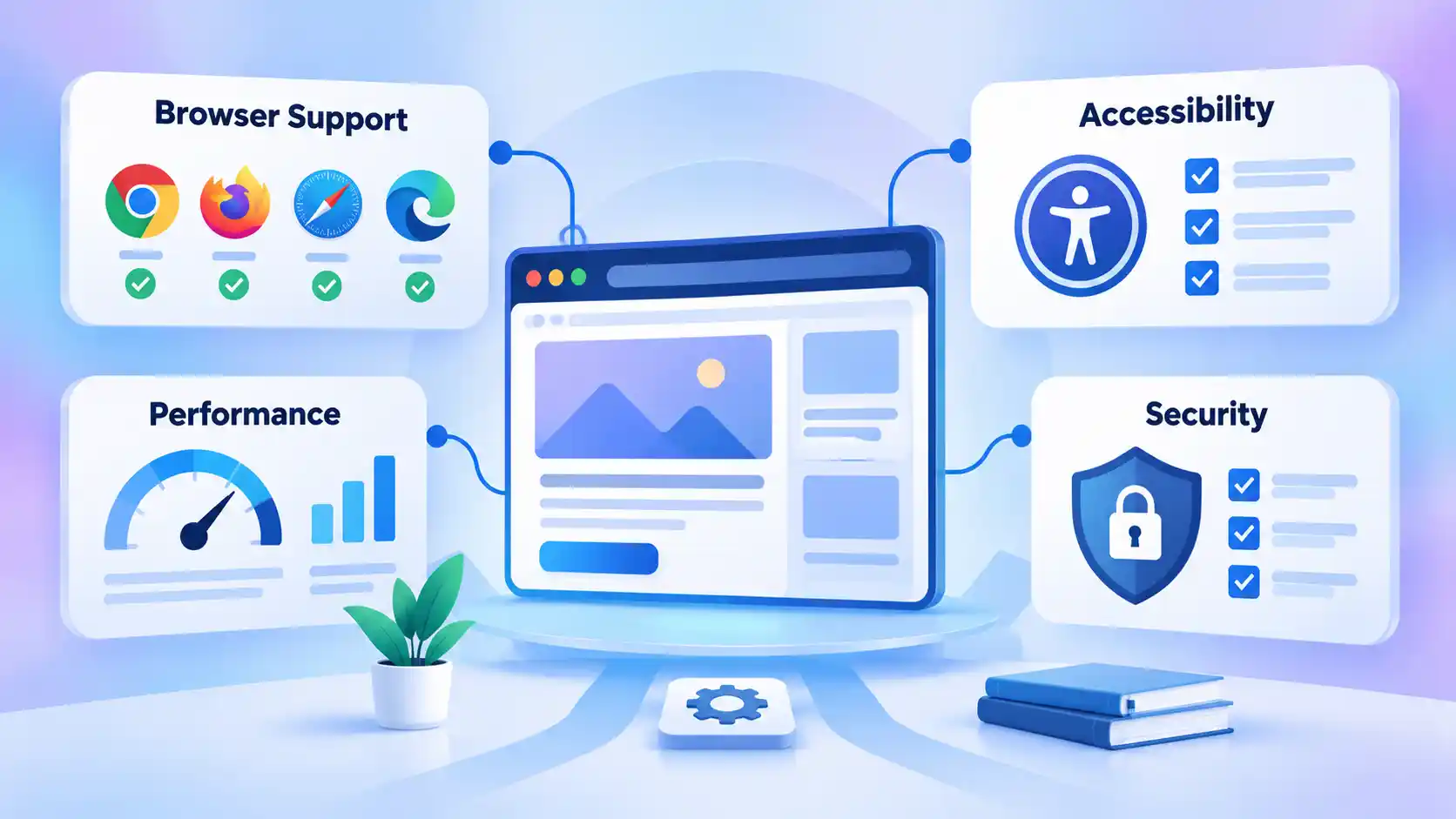
The table below separates the technologies in this article by practical adoption status rather than treating everything as equally new.
| Technology or practice | 2026 status | Practical interpretation |
|---|---|---|
| AI-assisted development | Adopt with review | Useful throughout development workflows, but generated output still requires human verification. |
| Baseline-first feature selection | Adopt now | Use interoperability data to decide when native platform capabilities can replace workarounds or dependencies. |
| Navigation API and View Transitions | Adopt progressively | Useful for modern routing and transitions where browser support and fallbacks fit the project. |
| Interaction to Next Paint | Adopt now | Responsiveness after page load is a core performance concern, not an optional optimization. |
| WebAuthn | Adopt where appropriate | Public-key authentication is mature enough for serious production consideration, with recovery and fallback planning. |
| Trusted Types | Adopt for relevant applications | Especially useful for applications with substantial client-side JavaScript and DOM injection risk. |
| Accessibility engineering | Baseline requirement | Treat accessibility as part of design, development, testing, and authentication rather than a cosmetic enhancement. |
| Progressive Web Apps | Mature and selective | Useful when installation or app-like behavior serves the product, but no longer a newly emerging architecture. |
| WebGPU | Watch or adopt selectively | Powerful for demanding graphics and computation, but compatibility still requires deliberate planning. |
| AMP, generic blockchain, dark mode and voice search | Deprioritize as general trends | These may remain useful in specific situations but should not automatically appear on a current general web development list. |
1. AI-Assisted Development Is Becoming Normal, but Review Still Matters
Artificial intelligence tools are moving from occasional code generators into everyday development workflows. Developers can use them to explain unfamiliar code, produce initial implementations, generate tests, summarize documentation, troubleshoot errors, refactor repetitive logic, or explore a large codebase.
Adoption alone does not establish reliability. In the 2025 Stack Overflow Developer Survey, 84% of respondents said they were using or planning to use AI tools in their development process. At the same time, 46% said they distrusted the accuracy of AI output, compared with 33% who trusted it. The survey also found that 66% had encountered AI solutions that were almost right but not quite.
That gap between convenience and confidence is the important development trend. AI can reduce the effort required to create a first version of something, but somebody still needs to determine whether the result fits the product requirements, handles edge cases, follows the project’s architecture, avoids insecure patterns, and is adequately tested.
A generated authentication handler, database query, configuration file, or accessibility fix should therefore be treated like code received from another contributor: review it, test it, and understand what it does before deployment.
Whether development is handled internally or assigned to a web development company in India, AI-generated code still needs the same requirements review, testing, security checks, and human accountability as manually written code.
AI agents deserve even more caution. The same Stack Overflow survey found that a majority of respondents either did not use agents or continued to use simpler AI tools, so fully autonomous development should not be presented as the default workflow yet.
2. Baseline-First Development Makes Modern Browser Features Easier to Adopt
For years, adopting newer CSS or browser APIs often began with a browser-support argument. Teams had to compare compatibility tables, maintain polyfills, or avoid useful platform features because support differed sharply among browser engines.
Baseline gives developers a more consistent vocabulary for that decision. A feature marked Newly Available has recently reached the required level of support across the current major browser set, while features that reached the threshold earlier can move into broader availability categories.
This encourages a practical change in architecture: check whether the browser already solves a problem before introducing another dependency. Container style queries can respond to characteristics of a component’s container. @scope can limit the reach of CSS selectors. The Navigation API can centralize modern navigation handling. Trusted Types can help constrain dangerous DOM injection paths.
That does not mean every project should immediately delete its existing libraries. A mature routing package, component framework, or utility layer may solve application-level problems that a browser API does not. Migration itself also has cost.
The useful question is narrower: does a native platform feature now solve this requirement well enough that custom code or another dependency is unnecessary?
This Baseline-first approach is especially valuable for long-lived projects because fewer unnecessary abstractions can mean fewer packages to update and fewer compatibility assumptions buried inside application code.
3. Navigation and Page Transitions Are Moving Into the Platform
A single-page application, or SPA, keeps a document loaded while JavaScript changes the visible application state. A multipage application, or MPA, normally loads a different document when the user navigates to another page. Neither architecture is automatically faster or better.
The legacy assumption that an SPA inherently loads faster than a conventional site is too broad. Performance depends on factors such as JavaScript volume, server response time, rendering strategy, caching, network conditions, device capability, and how much work occurs during each interaction.
The browser platform is also reducing some of the historical differences between these architectures. The Navigation API, which MDN identifies as Baseline 2026, provides mechanisms for initiating, intercepting, and managing browser navigation and history. It is particularly relevant to client-side routing in SPAs.
The View Transition API addresses another problem: moving visually between application states. It can animate transitions between DOM states inside an SPA and between documents in an MPA.
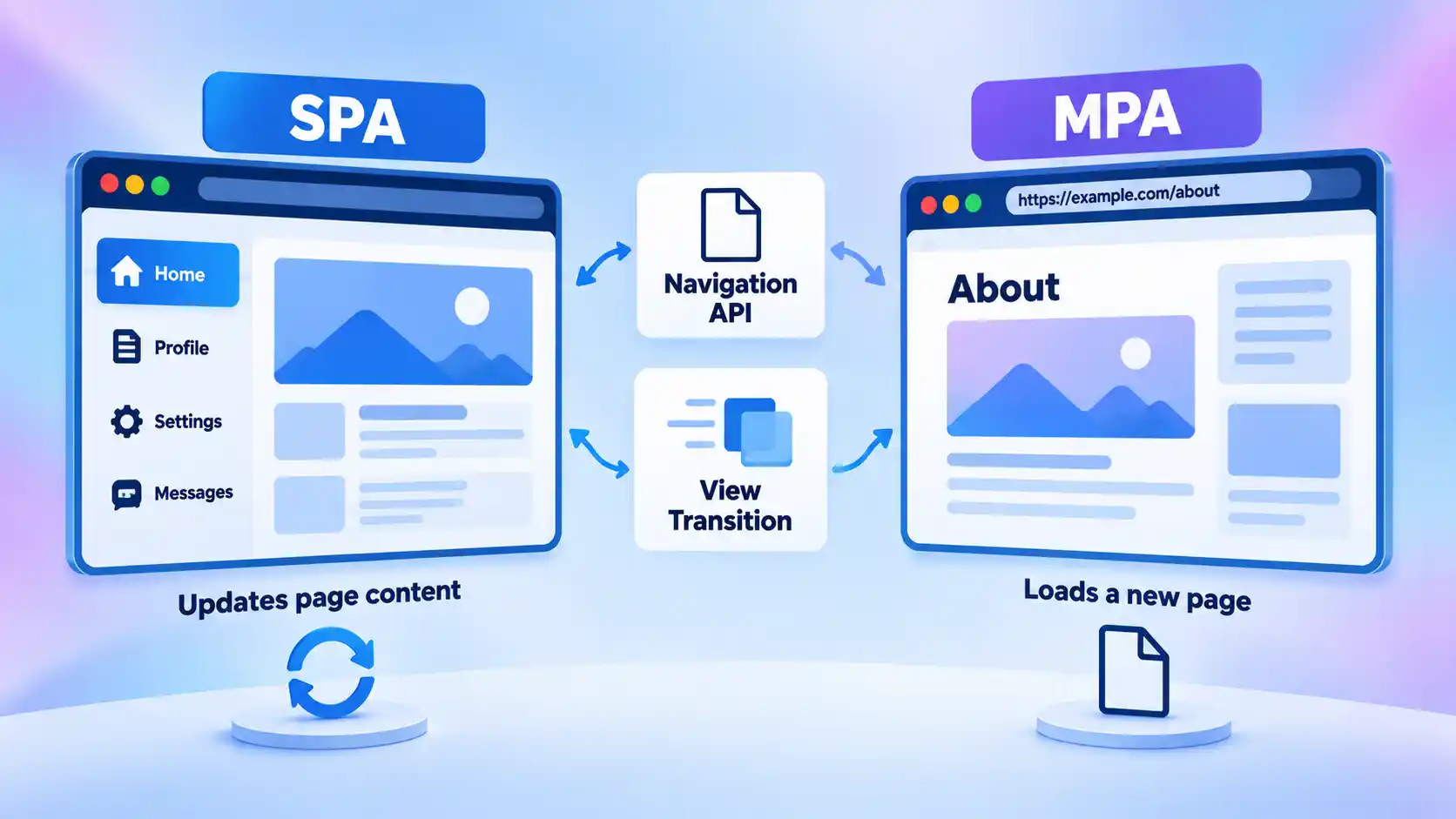
The result is not the end of routing frameworks. It is a broader set of native primitives that frameworks and application developers can build on.
For existing applications, progressive enhancement is usually safer than redesigning navigation solely because a newer API exists. Keep links and navigation meaningful without advanced transitions, then enhance the experience where the browser and product requirements justify it.
Developers evaluating these APIs in greater depth need to understand how SPA and MPA navigation differ before choosing an architecture around animation or client-side routing.
4. Performance Work Is Shifting From Page Load to Responsiveness
Fast initial loading still matters, but a page is not finished from the user’s perspective when its primary content first appears. People then open menus, type into forms, expand panels, change filters, submit actions, and navigate through application states.
Interaction to Next Paint (INP) measures how responsive a page is to qualifying user interactions over the duration of a visit. Google describes INP as a stable Core Web Vital. It replaced First Input Delay as the responsiveness-focused Core Web Vital because it evaluates interactions throughout the visit rather than only the first input.
This changes where performance work needs to happen. A page can display quickly but still feel slow when a click triggers a long JavaScript task, excessive rendering work, an oversized Document Object Model (DOM), or synchronous processing on the browser’s main thread.
For example, imagine an ecommerce category page that appears quickly but freezes briefly whenever a shopper changes a filter. Its loading performance may look respectable while its interaction experience remains poor.
Practitioners therefore need to test realistic user journeys, including interactions that occur while other work is still happening. Framework choice alone does not guarantee good INP. What matters is how much work your application asks the main thread to perform before the browser can present visual feedback.
5. Authentication Is Moving Toward Public-Key Credentials
Password-based sign-in is no longer the only mainstream authentication model available to web developers. Web Authentication, usually called WebAuthn, allows web applications to create and use scoped public-key credentials through an authenticator controlled by the user.
The standard reached another maturity milestone when Web Authentication Level 3 became a W3C Recommendation on August 25, 2026.
In simplified terms, the server does not authenticate the user by receiving a reusable shared secret. Instead, the application initiates a cryptographic challenge. An authenticator approves the operation with the user’s consent and produces cryptographic proof that the server can verify using the associated public credential.
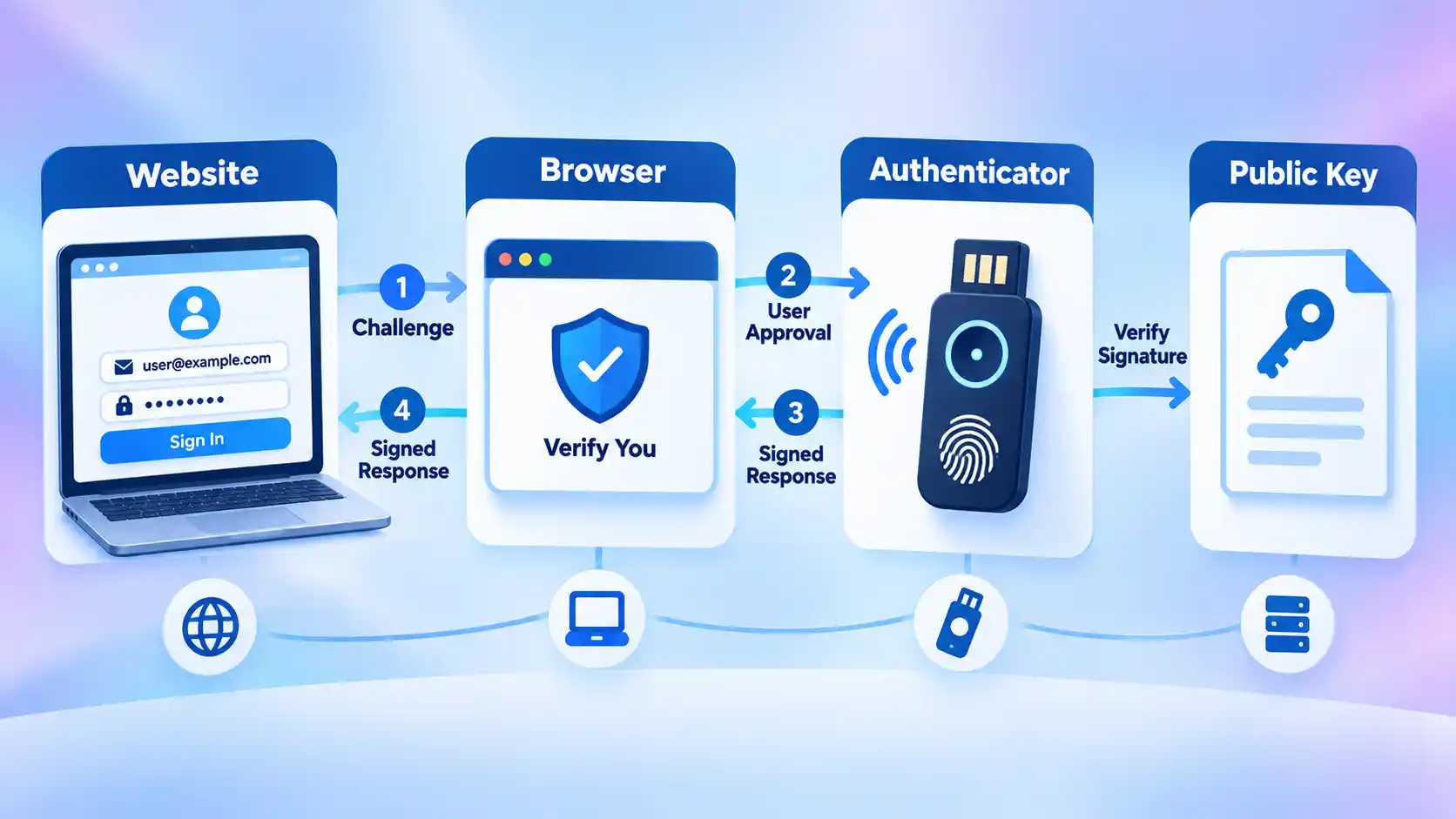
This can reduce reliance on passwords and create stronger resistance to common credential theft scenarios, but authentication design still extends beyond the happy path. Developers need recovery procedures, support for users changing or losing devices, fallback policies where required, and careful handling of account enrollment.
Authentication also intersects with accessibility. A technically secure sign-in flow is still defective if legitimate users cannot complete it with the input methods or assistive technology they depend on.
6. Browser-Enforced Security Is Gaining Practical Tools
Many client-side security failures occur when attacker-controlled text reaches a browser feature that interprets it as markup or executable code. DOM-based cross-site scripting, or DOM XSS, is one important example.
The Trusted Types API is designed to reduce this attack surface. MDN marks Trusted Types as Baseline 2026. Instead of allowing arbitrary strings to flow freely into sensitive browser APIs, an application can require values produced through defined Trusted Types policies.
Content Security Policy directives can strengthen enforcement. For example, the require-trusted-types-for directive can require appropriate typed values for relevant DOM XSS sinks such as assignments to innerHTML.
This is useful because it moves part of security enforcement into the browser instead of depending entirely on developers remembering that every individual data flow is dangerous.
Trusted Types does not eliminate the need to understand sanitization, Content Security Policy, third-party scripts, or application-specific data flows. A badly designed policy can simply concentrate unsafe behavior in a different place.
For JavaScript-heavy applications, reducing DOM XSS risk with Trusted Types is most effective when policy design is paired with an audit of the actual injection sinks in the application.
7. Accessibility Belongs in the Engineering Baseline
Accessibility should not be treated as a visual-design trend. It is an engineering requirement that affects markup, interaction design, navigation, forms, authentication, testing, and content structure.
The Web Content Accessibility Guidelines (WCAG) 2.2 are a W3C Recommendation. WCAG 2.2 adds success criteria covering areas such as focus visibility, dragging movements, minimum target size, redundant entry, consistent help, and accessible authentication.
These requirements expose problems that can otherwise survive a conventional visual QA pass. A menu may look correct but become unusable from the keyboard. A floating header may cover the focused control. A drag-and-drop interface may provide no practical alternative input method. An authentication step may depend on a cognitive test that creates an unnecessary barrier.
Automated accessibility tools are valuable for finding certain classes of defects, but they cannot determine whether every workflow is understandable, logically ordered, operable with a keyboard, or practical with assistive technology.
Accessibility therefore works best when considered before components and interaction models become difficult to change. Semantic HTML, sensible focus behavior, usable controls, clear labels, and multiple input methods usually cost less to design correctly than to retrofit across a mature application.
8. Progressive Web Apps Are Mature, Not New
Progressive Web Apps still solve useful product problems, but calling them a new development trend is increasingly misleading.
A PWA is built with web technologies and can gain app-like capabilities where the browser and operating system support them. MDN’s current PWA installation guidance explains that supporting browsers can promote an eligible PWA for installation, after which it can receive an application icon and launch in a standalone experience.
This corrects an important misconception in older descriptions: PWAs are not simply cloud-hosted substitutes for applications that never install. Installation can be a defining part of the experience.
PWAs make sense when installation, offline behavior, background capabilities, or an app-like launch experience genuinely benefit users. A content site does not automatically become better because it has an install prompt, and a complex native application does not automatically become replaceable by a PWA.
Platform differences also matter. Installation flows and supported capabilities can vary across browsers and operating systems, so teams should test the exact devices important to their audience rather than assume identical behavior everywhere.
9. WebGPU Is Promising, but Still a Selective Adoption Decision
Web applications increasingly perform work that once belonged mostly to native desktop software: interactive visualization, advanced graphics, creative tools, simulations, machine-learning workloads, and other computation-heavy tasks.
WebGPU gives compatible web applications access to modern graphics processing unit capabilities for rendering and general GPU computation. That creates room for richer browser-based tools and workloads that are difficult to execute efficiently with older graphics approaches.
The key limitation in 2026 is compatibility. MDN still marks the WebGPU API as having limited availability, meaning it does not yet work in every widely used browser environment.
That makes WebGPU a strong example of why “interesting” and “ready everywhere” are different categories. A controlled enterprise environment, advanced design tool, data visualization product, or specialized application may be able to define supported browsers and use WebGPU now. A public service expected to work across a broad collection of browsers may need a fallback or a different technical approach.
The relevant decision is therefore not whether WebGPU is impressive. It is whether the application’s audience, workload, fallback strategy, and maintenance budget justify it. A focused WebGPU versus WebGL comparison can help teams make that compatibility decision for graphics-heavy products.
Trends From Older Lists That No Longer Deserve Top Billing
Some technologies in web development trend lists from 2023 still exist and remain useful. What has changed is their relevance to a general list of technologies shaping everyday web development.
Accelerated Mobile Pages
AMP should no longer be framed as an essential new web standard for publishers. Google stated in 2021 that AMP was no longer required for eligibility in the Top Stories carousel. Publishers can still use AMP, but the old search-visibility rationale is no longer enough to position it as a major current web development trend.
Dark mode
Dark mode remains a valid interface preference, but it is now an established design capability rather than a defining web development movement. It should be implemented when it fits the design system and user preferences, without making unsupported health claims about protecting eyesight.
Blockchain
Blockchain remains relevant to applications that genuinely require decentralized ledgers, token systems, or smart-contract interaction. It is not, however, the backbone of modern web development in general. Conventional websites and web applications do not need blockchain merely to be secure or modern.
Internet of Things
Internet of Things products often use web dashboards, APIs, authentication systems, and browser interfaces, but IoT is a broader computing category. It is better treated as an application domain that can use web technology than as a web development technique by itself.
Voice search
Voice interfaces remain useful in some accessibility, assistant, search, and hands-free scenarios, but “voice search optimization” is too narrow to represent a defining web development trend. Developers should instead build understandable content, semantic interfaces, accessible controls, and appropriate structured functionality based on actual product requirements.
What Developers Should Prioritize Now
The safest way to respond to web development trends in 2026 is not to rebuild every project around the newest API. Start with the capabilities that consistently affect users: semantic HTML, dependable navigation, accessibility, security, responsive interaction, maintainable code, and measured performance.
Then use interoperability information such as Baseline to determine whether the browser platform already provides the capability you need. Introduce frameworks, packages, advanced APIs, or AI-generated code when they solve a clear problem rather than because they appear on a trend list.
For existing applications, this often means incremental change. Measure slow interactions before rewriting the front end. Add stronger authentication without breaking recovery. Introduce native browser features behind sensible fallbacks. Use AI to accelerate work without giving it authority over code quality. Adopt WebGPU only when its benefits outweigh its compatibility requirements.
The web continues to evolve quickly, but maturity is becoming as important as novelty. The strongest development decisions in 2026 come from knowing not only what the platform can do, but also when a feature is interoperable, accessible, secure, maintainable, and useful enough to deserve a place in production.

💬 Comments