A WooCommerce store should use HTTPS because customers send account, address, order, and sometimes payment-related information between their browser and the store. HTTPS uses Transport Layer Security (TLS) to encrypt that traffic, protect it from undetected modification, and help the browser verify that it is communicating with the intended server.
HTTPS is an essential security layer, but it does not make a WooCommerce store hack-proof, secure the WordPress database by itself, or automatically make the business compliant with payment-card security requirements.
What an “SSL certificate” actually does
An SSL certificate is the common name for the digital certificate used as part of an HTTPS connection. Technically, modern websites use Transport Layer Security rather than the older Secure Sockets Layer protocol. SSL was the predecessor to TLS, but the phrase “SSL certificate” remains widely used by hosting companies, certificate providers, and website owners.
When a shopper opens an HTTPS page, the browser and server establish a TLS connection. According to MDN’s TLS documentation, that connection provides three core protections: encryption, integrity, and authentication.
- Encryption prevents someone observing the network connection from simply reading the information moving between the browser and server.
- Integrity helps detect attempts to alter that information while it is travelling across the network.
- Authentication lets the browser verify the identity presented by the server through its digital certificate.
The certificate is therefore not a protective shell around the entire WordPress installation. It is part of the system that lets a browser establish an authenticated, encrypted connection with the server.
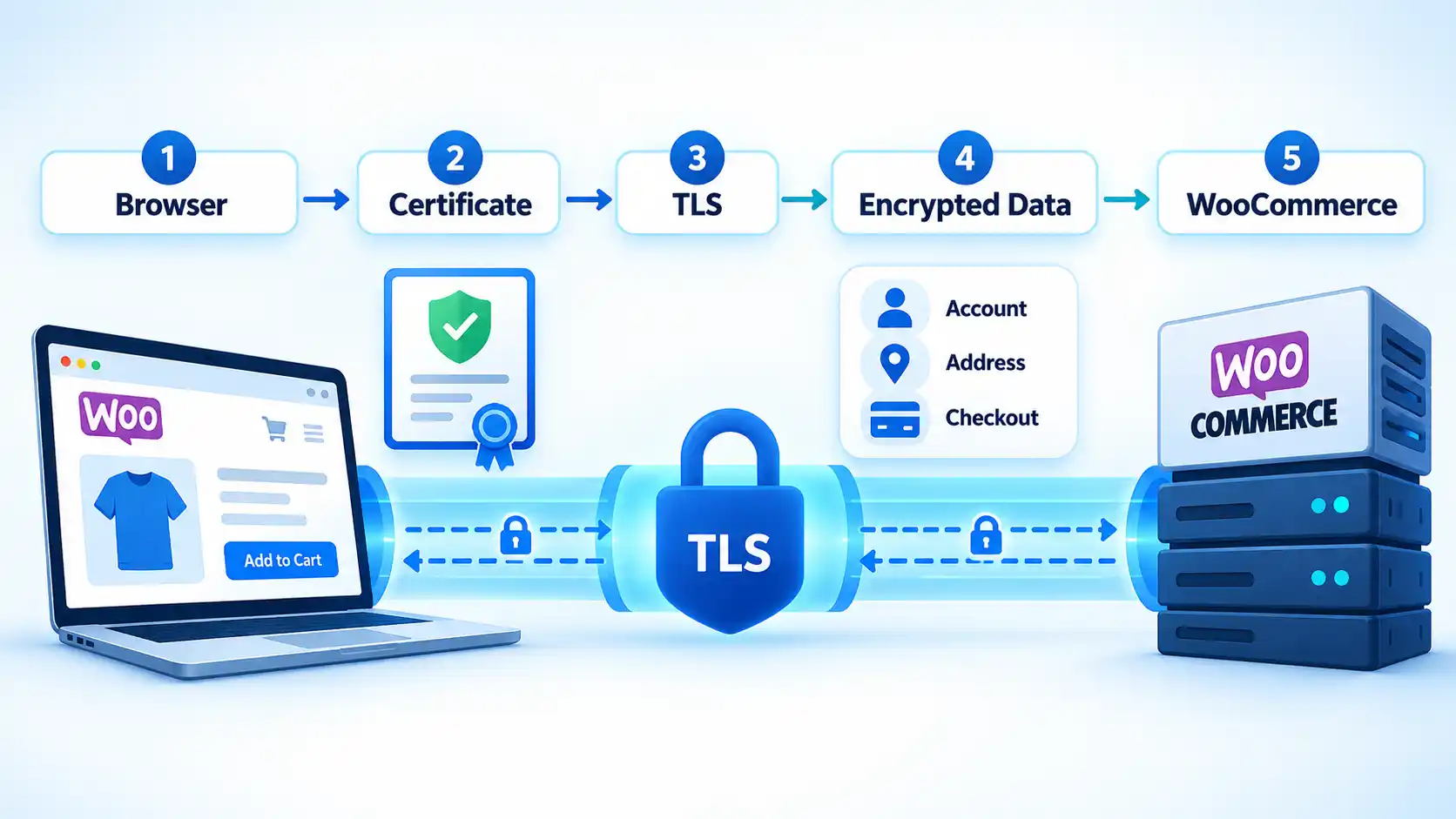
For example, when a customer submits a login password or delivery address, HTTPS protects that information while it crosses the network between the customer’s browser and your server. This browser-to-server relationship is the core of how HTTPS protects website traffic.
Why HTTPS matters more on a WooCommerce store
An ordinary informational website may collect little or no personal information. A WooCommerce store commonly handles substantially more because shoppers may create accounts, enter billing and shipping details, submit orders, and interact with payment systems.
The WooCommerce security FAQ says WooCommerce can retain information such as ordered products, customer names, email addresses, phone numbers, billing or shipping addresses, and a record of the payment method used. That information is stored separately from the protection HTTPS provides while data is travelling across the network.
WooCommerce also strongly recommends running the entire store over HTTPS rather than protecting only selected checkout pages.
That site-wide approach matters because sensitive activity is not confined to one payment form. A shopper may sign in through an account page, update an address, reset a password, view an order, add information during checkout, and then communicate with a payment gateway. Each interaction can involve information that should not travel as ordinary unencrypted HTTP traffic.
There is also an important distinction between data in transit and data at rest. HTTPS protects information while it moves between systems. Once information reaches the server and is stored in WordPress, WooCommerce, a backup, or another service, protecting that stored information depends on separate controls such as access permissions, software security, hosting configuration, and storage protections.
HTTPS and WooCommerce payment gateways
Payment security depends partly on how a gateway works. Some payment flows redirect shoppers to a payment provider or use provider-hosted interfaces, while other integrations operate more closely inside the store. These architectures can change which system handles sensitive payment information and how much security responsibility remains with the merchant.
WooCommerce distinguishes between off-site hosted gateways and integrated gateways. Its payment-security documentation explains that off-site payment flows move the payment portion to the processor’s systems, while integrated gateways place a greater security burden on the WooCommerce site. It also notes that WooCommerce payment-gateway plugins are designed so raw card numbers and security codes are not stored in the site’s database.
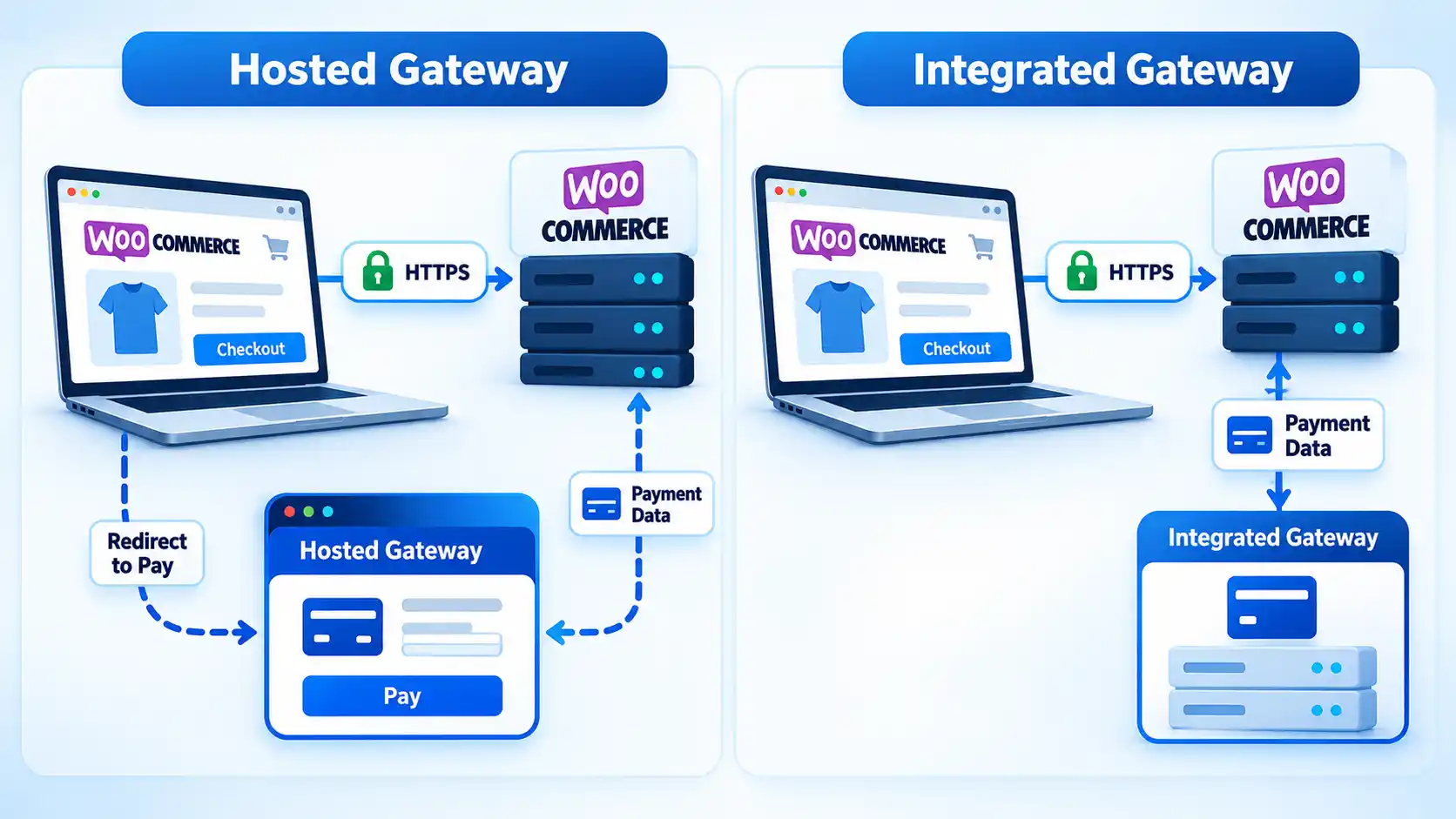
A gateway’s own requirements still matter. For example, the current WooPayments requirements state that the site must have an SSL certificate and be accessible over HTTPS.
Using an externally hosted payment interface also does not make HTTP appropriate for the rest of the store. Account credentials, customer details, order information, session data, and other interactions may still pass between the browser and the WooCommerce site before or after the payment provider becomes involved.
HTTPS is necessary security, not complete security
HTTPS solves a specific security problem: protecting network communication. It does not replace the other controls needed to operate WordPress and WooCommerce securely.
A store still needs appropriate WordPress, WooCommerce, theme, and plugin updates; strong administrator authentication; carefully limited user permissions; secure hosting; reliable backups; and safeguards appropriate to its payment setup. A vulnerable plugin, stolen administrator password, compromised server, or malicious extension can still create a serious incident even when every public page loads over HTTPS.
Warning
HTTPS protects traffic between systems. A valid certificate cannot repair a vulnerable WordPress plugin, a compromised administrator account, an infected server, or an insecure payment implementation.
HTTPS does not make a store PCI compliant
Payment Card Industry Data Security Standard (PCI DSS) requirements are broader than certificate installation. The PCI Security Standards Council states that strong cryptography and security protocols must safeguard sensitive cardholder data during transmission over open, public networks.
HTTPS can contribute to protecting payment data in transit when it is configured appropriately, but it is not the whole compliance program. The store’s PCI responsibilities depend on how payment data is collected, processed, transmitted, and handled by the merchant and payment provider. Store owners should therefore follow the requirements that apply to their gateway and actual PCI DSS scope rather than treating an SSL certificate as proof of compliance.
What customers and browsers see when HTTPS is missing
Modern browsers distinguish HTTPS pages from ordinary HTTP connections. MDN notes that browsers treat pages delivered over HTTPS as secure contexts, and some web capabilities are available only in those contexts.
The exact browser interface can change. Connection information may appear through an address-bar control rather than the traditional padlock symbol, so it is better to focus on whether the connection actually uses HTTPS than on a particular icon.
HTTPS also should not be described as proof that the business itself is trustworthy. A certificate authenticates the connection to the domain according to the certificate’s validation process. It does not independently guarantee the merchant’s honesty, product quality, privacy practices, or overall cybersecurity.
Does HTTPS improve WooCommerce SEO?
HTTPS should be treated as part of sound technical website operation, not as a shortcut that automatically moves a WooCommerce store higher in search results.
Google’s current page-experience guidance includes serving pages securely among the factors site owners should consider when assessing overall page experience. The same documentation says there is no single “page experience signal” and confirms that Core Web Vitals are used by Google’s ranking systems.
That means HTTPS should not be presented as a standalone switch that automatically produces higher rankings. Google instead describes good page experience as a collection of considerations that can contribute to search success when useful content is otherwise competitive.
HTTPS still has a direct relationship with canonicalization and migration hygiene. Google’s canonicalization documentation says Google generally prefers an HTTPS page over an equivalent HTTP page, except where issues or conflicting signals exist.
For an established WooCommerce store, that makes a clean migration important. HTTP URLs should redirect to their intended HTTPS equivalents, canonical signals should agree with the HTTPS versions, and the HTTPS pages should not redirect back through HTTP or rely on insecure dependencies that create conflicting signals.
HTTPS is therefore one part of technical SEO rather than the complete strategy. Content quality, crawlability, site structure, performance, search intent, and other factors still determine how effectively a store can compete in organic search.
Do you need a paid SSL certificate?
Not necessarily. WooCommerce documents both free and paid certificate options, and many hosting environments can provision a free certificate from a certificate authority such as Let’s Encrypt.
Let’s Encrypt provides free Domain Validation certificates that can be used to enable HTTPS. It also supports wildcard certificates and certificates containing multiple domain names, although it does not issue Organization Validation or Extended Validation certificates.
The practical question is therefore not simply whether a certificate is free or paid. You should check whether the certificate covers the required hostnames, whether the validation model fits the organization’s needs, whether renewal and installation are managed reliably, and whether you need commercial support or additional identity validation.
If you are comparing free and paid SSL certificates, compare those operational and validation differences rather than assuming price alone determines whether HTTPS is correctly implemented.
Stores that need a commercial provider for certificate validation, support, or certificate-management requirements can also compare commercial SSL/TLS certificate options.
Check that HTTPS is actually working across the store
Installing or activating a certificate is not the final check. A WooCommerce store can have a valid certificate and still contain HTTP links, insecure resources, incorrect WordPress URLs, or redirects that send visitors to the wrong protocol.
WooCommerce’s HTTPS documentation recommends updating WordPress and site URLs where necessary, redirecting existing HTTP URLs to HTTPS, and checking for insecure resources. It also notes that scripts, images, and stylesheets linked through http:// can trigger non-secure-content problems on an otherwise HTTPS page.
This is known as mixed content. MDN explains that mixed content occurs when an HTTPS document loads subresources over HTTP. Depending on the resource and browser, the insecure request may be upgraded automatically or blocked. Finding and fixing mixed content in WordPress prevents those remaining HTTP dependencies from undermining the integrity of an HTTPS page.
Verify the result
- Open the storefront, account area, cart, and checkout and confirm that each important page loads through HTTPS without a certificate warning.
- Request an HTTP version of an important store URL and confirm that it redirects to the intended HTTPS version rather than remaining on HTTP or entering a redirect loop.
- Use the browser’s developer tools or security information to check for images, scripts, stylesheets, fonts, or other resources still requested through HTTP.
- Confirm that the WordPress Address, Site Address, important internal references, and relevant canonical URLs point to the intended HTTPS locations.
- Test the checkout flow according to your payment gateway’s own documentation so HTTPS, redirects, callbacks, and payment-provider connections behave as expected.
Sites behind a reverse proxy, content delivery network, load balancer, or managed hosting layer may need additional configuration so WordPress correctly recognizes the original request as HTTPS. WooCommerce notes that proxy-based SSL detection problems can contribute to redirect loops, so this is a useful failure point to check when a store repeatedly switches between HTTP and HTTPS.
The bottom line
A WooCommerce store should use HTTPS across the site because TLS protects browser-to-server traffic, authenticates the server, and helps prevent information from being read or silently altered while it travels across the network.
That protection is foundational rather than comprehensive. A secure WooCommerce deployment still depends on software maintenance, account security, hosting controls, appropriate payment architecture, applicable PCI responsibilities, and correct HTTPS configuration. The goal is not merely to possess an SSL certificate, but to make sure the store consistently uses HTTPS and that the rest of its security controls are treated as separate responsibilities.
