An IP address identifies a source or destination at the Internet Protocol (IP) layer so packets, the units of data IP carries, can be routed across networks. It is not an immutable fingerprint for one computer, and by itself it does not reveal a person’s exact physical location.
Those distinctions matter because several familiar claims about IP addresses are only partly true. A home device may have a private address while sharing a public IPv4 address with other devices, an address may change over time, and an IP lookup can reveal network or approximate location information without identifying the person using the connection.
What an IP address actually does
Think about loading a web page. Your request has to travel across networks toward the server, and the returning packets need addressing information that lets the network route them back toward you. An Internet Protocol address is part of that addressing system.
The original IPv4 specification defines IP addresses as part of the mechanism used to move datagrams between interconnected networks, with IPv4 addresses containing 32 bits of addressing information. Routers use destination-address information when deciding where packets should go next.
An IP address is therefore better understood as a network address than as a permanent identity tag. One physical machine can use different IP addresses on different interfaces or networks, while one externally visible address can sometimes represent traffic from multiple devices.
IP also should not be confused with the Domain Name System (DNS), a device’s Media Access Control (MAC) address, or an account identity. Those systems answer different questions. IP addressing deals with network-layer packet delivery; it does not by itself establish who is sitting behind a connection.
IPv4 and IPv6 use different address formats
The two Internet Protocol versions you are most likely to encounter are IPv4 and IPv6. They perform the same broad addressing job, but they use very different address sizes and notation.
IPv4 uses 32-bit addresses. IPv6 was designed as IPv4’s successor and increases the address size from 32 bits to 128 bits. The larger address space supports far more possible addresses and a different addressing architecture.
IPv4 vs IPv6 at a glance
| Feature | IPv4 | IPv6 |
|---|---|---|
| Address size | 32 bits | 128 bits |
| Typical notation | Dotted decimal, such as 192.0.2.1 | Colon-separated hexadecimal, such as 2001:db8::1 |
The longer IPv6 format does not mean an IPv6 address contains a person’s name, device serial number, or street address. It is still an IP-layer identifier. The IPv6 addressing specification defines IPv6 addresses as 128-bit identifiers for interfaces and sets of interfaces.
A deeper IPv4 vs IPv6 comparison becomes useful when compatibility, transition mechanisms, address scopes, and network design matter more than recognizing the basic formats.
Public and private IP addresses are different
Your laptop can show an address such as 192.168.1.20 while a website sees a completely different IPv4 address. That is normal because addresses used inside a private network and addresses used across the public Internet serve different scopes.
For IPv4, three familiar ranges are reserved for private networks: 10.0.0.0/8, 172.16.0.0/12, and 192.168.0.0/16. Different homes and businesses can reuse those addresses independently without coordinating with one another.
That reuse is why seeing 192.168.1.5 on two unrelated laptops does not create a global Internet address conflict. The two addresses have meaning within their respective private networks rather than as globally unique public destinations.
Private also does not mean encrypted, anonymous, or automatically secure. It describes address scope. Security depends on other controls such as firewall policy, application security, encryption, authentication, and network configuration.
Private-use ranges are not the only IPv4 blocks with special behavior. IANA maintains a registry of special-purpose IPv4 address space that also includes loopback, link-local, shared-address, documentation, and other reserved ranges. The public-versus-private distinction is useful for beginners, but it is not the whole IPv4 addressing model.
Several devices can share one public IPv4 address
A phone, laptop, game console, and smart TV on the same home network do not necessarily appear to websites as four different public IPv4 addresses. A router can translate traffic from several private addresses so those connections use one external address.
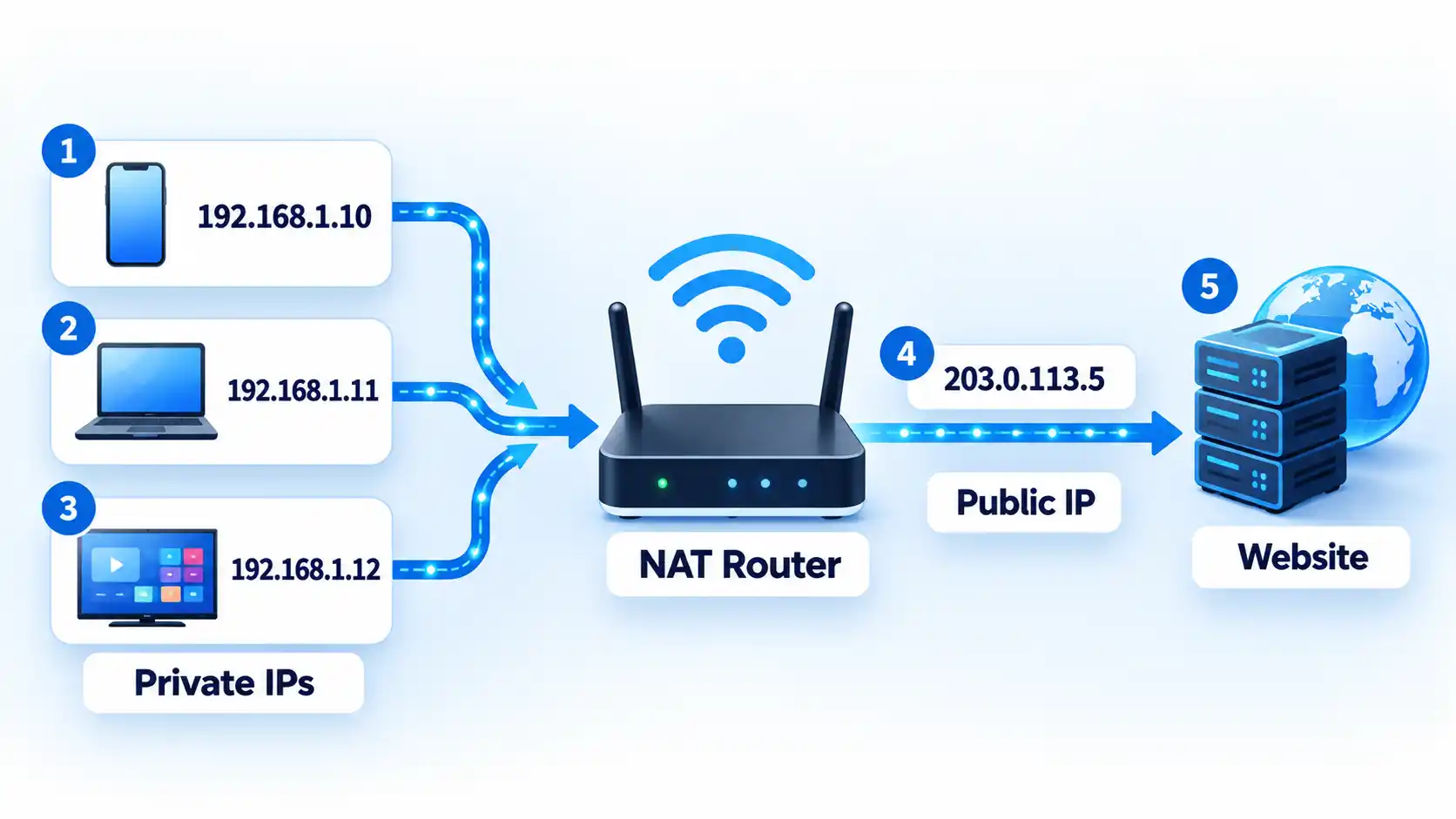
This process is commonly associated with Network Address Translation (NAT). A form called Network Address Port Translation (NAPT) can map many private address-and-port combinations to one external IPv4 address while keeping simultaneous connections separate. The NAT specification describes multiple local nodes sharing an address assigned at the network boundary.
That corrects the idea that every computer must have its own globally unique public IPv4 address. Devices still need usable addresses within their own network context, but the address visible to an Internet service may belong to the router or another translation layer rather than directly to the individual device.
NAT is not an anonymity system. A shared public address may make the address alone less useful for distinguishing devices, but services can also use accounts, cookies, browser information, timestamps, connection ports, and other signals when they need to distinguish sessions or users.
The mechanics behind Network Address Translation matter most when you are troubleshooting inbound connections, port forwarding, peer-to-peer applications, or networks where more than one translation layer is present.
IP addresses may be dynamic or static
An IP address does not have to stay with a device forever. Moving from your home Wi-Fi to a coffee-shop network, for example, places the device in a different network environment and normally gives it addressing appropriate to that network.
Inside many networks, the Dynamic Host Configuration Protocol (DHCP) assigns addresses automatically. With dynamic allocation, an address is provided for a period called a DHCP lease. The client can request an extension, and an address can later return to the available pool when it is no longer allocated to that client.
A static address, by contrast, is deliberately kept stable through configuration or an allocation policy. Servers, network appliances, remote-access systems, and other services sometimes benefit from predictable addressing, although the exact arrangement depends on the network.
The same device can also have more than one relevant address at the same time. A laptop might have a private IPv4 address on Wi-Fi, one or more IPv6 addresses, and traffic that ultimately leaves the network through a different public IPv4 address.
When the practical question is simply which address a device is using, platform-specific public and private IP address checks are more useful than assuming the address shown by one website represents every interface on the device.
IP geolocation is approximate
An IP address can sometimes be associated with a country, region, city, or other geographic area, but that information should be treated as an estimate. An IP address is not a GPS coordinate and is not a reliable way to identify a household or street address.
IP geolocation services use network information and other data to estimate where an address is being used. Precision varies with the Internet service provider, network architecture, country, mobile connectivity, IPv4 or IPv6 use, and whether traffic is passing through a proxy or Virtual Private Network (VPN).
MaxMind, one major IP-geolocation provider, states that its geolocation data is not precise enough to identify a specific household, individual, or street address. It also describes location in terms of confidence and an accuracy radius rather than treating a map pin as the user’s exact physical position.
This is why a lookup might show the right country but a nearby city, an Internet provider’s network location, or the location of a VPN endpoint. City-level information can be useful for regional content, fraud signals, analytics, and similar applications, but it is poor evidence for claims about exactly where one person is located.
A proxy or VPN adds another layer to that distinction. Traffic sent through either can cause a website to see the intermediary’s public address instead of the connection’s ordinary public address. That changes what the destination can infer from IP geolocation, but changing the visible address alone does not make a person anonymous.
An IP address can count as personal data in context
An IP address does not normally contain a person’s name, email address, or phone number. That does not mean privacy law always treats it as non-personal information.
Under UK General Data Protection Regulation guidance, IP addresses are included among online identifiers that may constitute personal data when they can distinguish or help identify an individual, either alone or together with other information available to the organisation processing the data.
Context makes the difference. A random IP address viewed in isolation may tell you very little about a person. A service that has the same address tied to an account login, timestamp, session record, or other identifiers may be able to connect that network information to a particular user much more readily.
Privacy law is therefore not a technical shield around an address, and an IP address is not automatically equivalent to a person’s identity. Organisations need to assess what information they process, what other data can be combined with it, why it is being processed, and which legal requirements apply in the relevant jurisdiction.
IP lookup data is network data, not identity data
The phrase “IP lookup” can describe several different operations, and the result depends on which database is being queried. Registration data, geolocation data, and DNS data should not be treated as interchangeable.
Registration Data Access Protocol (RDAP) queries can return information about registered Internet number resources. Regional Internet registries such as ARIN support RDAP queries for IP networks and address blocks, which can expose registration information about the network resource rather than identify every end user of that address.
That distinction matters for residential and mobile connections. Addresses can be reassigned, and NAT can place multiple devices behind one visible address, so an allocation or registration record should not be treated as proof of which subscriber or device used the address at a particular moment.
DNS answers another question. It maps names and address records used by Internet applications; for IPv6, the standard AAAA record stores an IPv6 address associated with a domain name. Geolocation services, meanwhile, estimate geographic use of an address. An address appearing in these systems does not make their results equivalent.
You may still encounter the term WHOIS because it was historically used for registration-data queries. RDAP was designed as its structured successor. For generic top-level domains, RDAP became the required registration-data service as of January 28, 2025, while most WHOIS-service requirements ended, with specific exceptions including .com, .name, and .post. Regional Internet registries also provide RDAP services for Internet number resources.
The useful rule is to identify what kind of address or lookup result you are looking at before drawing conclusions from it. A private address, public address, translated address, registration record, DNS record, and geolocation estimate each answer a different question.

💬 Comments