There is no universal winner between cloud contact software and a premises PBX.
Premises PBX also covers more ground than the phrase suggests. Cisco’s UCM product page describes a modern enterprise calling platform with premises and hybrid options. Treating every premises system as a 1990s switch in a closet produces bad shortlists in both directions.
Quick Take
Cloud contact software fits when agents work from browsers in many locations, queues carry more than voice, and routing needs to be exposed as configuration or code. Premises call control fits when you own the endpoints, need internal authority over the platform, or already run a hybrid design. Buy the operating model you can staff and monitor, whatever the category label says.
What actually differs between the architectures
The useful comparison runs on one grid. Arguments about “cloud versus PBX” collapse because the two categories are usually compared on different criteria: seat price against hardware refresh, or feature breadth against control.
| Criterion | Cloud contact platform | Premises PBX call control | Hybrid call control |
|---|---|---|---|
| Where call control runs | Provider-managed service; you configure it through a console or API. | Your servers and your change windows. | Platform stays on premises; cloud adds PSTN, features, or management. |
| Agent endpoints | Browser softphone or mobile SDK; a headset is the main hardware. | IP desk phones, softphones, and gateways matched to the platform build. | Existing desk phones stay in service while cloud services extend them. |
| Routing logic | Queues, skills, priority, delay, and channel concurrency set in configuration or code. | Queue and hunt-group features vary by version and licensing. | Mixed; cloud routing features layer over the local platform. |
| Numbers and PSTN | Numbers provisioned through provider APIs; SIP trunking or provider PSTN. | Carrier circuits and SIP trunks terminated on your equipment. | Cloud PSTN options alongside on-premises media gateways. |
| Administration | Web console, APIs, and automation workflows. | Enterprise admin tools; upgrades are your project plan. | Cloud management console with a local platform still to maintain. |
| Network dependency | Public internet plus browser and device behavior. | Private WAN and LAN design; QoS largely under your control. | Both, depending on where media terminates. |
| Switching constraint | Number porting, browser rollout, and any API build you own. | Hardware refresh cycles, version transitions, carrier agreements. | Two lifecycles to track and two support paths to staff. |
Read the table by column. A cloud contact platform concentrates its dependencies in a provider relationship: number availability, region coverage, trunk configuration, and API stability. A premises platform concentrates them in your own operations: certificate policies, version transitions, endpoint compatibility, and the carrier circuits landing in your building. Hybrid spreads both and doubles the surface you monitor.
Where a premises platform keeps costing you time
Cisco’s UCM product page leads with an urgent action notice about a certificate policy change that can disrupt on-premises collaboration services. That is the shape of premises ownership: the platform is yours, and so is every transition tied to it.
The recurring work clusters in five places.
- Platform lifecycle. Version upgrades, certificate and policy shifts, and hypervisor decisions all land on your calendar, not a provider’s release train.
- Endpoints. Desk phones are matched to the platform build; current handsets are configurable for either the premises platform or a cloud calling service, which helps only if you plan the transition.
- PSTN and interconnect. Circuits and SIP trunks terminate on your equipment unless you deliberately buy cloud PSTN connectivity.
- Administration. Adds, moves, changes, and the monitoring stack that tells you whether the phones are working.
- Continuity. Site-level power, circuit, and hardware risks are yours to design around.
Build the business case as a total-cost comparison, not a seat-price comparison. Put platform lifecycle, endpoints, PSTN and interconnect, administration, continuity planning, and cloud consumption in the same spreadsheet.
None of that makes premises call control obsolete. Modern premises platforms carry hybrid and cloud-connected paths that offload PSTN and management, and organizations with dependable endpoints and internal control value both. The honest framing is concentration of dependency. Premises architectures can concentrate platform lifecycle, endpoint, interconnect, and administrative decisions in one place; cloud architectures move those dependencies into a provider relationship with its own constraints. Neither concentration is free. Reviewing those dependencies is the same exercise as any platform modernization decision, which is why teams often pair it with a wider legacy software upgrade review.
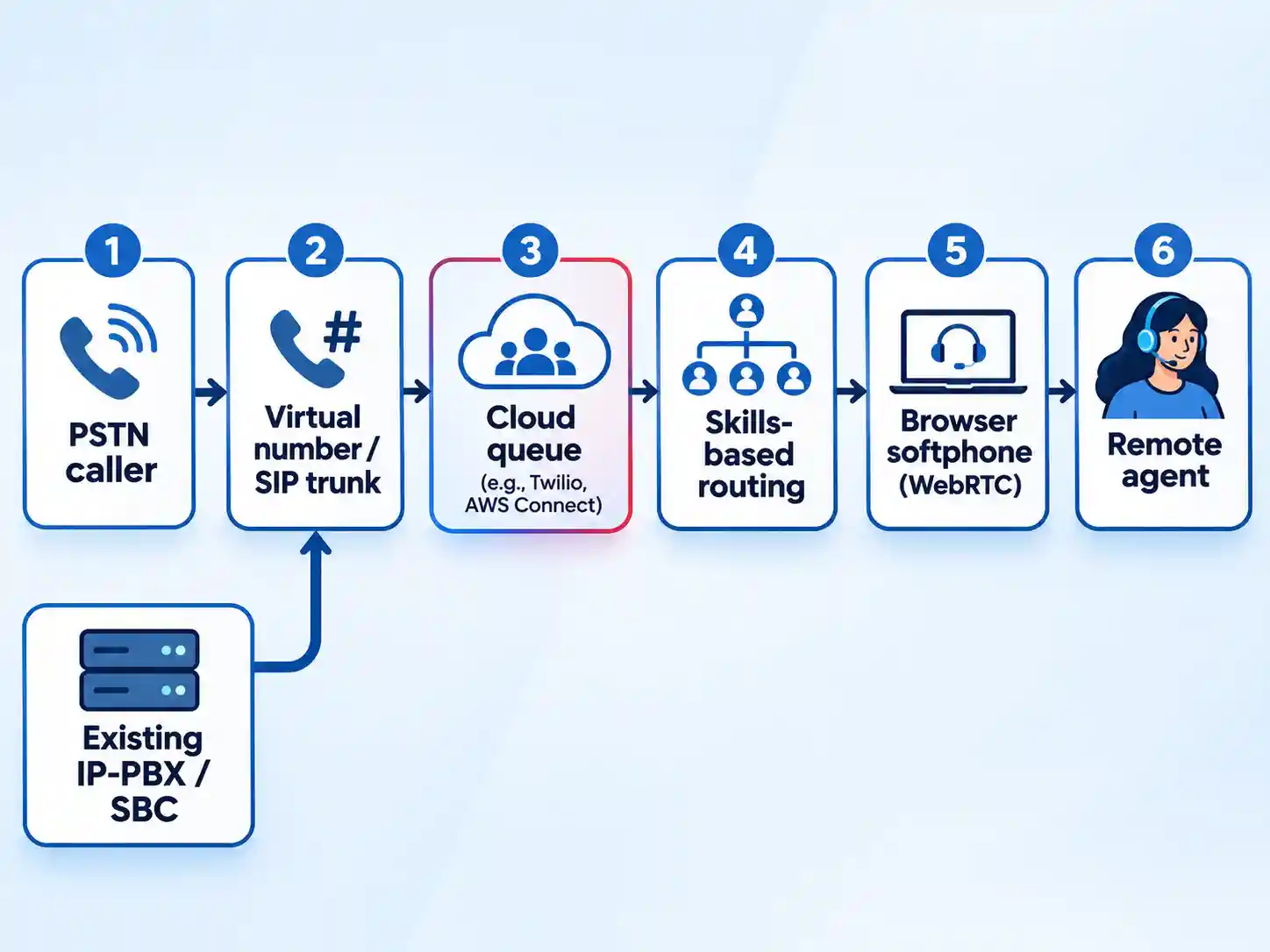
How a support call reaches a remote agent
A cloud call skips your wiring closet. The caller dials a virtual number the provider owns, or reaches your existing telephony gear through a SIP trunk. From there, provider-managed call control runs the queue, applies routing rules, and bridges the audio to whichever endpoint the assigned agent is using.
That endpoint is often a browser tab. WebRTC is a W3C standard for real-time audio and video inside browsers, and vendor SDKs build softphones on top of it. Twilio’s Voice JavaScript SDK, for example, opens an audio connection from the browser to Twilio, fetches instructions from your server, and processes the call the same way it would process traffic from a physical phone.
SIP trunking is the other half of the picture: the IP link between your calling infrastructure and the public phone network. Twilio’s Elastic SIP Trunking connects IP-based communications infrastructure to the PSTN over an ordinary broadband connection, with TLS for signaling and SRTP for media encryption. Emergency Calling appears on that trunk’s feature list, but verify availability, location handling, and limitations before an agent relies on it.
In distributed support environments, the primary operational vulnerability is often the last mile: an agent’s residential broadband connection, an unoptimized browser version, or an uncalibrated headset. That is where readiness testing earns its keep. Calculate peak network throughput based on simultaneous calls and codec overhead. Under standard planning guidance, such as Twilio’s G.711 voice benchmarks, allow approximately 100 kbps per concurrent call to account for payload, IP packet headers, and signaling overhead, then test the actual transmission path from each agent’s normal connection and browser.
Watch for jitter (delay variation), packet loss, headset and microphone behavior, and whether the provider’s assumptions match your peak concurrency. On managed networks, prioritize voice traffic; for home and mobile workers, treat quality-of-service (QoS) as something you can influence at the endpoint and router, not something you can assume end to end. Treat jitter buffering as a diagnostic lever rather than a fixed universal setting; provider defaults and endpoint behavior vary.
Routing logic that removes blind transfers
Routing is the part of the architecture that changes agent behavior most, and it is where wait time is won or lost. A round-robin or fixed-order hunt group spreads calls across a list and can work when every agent handles every call; it cannot match skills, honor queue priority, or account for channel concurrency. Skills-based routing matches a task to a worker with the right skills. Queue priority and delay decide which waiting contact goes first. Longest-available and first-in-first-out decide which eligible agent receives it. Concurrency limits how many contacts one agent holds at once.
| Routing control | Twilio TaskRouter | AWS Connect routing profiles |
|---|---|---|
| Core model | Skills-based routing that matches tasks to workers, with escalation and fallback rules. | Profiles that link queues to agents, with one profile assigned per agent. |
| Channel handling | Task and worker state tracked centrally; routing logic controlled from your code. | Voice, chat, task, and email channels routed per profile, with configurable concurrency. |
| Priority and delay | Flexible routing logic defined in your TaskRouter configuration. | Queue priority and delay settings decide which contacts go first. |
| Agent selection | Rules you define in TaskRouter’s routing logic. | Longest-available routing is the default; FIFO applies when priority and delay are equal. |
| Visibility | Task, worker, and performance state available to your application. | Real-time performance tracking within the managed service. |
Both models expose more explicit assignment logic than a plain hunt group, which rings endpoints in a fixed order and leaves the dispatcher blind to who is actually qualified. In standard provider documentation, repeat-caller treatment is rarely a default turnkey toggle. Caller-history routing is not a documented generic toggle in either platform’s routing documentation, so if your support desk wants loyal callers routed to the agent who solved their last ticket, plan to build it from your own data or verify it in a scripted demo.
Routing also decides what your dashboards can show. A skill-based queue produces per-skill wait times; a single queue with priority levels produces something else entirely. Define the metric logic before you sign, not after the first angry review of queue reports.
Four operating models cover most support organizations. For a voice-only SMB desk, hosted virtual call center software can cover queueing, browser endpoints, and basic reporting. Growing multi-channel teams more often need omnichannel remote contact center solutions or a managed contact-center platform. Pick the model that matches your constraints, then test the shortlist against the comparison table above.
Which operating model fits your team
Voice-only SMB support desk
Avoid it when: you need ticket-level routing across four channels or custom assignment logic tied to your own database.
Trade-off: routing depth and integration surface are limited compared with contact-center platforms built for larger operations.
Growing multi-channel support team
Avoid it when: your routing logic depends on proprietary assignment rules you cannot express in the platform’s profile model.
Trade-off: you gain a managed service and give up low-level control over call handling. Teams that later consolidate channels often move up to an omnichannel platform for exactly that consolidation step.
API-led or product-embedded telephony
Avoid it when: nobody on staff can own a routing configuration that lives in code.
Trade-off: maximum control, maximum engineering ownership. Every queue change becomes a review, a deploy, and a test.
Enterprise retaining premises endpoints
Avoid it when: the main driver is avoiding migration work rather than a real control requirement.
Trade-off: two lifecycles coexist. You monitor cloud services and patch the local platform, and each side affects the other.
Define the metrics before you compare dashboards
Every contact platform ships reports, but operational stability requires establishing a daily monitoring cadence across your core queue numbers. Before you compare vendor dashboards, define your team’s daily measurement intervals and confirm that both shortlisted platforms calculate each metric consistently.
- Service level. Decide the threshold and the interval yourself, then confirm whether the platform measures from queue entry or from the start of the IVR.
- Average speed of answer. Confirm whether abandoned contacts are included in the mean.
- Abandonment rate. Define the short-abandon window; a caller who hangs up after a few seconds is not the same failure as one who waits minutes.
- First contact resolution. Define what counts as resolved and where that evidence lives, usually not in the telephony platform at all.
- Agent occupancy. List which states count as occupied; after-call work and training time swing the figure substantially.
Those five names are a starting checklist, not a universal standard. Voice metrics only cover the voice leg. Resolution data usually sits in a ticketing or CRM software system, so decide how the two sets of numbers join before you promise a dashboard. Treat any single benchmark as context rather than a universal target; your benchmark is your own trend line and your own service commitments.
What switching actually takes
Migration friction shows up in three predictable places: numbers, endpoints, and timing.
Numbers. Porting starts with a portability check, then proof of ownership, then a letter of authorization signed by an authorized representative. The losing carrier can reject a request, and rejections get resolved by correcting information and resubmitting. Twilio’s automated Porting API is documented as public beta with no service-level agreement, so treat published timelines as estimates and keep the old carrier live until the port completes.
Endpoints. Desk phones do not automatically follow you into a browser-first platform. If the hardware speaks SIP, it reaches the provider through a session border controller, IP-PBX, or gateway into a SIP trunk. If agents move to browser softphones, budget for headsets, supported browsers, and a native mobile path for anyone taking calls on a phone.
Timing. Run both systems in parallel for a full queue cycle. That is the most practical way to see whether routing behaves the way the vendor demo suggested and whether your bandwidth estimates hold under real concurrency.
Before you buy
Warning
Emergency calling and call recording rules vary by location and provider. Verify both directly before agents depend on them.
Work through this list with the vendor in the room, and get the answers in writing.
- Does emergency calling cover every agent location you operate, and how is location data handled?
- Which browsers and versions are supported, and what happens to a call when the agent’s browser updates mid-shift?
- How are calls handled on mobile devices, including interruptions from a cellular call?
- What is the porting process, who signs the authorization, and what happens if the losing carrier rejects the request?
- Which platform features are generally available, and which are still in beta or preview?
- What recording controls exist, and how does the provider support notice and consent workflows in each location you operate?
The decision rule
The operational test comes down to whether your team can run the architecture on a bad Tuesday: port a number without losing a day of calls, diagnose a voice jitter complaint from a remote home office, and explain service-level performance to the person holding the support budget. If running your daily queue depends on infrastructure you cannot monitor, the setup is fragile regardless of whether it lives in a server rack or in the cloud.
Before you commit to a platform contract, test the real operational paths: port a number without losing a day of calls, diagnose a jitter complaint from a home office, and explain the service-level number to the person who owns the support budget. If the answer depends on a platform you cannot observe, the architecture is wrong for you. Cloud contact software moves the observability problem into a provider relationship and a network path you must still own. Premises call control keeps it in a room you have to staff.

💬 Comments