The best endpoint protection software is judged by how well it detects and automatically shuts down threats across every device and cloud workload you run, not by how long its feature list reads on a sales page. Get that comparison right and the rest of the decision, the vendor name, the price tier, the extra modules, tends to sort itself out.
Quick Take
Pick endpoint protection by working backward from your actual environment, not from a rankings list. Map what you’re protecting (laptops, servers, cloud workloads, remote and IoT devices) before you look at a single vendor. Then verify three things directly instead of trusting a spec sheet: how detection holds up against unknown threats, how much of your cloud footprint the tool actually reaches, and how much manual tuning its automation needs before it’s trustworthy. Run a real pilot before you sign anything longer than a month.
Prerequisites
You can’t evaluate endpoint protection software in the abstract, only against a specific environment. Before you take a single vendor call, get three things straight.
- Know what you’re actually protecting. Write down company laptops and desktops, on-prem servers, cloud workloads, remote employee devices, and anything IoT or operational-technology-adjacent that touches your network. A tool that’s excellent on Windows laptops and thin on Linux servers or container workloads isn’t a good fit if half your infrastructure sits server-side.
- Know your risk profile. A five-person accounting firm and a 400-person healthcare provider shop in the same product category but need very different levels of automation and compliance reporting. Naming your actual biggest cybersecurity risks up front, rather than treating “cyber threats” as one undifferentiated blob, tells you which EPP features are load-bearing and which are nice-to-have.
- Know who’s actually running this day to day. If you don’t have a security team watching alerts, self-managed EPP alone will quietly turn into a pile of unread notifications within a few weeks, which is one reason a broader set of cybersecurity solutions for your business, not just an endpoint tool, usually outperforms any single product bought in isolation.
What Endpoint Protection Software Actually Does
Strip away the marketing, and endpoint protection software does two things: it detects malicious activity on a device, and it responds to it, whether that’s quarantining a file, killing a process, or isolating the machine from the network entirely. CrowdStrike’s definition of an endpoint protection platform names prevention, detection, enforcing least-privileged access, threat hunting, threat intelligence, and vulnerability management as the pieces that make those two functions actually work in practice, not a single antivirus engine bolted onto an agent.
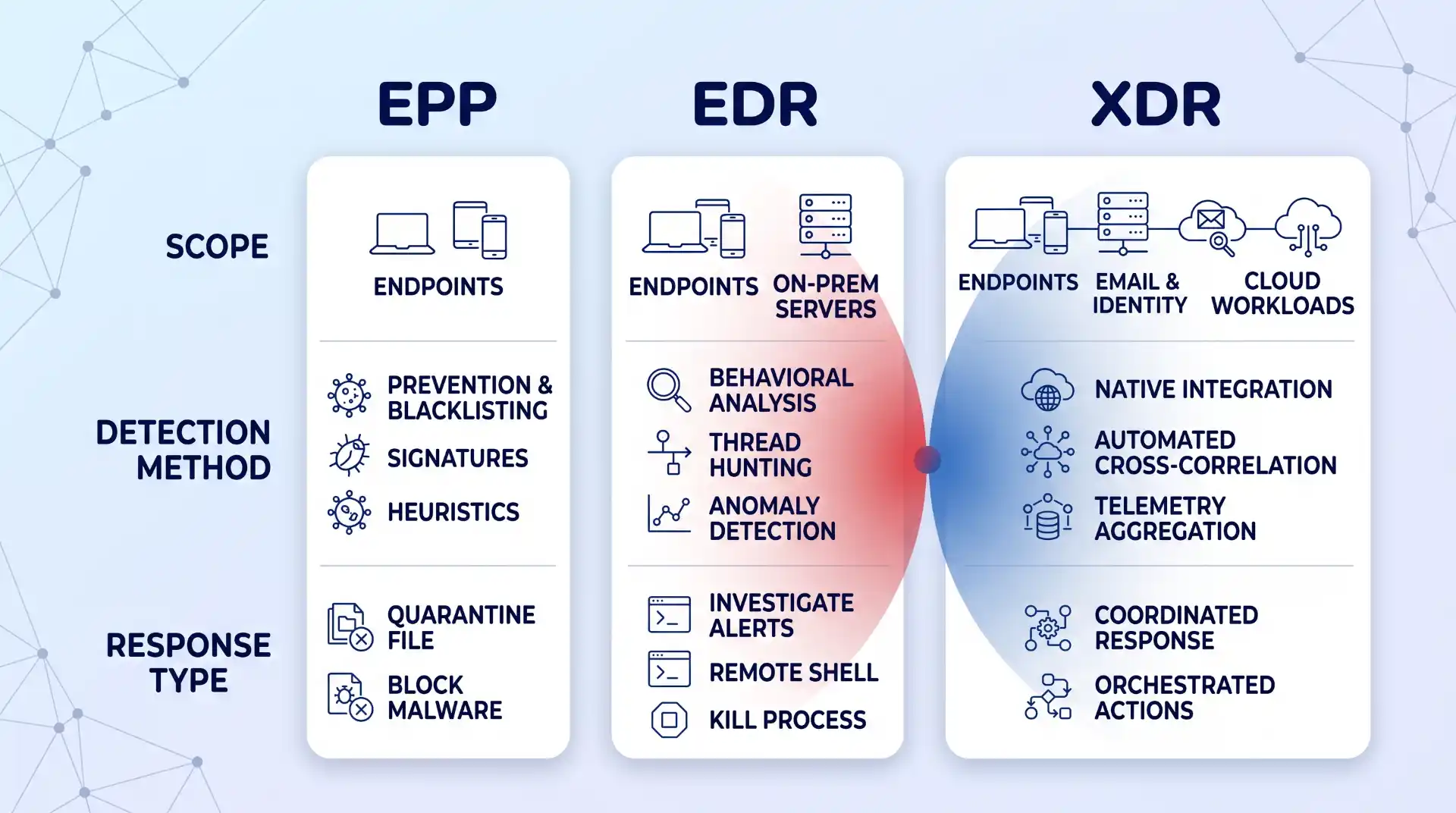
It helps to know where EPP sits relative to two terms you’ll hear constantly while shopping: EDR and XDR. Palo Alto Networks’ comparison of EPP, EDR, and XDR lays out the hierarchy cleanly: EPP is baseline prevention against known threats, EDR adds continuous monitoring and threat-hunting to catch what prevention missed, and XDR extends that monitoring across email, identity, and cloud systems, not just the endpoint. Most vendors now sell EPP and EDR bundled as one product with tiered pricing, which is convenient, but you should still know which capability you’re paying for at each tier, since a sales call will happily blur the line if you let it.
A Step-by-Step Framework for Evaluating EPP Vendors
One branch point worth flagging before you start: if you’re a small team without dedicated security staff, weight Steps 5 and 7 below most heavily, and seriously consider whether a managed option changes your shortlist entirely. If you have a SOC or a dedicated security engineer, Steps 2 and 6 deserve the closest scrutiny, since your team can handle tuning and cross-checking analyst opinions itself. Either way, run every step, but know which two matter most for your situation.
Step 1: Map Your Real Environment First
Before comparing feature lists, sketch a real map of your environment: which devices are company-owned versus BYOD, which servers live on-prem versus in the cloud, and which parts of your workforce work remotely or hybrid. This isn’t busywork. An EPP that assumes a tidy corporate LAN will leave gaps the moment someone logs in from a home network or a coffee shop.
Remote and hybrid work changed what “endpoint” even means. This shift in cybersecurity with remote work is worth reading in full: VPNs and zero-trust models became load-bearing rather than optional, and the number of devices connecting to your network multiplied well past what a single office ever had. Most EPP vendors will claim full remote coverage; few actually extend real behavioral monitoring to a laptop that’s been off the corporate network for weeks. If your team relies heavily on remote access tools, weighing the benefits of remote access against its security trade-offs up front tells you exactly what gaps your EPP still needs to close.
Step 2: Verify AI and Behavioral Detection Depth, Not the Marketing Claim
Every vendor now claims “AI-powered” detection. The distinction that actually matters is whether that AI does behavioral analysis, watching what a process does rather than matching it against a database of known bad files. Signature-based detection can only catch threats that have already been cataloged, and it’s largely useless against anything new. That’s the entire reason behavioral and AI-driven detection exist: to flag deviations from a device’s normal activity even when nothing matches a known signature.
This matters more now because attackers use the same technology. Palo Alto’s research on AI-driven threats points to AI-crafted phishing as one clear example: messages personalized well enough, and delivered convincingly enough, that the signals security-aware employees are trained to spot don’t show up anymore. If your evaluation only asks “does it have AI,” that’s the wrong question. Ask for specifics: does it flag fileless execution, credential-stuffing patterns, or a legitimate binary suddenly behaving abnormally? A guide to defending against AI phishing attacks is worth reading alongside this step, since detection software is one layer against AI-generated social engineering, not a complete answer by itself.
Step 3: Test Cloud and Hybrid Workload Coverage Specifically
Most businesses today run some mix of on-prem and cloud, whether that’s a deliberate hybrid strategy or just years of SaaS tools accumulating. An EPP that stops at the laptop and ignores your cloud workloads is protecting half your attack surface at best.
Microsoft’s explanation of cloud workload protection gets at why this is a distinct problem, not just “cloud, but with an agent installed”: cloud resources get created and torn down constantly, and configurations drift in ways a static, device-based security check never sees. What you actually want to test during evaluation is whether the tool gives consistent policy and visibility whether a workload is running on a physical server, a VM, a container, or something serverless, not just whether it technically “supports cloud.” If your organization leans on cloud storage as part of daily operations, the reasons cloud storage matters for your business are also the reasons it needs its own layer of protection: convenience and accessibility cut both ways, and an EPP that can’t reach that layer is a blind spot by design, not by accident.
Step 4: Confirm Enterprise-Wide Visibility Across Every Asset Class
Visibility is the least glamorous EPP feature and the one that gets skipped over fastest in a sales demo, which is exactly why you should slow down on it. It means being able to see, from one place, what’s happening across every endpoint, cloud workload, and remote connection you mapped in Step 1: what’s running, who has access, and what changed in the last hour.
The test here is concrete: during a demo, ask the vendor to show you a single device or workload you don’t recognize, and watch how many clicks and different screens it takes to get its full history. If the answer involves switching between three consoles or exporting a CSV, that’s not enterprise-wide visibility, no matter what the datasheet says. The gap almost always shows up at the edges: IoT devices, contractor laptops, and anything spun up in the cloud outside your standard image are the places visibility quietly stops.
Step 5: Evaluate Response Automation and How Much Oversight It Still Needs
Automated response is what lets an EPP act at 3 a.m. without waking anyone up: quarantining a file, killing a process, or isolating a device the moment its behavior crosses a threshold. That’s genuinely valuable, and for a small team without 24/7 coverage, it’s often the difference between catching an incident in minutes and finding it a week later in the logs.
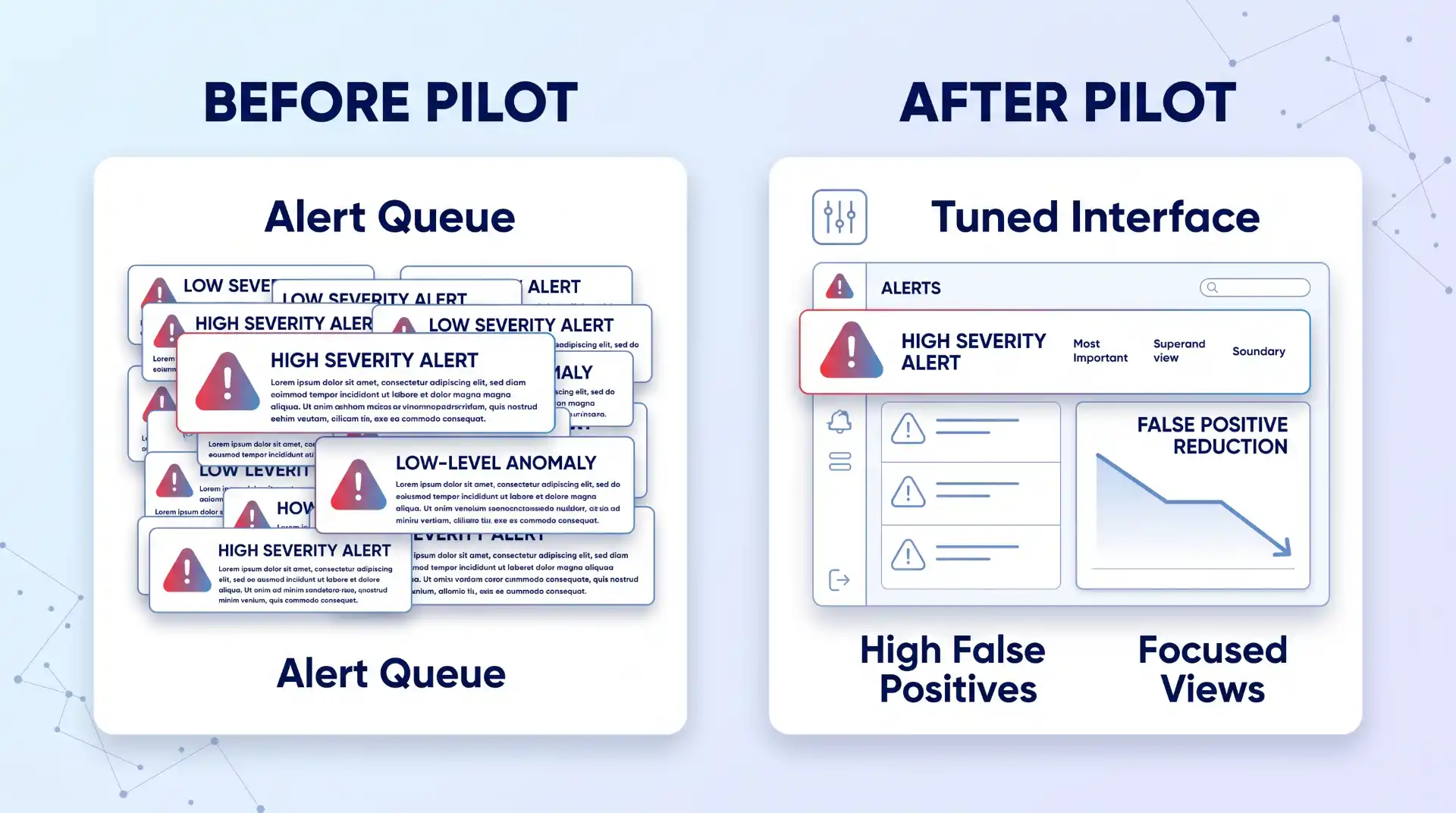
It’s also brittle if you don’t tune it. Automation configured with loose thresholds either misses real incidents or floods your team with false positives until someone disables half the rules out of fatigue, which defeats the purpose entirely. During evaluation, ask specifically how automated actions are scoped: can you set different response levels for a finance laptop versus a test server, and can a human easily review and reverse an automated action that turned out to be wrong? A tool that only offers “on” or “off” for automation, with nothing in between, will eventually either over-trigger on legitimate software or under-react to something real. Faster is only better here if it’s also controllable.
Step 6: Weigh Analyst and Peer Evaluations as One Input, Not the Final Word
Gartner’s Magic Quadrant used to be the single reference point everyone pointed to in this market, and it’s worth knowing the report itself has moved on: Gartner’s own market page for endpoint protection now labels it a report in transition, no longer simply “Magic Quadrant for Endpoint Protection Platforms.” Even analyst frameworks are moving targets, not permanent rankings.
Use it as one input, not the final word. Gartner explicitly frames its Peer Insights reviews as the opinions of individual users based on their own experience, not verified facts or a Gartner endorsement, which is worth remembering before letting five-star reviews substitute for your own testing. Where a Leader or Visionary placement is genuinely useful is as a shortlist filter for vendors worth demoing, not a purchase decision on its own. This is also the point in the process to decide whether you want to run the tool yourself or hand ongoing monitoring to a managed detection and response provider, since that choice changes which vendors and pricing tiers are even relevant to compare.
Step 7: Run a Scoped Pilot Before You Commit
Nothing in a demo or a spec sheet tells you how a tool behaves on your actual traffic, your actual users, and your actual mix of devices. Run a scoped pilot on a representative slice of your environment, not just the newest laptops in the IT closet, before signing anything longer than a month.
Huntress’s own comparison of enterprise options frames the decision as fundamentally dependent on your business context: team size, industry, deployment complexity, and whether you need a managed service layered on top, not a single “best” answer that applies universally. Build your pilot around that same logic. Give the tool two to four weeks, include at least one server and one remote or cloud endpoint, and track false positives and any real incidents alongside how much manual tuning the team had to do to get there. If a vendor pushes back hard on a real pilot and offers only a canned demo instead, treat that as information too.
Verification: How to Know You Picked Right
You’ll know you picked correctly a few weeks after rollout, not on day one. Track three numbers coming out of your pilot or early deployment:
- False-positive rate: how often it flags legitimate software or activity as a threat.
- Mean time to detect: how long it takes to flag a real issue once it starts.
- Mean time to contain: how long it takes to shut the issue down once flagged.
Confirm your cloud and remote endpoints from Steps 1 and 3 are actually showing up in the same console as your on-prem devices, with the same level of detail, not a separate cloud dashboard with limited data. And check that automated responses from Step 5 are logged clearly enough that you could explain to an auditor, six months from now, exactly what the tool did and why. If any of those three checks come back thin, that’s a sign the tool looked right on paper but isn’t actually covering what you mapped in Step 1.
Common Evaluation Mistakes
These four show up more than any others, roughly in order of how often they happen:
- Buying on the detection marketing alone. “AI-powered” and “next-gen” appear on nearly every vendor’s homepage regardless of what’s actually happening under the hood, and a glossy comparison chart won’t tell you which claims are real.
- Ignoring service-model fit. A five-person team buying a self-managed EPP built for organizations with a full-time SOC will end up with a console full of unread alerts within a month; that’s not a product failure, it’s a mismatch that should have been caught back in Prerequisites.
- Skipping the pilot. This is the mistake that costs the most later. A tool that looks identical to competitors on a spec sheet can behave completely differently on your actual traffic, and the only way to find that out is to run it, not read about it.
- Missing cloud blind spots. These tend to surface only after rollout, once someone spins up a workload outside the standard image and it simply doesn’t appear anywhere in the console. Catching this deliberately during Step 3 is far cheaper than catching it during an actual incident.
Where This Approach Has Limits
Even a well-chosen EPP has a ceiling. Fileless attacks and advanced persistent threats are specifically built to operate without leaving the kind of artifact a prevention-focused tool is designed to catch, and Infosec Institute’s EPP limitations comparison is direct about it: an EPP solution alone cannot deal with these more skilled attacks. That’s not a knock on any specific vendor; it’s a structural limit of prevention-first tools, which is why EDR and XDR exist as layers on top, not replacements.
There’s also a layer EPP was never built to cover: the application itself. If your business runs custom or cloud-native applications, endpoint protection won’t see an attack that exploits application logic at runtime rather than the operating system underneath it. That’s a separate discipline, and the case for RASP over traditional app defenses is worth evaluating alongside your EPP rather than assuming one tool covers both layers.
Key Takeaways
- Endpoint protection software earns its keep on two things: how well it detects what hasn’t been seen before, and how completely it reaches every device and workload you actually run, not just the ones easiest to secure.
- Map your environment before you take a single vendor call; a tool that’s strong on laptops and thin on servers or cloud workloads isn’t a fit if that’s where half your infrastructure lives.
- Verify AI-driven detection and cloud coverage directly instead of trusting a spec sheet, and never skip a real pilot on your own traffic.
- Treat Gartner and peer reviews as a shortlist filter, not a purchase decision.
- Go in knowing EPP has a ceiling: fileless attacks, advanced persistent threats, and application-layer risk need additional layers, not a bigger EPP budget.
FAQ
Is free antivirus software the same thing as an EPP?
No. Free antivirus tools generally rely on signature-based detection alone and offer little to no automated response, centralized visibility, or cloud workload coverage. They can be a reasonable stopgap for a single personal device, but they’re not built for the enterprise-wide visibility and response automation an EPP is expected to provide.
How much does endpoint protection software cost?
Pricing varies enough by vendor, deployment size, and whether you add managed detection services that any single number would be misleading here. Treat pricing as something to get in writing for your specific environment during the pilot in Step 7, rather than from a public price list, since per-device costs typically shift once you factor in server coverage, cloud workloads, and support tiers.
Can I run two different endpoint protection tools at once for extra coverage?
Usually not safely. Two EPP agents competing for the same file-system hooks and kernel-level access commonly cause performance conflicts or, worse, blind spots where each tool assumes the other is handling detection. If you want a genuine second layer, it typically belongs at a different part of the stack, like email security or network monitoring, rather than a second endpoint agent doing the same job.
How often should I re-evaluate my endpoint protection vendor?
Revisit the decision on a fixed schedule, not only when something goes wrong. An annual review against the framework above, tightened to every six months if you’re in a fast-changing environment like hybrid cloud, catches vendor drift, a tool that’s quietly stopped keeping pace with new threats, before an incident forces the conversation.

💬 Comments