Custom web development is most useful when your website needs workflows, integrations, or controls that a standard platform cannot provide cleanly. If your needs are straightforward, a mature website builder or content management system may solve the same problem with less development and maintenance.
Quick Take
- Custom development gives you more control over how a website works, connects to other systems, and handles unusual business requirements.
- That control does not automatically produce better SEO, faster pages, stronger security, greater accessibility, or higher sales.
- The strongest reason to pay for custom development is a specific requirement that an established platform cannot meet without awkward workarounds.
What Custom Web Development Actually Means
A custom website is built so its important behavior and structure can follow a particular organization’s needs rather than being limited mainly to a ready-made template’s default model. A project may combine a tailored interface, databases, account permissions, business rules, integrations, and other components according to what the website needs to do. The practical boundary is whether the architecture is being shaped around specific business requirements, not whether every component was written from zero.
Custom does not mean that every technical component has to be invented from scratch. Developers can still use established programming languages, frameworks, libraries, hosting services, payment systems, and other proven tools. The customization comes from how those pieces are selected and assembled around the required experience and business logic.
That distinction matters because many ordinary websites do not need a completely custom technical foundation. A company that needs pages for its services, contact information, a blog, and a standard enquiry form may already have suitable options in WordPress, Shopify, Webflow, Squarespace, or another established platform. Custom engineering becomes more valuable when the site’s requirements start pushing beyond what those systems handle comfortably.
Where Custom Development Can Add Real Value
The practical benefit of custom development is not simply that a website looks different. It is that the site’s behavior can be shaped around the job it needs to perform.
Business-specific workflows and rules
Consider a hypothetical repair business whose website needs to identify a customer’s equipment, check whether the address falls inside its service area, match the job to technicians with the right skills, show eligible appointment times, and create a work order in its scheduling system. A standard form can collect the customer’s details, but reproducing that complete decision process may require several extensions or manual steps.
Custom development becomes useful when rules like these are central to the service. A quotation tool might need different calculations for different customer types. A booking system might have to check several resources before showing availability. An account portal might display different information according to a user’s role or contract. In these cases, development is solving an operational requirement rather than adding customization for its own sake.
Integrations with existing systems
Business websites often need to exchange information with other software. An application programming interface, or API, is a defined way for one software system to request or send information to another.
A custom website could use APIs to connect with a customer relationship management system, inventory database, payment provider, identity service, internal reporting system, or other business software. Instead of an employee copying information from a web form into another system, the website may be able to send the data automatically when the integration supports it.
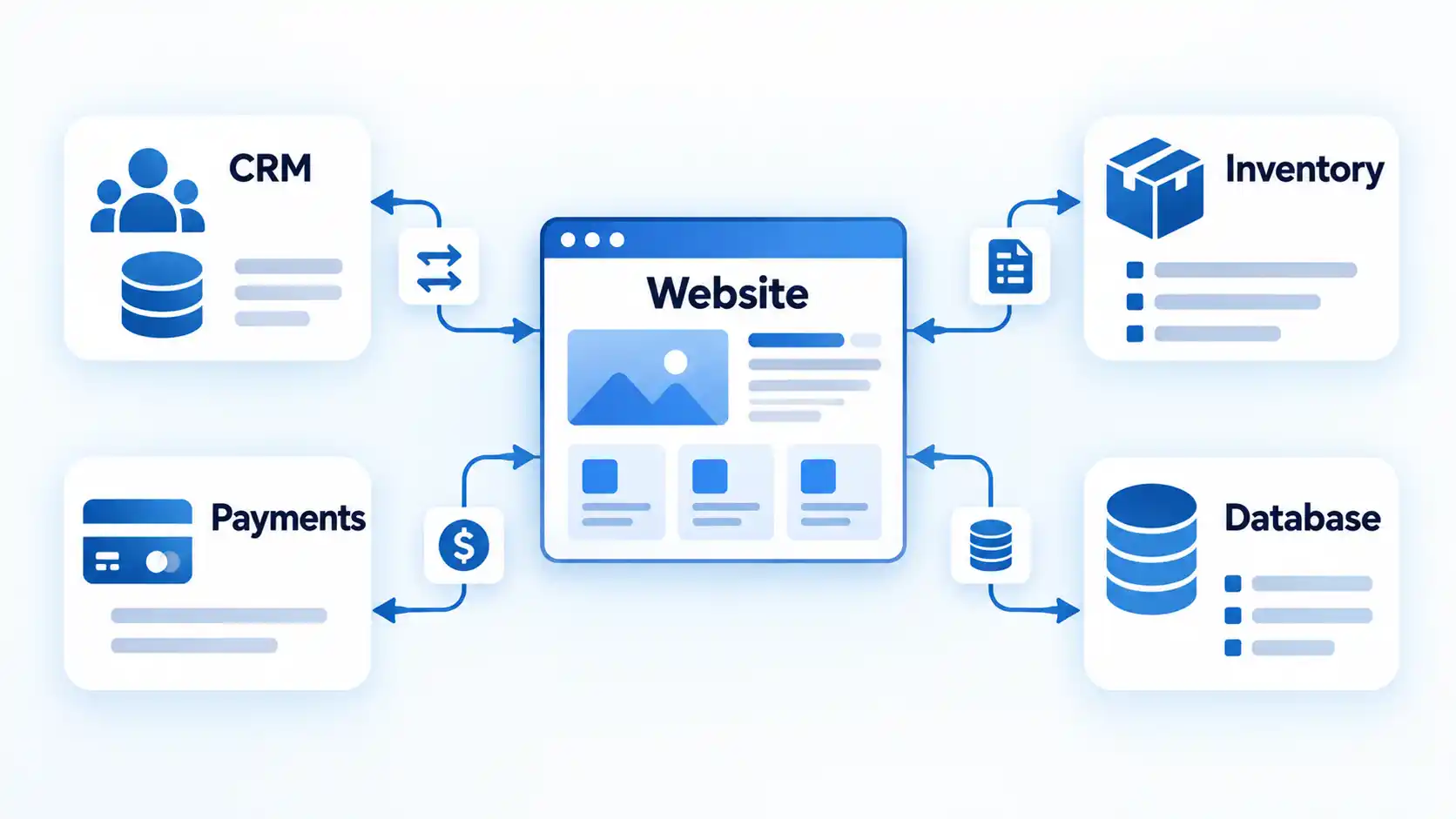
Integration work can also expose an important limitation: the website can only use the access and functionality that the connected system makes available. Custom code cannot create an API capability that the external service does not provide.
Greater control over the user experience and architecture
A template usually starts with layouts, content structures, and interactions intended to serve many different organizations. Custom development gives a team more freedom to shape those elements around a particular process.
That control is most valuable when the interaction itself is complicated. A long application, configurator, dashboard, or account portal may need conditional fields, saved progress, role-based information, or a sequence that changes according to the user’s choices. Those requirements go beyond changing colors or moving page sections.
Branding can benefit from that freedom too, but visual uniqueness should not be confused with business results. A distinctive interface can support a consistent identity; it does not by itself guarantee recognition, conversions, sales, or profit.
More room for targeted performance engineering
Custom development can give engineers more control over how code, images, data requests, caching, and third-party services are handled. That creates opportunities to remove unnecessary work and optimize the parts of the site that matter most.
But custom code can also be slow. A large JavaScript bundle, inefficient database query, badly optimized image, or overloaded third-party service can undo the advantage of having more control. Even apparently convenient additions can have a cost because third-party JavaScript can add network and processing overhead.
Performance should therefore be measured on the finished site rather than assumed from the development method. The useful question is not whether the site is custom, but whether the implementation performs well for the devices, connections, and workflows its audience actually uses.
Requirements can be designed in earlier
A custom project can consider accessibility, security, editing permissions, content structure, authentication, backups, and other operational requirements during design instead of treating them as last-minute additions.
For accessibility, the Web Content Accessibility Guidelines (WCAG) provide testable success criteria for web content. WCAG 2.2 organizes its guidelines under four principles: perceivable, operable, understandable, and robust.
Security also works best when it is treated as part of the development process. Requirements, design, implementation, verification, and operation can all include security work instead of leaving it for one final pre-launch check. Security activities throughout the software development lifecycle are part of OWASP’s secure-development guidance.
The advantage here is the opportunity to design around these requirements from the beginning. Whether the finished website actually meets them still depends on implementation and testing.
What Custom Development Does Not Guarantee
More control is not the same as a better outcome. A custom website can be well engineered or poorly engineered, just as a site built on an established platform can be excellent or badly configured.
Custom development does not guarantee better SEO. Search engines still have to discover, crawl, render, and understand the site’s content. For Google Search, basics such as crawlable links, accessible text, descriptive page information, and semantic HTML still matter. JavaScript-heavy applications also introduce additional crawling and rendering considerations. The broader technical SEO fundamentals therefore apply regardless of how the site was built.
It does not guarantee faster pages. Custom development gives the team choices about architecture and optimization, but those choices still have to be implemented well. Large scripts, excessive network requests, inefficient server work, heavy media, and poorly controlled third-party code can make a custom site slow.
It does not guarantee stronger security. Writing purpose-built software also creates code that has to be designed, reviewed, tested, patched, monitored, and maintained. Security depends on the controls and processes around the application, not on whether its codebase is custom.
It does not guarantee accessibility. A unique interface may actually introduce accessibility problems if keyboard use, focus behavior, labels, form errors, contrast, authentication, and assistive technologies are not considered and tested. WCAG provides a technical standard, but custom development still has to apply its requirements correctly.
It does not guarantee more sales or profit. Development can remove technical friction and support a useful customer journey, but commercial results also depend on the product, pricing, demand, traffic quality, content, trust, customer service, and other factors. A development method cannot establish those outcomes by itself.
When Custom Development Is Worth the Extra Cost and Complexity
The useful decision is not whether custom development is generally better. It is whether the added control solves an important problem that your simpler options cannot solve cleanly.
| Feature | Website builder or standard platform | Platform with custom extensions | Substantially custom site or application |
|---|---|---|---|
| Best fit | Common website and ecommerce needs that the platform already supports well | Mostly standard requirements with a few specialized features or integrations | Unusual workflows, business rules, interfaces, data structures, or system connections |
| Customization need | Mostly design, content, settings, themes, apps, or plugins | Targeted custom code around an established system | Behavior and architecture shaped closely around project requirements |
| Integration complexity | Standard built-in integrations are sufficient | A few integrations need additional development | Several systems or proprietary processes must work together |
| Day-to-day management | The platform usually handles more infrastructure and routine product updates | Responsibility is shared between platform capabilities and custom work | The owner or development team takes greater responsibility for the custom application and its maintenance |
| Main trade-off | Less freedom outside the platform’s supported model | More flexibility without replacing the entire platform | Greater control with more engineering, testing, ownership, and maintenance responsibility |
A standard platform is often enough when you mainly need common pages, ordinary publishing tools, standard ecommerce, basic forms, established payment options, and integrations already supported by the platform. Paying for a separate custom system simply to reproduce mature features may add responsibility without solving a meaningful constraint.
A hybrid route can make sense when most of the site is conventional but one part is not. Agencies frequently pitch this model as a headless CMS or decoupled architecture, where an established platform (such as WordPress or Shopify) is used purely to manage backend content, products, or commerce, while a developer builds a custom frontend, calculator, portal, configurator, or integration around it. In other words, the choice does not have to be all-or-nothing; platform tools and developer-led customization can serve different parts of the same project.
Substantially custom development becomes easier to justify when the unusual requirement is central to the website’s purpose. Proprietary business rules, complex account permissions, unusual data relationships, several connected internal systems, or a product whose main value comes from its web application can all make deeper customization worthwhile.
A useful test is to write down the important requirement in plain language. If the explanation is simply “we want a professional website,” that does not establish a need for custom engineering. If you can describe a workflow or rule that the available platforms cannot support cleanly without fragile workarounds, you have a much stronger reason to consider custom development.
What to Check Before Hiring a Custom Web Development Provider
Once you have a genuine reason to build custom functionality, the next risk is paying for something you cannot easily operate, maintain, or move later. A provider should be able to connect its technical proposal to your actual requirements rather than treating “custom” as a benefit on its own.
When comparing web-development providers such as IS&T Consulting Group, use the same operational questions for every candidate. Ask who will own the code and accounts, how the website will be tested, and what support remains after launch.
- Ask what really needs custom development. The provider should be able to separate requirements that need custom engineering from features that an established platform already handles well.
- Clarify code and account ownership. Establish who controls the domain, hosting account, source-code repository (such as Git), deployment pipelines, analytics accounts, third-party services, credentials, and other assets needed to operate the site.
- Check how normal content changes will work. Staff should know whether they can edit pages, products, images, navigation, and other routine content without requesting a developer for every change.
- Define security responsibilities. Ask how authentication, permissions, dependencies, vulnerability fixes, logging, backups, and security updates will be handled during development and after launch.
- Set accessibility expectations. Agree on the accessibility standard or requirements being targeted, which user journeys will be tested, and how issues discovered before or after launch will be resolved.
- Ask how performance will be measured. Avoid promises that a custom build will simply be “fast.” Agree on the important pages and interactions, testing approach, supported devices, and what happens when performance falls below the agreed target.
- Confirm browser and device support. The team should identify the environments that matter to your audience and test the important workflows there rather than assuming identical behavior everywhere.
- Understand deployment and recovery. Establish who can deploy updates, how failed changes can be rolled back, how backups are created, and how the site can be restored after a serious problem.
- Plan maintenance and handover. Custom code is not a one-time capital cost. Underlying software packages, libraries, and server runtimes continually evolve, encounter End-of-Life (EOL) cycles, and uncover security vulnerabilities (CVEs). Ask what documentation you will receive, who monitors and patches dependencies, how routine bugs are handled, what ongoing support retainers cover, and what happens if you later move to another developer.
These questions matter because a website has to remain usable after the launch project ends. Current production-ready web development decisions also extend beyond features to browser support, performance, security, accessibility, authentication, and maintainability.
Be cautious when a proposal focuses heavily on visual uniqueness but cannot explain ownership, testing, maintenance, or how the architecture supports the requirements you identified. Those details affect whether the website remains useful once the original development team is no longer making day-to-day decisions for you.
Bottom Line: Choose Custom Development for Requirements, Not Prestige
Before commissioning a custom build, write down the requirement that supposedly makes it necessary. If you cannot identify an important workflow, integration, rule, interaction, or technical constraint that your practical platform options cannot handle cleanly, the simpler platform should remain the default.
If the requirement is real and central to how the website creates value, then the extra engineering can be justified. The decision should come from the problem you need to solve and the responsibility you are prepared to own after launch, not from the assumption that custom software is automatically more professional or more capable.

💬 Comments