Embedded computers placed at the roadside, onboard vehicles, and inside rail cars process sensor and camera data on the spot. This lets transportation systems react in real time, without waiting for a distant server to respond.
Quick Take
“Edge” means the computer sits close to where the data is created, not in a faraway data center. In transportation, that shows up in five main places: traffic signals, self-driving systems, fleet tracking, predictive maintenance, and onboard data storage. Each one needs a computer that can survive heat, vibration, and shock while still processing data fast.
What “Edge” Means in Embedded Computing
Embedded computing is a small, purpose-built computer system. It is not a general-purpose desktop. It is built to do one job well, using less power, taking up less space, and holding up in rough conditions.
Cloud computing sends data far away to a large, central server. That server does the work and sends an answer back. This takes time. Edge computing skips that trip: the computer processes data locally, right at the source, instead of relying on distant, centralized servers, which cuts out that round-trip delay.
For transportation, that speed matters. A traffic sensor that has to wait for a distant server before it can change a signal is too slow to be useful. A computer sitting at the intersection can make that decision in a fraction of a second. Companies like things-embedded.com build and supply this kind of hardware: rugged edge computers, panel PCs, and single-board computers designed to survive exactly these conditions.
Where Edge Computing Shows Up in Transportation
Traffic Management
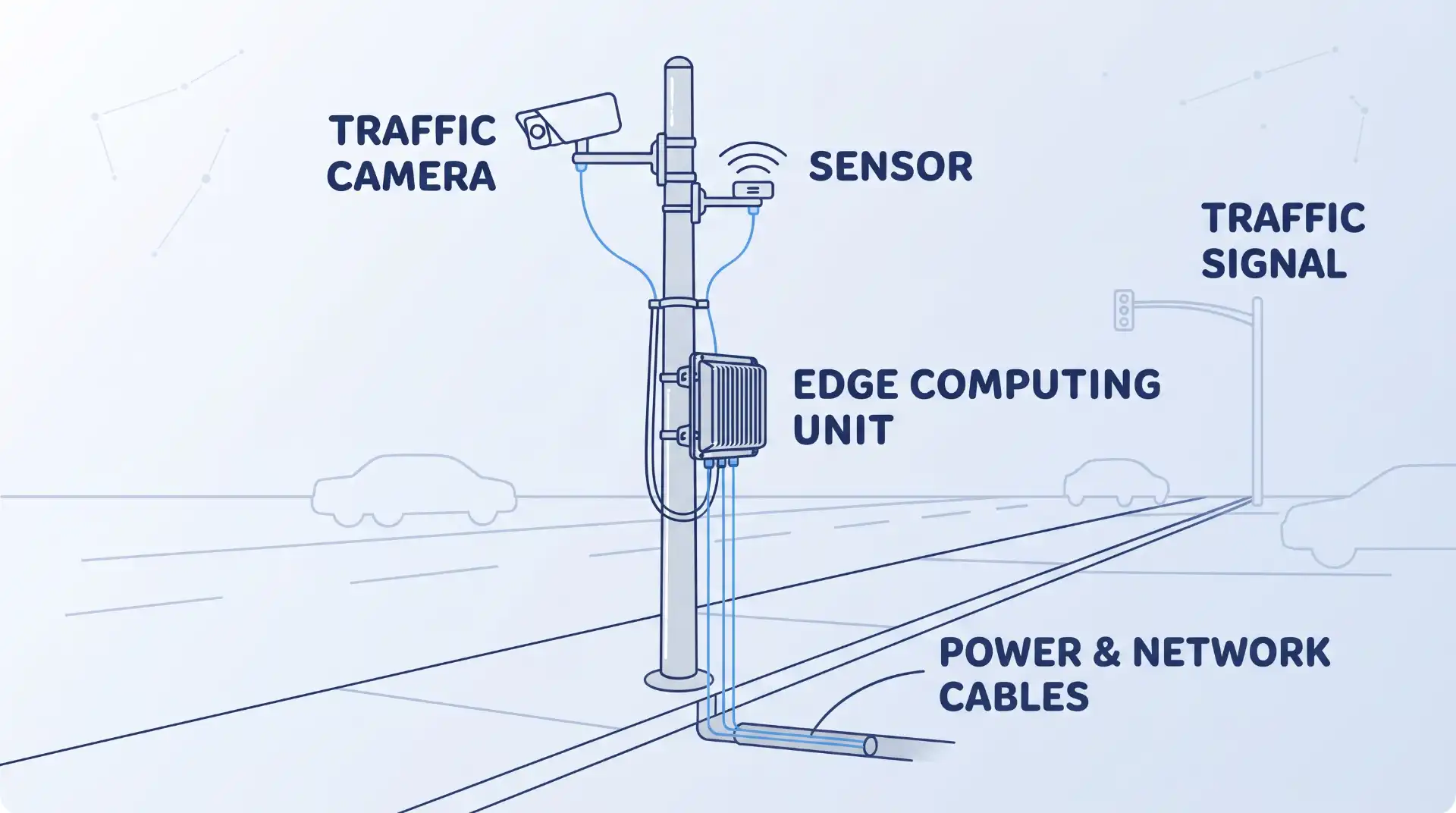
Sensors and cameras at an intersection collect data on how many vehicles are passing through, how fast they are moving, and in which direction. An edge computer processes this data locally and adjusts the traffic signal right away. One peer-reviewed traffic-sensor design pairs a small onboard computer, a camera, and a low-power AI chip to count and classify vehicles and estimate their speed, running for hours on battery power with no need to send raw video to the cloud. The result is smoother traffic flow and fewer jams, without a lag between data collection and signal adjustment.
Automated Driving
Self-driving and driver-assist systems rely on cameras, radar, and often LiDAR to build a picture of the road around the vehicle. That picture changes many times per second. Sending all of that data to the cloud and waiting for a response would be too slow and too risky. Edge computers inside the vehicle process this data on the spot, which is part of how edge AI supports driver assistance and predictive vehicle systems today. This onboard processing also supports over-the-air software updates and remote diagnostics, which keep the vehicle’s systems current without a trip to a service center.
Fleet Surveillance and Tracking
Fleet operators need to know where their vehicles are, how they are being driven, and whether they are on schedule. An edge computer inside each vehicle can process GPS, camera, and sensor data instantly, which is how modern systems eliminate the latency that slows down older, cloud-only tracking setups. Better real-time visibility also supports the broader goal of improving fleet safety, since dispatchers can spot risky driving patterns as they happen rather than after the fact. A well-placed vehicle tracking system depends on this same onboard processing to stay accurate even when a connection to the cloud drops out.
Predictive Maintenance
Rail and fleet operators lose money every time a vehicle breaks down unexpectedly. Onboard edge computers can monitor engine and mechanical data continuously and flag early signs of a problem, before it turns into a breakdown. Railway edge computing platforms, for example, are commonly built to meet EN 50155, EN 45545-2, and NFPA 130 standards, so the hardware can run reliably onboard a moving train while supporting real-time diagnostics and predictive maintenance. The same idea applies to trucking fleets: catching a failing part during a scheduled stop is far cheaper than a roadside breakdown. This kind of continuous sensor data analysis is what turns raw readings into an early warning.
Onboard Data Storage
Edge computers also store data locally and securely, close to where it is created. For this to work in transportation, the hardware usually needs to be built to an industrial or military-grade standard. MIL-STD-810 is the most common one: it is a set of laboratory tests for shock, vibration, extreme temperature, dust, and humidity. A computer that passes these tests can survive conditions a regular office PC cannot.
One real deployment on a multi-lane tolling system used a computer rated for -40°C to 75°C and validated against MIL-STD-810G, storing toll and violation footage on high-speed onboard storage instead of relying on a constant connection to a remote server. Keeping this kind of sensor and operational data local also makes it easier for transportation operators to meet data-handling rules that require certain information to stay within a specific location or network.
Common Misconceptions
Edge computing does not replace the cloud. Most real deployments use both: the edge computer handles anything that needs an instant response, and the cloud still handles long-term storage, large-scale analysis, and tasks that are not time-sensitive.
“Rugged” is not just a tougher-looking case. A computer is only rugged in a way you can rely on if it has been tested and rated against a specific standard, such as MIL-STD-810 or EN 50155. A sturdy-looking box with no such rating has not actually been proven to survive the conditions it is sitting in.
Where This Approach Has Limits
Edge hardware costs more per unit than a basic cloud-only setup, since each device needs its own processor, storage, and rugged housing. This adds up fast across a fleet of hundreds of vehicles or a citywide network of intersections.
Updating software across many field-deployed devices is harder than updating one central server. A fix that would take minutes in the cloud can take much longer to roll out across every roadside unit or every vehicle in a fleet.
When an edge device fails, someone often has to physically visit it to fix or replace it. A cloud server that goes down can usually be restarted remotely. A broken box on a pole at a busy intersection cannot. This does not make edge computing a bad choice. It means the trade-off between speed and maintenance effort needs to be weighed for each deployment.
How to Evaluate an Embedded Computing System
Before choosing hardware for a transportation deployment, check these four things:
| What to check | Why it matters |
|---|---|
| Operating temperature range | A roadside cabinet in a hot climate needs a wider range than an indoor office device. |
| Which standard actually applies | Rail hardware needs EN 50155/EN 45545-2. Roadside or in-vehicle hardware often needs MIL-STD-810. An IP rating alone covers dust and water, not shock or vibration. |
| Power input flexibility | Vehicles and roadside cabinets often supply unstable or variable DC power; the computer needs to handle that safely. |
| Connectivity options | Onboard systems often need 4G/LTE, GPS, or CAN bus support built in, not added on later. |
Getting these four things right up front avoids replacing hardware that looked fine on paper but could not actually survive its deployment site.
Key Takeaways
- Edge computing processes data close to where it is created, instead of sending it to a distant server first.
- In transportation, it shows up in traffic signals, self-driving systems, fleet tracking, predictive maintenance, and onboard data storage.
- Hardware needs to be tested against a real standard, such as MIL-STD-810 or EN 50155, not just labeled “rugged.”
- Edge computing works alongside the cloud, not instead of it, and comes with real trade-offs in cost and field maintenance.
FAQ
Is edge computing the same thing as IoT?
No. IoT (the Internet of Things) refers to connected sensors and devices that collect data. Edge computing is where that data gets processed. A traffic sensor is an IoT device; the box next to it that analyzes the data in real time is the edge computer.
Does every transportation deployment need MIL-STD-810 hardware?
No. The right standard depends on the environment. Rail applications typically need EN 50155 and EN 45545-2 instead. An indoor control room does not need either one. Matching the standard to the actual deployment site avoids overpaying for protection you do not need.
Can edge computers work without an internet connection?
Yes, for their core job. Since the processing happens locally, an edge computer can keep making real-time decisions, like adjusting a traffic signal or flagging a mechanical fault, even if its connection to the cloud drops. It just cannot sync that data to a central system until the connection is back.

💬 Comments