High-performance computing (HPC) in the cloud gives demanding workloads access to powerful processors, fast networking, storage, and job-management tools without requiring an organization to own the entire computing cluster. It is most useful when a job needs far more processing power, memory, specialized hardware, or parallel execution than an ordinary computer or general-purpose cloud server can provide.
Cloud HPC is not simply a bigger virtual machine. Useful performance depends on matching the workload to the right combination of compute resources, networking, storage, scheduling, and software.
Quick Take
Cloud HPC lets organizations run demanding scientific, engineering, data, and AI workloads on cloud-based computing clusters. Its main advantage is flexible access to specialized resources, but whether it makes sense depends on workload behavior, data movement, networking needs, software, cost, and existing infrastructure.
What Is HPC Cloud Computing?
High-performance computing uses many central processing units (CPUs), graphics processing units (GPUs), or complete computers together to solve computationally demanding problems. Common HPC workload areas include engineering, genomics, weather modeling, semiconductor design, financial modeling, and scientific simulation. A cloud HPC environment adds the ability to obtain and release computing resources as demand changes while still relying on compute, storage, and networking as core infrastructure.
A cluster is a group of connected computers working on related tasks. Each computer is commonly called a node. Some applications divide one large problem across many nodes so that calculations happen at the same time. This is called parallel computing.
The cloud changes how that infrastructure is obtained. Instead of purchasing enough hardware for every possible peak in demand, an organization can provision cloud resources when a project needs them and reduce capacity afterward. That flexibility can be valuable for temporary projects, unpredictable demand, or workloads that occasionally require hardware the organization does not own.
Cloud HPC therefore combines high-performance computing with cloud delivery. HPC supplies the processing model and specialized infrastructure; the cloud supplies flexible access to that infrastructure.
How Cloud HPC Works
Consider an engineering team that needs to simulate airflow around a vehicle design. The calculation may take too long on one workstation, so the team submits the job to an HPC environment instead.
A scheduler, also called a workload manager, decides which computing resources should run the job. Depending on the application, it may assign many CPU cores, several GPUs, high-memory nodes, or a combination of resources. A cloud HPC deployment can bring these resources together through reusable infrastructure building blocks for compute nodes, storage, schedulers, and related cluster resources.
Once the job starts, its work runs on the assigned compute nodes. If those nodes must exchange information while calculating, the network between them can become a major performance factor. A simulation whose nodes constantly share updated values has very different communication needs from thousands of independent tasks that rarely interact.
Storage also affects the result. Compute nodes need somewhere to read input data and write output. A workload processing large datasets can spend substantial time waiting for data if the storage system cannot keep up with the compute layer.
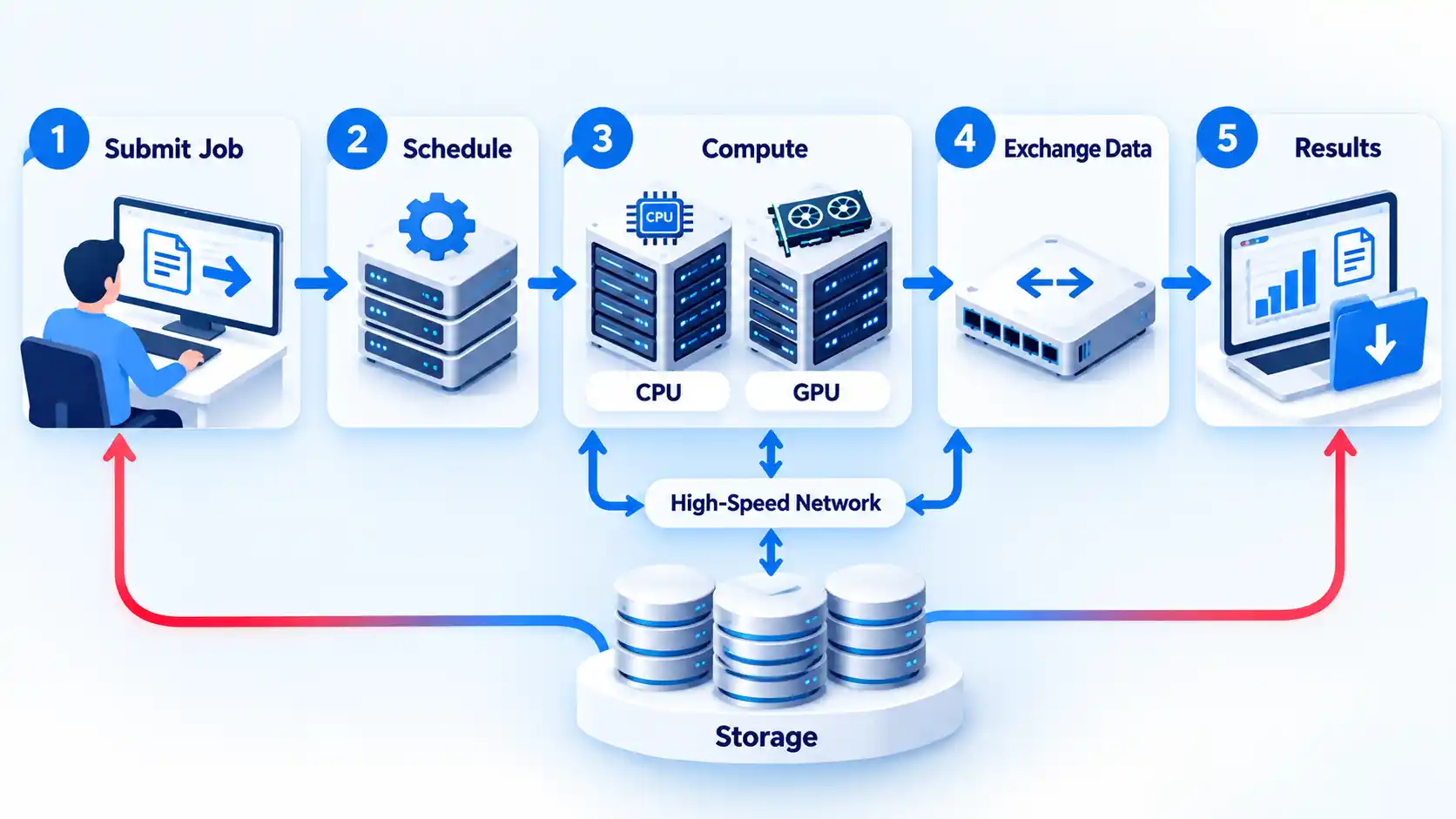
The full process is therefore more than sending a task to a powerful server. A job is submitted, assigned to suitable resources, executed across one or more nodes, supplied with data from storage, monitored while it runs, and written back as results. Cloud capacity can then be reduced when it is no longer required.
Which Workloads Benefit From Cloud HPC?
A workload being large does not automatically mean it needs HPC. The more useful question is whether it can benefit from specialized processors, large-scale parallel processing, large amounts of memory, or many computers working together.
One important distinction is between tightly coupled and loosely coupled workloads. Tightly coupled tasks exchange data frequently while they run. A physics simulation may split a model across many nodes, with each part repeatedly depending on calculations from the others. In that situation, latency, the delay before data reaches another node, can matter greatly.
Loosely coupled workloads behave differently. Imagine 5,000 independent images that need rendering or thousands of separate data files that need analysis. Each task may run largely on its own. The workload still needs substantial computing capacity, but extremely fast communication between every node may offer little benefit.
Whether a workload is tightly or loosely coupled should influence its compute, networking, placement, and scheduling choices because communication between parallel tasks changes the infrastructure they need.
Processor requirements also differ. CPUs remain suitable for many simulations, models, and analytics tasks. GPUs can handle many similar calculations in parallel and are valuable for some scientific computing, visualization, rendering, and machine-learning workloads. The right option depends on the application and how its calculations are designed, not merely on whether a provider labels a machine as HPC.
Benefits and Trade-Offs of Cloud HPC
The main attraction of cloud HPC is flexible access to computing capacity. An organization can obtain additional resources without first purchasing enough physical equipment for every possible peak. AWS, for example, offers HPC services that combine compute capacity, high-performance file systems, and high-throughput networking.
Flexibility does not make cloud HPC automatically cheaper or faster. Long-running jobs can consume substantial resources. Large datasets may be slow or costly to move. Commercial engineering and scientific applications can introduce separate licensing requirements. A poorly matched configuration may also leave expensive compute resources waiting on storage or network communication.
The three common deployment models make different trade-offs:
| Feature | Cloud HPC | On-Premises HPC | Hybrid HPC |
|---|---|---|---|
| Capacity | Can expand or shrink using available cloud resources | Mainly limited by installed hardware | Combines local capacity with additional cloud resources |
| Upfront infrastructure | No need to purchase the cloud provider’s physical cluster hardware | Organization purchases and maintains its own cluster hardware | Keeps local infrastructure while adding cloud capacity when useful |
| Operations | Provider maintains physical cloud infrastructure; the customer still manages workload design, software, data, and configuration | Internal teams maintain the computing environment and supporting infrastructure | Requires coordination between local and cloud environments |
| Scaling | Useful when demand changes or temporary capacity is required | Expansion normally requires additional physical resources | Can extend capacity beyond the local cluster when required |
| Typical fit | Variable demand, temporary projects, or access to specialized resources | Steady demand with established infrastructure and operations staff | Existing HPC users that sometimes need additional capacity or cloud-only hardware |
An HPC design has to balance reliability, security, cost, operations, and performance rather than optimizing one concern in isolation. It also needs to account for processor demands, network latency, storage throughput, and cluster placement that can change how efficiently the workload runs.
Common Cloud HPC Use Cases
Engineering simulation is one of the clearest examples. Computer-aided engineering (CAE) software can model physical behavior such as airflow, heat transfer, structural stress, and other conditions before every design variation is built as a physical prototype. Simulation can support testing and validation during the product development process, although physical testing may still be necessary.
Scientific research also uses HPC for demanding calculations and large datasets. Common areas include weather and climate modeling, genomics, computational chemistry, geoscience, molecular analysis, and other forms of numerical research. Cloud platforms also support engineering, financial modeling, semiconductor design, and related workloads that require substantial compute resources.
Rendering and media processing can benefit when a large project can be divided into independent pieces. Instead of one machine processing every frame or asset in sequence, separate tasks can run across many available nodes.
Some artificial intelligence and machine-learning workloads also use HPC-style infrastructure, particularly when training requires many GPUs or frequent communication between machines. That does not mean every AI project needs HPC. Smaller training jobs, inference, and ordinary data processing may work well on general-purpose cloud resources.
The common factor is computational demand. Cloud HPC becomes relevant when a workload needs parallel scale, specialized processors, unusually large memory, fast node-to-node communication, high-performance storage, or temporary access to much more capacity than a local system provides.
Cloud HPC, On-Premises HPC and Hybrid HPC
Cloud HPC places most or all of the computing environment in cloud infrastructure. The organization provisions resources when required and can release them when a project finishes. This model can suit workloads that change sharply between projects or occasionally require hardware the organization does not own.
On-premises HPC uses infrastructure owned or directly controlled by the organization. It can suit workloads that run steadily enough to justify dedicated equipment, especially when the organization already has data-center space, specialist staff, established software arrangements, or strict requirements around where data is processed.
Hybrid HPC combines local and cloud resources. An organization can keep its existing cluster for routine work and use cloud resources when local capacity is insufficient or when a project requires different hardware. Extending a local HPC environment with cloud capacity is often called cloud bursting.
A hybrid environment can connect an existing local cluster to a dynamically provisioned cloud resource pool, allowing jobs to use local or cloud compute according to the environment’s rules and available capacity.
Hybrid HPC can preserve earlier infrastructure investments, but it adds coordination work. Networking, data, identity, software, scheduling, and security may all need to work across both environments. Moving a workload between them is therefore more involved than simply adding extra servers.
When Cloud HPC Makes Sense
Cloud HPC
Avoid this if: your workloads run consistently at high utilization, existing local capacity already meets demand economically, or moving the required data would create an unacceptable burden.
Main trade-off: flexible access to infrastructure comes with continuing usage costs and requires careful workload, storage, network, and spending controls.
On-Premises HPC
Avoid this if: demand changes dramatically or projects frequently require hardware and capacity the local cluster does not provide.
Main trade-off: direct control requires capital investment, maintenance, capacity planning, and specialist operations.
Hybrid HPC
Avoid this if: your team cannot support the added networking, data, identity, software, and scheduling complexity across two environments.
Main trade-off: existing investments are preserved, but operating two connected environments can be more complex than standardizing on one.
If HPC is only one part of a wider infrastructure change, connect the decision to the organization’s broader cloud adoption strategy. Moving a demanding workload to the cloud should solve a defined capacity, performance, operational, or business problem rather than become the objective by itself.
What to Check Before Choosing a Cloud HPC Provider
Start with the application rather than the provider name. The first question is whether the service can supply the hardware, network, storage, and software environment that the workload actually requires.
- CPU and GPU options: Check whether the available processor types fit the application’s architecture, memory, and accelerator requirements.
- Network performance: Tightly coupled workloads may require very low latency and high bandwidth between nodes, while independent jobs may not need the same network design.
- Storage: Consider how quickly jobs must read and write data, how much data must be stored, and whether storage can keep the compute resources supplied.
- Scheduler and software support: Existing teams may depend on a particular workload manager, engineering application, scientific package, container environment, or software license.
- Region and capacity: Confirm that the required hardware and capacity are available in the regions where you intend to run the workload.
- Data movement: Estimate what must enter and leave the cloud. Large transfers can affect job-start time, architecture, and total cost.
- Security and governance: Access controls, encryption, auditing, data-location requirements, and organizational policies still apply to HPC workloads.
- Cost controls: Look beyond the compute rate. Storage, data transfer, idle resources, software licensing, and supporting services can also affect the final bill.
- Hybrid requirements: If local infrastructure remains in use, determine how networking, identity, storage, software, scheduling, and job movement will work across both environments.
- Monitoring and support: Teams need enough visibility to spot failed jobs, resource bottlenecks, unexpected spending, and performance problems.
Some organizations use a managed cloud HPC platform to combine job submission, infrastructure access, software support, and administrative controls instead of assembling every layer independently. Others build directly on cloud-provider infrastructure or operate their own management stack. The appropriate model depends on how much control, flexibility, integration, and operational responsibility the organization wants to keep.
Before making a large commitment, benchmark a representative workload instead of assuming that the configuration with the most processors will produce the best result. Define the workload, candidate configurations, acceptable performance, and cost boundary first, then compare completion time, scaling behavior, storage performance, network requirements, software compatibility, and operating cost. Current HPC benchmarking guidance likewise starts with the decision, workload, candidate configurations, acceptance criteria, and cost boundary.
Conclusion
Cloud HPC is most useful when a demanding workload genuinely benefits from parallel processing, specialized processors, fast communication, high-performance storage, or temporary access to a large amount of compute capacity.
The decision should begin with the workload. Understand how it uses processors, memory, networking, storage, data, and software, then choose the cloud, on-premises, or hybrid model that provides the most suitable balance of performance, flexibility, cost, and operational control.

💬 Comments