Most small fleets should not buy GPS tracking to chase a vendor’s ROI promise. Buy it, or run a paid pilot, when you can name one cost that is already leaking and measure it before and after.
That cost is usually one of five things: fuel burned while parked, miles driven outside scheduled hours, windshield time lost to poor dispatch, billing arguments about how long a crew stayed on site, or repairs handled reactively because nobody saw the warning light. Any of them can justify hardware. None of them is fixed by hardware alone.
If you cannot name the leak in one sentence and put a rough dollar figure on it this month, the honest answer is wait. Come back when you have the receipts.
Quick Take
- Tracking reports where vehicles are, when they move, and when they stop. Savings come from acting on those reports.
- Price the whole system: devices, subscription, installation, admin time, and data controls.
- Budget insurance credits at zero until your carrier confirms one in writing.
- Geofence timestamps support a billing conversation; pair them with job tickets and invoices.
- Pilot a handful of vehicles, then expand only if measured value clears total cost.
What Fleet GPS Tracking Is, and Where It Stops
A typical commercial fleet tracker is a small device installed in the vehicle, either plugged into a diagnostic port or wired in, that reports four basics to a web dashboard: location, ignition state, movement, and stops. Picture a time clock for the truck, with a map attached.
From those four signals you get trip logs, idle time, geofence entry and exit events, after-hours movement, and speed data. Add a data plan and a subscription, and a dispatcher can review all of it from a phone.
That is a narrower capability than most sales decks imply. A general tracking unit differs from an hours-of-service recorder. The federal ELD rule covers commercial drivers subject to hours-of-service limits, and it requires a device that synchronizes with the engine to record driving time automatically. Check the FMCSA electronic logging device overview before anyone tells you one box covers both jobs.
The tracker supplies location and event data. Mechanics, underwriters, and judges supply their own judgments. Devices that read the diagnostic port may surface trouble codes, but a code reports what the computer logged; physical wear remains a mechanic’s call. An insurance credit belongs to your carrier’s underwriting rules, and no device guarantees one. A geofence timestamp is one piece of evidence in a customer dispute, and it only helps if the clock is reliable and the record still exists when the argument arrives.
Run the ROI Test in Five Steps
This model starts with costs you can see today and treats every unverified benefit as zero. Set aside a working session with fuel receipts, job tickets, and three quotes.
- List every vehicle and the leak attached to it.Build a row per vehicle with annual miles, annual fuel spend, and the specific problem you suspect: long idle periods, after-hours movement, unbilled site time, or missed service intervals.
Ask the dispatcher and two senior technicians what goes wrong most often. Their answer is usually more specific than your instinct, and it tells you which report to check first.
If you cannot attach a plausible leak to at least three vehicles, the case for a fleet-wide subscription is weak. You may have a one-off instead, and a subscription will not fix it.
- Turn each leak into a low and high dollar figure.For idling, multiply idle hours by the federal fuel-use range and your own fuel price. For after-hours use, count exception hours and multiply by fuel and wear cost per mile. For billing friction, count the disputed jobs and the average amount written off.
Produce two numbers per vehicle, a conservative low and a stretch high. The gap between them is your uncertainty, and it should shape how big a pilot you run.
When both numbers are smaller than the subscription cost for that vehicle, stop here. The math has already answered the question.
- Add the full cost of running the system.Total the device price, installation, the monthly subscription multiplied across the year, and the loaded cost of the admin hours someone will spend reading reports. Add the time to write a data policy and set user permissions.
Carry that combined figure into your small-business financial management model as a fixed monthly line. Budget fleet tracking as a recurring operating cost with hardware, subscription, and admin time.
If the annual total is not clearly smaller than your conservative leak estimate, the case is not there yet. Wait a quarter and re-measure.
- Put the insurance credit at zero and ask for paper.Send your agent a short written question: does this device’s data qualify for a credit, what must you share, how long does it last, and what breaks it. Until the answer arrives in writing, enter $0.
If a credit is confirmed, add it as its own line so you can see how much of your case depends on it. Keep a renewal-sensitive discount from carrying the business case.
A written quote with underwriting conditions is the only version of this number you can budget against.
- Pilot three to five vehicles and fix the success threshold first.Pick the vehicles with the clearest leak, run the devices for a defined pilot period, and write down now what result counts as success. That might be a specific drop in idle hours, a specific reduction in disputed jobs, or a specific drop in unplanned downtime.
Keep the pilot group small enough that a bad result is affordable and large enough that one unusual stretch does not decide it.
At the end, compare the measured result against the full annual cost from step three. Expand, stop, or redesign the pilot based on that comparison, not on how good the dashboard looks.
Cost Leak One: Idling and Fuel
Idling is the easiest leak to price because the federal numbers are public. The Department of Energy’s fuel-economy driving guidance estimates an idling engine burns a quarter to a half gallon of fuel per hour depending on engine size and air conditioning, which works out to roughly two to three cents a minute with the AC off and three to five cents with it on. Restarting burns a small amount of fuel, so long pauses are pure loss. The same guidance estimates aggressive driving can cut gas mileage by roughly 15% to 30% at highway speeds and 10% to 40% in stop-and-go traffic, and that every 5 mph above 50 mph is like paying an extra $0.30 a gallon. Speeding is also a safety problem: NHTSA reports that speeding was a contributing factor in 29% of all traffic fatalities in 2024.
Engine wear compounds the fuel bill. The Alternative Fuels Data Center notes that idling wastes fuel and increases engine wear, and that small changes in idling time produce noticeable savings in fuel, pollution, noise, and wear. It also counts more than 6 billion gallons of diesel and gasoline burned annually by U.S. vehicles while stationary, with roughly half wasted by passenger vehicles. That number describes national scale; your own logs decide your number. See the AFDC idle-reduction basics.
Here is a fictional worked example for one ExampleCo service van. It idles for part of each workday, and the pilot tests a shutdown rule and coaching. The table below keeps every input constructed and annualized, including subscription, installation, admin time, data overage, and recovered dispatch time. None of these numbers is a quote or forecast; the point is the arithmetic.
| Line item | Annual amount | Basis |
|---|---|---|
| Avoidable idle fuel savings | $180 | Constructed: 40% of $450 gross idle fuel |
| Recovered dispatch time | $300 | Constructed: 10 hours at $30 loaded |
| Total annual benefit | $480 | Sum of benefit lines |
| Hardware amortization | $40 | Constructed: $120 device over three years |
| Subscription | $180 | Constructed: $15 per month |
| Installation amortization | $25 | Constructed: $75 install over three years |
| Admin time | $360 | Constructed: 12 hours at $30 loaded |
| Data overage allowance | $60 | Constructed annual reserve for volume overage |
| Total annual system cost | $665 | Sum of cost lines |
| Net annual value | -$185 | $480 benefit minus $665 cost |
| ROI | -28% | Net annual value divided by total annual system cost |
| Annual benefit needed to break even | $665 | Equal to total annual system cost |
The result is deliberately unflattering: on idle fuel savings alone, this fictional van does not clear the bar. The table shows why. Replace the constructed inputs with your own fuel price, idle hours, subscription quote, admin estimate, and expected recovered time; if annual benefit still trails total cost, the case needs a larger leak, lower admin time, or a cheaper plan.
The spread between a lightly idling van and one that runs stationary for much of the day is wide, and that is the useful part. Idle hours, engine size, and fuel price decide the number, so only your own logs can narrow it. Use the federal gallon-per-hour range with your own fuel price to scale the arithmetic across a light, moderate, or heavy idling day; run the devices for a baseline period, then rerun the table with your real hours.
Driver feedback is the other lever, and it is smaller than sales decks suggest. The Department of Energy’s fuel-economy driving guidance cites a study suggesting driver feedback devices can improve average fuel economy by about 3%, and about 10% for drivers actively trying to save fuel. Treat that as a behavior benchmark for a coaching program; your before-and-after fuel receipts decide the tracker’s value.
Cost Leak Two: After-Hours Miles and Dispatch Waste
Your own operation is the only reliable prevalence figure for unauthorized after-hours driving or bad routing, so measure it. Three data pulls do most of the work.
- Compare first ignition and last stop each day against the dispatch schedule, then count vehicles that regularly move outside it.
- Match fuel-card transactions to job locations for the same date, and look for fill-ups where no job existed.
- For dispatch, total drive time per completed job, jobs per vehicle per day, and the gap between consecutive addresses.
Then ask the vendor for a saved exception report that flags movement outside scheduled hours, and name the person who reviews it on a regular schedule. A named weekly reviewer turns the dashboard into an active control.
Here is a constructed way to size the leak. Suppose a fictional van makes a couple of unscheduled trips each week. Add the extra miles, divide by your own miles per gallon, and multiply by your fuel price to get the annual fuel cost. If poor dispatch adds an extra leg on many working days, do the same arithmetic for that mileage. Plug in your own mpg and fuel price; a modest routing habit can produce a four-figure annual fuel number before labor or wear.
Insurance: Model the Discount at Zero
You will hear that telematics earns a 10% to 25% reduction in commercial auto premiums. Treat that range as a question for your carrier and keep it out of the budget until confirmed. The qualifying terms are the carrier’s to define, and they may involve the device data you share, anti-theft tracking, speed monitoring, or another condition in your policy.
Ask your agent in writing whether the device’s data qualifies, what you must share, how long the credit lasts, and what voids it. Until that answer is on paper, the insurance line in your model stays at $0. If a credit does arrive, log it separately so you can see how much of the case stands on it.
Billing Disputes and Vehicle Records
Geofence entry and exit timestamps are useful corroboration when a customer questions a labor charge. Treat them as one part of the record. Three controls decide whether the record holds up: the device clock stays synchronized to a reliable time source, your retention window covers the span in which disputes typically surface, and access is limited to the people who need it.
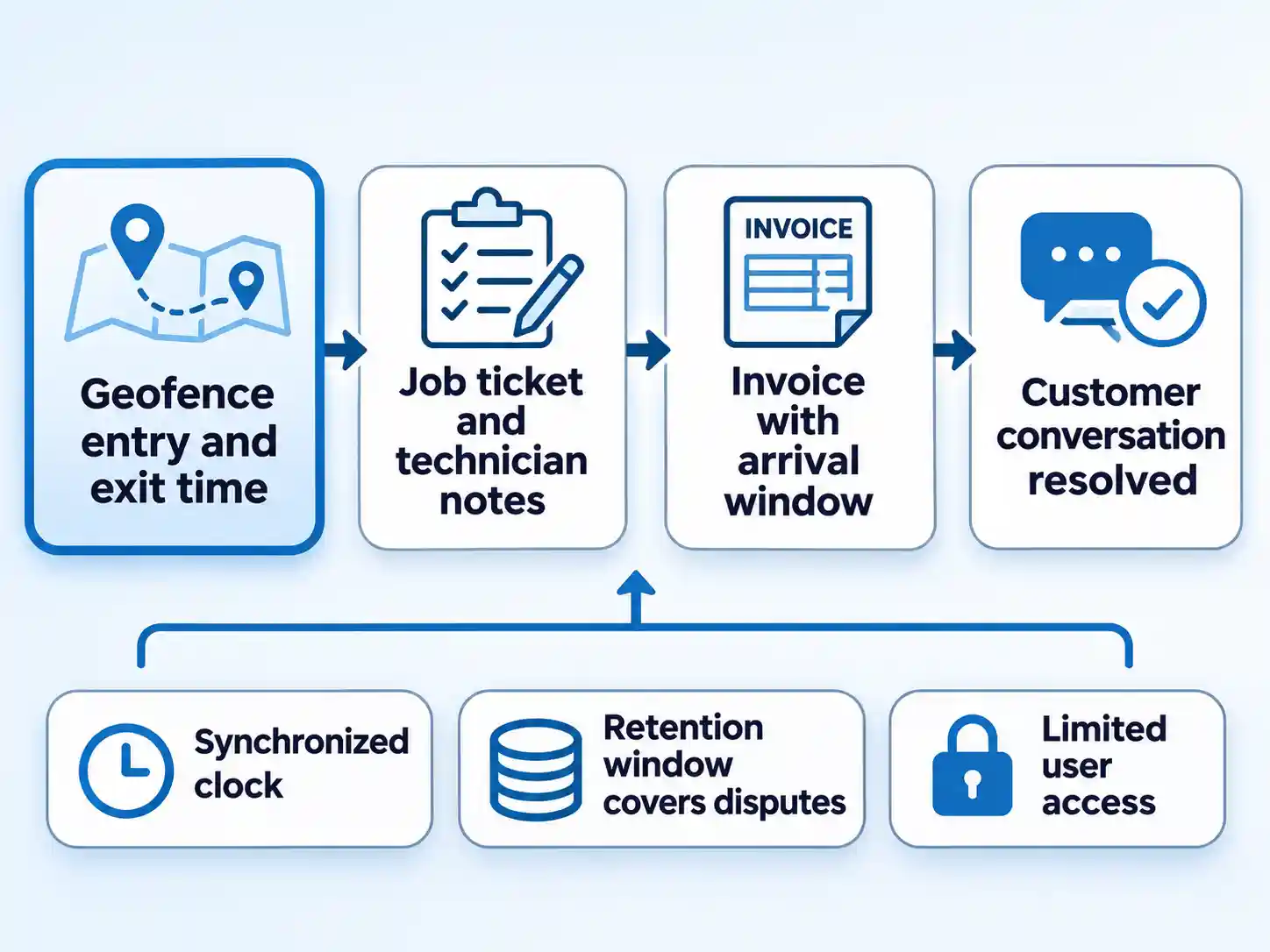
Pair every timestamp with the job ticket, the technician’s notes, and any signature or photo. Then the record tells one consistent story. When a customer challenges an arrival window, the geofence plus the invoice usually ends the conversation faster than either alone.
The same record can support a payroll review when the device clock and payroll system agree, but it should never be the sole basis for a deduction.
Accurate per-vehicle records also matter at tax time. The IRS requires vehicle expenses to be substantiated by adequate records or sufficient evidence, and it bars the standard mileage rate for a taxpayer operating five or more cars at the same time as in a fleet operation. For many five-to-thirty vehicle operators, that rules out the standard mileage rate, so the actual-expense method is the one to discuss with your accountant. Every business mile and receipt needs a home under that method. Read IRS Topic 510 on car expenses and confirm your method with your accountant before you change it.
Maintenance Alerts: Ask, Then Assign
Some trackers read the diagnostic port and can surface diagnostic trouble codes (DTCs) or battery voltage. Whether yours does is a vendor question. Whether it changes anything is an internal one.
Ask three things before you pay for the feature: does the device report engine codes and battery voltage, what triggers an alert, and who receives it. Then write the workflow down. An alert should reach the shop lead, become a work order within a set time, and be closed out with a note.
Codes report only what the computer logged; a worn brake line or failing water pump still needs a mechanic’s inspection. Keep a manual maintenance plan alongside any alerts.
Hardware: OBD-II or Hardwired?
Two installation styles cover most small fleets. A plug-in device uses the OBD-II port under the dash. A hardwired unit taps the vehicle’s wiring. Each style fits a different fleet, so match the choice to who drives the truck, who services it, and who might unplug a device.
| Buyer question | Plug-in OBD-II device | Hardwired unit |
|---|---|---|
| How long does installation take? | Minutes per vehicle, often self-installed | Scheduled shop time per vehicle |
| Can the driver remove it? | Yes, easily, which is a real risk if the point is accountability | Harder to remove without tools and time |
| What happens to the diagnostic port? | Occupied; confirm whether other diagnostic tools need it | Stays free for technician scan tools |
| What data can it reach? | Whatever the vehicle exposes through the port, which varies by make and year | Whatever the installer taps, and the vendor documents it |
| What should I confirm with the vendor? | Port compatibility, warranty language, and behavior if unplugged | Wiring method, fuse protection, and who is qualified to install |
| Where does it fit best? | Short pilots and mixed fleets you want to test cheaply | Long-term installs where tamper resistance matters |
For a hardwired unit, use a qualified installer and confirm fuse protection and warranty terms before the work begins.
Remote engine immobilization, sometimes sold as relay cutoff, is a separate capability from tracking. Ask whether the device supports it, what installation involves, how the vehicle behaves if the unit fails, and which local rules govern shutting off a vehicle remotely. Get those answers in writing before paying for the feature.
Vendors publish their own installation documentation, and reading it before a call saves an hour of sales conversation. If you are building a shortlist, put the same six questions to every bidder, including a provider such as SEEWORLD GPS.
Before you sign
Settle four things in writing: whether your vehicle makes and years are on the compatibility list, whether installation affects any warranty, what the subscription includes and what triggers an overage, and what happens to your data if you cancel. Those four answers decide more of your total cost than the device price on the quote.
Rolling It Out Without Losing the Crew
Technicians who have driven your trucks for a decade will notice something new in the truck. What they do with the news depends on what you tell them, and a short written policy does more than a speech at the Monday meeting.
- State what is collected: location, ignition, speed, idle time. Say plainly that the system does not collect calls or texts.
- Limit access to dispatch and the owner unless a role needs more.
- Set a retention window in the policy and delete on schedule, not when someone remembers.
- Explain personal-use rules and after-hours expectations before the first report runs.
- Describe how the data will be used in coaching, with examples of what is out of bounds.
- Book a review with drivers after the pilot and change something based on what they raise.
Then limit access on purpose. The FTC’s small-business guidance recommends five practices: know what personal information you hold, keep only what you need, protect it, dispose of it on schedule, and plan for incidents. The FTC also recommends least-privilege access, so each person sees only what their job requires. Location data can identify customers and employees, so a written retention rule is part of the system’s cost. Read the FTC data-security guidance and check your state’s employment rules with counsel if you monitor after hours.
Train the people who will actually read the dashboard, the same way you would train small-business employees on any new process. One dispatcher who reviews exceptions weekly beats five logins nobody uses.
Where Tracking Data Misleads
Signals drop in parking garages, tunnels, and dense downtown blocks. Idle time can be overstated by a stalled fix and understated by a gap, so reconcile suspicious days against fuel records and job tickets before confronting anyone.
An unplugged device looks like a parked truck. Check for missing-trip alerts and confirm install quality before you interpret silence as compliance.
Clocks drift. If the device time and the payroll system time disagree by a few minutes, a technician can appear late to a job they reached on time. Synchronize, document your time zone handling, and never build a payroll deduction on an unsynced timestamp.
Context decides whether an event is a leak. A van idling at a loading dock during a scheduled delivery is doing its job. Look at patterns across weeks, and treat single alerts as questions to ask.
Which Fleet Type Should Buy, Pilot, or Wait?
| Operation | Strong case to buy or pilot | Better to wait |
|---|---|---|
| Field service (HVAC, plumbing, roofing, electrical) | Long site idles, time-on-site billing, or trucks parked at technicians’ homes overnight | Three trucks, one dispatcher, and no history of billing disputes |
| Delivery contractor | Route density drives margin, or customers regularly dispute proof of arrival | Fixed routes with the same stops and no disputes on record |
| Dispatch-heavy operation | Scheduling runs on memory, and gaps between jobs are never measured | Dispatch software already logs arrival and departure times you trust |
| Very small or low-complexity fleet | A documented loss is already on the books, such as a theft or repeated after-hours use | Low annual miles, simple routes, and no measurable leak to chase |
The pattern behind the table is simple. Buy or pilot where a specific number is already hurting you and the data would change a decision. Wait where you would be buying a report you cannot act on.
The Reasonable Answer
Fleet GPS tracking earns its place when the measured annual value clears the full annual cost and the operation is ready to act on the reports. Put a number on the leak, put the total system cost beside it, and hold the insurance credit at zero until your carrier writes it down. Then ask two readiness questions: does one named person own the weekly review, and can the crew see the policy before the first report runs? If the answer is yes and the measured gap is clear, expand beyond the pilot. If the gap is thin or the review owner is missing, keep the baseline data, fix the process, and revisit the purchase when the numbers are stronger.

💬 Comments