A better movie night at home comes from getting the screen, sound, playback source, network, and control system to work together. You do not need every upgrade on this list, but choosing the right technologies for your room can improve picture quality, dialogue, streaming reliability, and everyday convenience.
Quick Take
Start with the technology that fixes the weakest part of your current setup. For many rooms, that means the display, audio, or network first. Lighting, automation, local-media playback, and battery backup become more useful once the basic picture, sound, and connection path are working properly.
What Actually Makes a Home Movie Setup Work Well
Think of a movie setup as a chain. The film comes from a streaming service, disc, or local file; a player or smart-TV app decodes it; the network may have to deliver it; HDMI may carry picture and sound between devices; and the TV, projector, soundbar, or receiver has to support the formats being sent.
One weak link can limit the rest of the system. A 4K television cannot display a 4K stream if the playback device outputs only a lower resolution. An advanced sound system may fall back to a simpler audio format when the connection path cannot carry the intended format. Fast broadband at the modem also does not guarantee smooth playback if Wi-Fi is unreliable where the television sits.
The useful question is not how many gadgets you can add. It is which part of the chain is holding the experience back. The 11 technologies below cover the major parts of that chain without assuming that every living room needs the same equipment.
1. A TV or Projector Sized for the Room
The display determines how much of your field of view the movie occupies, so screen size should be considered together with seating distance rather than by itself. A very large screen viewed too closely can feel uncomfortable, while a small screen across a large room can make cinematic detail harder to appreciate.
RTINGS’ TV size and viewing-distance analysis relates screen size to viewing distance and field of view rather than presenting one size as correct for everyone. Measure your normal viewing position before choosing a TV, then check the manufacturer’s full dimensions so the set also fits the available furniture or wall space.
A projector changes the calculation because the projector and screen work as a system. ProjectorCentral’s current home-theater projector buying guide explains how image size, projector brightness, screen material, and ambient light interact. A projector can make sense when a very large image is the priority, but a bright multipurpose living room demands more attention to light control and screen choice.
The room should decide the direction. TV versus projector trade-offs are easier to judge once you know the seating distance, available wall space, and how much uncontrolled light reaches the screen.
2. A Soundbar or Surround-Sound System
Movie audio has to do more than play loudly. Dialogue should remain understandable, effects should have space around them, and bass should support the scene without dominating the room.
A soundbar keeps the setup compact and can be practical when floor space, wiring, or neighbors limit a larger speaker installation. A separate AV receiver, commonly shortened to AVR, and multiple speakers provide more placement flexibility but also require more setup. The larger system is not automatically the better choice for every room.
Surround-system notation tells you how speaker roles are divided. In a 5.1 system, the first number represents five main speaker channels and the second represents the low-frequency effects channel normally handled by a subwoofer. Dolby’s Dolby Atmos speaker-layout guidance explains configurations with a third number, such as 5.1.2, where the final number represents overhead or height channels. Those channels may use ceiling-mounted or compatible upward-firing speakers.
Placement matters as much as the format name. A capable speaker system can still sound uneven when a center speaker is poorly positioned, furniture blocks speaker paths, or the main seats fall outside the intended listening area. Treat speaker placement as part of the room design rather than a specification-sheet exercise.
3. A Capable Streaming Player or Smart-TV Platform
If the apps built into your television already support the services and picture or audio formats you use, an external streamer may add little. A separate streaming player becomes more useful when the television platform is slow, lacks an app you need, or cannot output the formats required by the rest of the system.
Current devices show the types of capabilities worth checking. Apple’s Apple TV 4K specifications list HDMI 2.1, Wi-Fi 6, Dolby Atmos, multiple 4K high dynamic range formats, and Gigabit Ethernet on the Wi-Fi + Ethernet model. Roku’s Roku Ultra specifications list 4K, HDR10+, Dolby Vision, Dolby Atmos, Wi-Fi 6, Ethernet, and USB local playback. These are capability examples, not universal recommendations.
Check the full playback chain before assuming a new streamer will unlock a feature. The application, subscription tier, player, HDMI connection, display, and audio equipment can all affect whether a particular resolution, high dynamic range format, or surround format is available.
4. A Stable Home Network
Streaming depends on two different connections: the internet service entering the home and the local network carrying data from the router to the television or player. Either one can become the bottleneck.
Netflix currently recommends at least 15 Mbps for its Ultra HD 4K streams, compared with 5 Mbps for Full HD. That is a Netflix-specific baseline, not a universal speed requirement for every service or household. Other streams, downloads, calls, and connected devices may be using the connection at the same time.
Your internet connection might come from cable or a fiber internet service; inside the home, Ethernet or reliable Wi-Fi still has to carry the stream from the router to the playback device. Paying for a faster plan will not by itself fix weak wireless coverage in the room where you watch movies.
If buffering happens mainly in one room, investigate the local connection before assuming the internet plan is too slow. Ethernet avoids the radio-link variability of Wi-Fi when a cable run is practical. With wireless connections, distance, walls, interference, and router placement can affect performance. Streaming-buffering problems are easier to diagnose when internet speed and in-home network quality are treated as separate issues.
5. The Right HDMI and eARC Connection Path
Owning compatible equipment is not enough if the connections between the devices cannot carry the signal you want. This matters when a television, streaming player, soundbar, game console, or AV receiver are connected in the same system.
eARC stands for Enhanced Audio Return Channel. It allows audio from a television, or from a source connected to that television, to travel back to a compatible soundbar or AV receiver over HDMI. HDMI Licensing Administrator’s eARC overview states that the technology supports high-bitrate formats and can send television audio to an AVR or soundbar through a single HDMI cable.
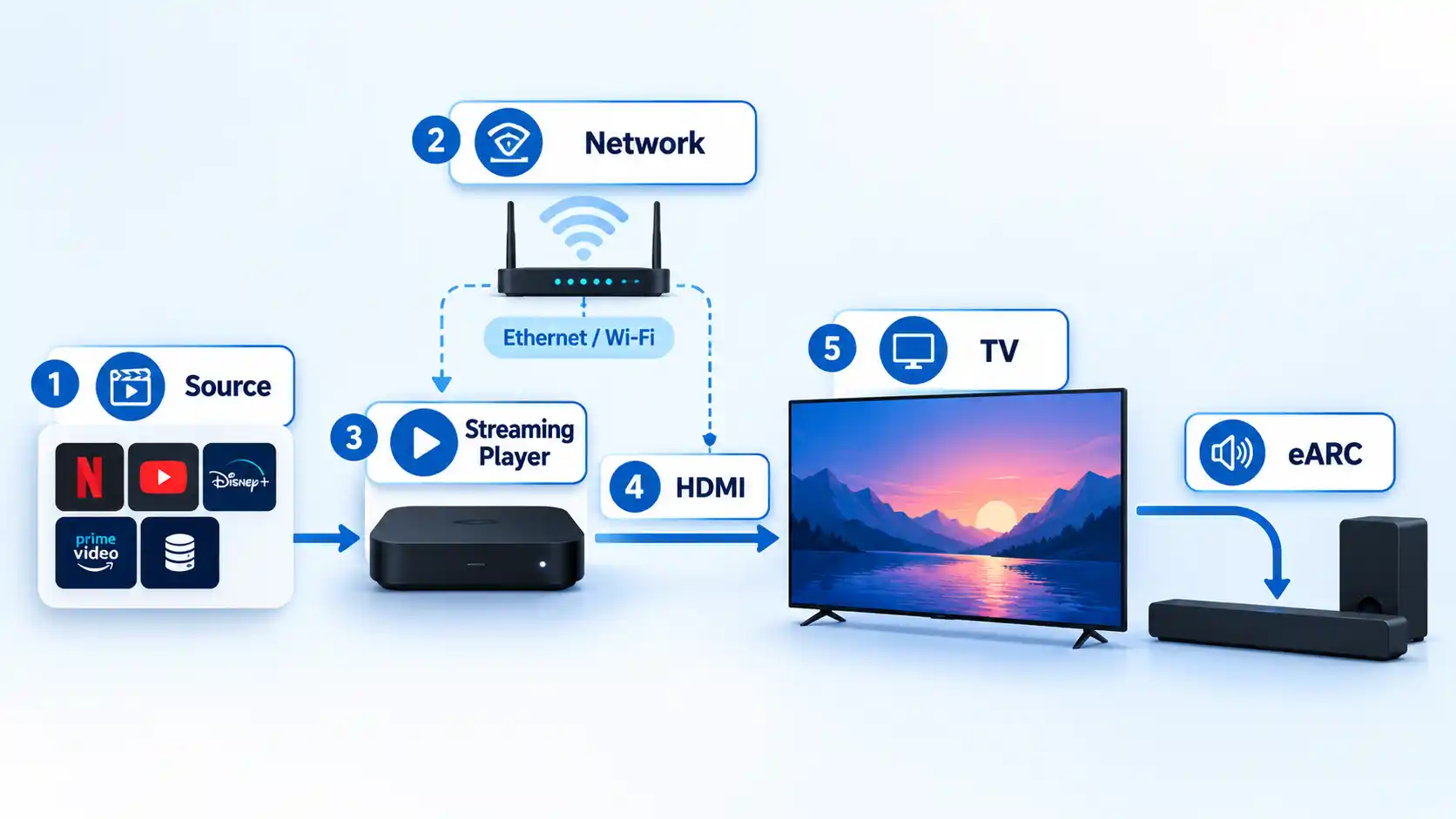
In practice, check the labels on the actual ports and confirm the relevant audio settings. Connecting a soundbar to an ordinary HDMI input instead of the ARC/eARC port can prevent the intended return-audio path from working. Receivers and switches inserted between the source and display can also become part of the compatibility chain.
Do not rely on an HDMI version number alone to tell you what every port can do. Verify the features assigned to the specific input or output you plan to use. A focused home-theater HDMI compatibility check can prevent a capable display or sound system from being limited by the connection between them.
6. Dimmable or Smart Lighting
Lighting affects what you see around the screen and how much glare reaches it. The simplest improvement may be a basic dimmer that reduces reflections while leaving enough light to move around safely.
Smart bulbs, dimmers, and light strips add remote control and scene presets. More elaborate systems can synchronize lighting with on-screen content. Philips Hue currently offers HDMI-based synchronization hardware and TV-app options for specified compatible Samsung and LG televisions. Its TV-light synchronization overview also makes clear that the required hardware or app depends on the television and source setup.
Static backlighting and dynamic synchronization solve different tasks. A fixed light behind the television creates a steady illuminated background, while dynamic systems deliberately change with the image. Choose the effect you want rather than assuming that more automation will improve picture quality.
7. Room Correction and Acoustic Control
If dialogue is clear in one seat but muffled in another, or bass seems heavy in one corner and weak elsewhere, the room itself may be contributing to what you hear. Walls, floors, windows, furniture, speaker position, and listening position all affect reflections and bass behavior.
Room correction, also called room calibration, uses measurements from the listening area to adjust a compatible audio system. Dolby notes that many soundbars, AV receivers, and subwoofers include calibration modes that listen to the room and alter system settings. Its speaker-setup guidance also emphasizes placement, a clear path between speakers and listeners, and controlling unwanted reflections.
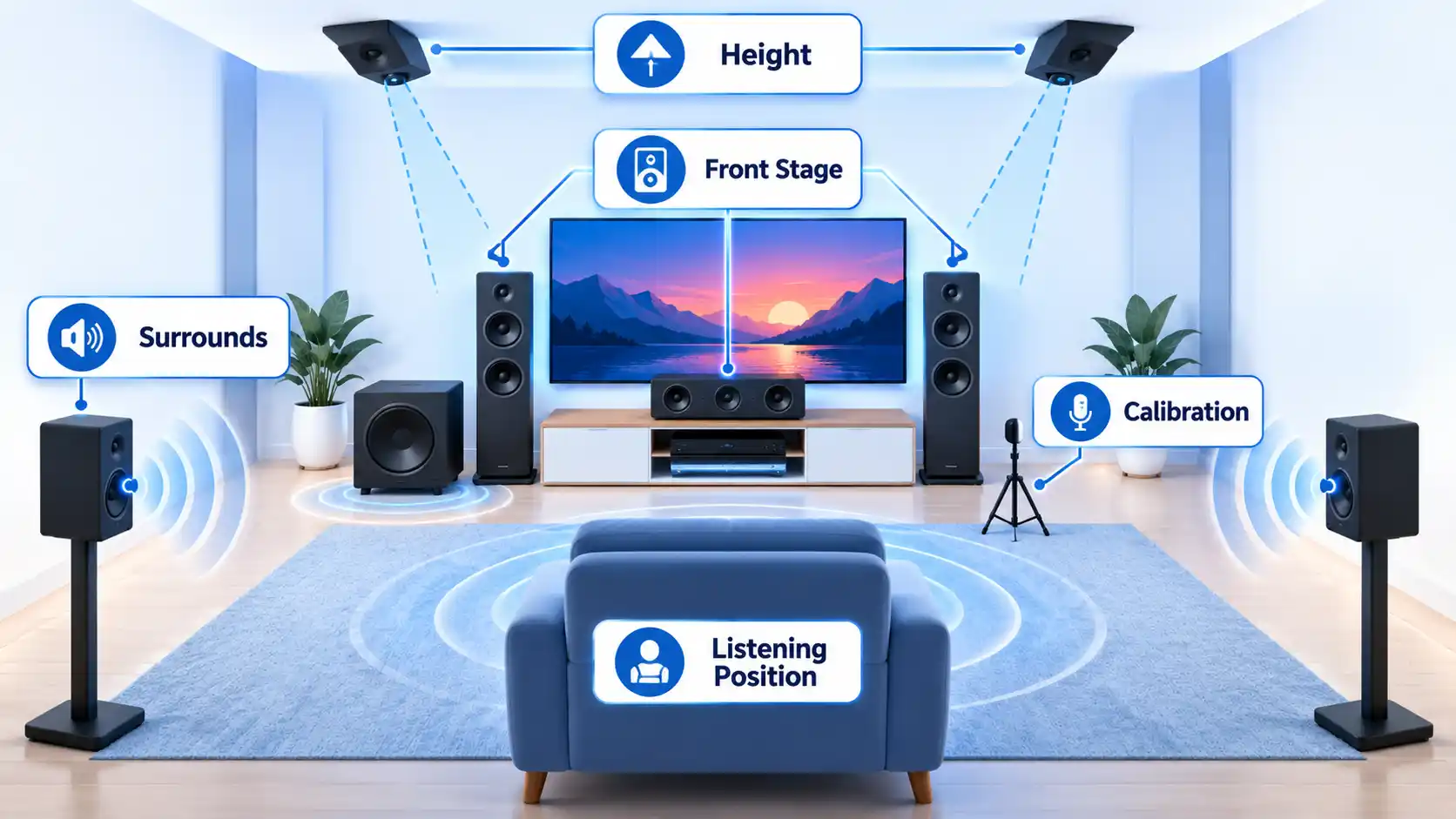
Start with sensible physical placement before relying on software correction. Keep speaker paths unobstructed and position the system around the main listening area. Built-in calibration is most useful as a refinement of a workable layout, not as a substitute for one.
8. Unified Device Control
A movie setup becomes frustrating when starting a film requires several remotes, manual input changes, and separate volume controls. Unified control technology reduces those repeated actions.
HDMI-CEC means HDMI Consumer Electronics Control. It allows compatible HDMI-connected devices to exchange control commands. A streaming-player remote may therefore be able to power a television or adjust receiver volume. Apple’s current specifications, for example, state that the Siri Remote can control a television or receiver through infrared or CEC.
CEC behavior and manufacturer naming vary, so mixed-brand systems can still produce awkward edge cases. If HDMI control is unreliable, a programmable or universal remote can remain useful because it can control several devices without depending entirely on CEC behavior.
9. Smart-Home Scene Automation
Smart-home automation becomes useful when several devices need the same setup every time you watch a film. Instead of changing each compatible device separately, a “Movie Night” scene can group routine actions under one command.
A scene might dim compatible lights, close motorized shades, or set selected devices to the desired state. The exact actions depend on the smart-home platform and equipment already in the room.
Keep normal controls available as a fallback. Starting a movie should not depend entirely on a voice assistant, cloud service, or smart-home hub being reachable. Automation works best when it removes repetitive steps without making ordinary playback dependent on another system.
10. A 4K Blu-ray or Local-Media Playback Option
Streaming is convenient, but it depends on the service, the app, and a working connection. A disc player or compatible local-media player provides another way to play movies when you already own suitable discs or locally stored media.
A 4K Blu-ray player is relevant when you have compatible discs and a display that can use their video formats. Local playback requires a different compatibility check: the player must understand the file container, video codec, audio codec, subtitles, and output format involved.
Do not assume that a USB port means a television or streamer can open every file. Roku’s current Ultra specifications, for example, list local playback through USB and identify supported video containers and codecs, including specific H.264, H.265/HEVC, VP9.2, and AV1 combinations. Check the formats you actually use before choosing hardware around local playback.
11. Surge Protection or Battery Backup for Key Devices
Power protection does not improve picture or sound, but it can protect availability when the electrical supply is interrupted. A basic surge protector and an uninterruptible power supply, or UPS, do not provide the same function.
A UPS adds battery backup so supported electronics can remain powered temporarily during an outage. APC’s UPS selection guidance describes battery backup and surge protection for connected electronics and specifically lists equipment such as networking hardware and televisions. Runtime falls as more equipment is connected, so the unit has to be sized for the devices you actually intend to support.
That can make battery backup useful for a modem, router, media server, or other equipment where a short interruption would end playback or connectivity. Eaton likewise describes home UPS systems for routers, modems, and streaming connectivity.
Use commercially rated equipment according to its manufacturer instructions. Power strips and UPS units are not substitutes for repairing damaged outlets, overloaded circuits, or faulty building wiring.
Which Upgrades Matter Most for Your Room?
The same technology does not solve every room. Match the first upgrade to the clearest problem you already have, then make sure the surrounding equipment can support it.
| Room or situation | First priority | Second priority | Common mistake |
|---|---|---|---|
| Small living room | Audio clarity and sensible screen size | Simple unified control | Buying a display or speaker system that overwhelms the room |
| Bright multipurpose room | Display choice and glare control | Dimmable lighting | Choosing a projector without accounting for ambient light |
| Dedicated projector room | Projector, screen, and light control | Speaker placement and calibration | Treating the projector and screen as unrelated purchases |
| Apartment or noise-sensitive setup | Dialogue-focused audio at controlled volume | Unified control and lighting | Assuming deeper bass or more speakers automatically improve the experience |
| Household with unreliable streaming | Network diagnosis | Ethernet or stronger local Wi-Fi where appropriate | Upgrading the internet plan before checking the connection inside the home |
If several parts need work, begin closest to the symptom you notice. Frequent buffering points toward the network. Hard-to-follow dialogue points toward audio and placement. A washed-out projector image points toward room light, screen choice, or projector capability rather than the streaming box.
Build the Setup Around the Weakest Link
An enjoyable movie night does not require all 11 technologies at once. A well-sized display, understandable audio, reliable playback, and a stable connection form the foundation; the remaining upgrades solve narrower problems or make the system easier to use.
Improve the weakest part first, then check compatibility before adding the next component. That is more likely to produce a noticeable improvement than collecting features the room, connection path, or existing equipment cannot fully use.

💬 Comments