The right database management system is the one that matches your application’s data relationships, access patterns, transaction and recovery requirements, scale, security needs, operating model, and budget. Start by defining those requirements, then use them to eliminate unsuitable database models and test the remaining options with a representative workload.
That approach is more reliable than starting with a familiar product name. Modern database systems overlap in important ways: relational systems can store JSON, document databases can support multi-document transactions, and an embedded database can be a better architectural fit than a server database even when both support SQL.
Start With the Workload, Not the Database Brand
Before comparing PostgreSQL, MySQL, MongoDB, Oracle Database, SQLite, or any other product, write down what the application actually has to do. A workload is the combination of data, queries, writes, users, concurrency, response-time expectations, and operating conditions that the database must support.
Current architecture guidance from both Microsoft and AWS treats those workload characteristics as the starting point for database selection. Microsoft’s data-store selection guidance separates requirements such as data format, relationships, consistency, access patterns, scale, security, performance, and cost. AWS similarly recommends evaluating data characteristics, operational requirements, resiliency, performance, and security before choosing a database service.
Consider an order-management application. It may need to create an order, reserve inventory, record a payment state, and preserve relationships between customers, products, and line items. Those requirements are different from a note-taking application that stores one user’s data locally on a device. Both applications need a database, but treating them as the same database-selection problem would hide the most important architectural difference.
Separate your requirements into two groups. Functional requirements describe what the database must let the application do, such as querying customers and their orders. Nonfunctional requirements describe how reliably or quickly it must do it, such as supporting the expected number of concurrent writers or recovering within an acceptable period after a failure.
Mark genuine constraints as must-haves. Team familiarity, licensing requirements, hosting restrictions, compliance obligations, supported programming environments, and migration constraints can eliminate an option even when its data model looks suitable.
Define Your Data and Query Model
A data model describes how information is represented and related. The familiar relational model stores data in tables with defined columns and relationships. A document database stores records as document-shaped structures, commonly resembling JSON. Key-value, graph, time-series, vector, and other specialized models organize data around different access patterns.
The useful question is not simply, “Is my data structured?” Ask what the application needs to retrieve together and which relationships must remain correct. An order system may benefit from explicit relationships among orders, customers, products, and payments. A product catalog with widely varying attributes may benefit from a document-oriented representation that keeps data commonly read together in one document.
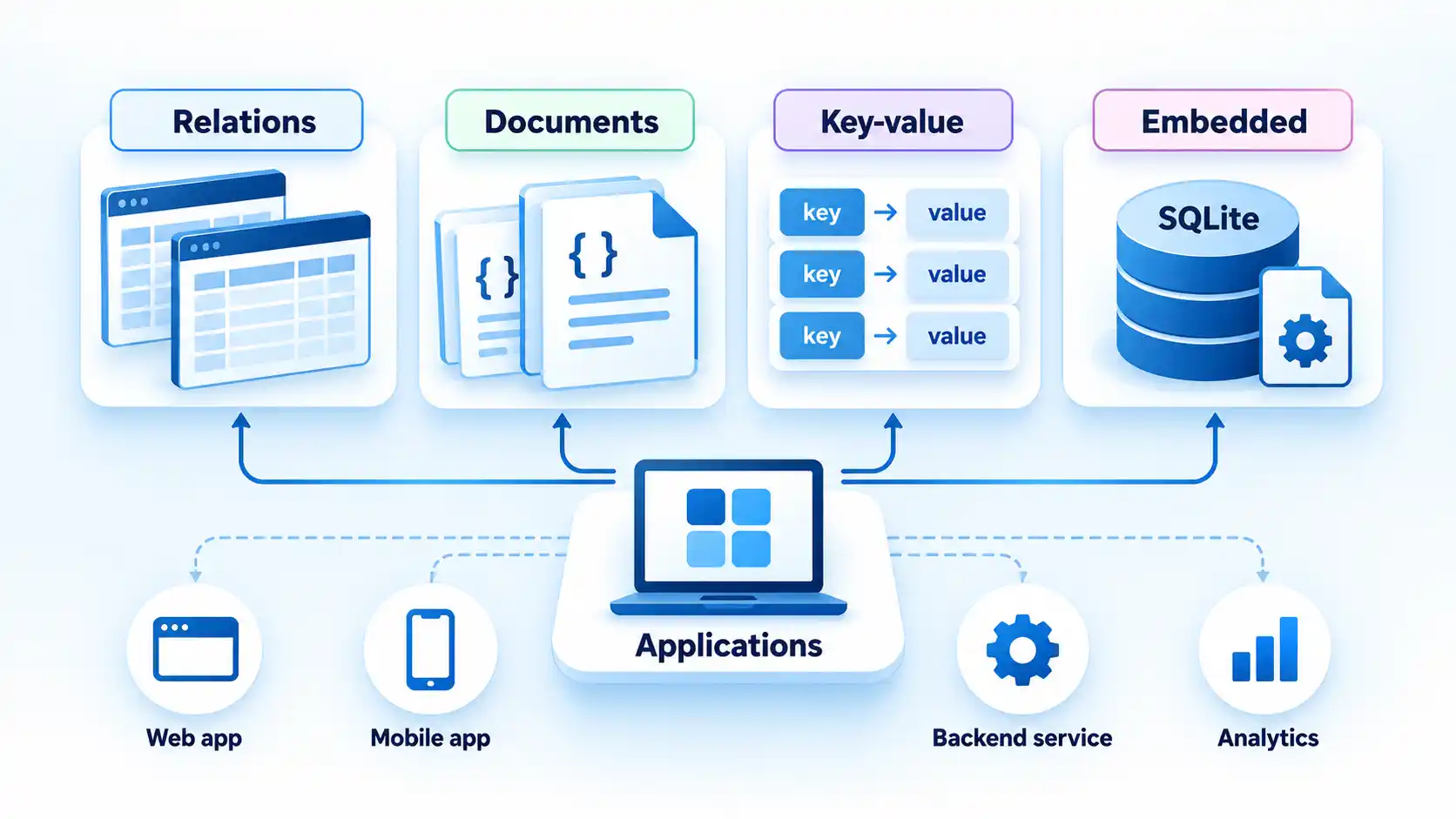
MongoDB’s data-modeling documentation emphasizes access patterns and the option to embed related data that is commonly accessed together. Its document model also permits records in the same collection to differ in their fields.
Do not assume, however, that an application using JSON automatically needs a document database. PostgreSQL provides both json and jsonb, and jsonb supports indexing and avoids reparsing the original JSON text for each operation. PostgreSQL’s JSON documentation also explains that relational and JSON approaches can coexist within the same application. MySQL likewise provides a native JSON data type with validation and an optimized internal storage format.
That overlap makes query design important. List your important reads and writes before choosing a model. If one screen consistently needs a customer, the customer’s current subscription, and the last five invoices, note that access pattern. If reports regularly aggregate large volumes of records by time range, note that too. Database design becomes easier when the expected queries are concrete instead of hypothetical.
Schema flexibility also deserves a precise definition. A flexible document schema can make some forms of evolving application data easier to represent, but flexibility does not remove the need for predictable structure. Both MongoDB and PostgreSQL document reasons to design data with deliberate, repeatable shapes even when a conventional relational schema does not enforce every field.
Decide How Much Transactional Consistency You Need
A transaction groups operations so the application can treat them as one logical unit. Atomicity, Consistency, Isolation, and Durability, usually shortened to ACID, describe properties that help a database preserve correct state when multiple operations or users interact with the same data.
Suppose an application accepts an order and reduces available inventory. If the inventory update succeeds but the order record fails, the system can end up in a state the business considers incorrect. A transaction can make dependent changes commit together or roll back together.
Relational databases are commonly used for workloads with strong transactional requirements, but transaction support is not a simple SQL-versus-NoSQL dividing line. PostgreSQL uses Multiversion Concurrency Control (MVCC), which gives each statement a snapshot of data and allows ordinary reads and writes to proceed without blocking one another in the usual case. The PostgreSQL concurrency documentation describes that model and its isolation behavior.
MySQL’s default InnoDB storage engine follows the ACID model and supports commit, rollback, crash recovery, and row-level locking according to the MySQL 8.4 InnoDB documentation. Oracle Database likewise supports transaction commit and rollback, automatic locking, and concurrent transaction processing, as described in Oracle’s current transaction-processing documentation.
MongoDB supports distributed transactions across multiple documents, including transactions in replica sets and sharded clusters. MongoDB also cautions that distributed transactions can cost more than single-document writes and should not replace effective document modeling. The important question is therefore what transactional behavior your workload requires and how naturally the chosen data model provides it.
Set Performance, Concurrency, and Scale Requirements
Performance requirements are useful only when they are measurable. Replace vague requirements such as “the database needs to be fast” with expected read and write volume, concurrent users, acceptable latency for important operations, expected data size, growth rate, and geographic requirements.
Start with the read-to-write ratio. A catalog may receive many reads for every update. A telemetry workload may continuously append data. An inventory service may have substantial contention around a smaller set of records. Those differences affect indexing, replication, partitioning, caching, and database choice.
Concurrency matters separately from total traffic. A system that processes thousands of requests may still have few simultaneous writers, while a collaborative application can produce many users changing related records at once. Determine where contention can occur and whether the chosen engine’s locking or concurrency model fits that pattern.
SQLite illustrates why architectural context matters. SQLite is an embedded, serverless SQL database that reads and writes database files directly instead of communicating with a separate database-server process. SQLite’s guidance on appropriate uses explicitly distinguishes its local-storage role from the shared client/server role of systems such as PostgreSQL, MySQL, and Oracle.
The boundary becomes important when many computers need to issue SQL directly against the same database file across a network or when the workload requires many concurrent writers. SQLite permits many simultaneous readers but serializes writes to a database file. That is not inherently a defect. It is a workload constraint that can be entirely appropriate for local storage and inappropriate for a high-contention shared service.
Also distinguish vertical and horizontal scaling. Vertical scaling gives one database instance more CPU, memory, or storage. Horizontal scaling distributes data or work across multiple machines. For example, MongoDB’s sharding architecture distributes collections across shards to support large datasets or high-throughput workloads, while also adding infrastructure and maintenance complexity.
Define Reliability, Security, and Recovery Requirements
A database that performs well during normal operation can still be the wrong choice if it cannot meet your failure and recovery requirements. Define what must happen when a node fails, storage is damaged, an operator makes a mistake, or an entire location becomes unavailable.
At minimum, evaluate backup and restore, point-in-time recovery where required, replication, failover behavior, monitoring, and the ability to test recovery. The acceptable amount of data loss and acceptable recovery time should be business requirements rather than assumptions based on database defaults.
High availability also involves trade-offs. PostgreSQL, for example, documents multiple replication and standby approaches in its high-availability and replication documentation. Synchronous and asynchronous replication make different trade-offs among commit behavior, latency, and failure handling, so the replication mode should follow the application’s recovery requirements.
Security requirements should include authentication, authorization, encryption in transit and at rest where needed, secret management, auditing, network exposure, patch management, and access to backups. If the system handles regulated or sensitive data, translate the applicable organizational or legal requirements into concrete database and deployment controls before the shortlist is finalized.
Do not treat a vendor’s feature checklist as proof that a secure deployment will happen automatically. The operating configuration, identity model, network architecture, application code, patching process, and backup handling are part of the security boundary.
Choose an Operating Model: Managed or Self-Hosted
The database engine and the way you operate it are separate decisions. PostgreSQL running on infrastructure your team manages creates a different operational workload from PostgreSQL provided as a managed database service.
With a self-hosted system, your team remains responsible for tasks such as maintenance, monitoring, patching, backups, capacity planning, performance management, and availability. Managed database services transfer some of that operational burden to the provider, although the application team still owns application-level concerns such as data modeling, queries, access policy, and correctness.
AWS makes this distinction explicit in its database decision guide, which contrasts self-hosted database operations with fully managed services.
Ask who will be paged when the database is unavailable. Who tests restores? Who approves upgrades? Who diagnoses a query that suddenly consumes most of the available database resources? Those questions are part of database selection because a technically capable engine can still create operational risk when responsibilities and expertise are unclear.
The same ownership question applies when development work is external. A company using an agency, contractor, or specialist development team still needs a named owner for schema changes, database credentials, monitoring, backups, and incidents. Clear IT support and operational ownership can help prevent database administration from becoming an undefined responsibility between teams.
Team capability therefore belongs in the decision matrix. Familiarity should not override hard technical requirements, but two technically suitable databases can differ substantially in operational risk if the organization already has mature tooling and expertise for one of them.
Calculate Total Cost and Lock-In, Not Just License Price
License price is only one part of database cost. Include compute, storage, replicas, backup storage, data transfer, monitoring, support contracts, engineering time, specialist staffing, testing environments, and the operational work required to maintain the intended availability level.
An open-source database can have no software license fee and still require substantial operating effort. A commercial or managed database can carry direct service or licensing charges while moving some infrastructure and maintenance work to a provider. Compare the total cost of meeting the workload’s service requirements rather than comparing license labels alone.
Model growth as well as today’s bill. Storage costs can expand when replicas, backups, retained logs, indexes, and analytical copies are included. Managed-service charges may also depend on provisioned resources, requests, data transfer, backup retention, or high-availability configuration.
Migration cost is another part of the decision. Proprietary features, engine-specific SQL, stored procedures, extensions, data types, and operational tooling can all increase the work required to move later. Avoiding every platform-specific feature can also be counterproductive if those features materially improve the application. The useful question is whether the benefit justifies the future switching cost.
How to Choose the DBMS Step by Step
Use this sequence to turn the requirements above into a shortlist and then a production decision. The order matters because product evaluation should follow the workload definition rather than determine it.
- Write down the workload and critical access patterns. List the important entities, relationships, reads, writes, reports, data volumes, and user interactions. Include the queries that matter most to application correctness and user experience. For an order system, that might include creating an order, reserving inventory, retrieving a customer’s order history, and finding unfulfilled orders.
- Mark the non-negotiable correctness, security, and recovery requirements. Identify which changes must be transactional, what consistency behavior the application expects, who may access each class of data, what auditing is necessary, and what amount of data loss or downtime the business can tolerate. Treat these as elimination criteria rather than preferences.
- Choose the data model that matches the dominant access patterns. Decide whether the core workload fits a relational model, document model, key-value pattern, graph, time-series system, embedded database, or another specialized store. Do not select a document database merely because some fields arrive as JSON, and do not select a relational database merely because the team already knows SQL.
- Set measurable scale and performance targets. Estimate current and expected data size, read and write rates, peak concurrency, latency goals, geographic distribution, and growth. Identify hot records or partitions that may receive disproportionate traffic. The estimates do not need to predict the future perfectly, but they should be specific enough to expose obvious mismatches.
- Decide what your team can operate. Determine whether the database must be self-hosted, managed, or serverless and which deployment environments are permitted. Record who will own patching, upgrades, backups, restores, monitoring, incident response, schema migrations, and capacity planning.
- Build a shortlist using hard requirements. Eliminate products that cannot meet the required data model, transaction semantics, deployment constraints, supported environments, recovery goals, security controls, or operational model. Compare the remaining candidates on total cost, team expertise, ecosystem support, migration effort, and useful product-specific capabilities.
- Test the finalists with representative data and queries. Load data that resembles the intended schema and volume, then run important reads, writes, transactions, schema changes, and concurrency patterns. Test operational events such as backup and restore when they are part of the production requirement. Record the configuration used so the result can be reproduced and compared.
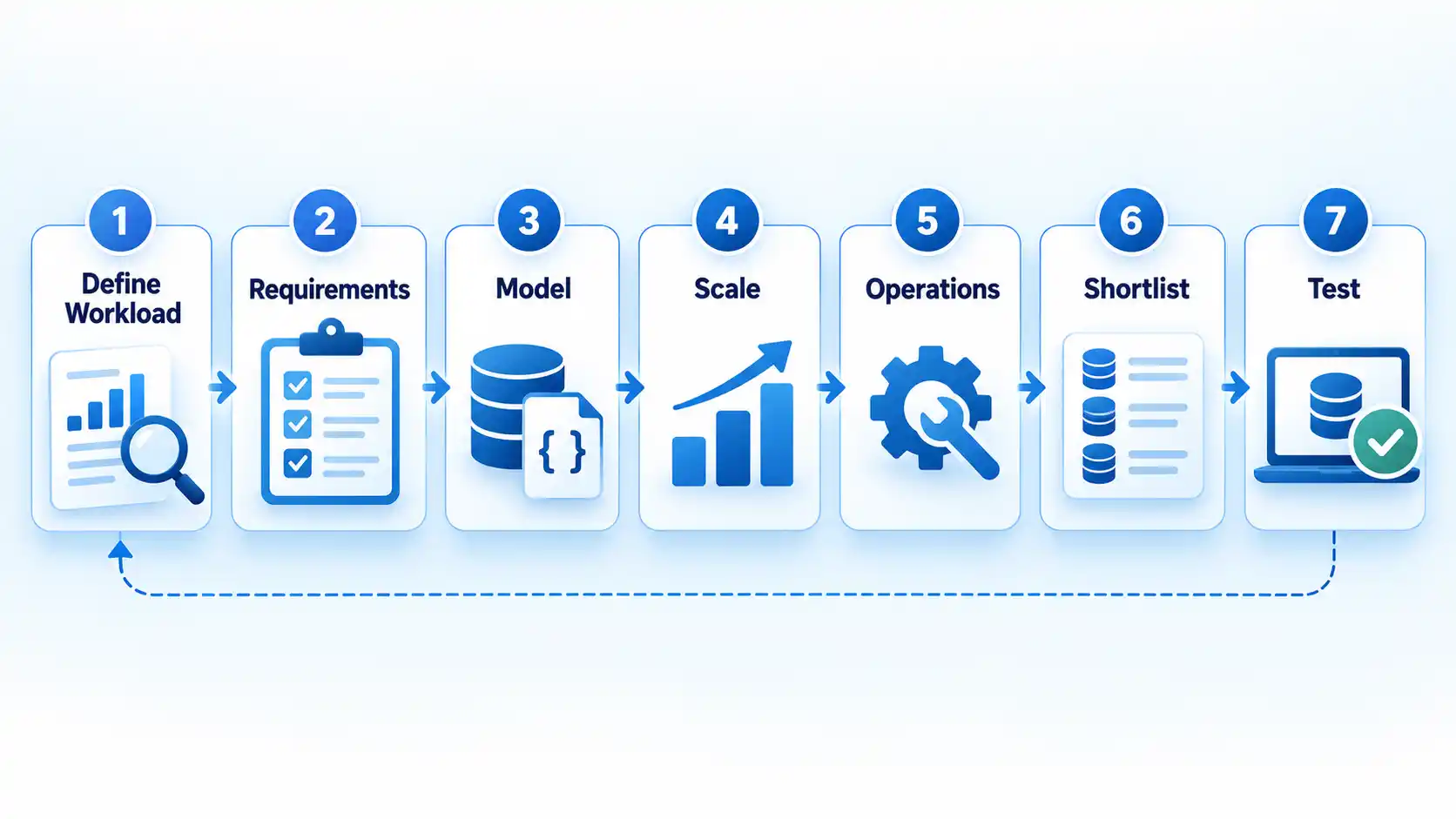
A proof of concept should answer specific questions rather than produce one attractive benchmark number. For example: Can the candidate preserve the required transaction behavior under the expected number of concurrent writers? Does the application’s most important query remain within its latency budget after the data grows? Can the team restore the system using the proposed backup process?
How PostgreSQL, MySQL, MongoDB, Oracle and SQLite Fit the Framework
The five systems in the original shortlist solve overlapping but not identical problems. Use this table as orientation, not as a ranking. The correct fit depends on the workload and deployment you defined earlier.
| Option | Primary model / architecture | Typical fit | Important decision considerations | Operational note |
|---|---|---|---|---|
| PostgreSQL | Client/server relational database with extensive SQL capabilities and native JSON/JSONB support. | Transactional applications with relational data, complex querying, and workloads that benefit from combining structured tables with indexed JSON data. | Uses MVCC for concurrency and supports transactions, JSONB indexing, and multiple replication and high-availability designs. Validate extensions and operational requirements against the intended hosting platform. | Available self-hosted and through managed services. Backup, failover, tuning, upgrades, and replication still require an explicit operating model. |
| MySQL | Client/server relational database. InnoDB is the default storage engine in MySQL 8.4. | Transactional applications that fit a relational model and the MySQL ecosystem. | InnoDB provides ACID transactions, commit and rollback, crash recovery, and row-level locking. MySQL also has a native JSON data type, so semi-structured fields alone do not rule it out. | Available in self-hosted and managed forms. Confirm version, storage-engine assumptions, replication design, backup process, and provider-specific limits. |
| MongoDB | Client/server document database. | Applications where document-shaped records and access-pattern-driven embedding are a natural fit, including workloads with varying document fields. | Schema flexibility does not remove the need for intentional data modeling. MongoDB supports multi-document transactions and sharding, but transaction scope, indexes, document design, and shard-key selection can affect cost and complexity. | Available self-managed and as managed services. Replication, sharding, backups, and geographic distribution change the operational requirements. |
| Oracle Database | Client/server relational database platform. | Transactional and enterprise workloads that require Oracle-specific capabilities, compatibility, tooling, or an established Oracle operating environment. | Supports transactional processing, concurrent access, locking, commit, and rollback. Evaluate the required edition, deployment model, supported features, and commercial terms for the actual project rather than assuming one universal cost profile. | Operating complexity and cost depend on deployment, edition, features, support arrangements, and existing Oracle expertise. Verify those details for the proposed environment. |
| SQLite | Embedded, serverless SQL database library using a database file instead of a separate database-server process. | Local application storage, desktop and mobile software, embedded devices, application file formats, testing, and server applications where the database file can remain close to the application. | SQLite is not a direct architectural substitute for a shared client/server database. It supports many readers, while writes to a database file are serialized. Direct access by many remote clients to the same file is a poor fit. | There is no separate database server to administer, but the application still needs appropriate file permissions, backup handling, concurrency handling, and deployment practices. |
The table also shows why labels such as “SQL database” and “NoSQL database” do not finish the decision. PostgreSQL and MySQL can work with JSON. MongoDB has multi-document transaction support. SQLite supports relational SQL but runs inside the application process instead of as a conventional shared database server. Architecture and workload behavior matter more than category labels alone.
Validate the Choice Before Production
A successful proof of concept should reproduce the parts of the workload that could invalidate your choice. Synthetic benchmarks can be useful, but a benchmark from different hardware, data distribution, indexes, query patterns, concurrency, or durability settings does not establish how your application will behave.
Use representative data volumes and distributions. If a production table will contain highly skewed values, do not test only evenly distributed sample data. If the application performs bursts of writes, test bursts. If several workers update the same logical records, reproduce that contention.
Verify the result
- Representative data loads successfully with the intended schema, indexes, document structure, or partitioning strategy.
- The most important reads and writes meet the application’s measured latency and throughput requirements under realistic concurrency.
- Transactions and concurrent updates preserve the business rules identified as non-negotiable.
- The proposed backup and restore process has been tested when recovery is a production requirement rather than assumed from a feature list.
- A normal schema or data-model change can be deployed using the intended migration process without unacceptable downtime or risk.
- Monitoring exposes the failures and resource constraints the team would need to diagnose in production.
- The estimated operating cost includes production capacity, replicas, backups, observability, support, and the engineering effort required to run the system.
- The people responsible for the system can perform routine operations and explain how they would respond to a database incident.
If a candidate fails one of the hard requirements, decide whether the requirement, architecture, or candidate should change. Do not hide a fundamental mismatch behind increasingly elaborate infrastructure unless the added complexity has a clear operational and business justification.
When One Database Is Not Enough
Some applications have workloads different enough that one database model is not the most practical answer for every job. A transactional system of record may coexist with a search index, analytical warehouse, cache, graph store, or another specialized system.
A common example is separating operational transaction processing from large analytical workloads. A PostgreSQL application can remain the transactional system of record while selected data is copied into an analytical platform; one example of that architectural boundary is a workflow that moves PostgreSQL data to BigQuery.
Use multiple databases deliberately. Every additional datastore introduces synchronization, security, monitoring, backup, deployment, troubleshooting, and data-governance work. If one database meets the critical requirements without creating a serious bottleneck or modeling problem, the simpler architecture is usually easier to operate.
Final Decision Rule
Choose the simplest database architecture that satisfies the workload’s correctness, access-pattern, scale, reliability, security, and operating requirements. Treat familiar products as candidates rather than defaults, eliminate options with explicit requirements, and make the final choice only after the finalists have been tested with representative data and application behavior.

💬 Comments