To perform a free reverse phone lookup without hitting paywalls, combine real-time community spam directories, exact-match search engine operators, social messaging app profile checks, and free technical carrier lookup tools. This multi-layered investigation method reveals caller identities, line types, and scam risks without requiring a subscription or credit card.
Quick Take: Reverse Lookup Method Comparison
Different reverse phone lookup methods yield distinct types of data. While community databases highlight telemarketers and scammers quickly, search engines and messaging apps are better suited for identifying unknown individuals.
| Lookup Method | Information Discovered | Best Use Case | Paywall Risk |
|---|---|---|---|
| Community Spam Directories | Caller reputation, robocall tags, spam categories, business names | Identifying telemarketers, delivery drivers, and active scam calls | Low (Free web searching available) |
| Exact-Match Search Operators (OSINT) | Associated owner names, forum posts, PDF resumes, public classifieds | Uncovering the digital footprint of unknown individual callers | None (100% free) |
| Messaging App Correlation | Profile pictures, display names, public bios, activity statuses | Verifying personal mobile lines on WhatsApp, Telegram, or Signal | None (100% free) |
| Technical Carrier Utilities | Line type (VoIP vs. Mobile vs. Landline), original carrier, line status | Detecting burner numbers, virtual call centers, and spoofing tools | Low (Free daily query tiers) |
Prerequisites & Anti-Paywall Red Flags
Before initiating a reverse search, standardizing your input digits improves accuracy across search engines and directory databases. Most reverse search failures happen because the query string omits essential formatting or includes extra characters that break direct database matching.
Standardizing Phone Number Formats Before Searching
Search engines and public databases parse telephone numbers differently depending on how punctuation is used. When preparing a number for analysis, test these common variations:
- Unformatted 10-digit string: 1234567890 (best for raw database and URL parameter searching)
- Standard hyphenated format: 123-456-7890 (standard formatting for web articles and classified ads)
- Parenthetical local format: (123) 456-7890 (common in corporate directories and footers)
- International E.164 format: +11234567890 (required for messaging platforms and global lookup APIs)
If you regularly inspect incoming calls on mobile devices, review our reference guide on standard phone number formats to streamline bulk queries across multiple tools.
How to Spot Deceptive “Free” Lookup Traps
The vast majority of commercial “free reverse lookup” websites use aggressive lead-generation mechanics. Commercial background check services like Whitepages paywall mobile subscriber names behind subscription models, limiting free results strictly to landline owner details, general city locations, and carrier line types.
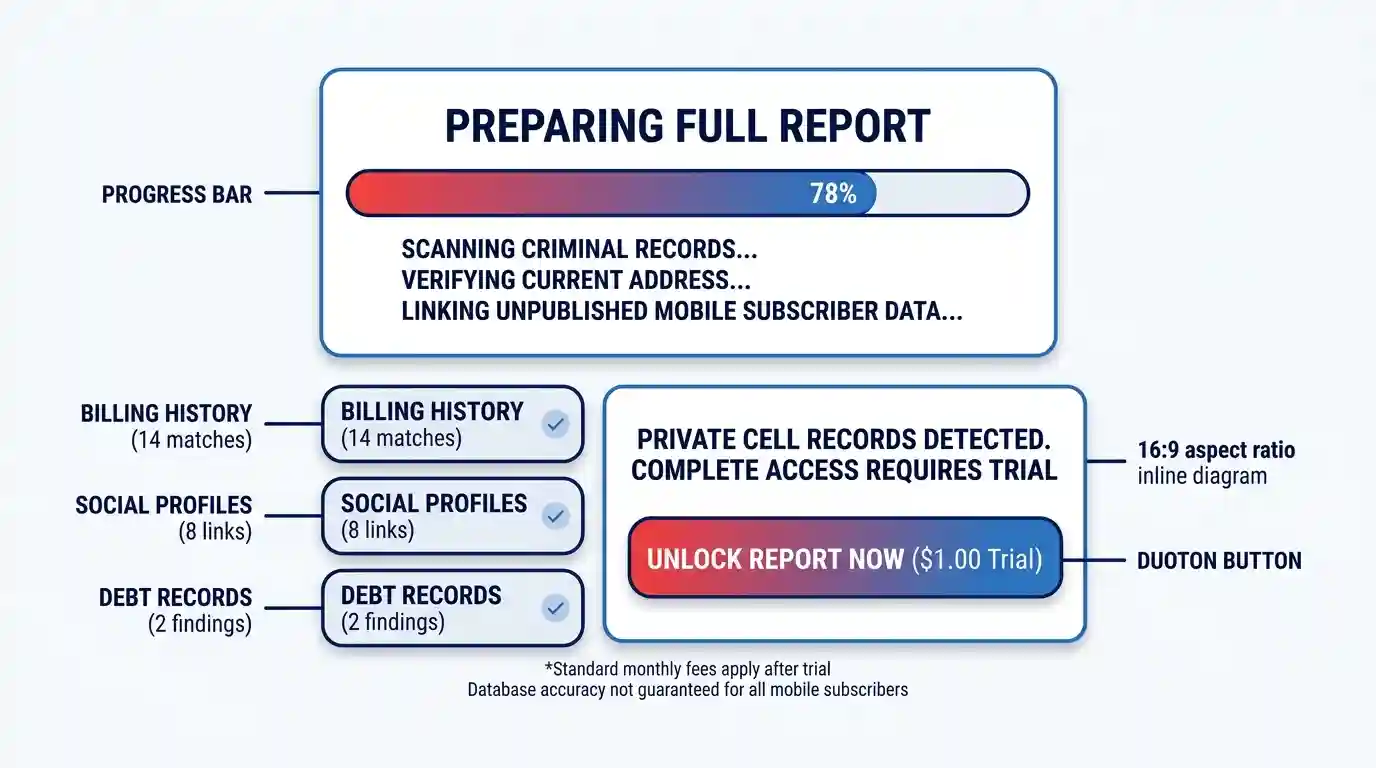
Watch for these common indicator patterns that signal a site will demand payment before delivering usable data:
- Progress bar animations: Simulated loading screens claiming to scan “50 billion public records” or “criminal databases” for a basic phone query. Real database lookups execute in milliseconds.
- Trial subscription lures: Prompts offering a full background report for $1.00 or $5.00. Accepting these trials enrolls your payment card in recurring monthly fees ranging from $19.95 to $34.95.
- Hidden subscriber disclosures: Micro-copy in site footers stating that cellular phone records are protected by telecommunication privacy laws and cannot be provided for free.
Step-by-Step Reverse Phone Lookup Protocol
Follow this multi-tier protocol to trace unknown numbers. If you are dealing with suspected robocalls or telemarketers, start at Step 1. If you are trying to identify a specific personal caller, skip directly to Step 2 and Step 3.
Step 1: Query Community Spam & Telemarketing Directories
When an unknown caller leaves no voicemail, your first step should be cross-referencing public spam reporting networks. Millions of users submit real-time reports categorizing calls from debt collectors, political campaigns, delivery agents, and financial scams.
- Open a browser tab and access Truecaller’s web lookup engine. Enter the full 10-digit number with its country code to view caller reputation scores, business names, and user-submitted flags.
- If the caller operates within the United Kingdom or Europe, search the Who Called Me database to view community comments detailing exact call scripts and caller behavior patterns.
- For US-based incoming calls, cross-reference the number against public regulatory indices using tools like Block Guard’s FTC complaint search to verify whether the line has been cited in official federal telemarketing violation reports.
Expected Outcome: If the number belongs to a call center or scam campaign, community directories will surface the caller’s business identity, operational category, and risk score instantly without requiring account creation.
Step 2: Execute Exact-Match Google OSINT Searches
If community directories return no results, the number likely belongs to a private individual or local small business. General search engine queries often obscure specific phone matches under paid advertising results. Using exact-match search operators (open-source intelligence dorking) bypasses sponsored ads and forces the search engine to return indexed pages containing that explicit digit string.
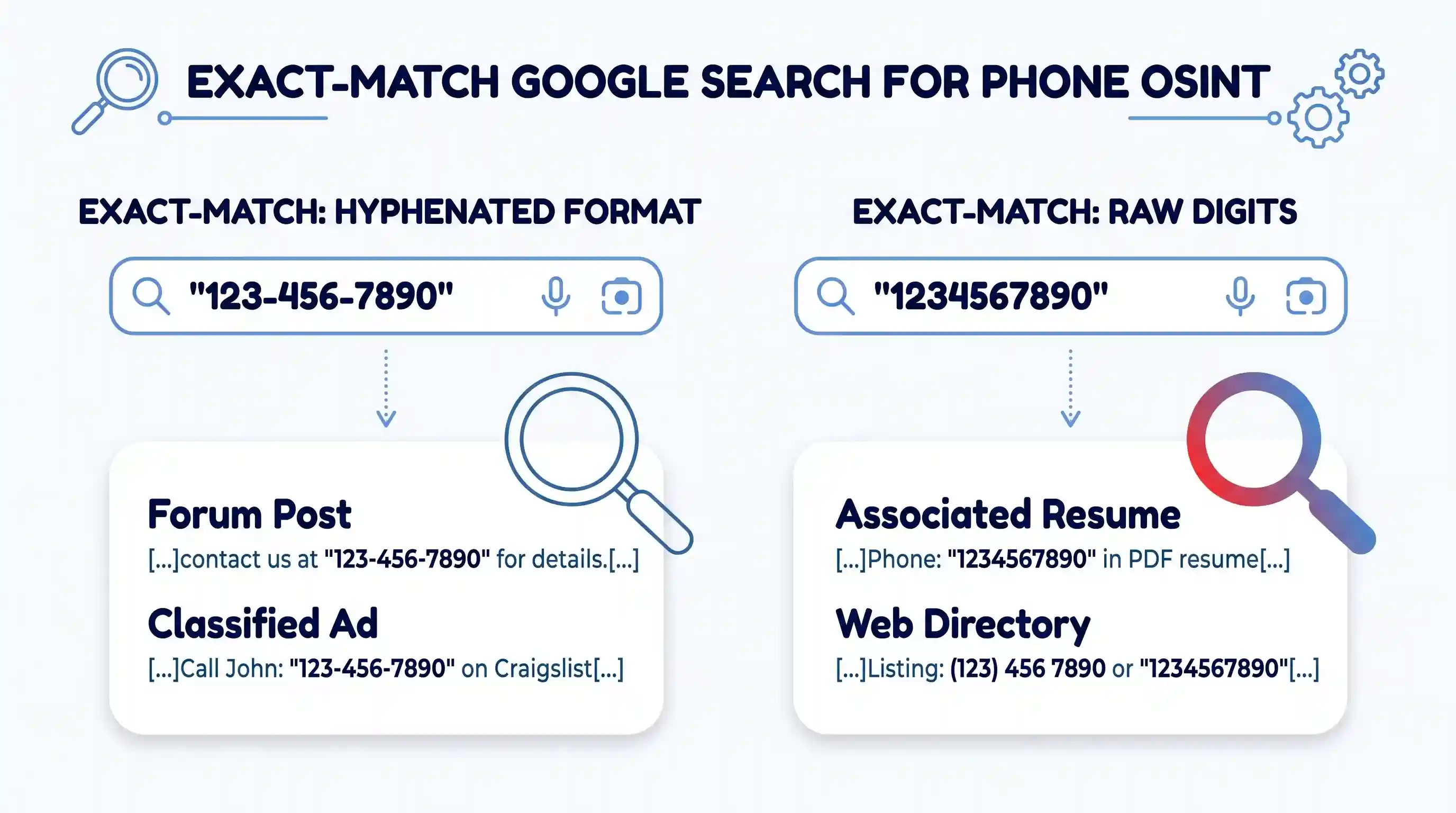
- Search exact digit strings by wrapping the number in quotation marks:
"123-456-7890"and"1234567890". - Restrict results to specific social platforms and professional directories by appending domain parameters:
site:facebook.com "123-456-7890"orsite:linkedin.com "123-456-7890". - Search for associated documents such as public real estate listings, corporate PDF filings, or classified ads:
filetype:pdf "123-456-7890".
Applying structured advanced search operators exposes forgotten forum postings, old Craigslist listings, church newsletters, and municipal public records where individuals published their direct cell numbers online.
According to the official OSINT Industries investigation workflow, testing both national international prefixes and local hyphenated formats across major search engines captures cached web pages that standard search algorithms filter out.
Expected Outcome: Uncovering direct web footprints connecting the number to real names, personal blog posts, business registration documents, or historical real estate listings.
Step 3: Cross-Reference Social Messaging Apps
Mobile messaging applications often link telephone numbers directly to user account profiles. By temporarily saving an unknown number into your device contacts, you can inspect associated profile pictures, screen names, and bio metadata within privacy-respecting messaging ecosystems.
- Create a temporary contact entry in your smartphone address book (e.g., “Trace Subject”) and save the unknown number in full international format (+1XXXYYYZZZZ).
- Open WhatsApp, select the new chat icon, and search for your newly created contact entry. If the contact possesses an active WhatsApp profile, their profile photo, display name, and public “About” text will load automatically.
- Open Telegram, access the contact sync menu, and check whether an associated account appears. Telegram profiles frequently expose custom user handles, personal avatars, and recent activity statuses.
- Open Signal to check for public profile names and avatar disclosures.
- Once your inspection is complete, delete the temporary contact from your address book. You can also safely backup contact lists to ensure sandbox testing does not pollute your main address book sync.
Expected Outcome: High-resolution profile photos, full display names, and personal bio text provided directly by the account owner, effectively confirming who holds the line.
Step 4: Verify Carrier, Location, and Line Type
When web searches and messaging applications reveal no user profiles, auditing the technical infrastructure of the phone line provides critical answers. Knowing whether a number is a physical landline, a cellular phone, or a virtual internet line dictates how you should handle incoming calls.
- Navigate to a free telecommunication lookup utility. Query the number using the IPQualityScore phone carrier lookup tool to fetch underlying network routing records.
- Inspect the line type specification: Landline, Mobile/Wireless, Fixed VoIP, or Non-Fixed VoIP.
- Review the original issuing carrier (e.g., Verizon Wireless, AT&T, T-Mobile, Bandwidth.com, or Twilio) and verify the original geographical rate center (city and state).
Identifying non-fixed virtual phone line services confirms that the caller operates through an internet application rather than a physical SIM card or home landline, which is a common characteristic of commercial call centers and automated web applications.
Expected Outcome: Clear determination of line type, network operator, origin location, and line activity status, establishing whether the caller is using a physical telephone or a virtual web application.
Verification: Confirming Identities and Detecting Spoofing
Gathering a name or carrier record is only effective if you verify that the information actually matches the person on the other end of the line. Misidentification occurs easily when relying on a single data point.
Cross-Referencing Multi-Source Signals
Never accept a single search result as absolute proof of identity. Validate your findings by comparing at least two independent data channels:
- Match the geographical area code and carrier location from Step 4 against the physical address details discovered via search dorking in Step 2.
- Confirm that the display name exposed in messaging apps (Step 3) aligns with public business directory records or social profiles found in Step 2.
- Verify that the line type reported by carrier utilities matches the caller’s behavior (for instance, a local bank calling from a non-fixed VoIP line warrants extra scrutiny).
Detecting Caller ID Spoofing
Caller ID spoofing occurs when a caller alters the outgoing call signal to display a fake number on your phone screen. Scammers frequently practice “neighbor spoofing,” disguising outgoing calls with your local area code and exchange prefix to increase answer rates.
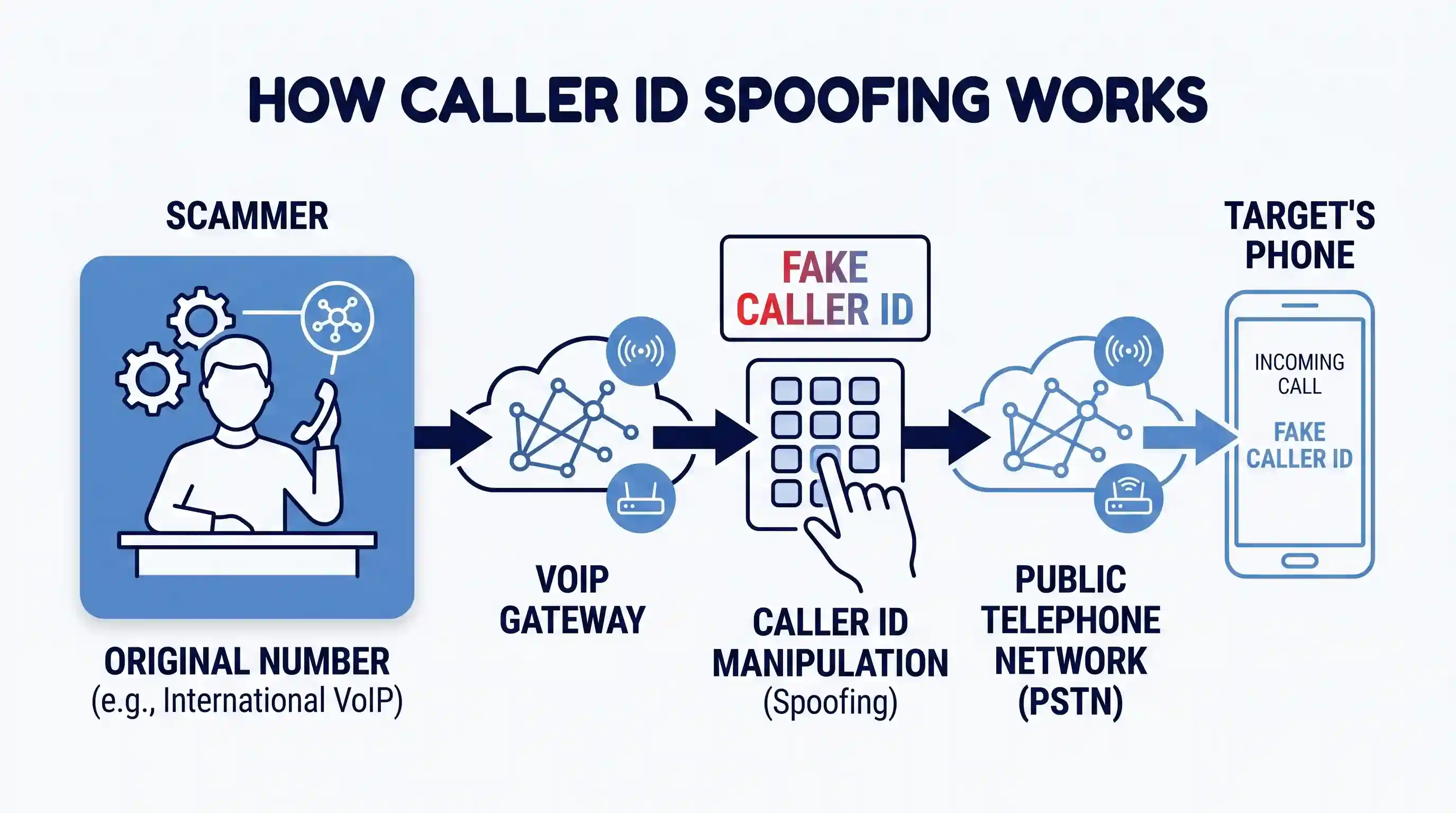
To guard against spoofed calls, implement these defense measures:
- Never rely solely on incoming Caller ID: Seeing a legitimate hospital, police department, or utility company name on your caller ID screen does not prove the call originated from that organization.
- Perform outbound verification callbacks: If an incoming call demands urgent payment or sensitive information, hang up immediately. Search for the official published phone number of the institution independently and initiate an outbound call directly.
- Review established defensive strategies: Read our complete guide on identifying caller ID spoofing tactics to learn how modern call authentication standards (STIR/SHAKEN) handle call routing verification.
Troubleshooting Common Lookup Failures
Even structured investigations can encounter dead ends. Here is how to resolve common reverse phone lookup roadblocks.
No Results Found Across Directories
If every public directory, search engine, and messaging application returns zero records, you are likely dealing with one of these scenarios:
- Newly provisioned mobile lines: Newly assigned cellular numbers take several months to accumulate public digital footprints or appear in cached search engine indexes.
- Strict privacy settings: Mobile users who uncheck “Discoverability by Phone Number” in their social app settings will not appear during messaging app contact syncs.
- Unlisted private numbers: Individuals who never publish their contact details on public websites or e-commerce platforms will leave no indexable search engine footprint.
Handling VoIP and Virtual Burner Numbers
When carrier lookup utilities identify a line as “Non-Fixed VoIP” (provisioned by services like Google Voice, TextNow, Pinger, or Skype), individual owner details are shielded behind service provider privacy protections. Non-fixed VoIP numbers can be created in seconds from anywhere in the world, making them popular for privacy-conscious individuals as well as telemarketers.
If you encounter a persistent virtual line that cannot be traced to a real person, consult our overview of temporary virtual phone numbers to understand how disposable internet numbers operate and how privacy apps handle user registration data.
Where This Approach Has Limits: Legal & Privacy Boundaries
Understanding the legal limits of public data retrieval prevents wasted effort and keeps your expectations realistic. Cellular carriers in North America and Europe are legally restricted from publishing master subscriber directories under telecommunication privacy regulations, including the Fair Credit Reporting Act (FCRA) and the General Data Protection Regulation (GDPR).
Legitimate, 100% free reverse phone lookup techniques rely entirely on public OSINT footprints, real-time spam reporting feeds, and opt-in user profiles. Websites promising to reveal private cellular billing addresses, SSNs, or credit histories for free are deceptive lead generators designed to sell recurring monthly subscriptions.
Key Takeaways
- Bypass commercial paywalls by avoiding sites that run fake loading screens or demand credit cards for $1 trial reports.
- Start every unknown call investigation by querying community spam directories like Truecaller to catch telemarketers quickly.
- Use exact-match Google search operators with quotation marks around both hyphenated and unformatted numbers to uncover cached web pages.
- Save unknown numbers to a temporary sandbox contact list to reveal associated WhatsApp, Telegram, or Signal profile pictures and display names.
- Verify the underlying line type using free technical lookup utilities to determine whether a caller is using a physical SIM card or a virtual VoIP burner app.
Frequently Asked Questions
Can I perform a completely free reverse phone lookup on a cell phone number?
Yes, but not through traditional directory white pages. Because cellular phone owner databases are protected by telecom privacy laws, finding a mobile caller for free requires open-source intelligence methods. By combining exact-match Google search operators, social messaging app profile checks (such as WhatsApp and Telegram), and community caller ID directories, you can identify cell phone users without paying for background check reports.
Why do most lookup websites demand payment after showing search progress?
Commercial reverse lookup websites operate on lead-generation models. They present animated loading graphics to simulate scanning private government or public records, creating a false sense of value. Once the animation finishes, the site hides basic mobile subscriber names behind a paywall, requiring a trial fee or monthly subscription to access records that are often outdated or incomplete.
What does it mean if a reverse lookup shows a number is VoIP?
A VoIP (Voice over Internet Protocol) classification means the phone number is routed over an internet connection rather than a physical copper landline or cellular cell tower. VoIP numbers are generated by virtual phone services like Google Voice, Skype, or business call center software. While legitimate businesses and privacy-conscious individuals use VoIP lines daily, scammers also favor them because they can be created remotely without a physical location contract.
How can I tell if an incoming call is using a spoofed phone number?
You can identify potential caller ID spoofing by evaluating caller behavior and technical line data. If an incoming caller claims to represent an official agency (like a bank, government office, or utility provider) but carrier lookup utilities identify the originating line as a non-fixed VoIP number or residential landline, the caller ID is likely spoofed. Always hang up and call back using the institution’s official published website number to verify authenticity.

💬 Comments