A video is more likely to spread when people choose to watch it, find enough value to stay, and feel a reason to react or share. Editing can strengthen those parts of the experience, but no CapCut effect, video length, hook style, or other single technique can guarantee that a platform will make a video go viral.
The useful approach is to separate what you can control from what you cannot. You can improve the idea, opening, pacing, captions, framing, and clarity of a video. Recommendation systems, audience demand, competing videos, and individual viewer interests still affect how widely it travels.
Quick Take
Virality comes from a combination of audience interest, viewer behavior, shareability, and distribution. CapCut can help you make a video clearer and easier to watch, but use performance data rather than editing tricks or fixed length rules to decide what to improve.
What “Going Viral” Actually Means
A video goes viral when it spreads unusually quickly and reaches far beyond the audience that would normally see it. There is no universal view count that turns a post from ordinary into viral. A small creator reaching hundreds of thousands of unexpected viewers and a major publisher reaching millions can both experience unusually broad distribution relative to their normal reach.
That distinction matters because virality is an outcome, not a video format. A vertical short video, tutorial, comedy clip, product demonstration, news clip, or long-form video can all spread widely. The important question is not whether the video contains a particular transition or stays below a particular duration. It is whether enough people find the content relevant and respond well when it reaches them.
Fixed rules about duration are especially unreliable. YouTube states that there is no universal ideal video length. The better target is the amount of time needed to deliver the promised value without unnecessary material, followed by a check of how your actual audience responds.
What Makes People Watch and Share Videos
Think about the last video you sent to somebody else. You probably had a reason: it was useful, surprising, funny, impressive, emotionally strong, or unusually relevant to that person. Sharing usually begins with the value a viewer receives, not with the editing software used to assemble the clip.
Research by Jonah Berger and Katherine Milkman found that content associated with stronger activating emotions, such as awe, anger, or anxiety, was more likely to be shared in their dataset. Interesting, surprising, and practically useful content was also positively associated with virality. The research examined New York Times articles rather than modern short-form video feeds, so it is better used as evidence about human sharing behavior than as a formula for a social platform’s algorithm. The published virality study does not imply that creators should manufacture anger or exaggerate emotion.
For video, the first practical test is simpler: can a new viewer quickly understand why the video is worth watching? A clear opening might show the result of a repair, name the problem being solved, begin at the most interesting point of a story, or make the subject obvious on screen. The goal is not to force a dramatic “hook” into every post. It is to remove the uncertainty that makes somebody swipe away before reaching the useful part.
Clarity has to continue after the opening. Long pauses, unreadable captions, unnecessary introductions, distracting backgrounds, or repeated information can make an otherwise good idea harder to follow. Cutting those obstacles is often more useful than adding more effects.
How Recommendation Systems Expand a Video’s Reach
Once a video is published, the platform has to decide which people may want to see it. A recommendation system is the software that makes those personalized choices. It does not simply check whether a creator used a certain transition, song, caption style, or editing app.
TikTok describes three broad categories used in its recommendation systems: user interactions, content information, and user information. For the For You feed, interactions can include whether someone watches, skips, likes, shares, or comments, as well as how long they spend watching. Creators focused heavily on TikTok should therefore treat likes as only one part of the wider set of TikTok recommendation signals.
YouTube describes a similar idea in different terms. It groups performance signals around appeal, engagement, and satisfaction: whether people choose the content, whether they continue watching after starting, and whether their response suggests that they enjoyed it.
For Shorts, ranking also considers whether viewers choose to watch, average view duration, average percentage viewed, likes, and post-watch satisfaction. These are examples of documented signals, not a formula that lets a creator calculate or guarantee distribution.
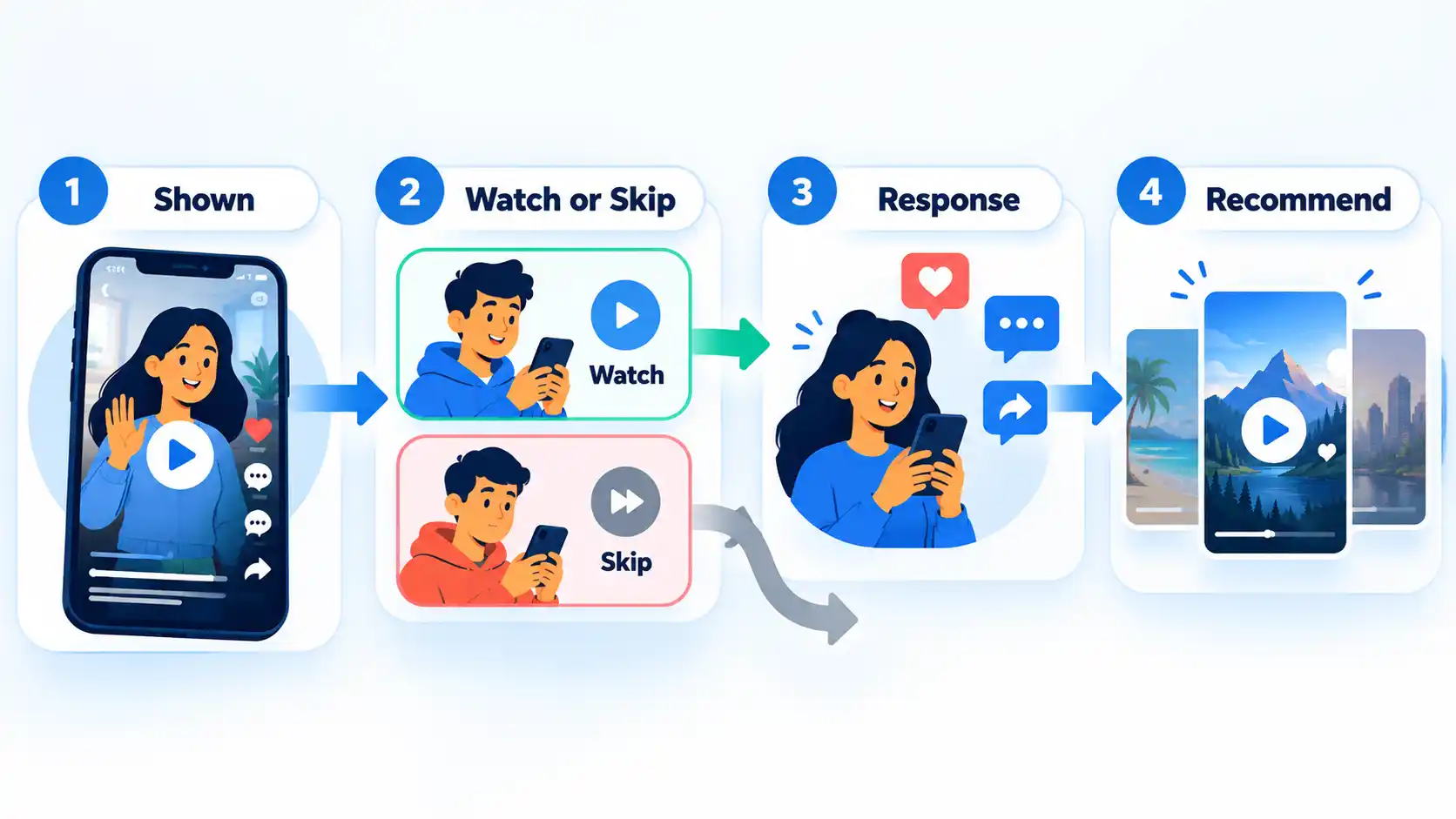
The exact signals and their importance differ by platform and can change. The useful principle is that distribution reacts to people, content, context, and competing choices rather than to one secret setting.
That is also why TikTok and YouTube Shorts recommendation signals should not be treated as interchangeable even when both platforms reward videos that viewers choose to keep watching.
What CapCut Can and Cannot Do for Virality
CapCut can change the presentation of a video, not the audience demand behind it. On the Web editor, creators can use manual trimming and splitting, while Auto Captions can generate editable subtitles. These tools can help remove dead time or make spoken information easier to follow.
What CapCut cannot do is guarantee demand or distribution. A polished video can still cover a subject few people want at that moment. Another creator may publish stronger competing content. The platform may decide that a different group of videos is more relevant to a particular viewer.
The distinction is easiest to see by separating editing choices from distribution factors:
| Area | You can influence | You cannot guarantee |
|---|---|---|
| Opening | How quickly the subject, result, problem, or value becomes clear | That every viewer will find the idea interesting |
| Pacing | Removing dead time, repetition, and clips that do not advance the video | A universal retention level or ideal duration |
| Comprehension | Captions, readable text, clear framing, and understandable audio | That viewers will agree with, like, or share the message |
| Presentation | Crop, background, sequence, transitions, and visual emphasis | How much audience demand exists for the topic |
| Finished file | Available resolution, quality, frame rate, and format settings | How a platform will distribute the uploaded video |
This boundary keeps editing decisions useful. Instead of asking which CapCut feature “makes videos viral,” ask what is currently making the video harder to understand, slower to reach its point, or less comfortable to watch.
A Practical CapCut Editing Workflow
This workflow uses CapCut Web because the browser version gives a clear starting point without requiring a separate desktop installation. Interface details can change, so use the current controls shown in your account when they differ from the labels below.
- Start with the video’s one main promise. Before adding effects, decide what the viewer should understand, see, or feel by the end. A repair video might promise a fix; a comparison might promise a visible difference. This gives you a reason for keeping or removing each clip.
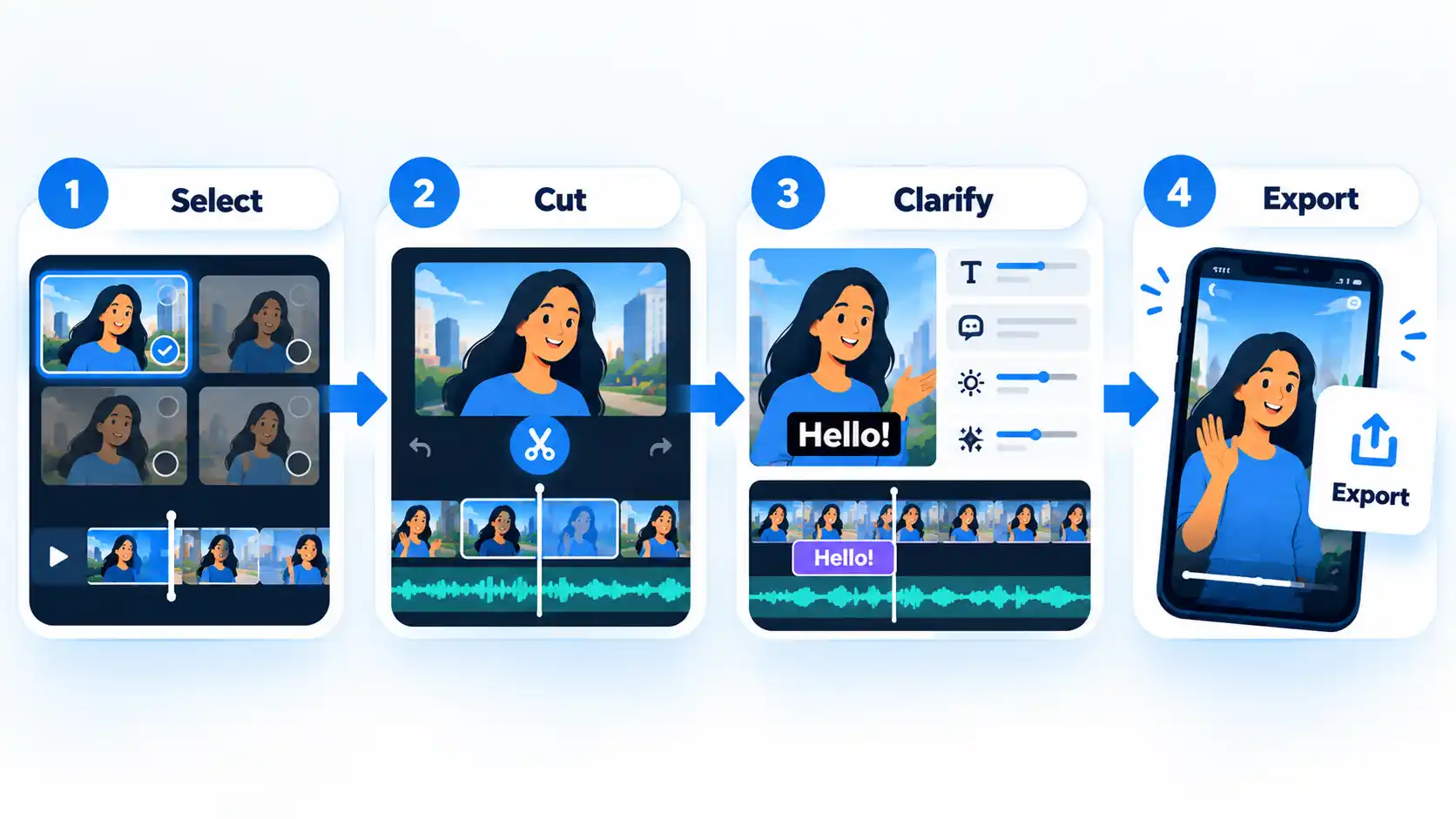
- Import the footage and build the useful sequence. Open the CapCut online video editor, sign in, and upload the footage you need. CapCut Web supports manual trimming and splitting, so cut pauses, repeated explanations, and material that delays the promised value. If you specifically want Auto Cut, current CapCut support documents it for mobile and desktop rather than Web.
- Make important speech easy to follow. When captions help the audience, open Text > Auto Captions, select the language, and generate them. CapCut’s current Web instructions allow you to select a caption block and correct inaccurate text. Review names, numbers, technical words, and timing rather than assuming automatic recognition is perfect. Preview the captions with sound before export so transcription or timing errors are easier to catch.
- Remove visual distractions only when they interfere. A busy background does not automatically need replacing. If it competes with the person, product, or demonstration that viewers need to see, a video background remover is one optional way to simplify the frame. Keep the original background when it provides useful context or already looks clear.
- Watch the full edit as a viewer would. Play the video from the beginning with sound. Check whether the opening matches the video’s promise, captions stay readable, cuts feel understandable, and text or effects compete with anything important. Remove an effect when it adds movement without improving meaning.
- Export using settings your project actually supports. In CapCut Web, open Export and review the available settings. CapCut documents resolution availability as dependent on the platform, device, browser, source footage, and project conditions, so choose from the settings actually offered by your project rather than assuming every account can export the same specification. The workflow is complete when the downloaded file plays correctly and preserves the intended picture, audio, and captions.
How to Test Whether Your Edits Are Working
Finishing an edit tells you that the file is ready to publish. It does not tell you whether the choices worked for viewers. Use several comparable posts to build evidence about your own audience rather than judging the strategy from one unusually strong or weak result.
- Publish a video with a clear purpose. Know what you are testing. It might be a faster opening, cleaner captions, less dead time, a different structure, or a narrower topic. Avoid changing every part of the content at once when you want to learn from the result.
- Inspect the viewer response available on the platform. On YouTube, the audience-retention report can show where viewers continue watching, leave, or rewatch portions of a video. Its highlighted key moments can include dips, spikes, top moments, and intro performance. YouTube notes that these highlighted moments may not appear unless a video is at least 60 seconds long and has at least 100 views, so the absence of those labels is not evidence that the edit failed.
- Locate the moment that deserves investigation. If viewers repeatedly leave during a long introduction, examine the introduction. If a section attracts unusually strong retention or rewatching, inspect what changed there. A graph shows what happened, not necessarily why, so treat the cause as a hypothesis to test rather than a fact.
- Compare videos that are reasonably similar. A 20-second comedy clip and a five-minute tutorial answer different viewer needs. Comparisons become more useful when the topic, intended audience, format, or purpose is similar enough that the difference means something.
- Change one meaningful variable when practical. If you suspect the opening is slow, improve the opening on the next comparable video without simultaneously changing the topic, format, length, caption style, and publishing time. Repeated tests provide better evidence than copying a generic benchmark from another account.
Learning to read audience retention patterns is especially useful when a video’s overall numbers look acceptable but one part repeatedly loses viewers.
On TikTok, topic research can begin even before publishing. Creator Search Insights can surface subjects people search for and, in supported regions, content gaps where search interest is not matched by as much relevant content. TikTok describes the feature as a source of search-topic insight, not as a promise of extra distribution.
Why a Good Video Still May Not Go Viral
A strong edit removes some reasons for viewers to leave, but it does not control the size of the interested audience. A highly specific tutorial may satisfy nearly everyone who needs it and still receive fewer views than a broadly appealing entertainment clip.
On YouTube, reach can also change with topic interest, competition, and seasonality. A video can therefore perform well by its creator’s normal standards and still receive fewer impressions when viewers have stronger alternatives or when interest in the subject falls.
Personalization adds another limit. Two people can open the same platform at the same time and receive different recommendations because their viewing histories, interests, and other signals differ. There is no single version of the feed that every creator is competing to enter.
When a good video gets low views, separate problems you can improve, such as topic choice or a weak opening, from normal variation caused by competition, timing, audience size, and personalization.
This is why a viral spike should not become the only definition of success. A smaller video that reaches the right people, answers its question well, and gives you repeatable information about your audience can be more useful for future content than one unexplained burst of reach.
The Bottom Line
You cannot edit your way to guaranteed virality. You can make a stronger candidate for attention by choosing a relevant idea, making the value clear early, cutting unnecessary material, improving comprehension, and testing what viewers actually do after publication.
CapCut is useful when it solves one of those production problems. Use it to shape the viewer experience, then let retention, engagement, and repeated comparisons tell you what deserves another attempt. That approach produces evidence you can apply to later videos instead of relying on a secret viral formula.

💬 Comments