Choosing antivirus software is not about finding the product with the biggest feature list or the highest score in one malware test. A better choice starts with the protection already on your PC, then weighs independent test results, false alarms, performance, privacy, and the extra features you will actually use.
These ten mistakes are not ranked from worst to least serious. Each describes a different way an antivirus comparison can point you toward the wrong product.
Mistake 1: Assuming You Need to Replace Windows Security
A Windows PC does not begin with no protection at all. Microsoft Defender Antivirus runs in the background on Windows and scans files and processes for malware, while the Windows Security app also provides access to security-intelligence updates and ransomware controls such as Controlled Folder Access.
Before paying for another antivirus, check what your PC already provides. Microsoft’s Windows Security information explains the real-time scanning, protection updates, and ransomware controls built into Windows.
A third-party product can still make sense if it adds something you need, such as different web protection, family controls, cross-device management, support, or other security tools. The useful comparison is between those added benefits and Windows’ built-in antivirus baseline, not between “protected” and “unprotected.”
Mistake 2: Choosing by One Detection Percentage
A malware-protection percentage looks easy to compare. If one product shows 100% and another shows 99%, it is tempting to assume the first product must always be safer. That number only describes how the product performed in a particular test under particular conditions.
AV-TEST’s July-August 2026 Windows evaluation assessed 15 home-user security products with their normal settings and separated results into protection, performance, and usability. That makes one point clear: antivirus quality is not measured by a single detection percentage.
AV-Comparatives uses a different real-world methodology. Its February-May 2026 test covered 400 cases and included false-alarm testing alongside protection. The test combines protection results with false-alarm evidence, so a high blocking rate is not judged in isolation.
There is no sound universal rule that an antivirus must cross one fixed percentage or be rejected. Compare recent results from reputable independent labs, check what each test measures, and look for consistent performance across protection, false alarms, and system impact. Knowing how to read antivirus test results is more useful than chasing the largest isolated number.
Mistake 3: Looking Only at Traditional Virus Scanning
Many attacks begin before a suspicious file is sitting on your hard drive. You might first encounter a phishing page, a dangerous download, or a program that looks harmless until it starts behaving like malware.
Useful protection can therefore operate at several points. Microsoft Defender SmartScreen, for example, can warn about phishing or malware websites, suspicious applications, and potentially malicious downloads. Its site and download checks can stop a threat before ordinary file scanning becomes the main defense.
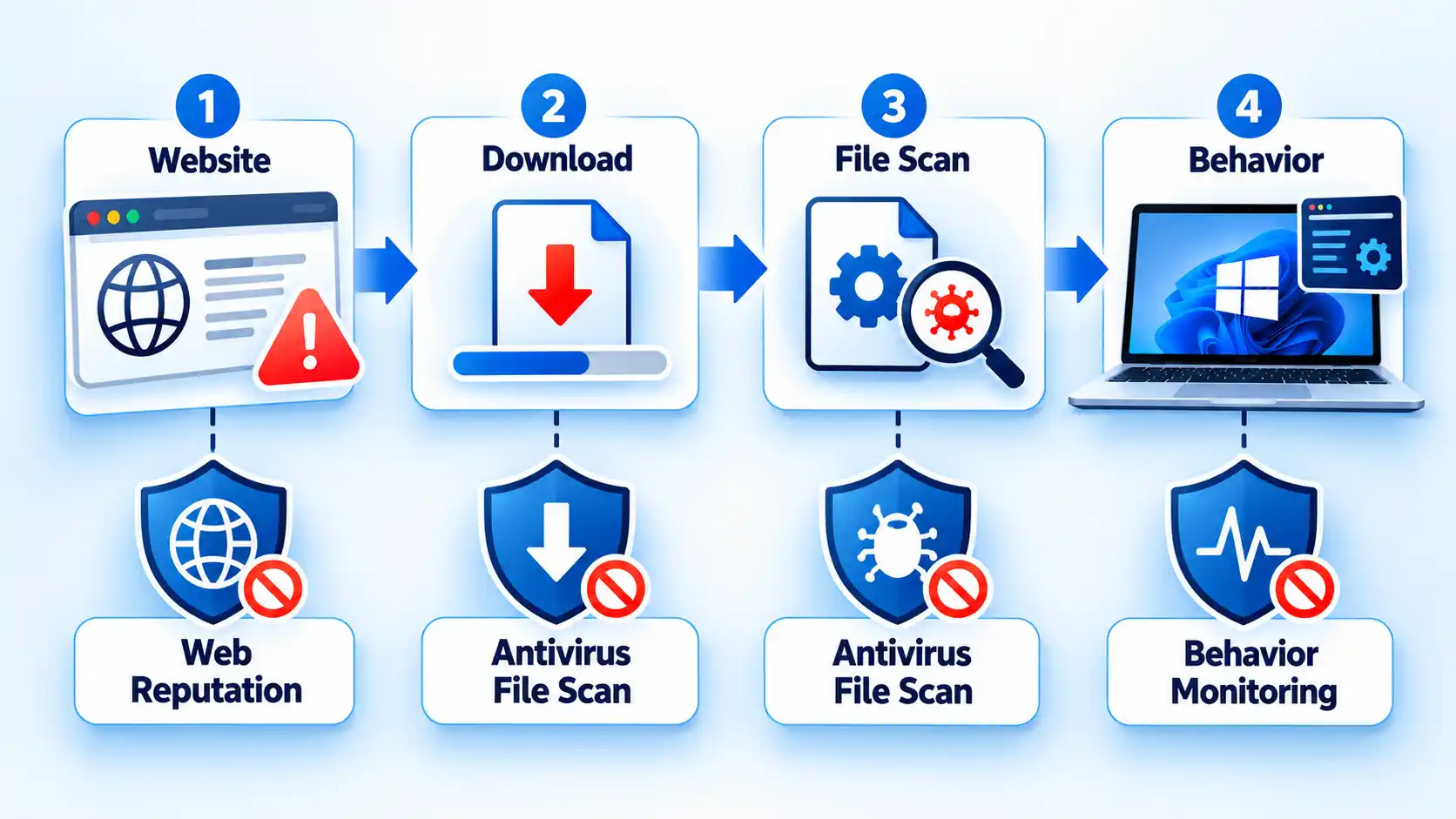
AV-Comparatives’ real-world testing also allows different protection layers to stop an attack at different stages. That matters because a product may use URL filtering, reputation checks, file detection, or behavior-based protection rather than relying on one scanner.
When comparing software, look beyond a claim about “virus detection.” Check whether the protection you care about also covers malicious websites, phishing, suspicious downloads, ransomware behavior, and other attack stages relevant to how you use the PC.
Mistake 4: Trusting One Review or Ranking
A review can help you discover products, but one ranking should not become your entire security decision. Editorial reviews, independent laboratory tests, vendor specifications, and customer reports answer different questions.
An antivirus comparison site can help you build a shortlist, but protection, false-positive, and performance claims are stronger when you also check recent independent laboratory results.
Independent labs are useful for measurable comparisons because several products are tested under the same methodology. Official vendor pages are better for checking current compatibility and features. Editorial reviews can add context about interface design and practical limitations. Customer reviews can reveal individual experiences, but they are not controlled security tests.
Using those sources for the questions they can actually answer gives you a more reliable shortlist than following one winner label.
Mistake 5: Ignoring False Positives
Security software can make a mistake in the opposite direction from missing malware: it can flag a harmless file, website, or program as dangerous. This is called a false positive or false alarm.
False alarms matter because they can block legitimate software, interrupt work, or teach users to distrust security warnings. The goal is not simply to block as much as possible. Good protection also needs to distinguish safe activity from real threats.
AV-Comparatives tests wrongly blocked benign websites and files as part of its real-world evaluation. That makes false positives worth comparing when two products have similarly strong protection results.
If a familiar installer or website is blocked, do not automatically assume the antivirus is wrong. Check where the file came from and what the alert says before allowing it. Understanding why antivirus flags safe files helps you separate a plausible false alarm from a warning that deserves investigation.
Mistake 6: Ignoring Performance Impact
Antivirus software works in the background while you use the PC, so its effect on speed matters. Slowdowns can show up when you copy files, install applications, launch programs, download files, or browse the web.
Performance is better measured than guessed from advertising terms such as “lightweight.” AV-Comparatives’ April 2026 performance test used a Windows 11 system and measured normal activities including file operations, application installation and launch, downloads, and web browsing. Those speed-impact tests are kept separate from malware-protection results.
That separation prevents another common mistake: treating fast software as automatically secure, or strong protection as proof that the software will feel fast on your PC.
If you use modest hardware, give performance results more weight and use a legitimate trial period when one is available. The goal is strong protection with an acceptable effect on the applications you actually run.
Mistake 7: Installing Multiple Real-Time Antivirus Products
Running two primary antivirus products at the same time can sound like double protection. Windows is not designed on the assumption that two active real-time antivirus engines are always better than one.
Microsoft states that installing a compatible non-Microsoft antivirus automatically turns Microsoft Defender Antivirus off. The UK’s National Cyber Security Centre also cautions that separate antivirus products do not always work alongside the built-in antivirus as users might expect.
This does not mean every second-opinion scanner, browser security tool, or specialist utility conflicts with your main antivirus. The mistake is assuming that two full real-time antivirus products automatically provide twice the protection.
Before installing another security program, check whether it is designed to replace your main antivirus, complement it, or run only when you start a scan.
Mistake 8: Ignoring the Vendor’s Privacy Practices
Antivirus software is installed in a position of considerable trust. Depending on the product and features you enable, it may examine files, websites, downloads, suspicious programs, or security telemetry to detect threats.
A documented regulatory case shows why privacy deserves attention. In 2024, the U.S. Federal Trade Commission alleged that Avast and its subsidiaries collected browsing information through antivirus software and browser extensions and sold data without adequate notice or consent. The final order banned the sale or licensing of browsing data for advertising and required a $16.5 million payment.
That case concerns Avast’s documented conduct; it does not show that every antivirus vendor handles data the same way. The lesson is to check rather than assume.
Before installing a product, look for clear information about security telemetry, optional data collection, analytics or advertising use, account controls, retention, and data sharing. Strong malware protection does not cancel out a privacy policy you are uncomfortable accepting.
Mistake 9: Paying for Features You Do Not Need
Security suites often bundle tools far beyond malware scanning. Depending on the product and plan, those extras can include a virtual private network (VPN), password management, parental controls, cloud backup, identity monitoring, device-cleanup tools, or coverage for phones and Macs.
A longer feature list is not automatically better value. If you already use a password manager you trust, another password vault may add little. If there are no children in the household, parental controls may be irrelevant. If you need to protect one Windows PC, a large multi-device package may solve a problem you do not have.
Start with your actual requirements: which devices need protection, which operating systems they run, and which bundled services would replace something you already use or pay for. Then check the exact plan before buying because bundles, device limits, trials, and renewal terms can change.
Usability matters as well. A feature has little value if it is difficult to configure or unavailable on the device where you need it.
Mistake 10: Treating Antivirus as Your Entire Security Plan
Antivirus reduces risk; it does not make every action on a PC safe. No product can guarantee that every malicious website, fraudulent message, dangerous download, stolen password, or newly discovered software flaw will be stopped.
Windows itself uses several different security controls rather than relying on one scanner. SmartScreen can warn about suspicious websites and downloads, Defender Antivirus scans files and programs, security updates address known flaws, and ransomware controls can restrict changes to protected files.
The UK’s National Cyber Security Centre recommends keeping antivirus switched on and up to date. Its consumer antivirus advice also notes that modern operating systems already include antivirus protection.
Antivirus therefore belongs inside a wider security routine. Keep Windows and important applications updated, be cautious with unexpected downloads and login pages, protect important accounts, and keep recoverable copies of files you cannot afford to lose.
A Better Way to Choose PC Security Software
A useful antivirus decision can be reduced to four questions:
- What protection do you already have? Check the Windows Security baseline before paying to replace it.
- How does the product perform under independent testing? Compare recent protection, false-alarm, and performance results rather than one headline percentage.
- What additional problem does it solve? Pay for web protection, family controls, support, privacy tools, or multi-device management only when those features meet a real need.
- What new trade-offs does it introduce? Consider subscription cost, system impact, privacy practices, compatibility, and the extra software you will need to manage.
A product earns its place on your PC when its added benefits are useful enough to justify those trade-offs. That gives you a clearer decision than searching for one universal “best antivirus” score.

💬 Comments