A service mesh is a dedicated infrastructure layer that manages, secures, and monitors how microservices talk to each other, without touching a line of application code. Its real value shows up at scale: once a system has dozens of services calling each other over the network, a mesh is often the difference between finding a failing call in minutes and losing a day to it.
What Is a Service Mesh?
Most modern applications aren’t one program anymore. They’re a set of small, independently deployed services that call each other constantly to do their job, an approach generally called microservices. That pattern solves a lot of problems around team autonomy and independent deployment, but it creates a new one: every one of those calls can time out, fail, get intercepted, or slow the whole request chain down, and none of that logic naturally lives anywhere else.
Red Hat’s service mesh documentation describes a service mesh as infrastructure that handles traffic routing, security, and observability at the platform layer instead of inside each service’s code. AWS’s definition of a service mesh breaks that down further into concrete jobs: service discovery so instances can find each other as they scale up and down, load balancing across healthy instances, fine-grained traffic control, and encrypted, authenticated communication between services. A mesh doesn’t replace any of that logic that used to get bolted onto each service individually; it centralizes it.
Quick Take
A service mesh sits between your microservices and handles the plumbing: retries, encryption, load balancing, and visibility into who’s calling whom and how slowly. It’s genuinely useful once you have enough services that manual troubleshooting stops working, and it’s genuinely unnecessary if you have five services and a small team that can reason about the whole system in their heads. The technology itself changed meaningfully in the last two years: the classic model added a proxy container to every single service, which got expensive to run and operate, and 2026’s version of this conversation is mostly about architectures that get the same benefits without that tax.
How a Service Mesh Actually Works
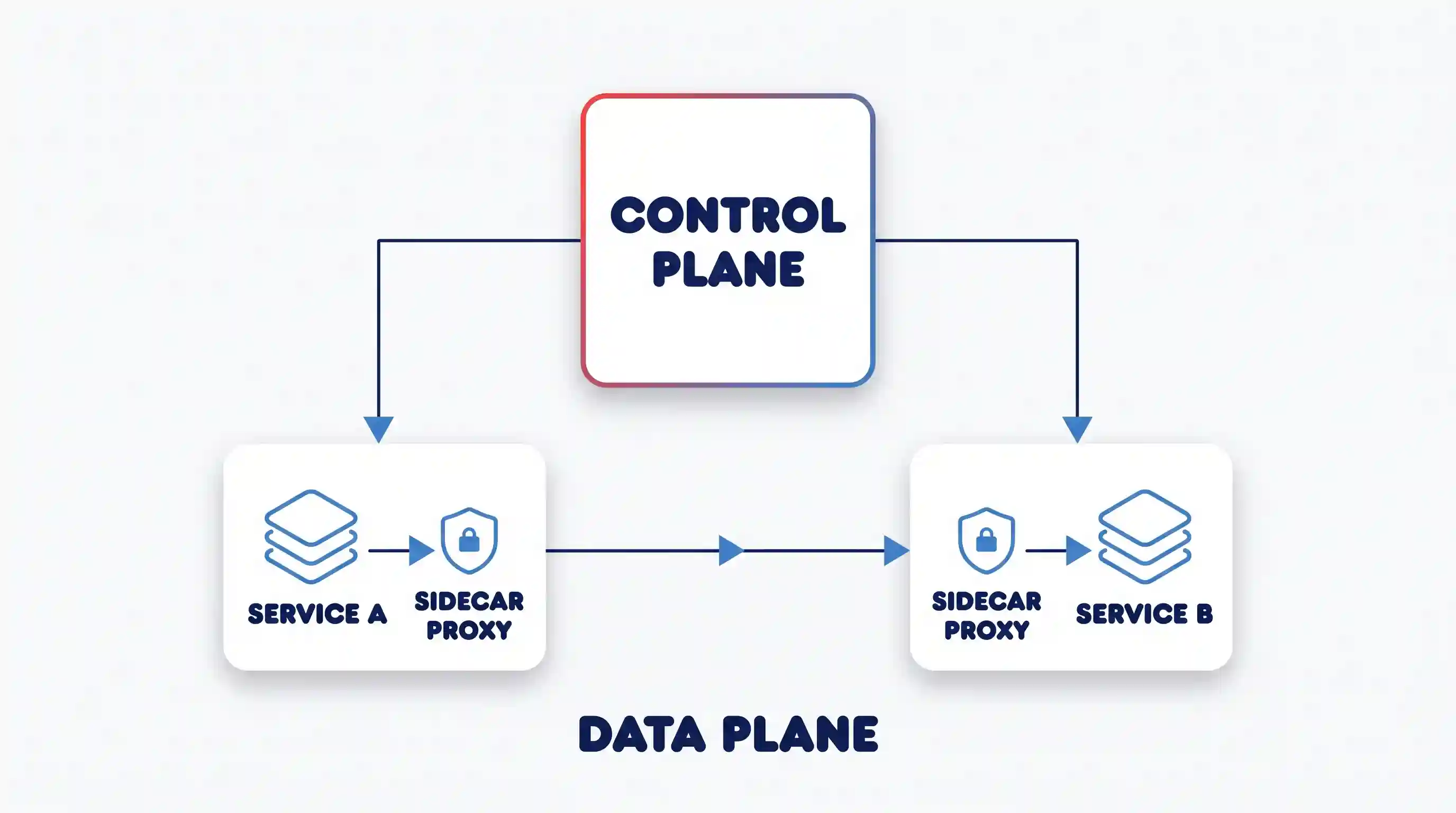
Every mainstream service mesh splits its work into two layers. The data plane is the part that actually touches traffic: in the classic design, that’s a lightweight proxy (a sidecar) deployed alongside every instance of every service. Instead of Service A calling Service B directly, the call goes through A’s sidecar, over the network to B’s sidecar, and then to B. Neither service’s own code changes; the proxies do the routing, retrying, and encrypting.
The control plane is the management layer that configures all those proxies at once: it pushes out routing rules, rotates the certificates used for encrypted connections, and collects the metrics and traces the proxies generate. Linkerd’s own documentation describes this same split independently of Red Hat and AWS, which is a useful sanity check: it’s not one vendor’s marketing framing, it’s how the architecture actually works across implementations. In practice, this is what makes mutual TLS (mTLS), where both sides of a connection prove their identity and encrypt the traffic between them, practical to roll out across hundreds of services. The control plane manages the certificates, and the sidecars enforce the encryption, so no developer has to write TLS handling into their own service.
The Shift Nobody’s Glossary Page Mentions: Sidecars vs. Sidecar-less
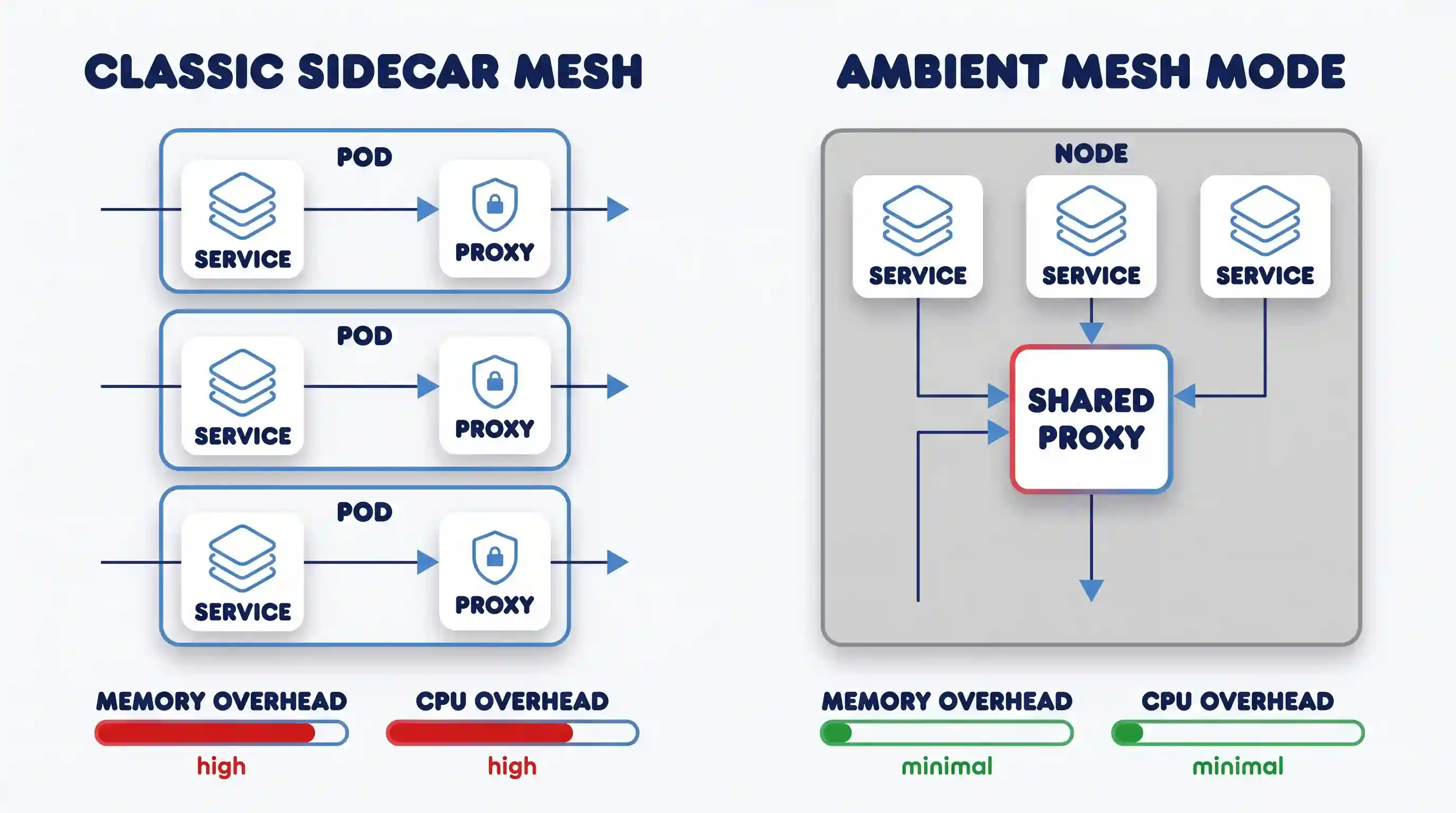
Here’s the part most explainer pages on this topic skip, because most of them were written before it happened: sidecar-based service mesh adoption actually declined. According to CNCF’s 2025 cloud native survey, sidecar mesh adoption dropped from 50% of surveyed organizations in 2023 to 42% in 2024. The reason wasn’t that teams stopped needing traffic management, security, and observability between services. They still did. The reason was operational cost: running a full proxy container next to every single instance of every service adds real memory and CPU overhead, and upgrading the mesh often meant restarting every application pod in the cluster to pick up the new sidecar version.
That’s the problem sidecar-less architectures were built to fix. Istio’s ambient mode announcement, which reached general availability in Istio v1.24, replaces the per-pod sidecar with a shared, lightweight proxy running once per node, plus optional per-namespace proxies for teams that need more advanced layer-7 features. Istio’s own numbers put the resource savings from this change above 90% in some deployments, and because there’s no sidecar container injected into each pod, upgrading the mesh no longer requires restarting application workloads. If you’re evaluating a mesh in 2026, this distinction between sidecar and sidecar-less matters more than which brand name you pick, because it changes what the mesh actually costs you to run.
What a Service Mesh Does in Practice
Stripped of the architecture diagrams, here’s what a mesh is actually buying a team day to day:
- Traffic shifting and canary releases: You can route 5% of live traffic to a new version of a service, watch its error rate, and roll the rest over gradually, all through mesh configuration, without redeploying anything.
- Zero-trust security by default: With mTLS enforced at the proxy layer, every service-to-service call is encrypted and authenticated automatically, instead of depending on each team to implement it correctly (or forget to).
- Observability without instrumentation work: Because every call passes through a proxy, the mesh can generate consistent latency, error-rate, and trace data for every service without each team adding logging code by hand.
- Resilience patterns applied uniformly: Retries, timeouts, and circuit breaking (stopping calls to a service that’s already failing, so the failure doesn’t cascade) get configured once at the mesh level instead of reimplemented inside every service.
This is also where commercial products earn their keep for teams that don’t want to run and patch the open-source control plane themselves. Service mesh products like Kong Mesh package these capabilities (traffic policy, mTLS, observability, centralized governance across Kubernetes, VMs, and on-prem environments) into something a platform team can operate without becoming full-time mesh maintainers, which matters if your deployment pipeline already has enough moving parts.
Common Misconceptions About Service Mesh
The biggest one: a service mesh is not an API gateway, and it doesn’t replace one. A gateway handles north-south traffic, meaning requests coming in from outside your system, from a browser or a partner API, including things a mesh doesn’t do, like protocol translation and external rate limiting. A mesh handles east-west traffic, the calls services make to each other internally. Most production systems that need one also still need an API gateway too; they solve adjacent, not overlapping, problems, a distinction TechTarget’s service mesh overview makes as well.
Second misconception: that installing a mesh is free once it’s running. It isn’t. Every call now makes an extra hop through a proxy, which adds some latency. How much depends on your proxy and traffic pattern, but it’s never exactly zero, and someone on your team now owns an additional piece of infrastructure that can itself fail or misconfigure traffic. A mesh is a trade: you’re paying operational cost and a small latency tax in exchange for centralized control and consistency you’d otherwise have to build into every service by hand.
Third: a mesh does not fix bad service boundaries. If your microservices are poorly decomposed, meaning too chatty, too tightly coupled, or calling each other in circular dependencies, a mesh will give you better visibility into that mess, but it won’t untangle it. Teams sometimes reach for a mesh expecting it to paper over architectural debt, and it can’t. If a request already fans out through eight synchronous calls before it can respond, a mesh will show you that clearly in its tracing data, but the fix is still redesigning those service boundaries, not adding more infrastructure on top of them.
Where a Service Mesh Falls Short
A service mesh isn’t a default-yes decision. The honest version of “should we adopt one” depends on a handful of concrete signals:
| Signal in your system | Consider a service mesh | Skip it for now |
|---|---|---|
| Number of services calling each other | Dozens or more, growing | A handful, stable |
| Cross-service security requirements | Need mTLS/zero-trust enforced consistently | Trust boundary is simple, low compliance pressure |
| Team’s platform/ops capacity | Dedicated platform team to own it | Small team already stretched thin |
| Debugging pain today | Tracing failures across services is already hard | You can reason about the whole system by hand |
| Latency sensitivity | Can absorb a small added hop per call | Every millisecond is already tightly budgeted |
The failure mode worth naming directly: a small team adopts a full sidecar-based mesh because it showed up in a conference talk, and six months later they’re spending more engineering time operating the mesh’s control plane than they were spending on the traffic problems it was supposed to fix. This is exactly the pattern behind the CNCF adoption decline mentioned earlier: the tool outgrew the team’s capacity to run it. If that risk sounds familiar, sidecar-less options like ambient mode are worth evaluating specifically because they lower that operational floor, though they’re newer and have a smaller track record than the classic sidecar model.
A second, quieter failure mode: teams that adopt a mesh purely for its security features often skip the traffic-management and observability configuration entirely, then wonder why they’re still debugging cascading failures manually. The mTLS runs by default once the mesh is installed, but canary routing, retries, and circuit breaking all have to be configured deliberately, service by service. Installing a mesh doesn’t switch those on for free.
Adopting Service Mesh in Your Business
Rolling out a mesh doesn’t have to be all-or-nothing. Ambient-style architectures in particular support incremental adoption — you can add a namespace to the mesh by labeling it, watch how it behaves, and expand from there rather than committing your entire cluster to sidecars on day one. That lower-risk path is a meaningful part of why service mesh is showing up again in Kubernetes platform roadmaps after a couple of quieter years.
For organizations further along in their digital transformation planning, a service mesh is usually one piece of a bigger platform-engineering decision, not a standalone purchase. It needs to fit alongside your existing gateway and CI/CD tooling, not replace them. Because most of this infrastructure runs on top of cloud computing platforms rather than on-prem hardware, the mesh’s compatibility with your specific cloud provider’s networking model is worth confirming before you commit to one implementation over another.
Key Takeaways
- A service mesh manages service-to-service traffic, security, and observability at the infrastructure layer, separate from your application code.
- It works through a data plane (proxies handling traffic) and a control plane (managing configuration and policy for those proxies).
- Sidecar-based adoption declined from 50% to 42% between 2023 and 2024 due to operational overhead, not because the underlying need went away.
- Sidecar-less architectures like Istio’s ambient mode, GA since v1.24, cut that overhead substantially and don’t require restarting applications to upgrade.
- A mesh complements an API gateway; it doesn’t replace one, and it won’t fix poorly designed service boundaries on its own.
- Adoption makes the most sense with dozens of services, real cross-service security requirements, and a team that can own the operational cost, not by default.
FAQ
Is a service mesh the same thing as an API gateway?
No. A gateway manages traffic coming into your system from outside: browsers, partner integrations, public APIs. A service mesh manages traffic between your own internal services. Most systems that need a mesh still keep a gateway at the edge; the two work together rather than one replacing the other.
Do I need a service mesh if I’m already running Kubernetes?
Not automatically. Kubernetes handles scheduling, scaling, and basic service discovery on its own. A mesh becomes worth adding when you specifically need consistent mTLS across services, fine-grained traffic control like canary releases, or observability data you can’t easily get otherwise, not simply because you’re running on Kubernetes.
What’s the practical difference between a sidecar mesh and ambient mode?
A sidecar mesh runs a dedicated proxy container next to every instance of every service, which is resource-intensive and requires app restarts on mesh upgrades. Ambient mode runs a shared proxy once per node instead, which Istio’s own GA announcement credits with cutting resource overhead substantially and removing the restart requirement, at the cost of being a newer, less battle-tested approach.
Will adding a service mesh slow my application down?
It adds a small amount of latency, since every call now passes through a proxy instead of going directly to its destination. For most systems that latency is a reasonable trade for the security and traffic-control benefits, but it’s not zero, and highly latency-sensitive workloads should benchmark it against their own traffic before committing.

💬 Comments