Technology simplifies a business when it removes unnecessary steps, duplicate work, waiting, and confusion about who owns what. The safest approach is to improve the process first, then use software, automation, cloud services, or integrations only where they remove a specific source of friction.
What Simplifying a Business With Technology Actually Means
Imagine a customer sends a request by email. Someone copies the details into a spreadsheet, messages a manager for approval, creates a task in another application, and later types the same information into an invoicing system. Every tool may work correctly, yet the process is still complicated because people keep moving information manually between disconnected places.
Simplification starts by finding that operational friction. Look for repeated data entry, unclear ownership, information scattered across systems, recurring rule-based administration, and work that spends more time waiting for a person or handoff than being completed.
A process-first approach also helps prevent unnecessary software purchases. Research into UK small and medium-sized enterprises describes technology adoption as a staged journey in which businesses value reliable, personalized support. OECD research likewise finds that mature tools such as cloud computing and data analytics have higher uptake than more advanced technologies such as robotics and automation, while cost, perceived relevance, and trust in technology vendors remain important barriers. The useful question is therefore not which technology is newest, but which change removes a defined operating problem without creating a larger one.
| Friction signal | Example | Technology pattern | Important constraint |
|---|---|---|---|
| Duplicate data entry | Customer details are typed into several systems. | Integration or one controlled system of record | Connected systems still need clear data ownership and failure handling. |
| Unclear ownership | Requests sit in email because nobody knows who acts next. | Shared task or workflow management | Every important task still needs an accountable owner. |
| Repeated rule-based administration | The same approval or notification steps are performed manually each time. | Workflow automation | Exceptions and judgment-heavy cases need a human route. |
| Scattered information | Files, decisions, and status updates live in several unrelated locations. | Shared workspace or cloud service | Centralization needs permissions, naming rules, and lifecycle ownership. |
| Tool overlap | Several subscriptions perform substantially the same job. | Software-stack consolidation | Removing a tool can disrupt workflows, integrations, or stored data. |
Before adding another platform, check whether the real problem is the process, a missing connection between existing tools, or unnecessary duplication in the software stack. A periodic software-stack audit can expose overlapping functions, inactive accounts, and systems that no longer justify the operational cost of maintaining them.
How to Simplify a Business Process With Technology
Choose one process that regularly causes delay, rework, or confusion. Improve that process from end to end before trying to automate several unrelated problems at once.
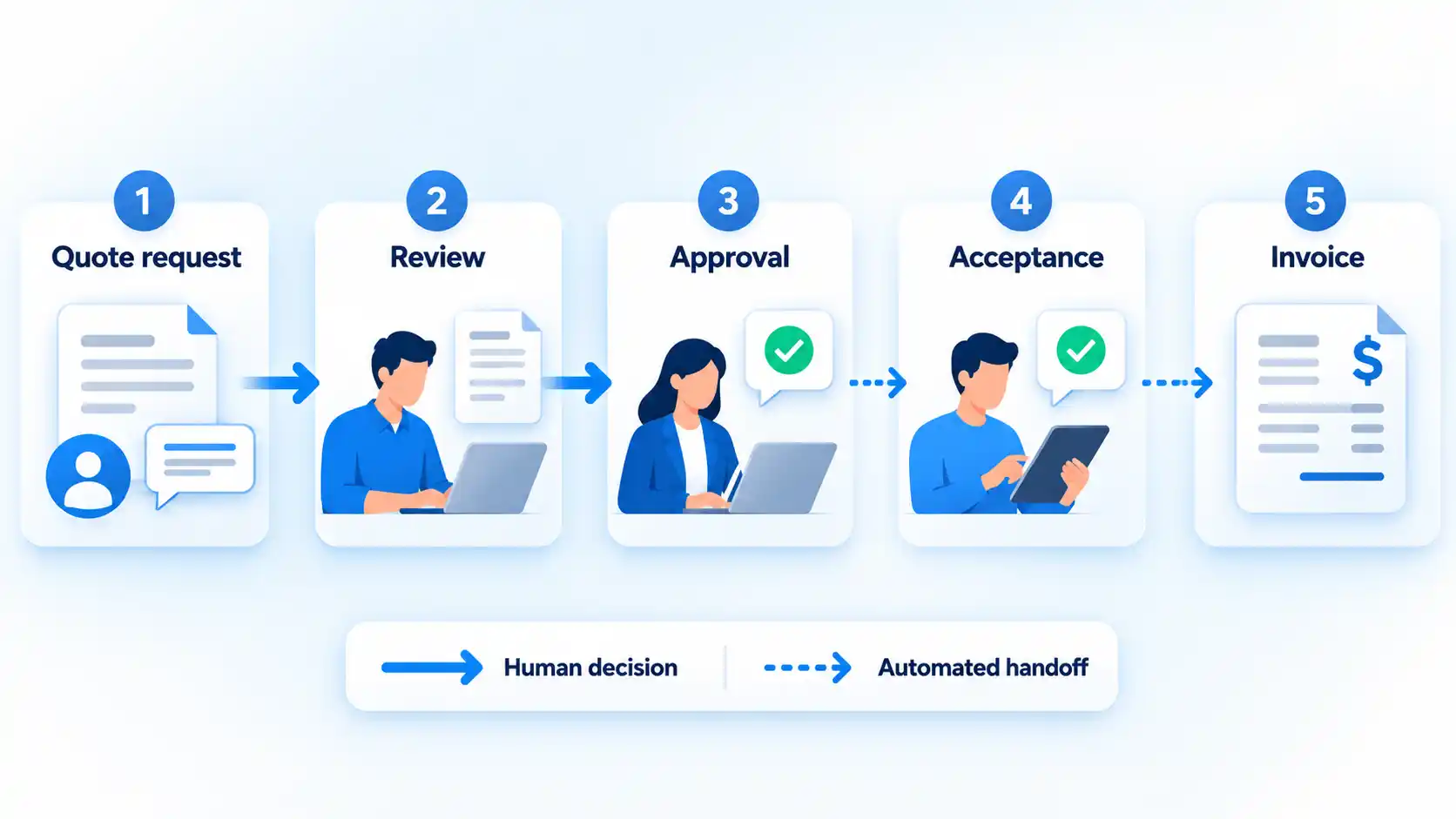
- Define the outcome and owner. Write down what the process is supposed to produce and name the person or role responsible for the result. “Process customer requests” is vague. “Turn an approved quote into an accurate invoice without re-entering customer data” is specific enough to evaluate.
- Map the current steps and handoffs. Follow one real piece of work from start to finish. Record where information arrives, who touches it, which systems are used, what approvals are required, and where work commonly waits or returns for correction.
- Remove unnecessary steps before automating. Delete duplicate approvals, repeated copying, obsolete reports, or handoffs that no longer serve a purpose. Automating an unnecessary step makes it faster, not more useful.
- Choose the smallest technology change that solves the remaining problem. That may be an automation inside software you already use, one shared task system, a cloud application, or an integration between existing systems. Avoid introducing a new platform when a simpler configuration change will do the job.
- Pilot the new workflow and preserve an exception path. Test it with a limited set of real work. Make sure staff know what happens when required information is missing, an approval is rejected, an integration fails, or a case genuinely needs judgment.
- Measure the result before expanding it. Compare the new process with the starting point. Check whether handoffs, re-entry, waiting time, avoidable errors, or unresolved exceptions actually decreased before applying the design elsewhere.
The sequence matters because technology cannot compensate for an undefined outcome or a process nobody owns. It is usually easier to change one controlled workflow, learn where the design fails, and then extend the pattern than to replace several systems at once.
Where Automation Helps Most
Automation is most useful when the work is repeated, the trigger is clear, and the next action can be described with stable rules. A routine invoice approval, a notification after a form submission, or the transfer of approved information into another system is easier to automate safely than a decision that depends on negotiation, context, or professional judgment.
A workflow can also require people to follow the same stages each time. For example, a business process flow can require an invoice to be approved before an order is submitted. The broader operating principle is useful even when you use different software: important stages and required inputs should be explicit instead of depending on each person to remember the process independently.
The harder design work sits around exceptions. Ask what should happen if the trigger fires twice, required data is missing, the destination system is unavailable, or a manager rejects the request. A useful automation needs a visible failure route, an accountable owner, and a way for a person to intervene.
If you are deciding where to begin, compare candidates by volume, predictability, time spent, error cost, and the number of systems involved. A focused assessment of which business processes to automate first helps separate high-value repetitive work from tasks that are rare, unstable, or too dependent on judgment.
Artificial intelligence can widen the range of work software can assist with, but it does not remove the need to define approval boundaries and human review. Work involving sensitive data, consequential decisions, uncertain outputs, or customer commitments needs controls that match the risk. The distinction between assistance and autonomous action becomes especially important in AI workflow automation.
How to Centralize Tasks, Files, and Decisions
A business becomes difficult to coordinate when the answer to “Who owns this, when is it due, and where is the latest information?” depends on searching email, chat, spreadsheets, personal notes, and several project tools.
Centralization does not mean forcing every kind of information into one application. It means deciding where each type of operational record belongs. A team may use one system for task ownership, another for customer records, and another for accounting, as long as staff know which system is authoritative for each job.
A shared task system should make ownership, deadlines, and status visible to the people who need them. Microsoft Planner provides one example: its views can group tasks by progress, due date, and priority, while tasks can be assigned to plan members. The product is only an example of the underlying requirement: staff should not have to reconstruct responsibility and progress from scattered messages.
The common failure is maintaining parallel trackers after centralization. If the same project status must be updated in a spreadsheet, task board, email thread, and weekly slide deck, the business has not really created a source of truth. Decide which system owns the operational status and make other views derive from it where practical.
Files need similar discipline. Shared storage helps only when people can recognize the current version, permissions match job responsibilities, and obsolete copies do not keep circulating. Naming conventions, folder ownership, retention decisions, and access reviews are mundane controls, but they often determine whether a shared workspace stays simple after the initial rollout.
When Cloud Services Reduce Operational Friction
Cloud services can reduce the amount of infrastructure a business has to provision and maintain itself. A hosted accounting platform or customer system, for example, can let authorized staff use the same application without the business running that application server on its own premises.
Cloud computing means on-demand network access to a shared pool of configurable computing resources that can be rapidly provisioned and released with limited management effort. One common service model is Software as a Service (SaaS), where the provider operates the application and customers access the service rather than maintaining the underlying application infrastructure themselves.
That operating model can remove some infrastructure work, but it does not remove responsibility. Someone still has to manage user access, configuration, data retention, backups or recovery arrangements, integrations, subscription costs, and the consequences of an outage or vendor change.
Before moving an important workflow to a cloud service, answer practical exit questions as well as setup questions. Can you export the business data in a usable format? Which administrator accounts control the service? What happens to integrations if the subscription changes? How will the business continue if the service is temporarily unavailable? These questions keep convenience from turning into avoidable dependency.
How to Integrate Systems Without Creating More Complexity
Integration becomes useful when the same information has to move predictably between systems. If an accepted sales quote should create a project and billing record, a controlled connection may remove retyping and reduce the chance that one system is forgotten.
An application programming interface, or API, is one common way for software systems to exchange data or actions. The technical method matters less to the business than the ownership model behind it. Decide which system is the system of record, meaning the authoritative home for a particular piece of information, before you connect everything together.
That avoids a basic problem: two applications both treating themselves as the master copy and repeatedly overwriting each other. One-way synchronization is often easier to reason about because one system sends information to another. Two-way synchronization can be appropriate, but conflict rules become much more important when both sides can change the same record.
Plan for failure as part of the integration, not after it. Someone should know when a transfer fails, duplicate records appear, credentials expire, or a field changes in one system. For important transactions, reconciliation is useful: compare what the source says should have moved with what actually arrived in the destination.
A fragile chain of integrations can be harder to operate than the manual process it replaced. Prefer the smallest connection that removes meaningful duplicate work, document what depends on it, and assign an owner who can investigate when it stops behaving as expected.
How to Simplify HR and Other Recurring Administration
Employee onboarding shows why recurring administration is a good candidate for simplification. The same new-hire information may be needed for payroll, leave administration, account provisioning, equipment, policy acknowledgments, training, and internal directories. Re-entering it independently in every system adds work and creates more opportunities for records to disagree.
A central HR or workforce system can provide one operating point for parts of that lifecycle, while automation can trigger standard follow-up actions after an employee reaches a defined stage. The same pattern applies to supplier onboarding, recurring invoices, expense approvals, routine customer setup, and scheduled reporting.
Do not confuse centralization with universal access. Employee and financial records can contain sensitive information, so permissions should follow job responsibilities. A manager who needs to approve leave does not necessarily need access to payroll details, and an IT administrator provisioning an account may need only the information required for that task.
Some administrative requirements also depend on employment, tax, payroll, privacy, or records rules that vary by jurisdiction. Technology can make the workflow easier to operate, but it does not decide which legal or regulatory requirements apply. Assign responsibility for those requirements separately and configure the process around the obligations that have actually been established for the business.
Security and Governance That Keep Simplification From Backfiring
Consolidating work can increase the impact of one compromised account. If email, files, task management, customer information, and approvals all depend on the same identity system, protecting access becomes more important as the workflow becomes more connected.
Multi-factor authentication (MFA) requires an additional verification step beyond a password. A practical security baseline is to use MFA, keep software updated, limit access to sensitive information, encrypt sensitive data, back up data regularly, and train staff. Vendor access should receive the same attention because third parties may also be able to reach sensitive systems or information.
Start with access. Give people the permissions they need for their work rather than broad access by default, and remove access when responsibilities change. Administrative accounts deserve particular care because one compromised administrator can often change settings or reach more data than an ordinary user.
Backups also need a recovery purpose. A completed backup job does not by itself prove that the business can restore the systems or data it needs after a disruption. Recovery planning should include realistic test scenarios and testing of recovery procedures, especially for systems that support important business operations.
Vendor access belongs in the same governance model. Know which outside providers can reach business systems or sensitive information, why they need that access, and who can revoke it. When a technology change removes five manual steps but introduces an unmanaged privileged vendor account, part of the complexity has merely moved out of sight.
How to Measure Whether the New Setup Is Actually Simpler
A software deployment is not proof that a business process improved. Compare the new workflow with the condition you recorded before the change and look for observable differences in how work moves.
Verify the result
- People perform fewer manual handoffs for the same completed outcome.
- The same information is entered fewer times across separate systems.
- Task ownership and current status are visible without reconstructing them from messages.
- Waiting time or total process cycle time has decreased where speed was an original objective.
- Avoidable errors, duplicate records, or missed follow-ups have decreased rather than moved to another stage.
- Exceptions have a clear human owner instead of becoming invisible automation failures.
- Redundant tools, accounts, or parallel trackers have been removed where doing so does not break necessary work.
- Staff can complete the process without depending on undocumented workarounds known to only one person.
- Important data and systems still meet the business’s access, backup, and recovery requirements.
Use the measures that match the problem you originally set out to solve. If duplicate entry was the issue, count re-entry rather than collecting unrelated productivity statistics. If approvals were slow, compare approval time. If ownership was unclear, check whether unresolved work can now be assigned and found reliably.
Keep a technology change when it removes measurable friction without creating a larger maintenance, security, or exception-handling burden. If the new process still depends on duplicate entry, hidden workarounds, or unclear ownership, the next step is to fix that operating problem rather than add another system.

💬 Comments