Modern virtual machine security needs more than antivirus inside each guest. A defensible setup protects the hypervisor and management plane, guest operating systems, privileged access, virtual networks, boot integrity, security telemetry, and recovery paths.
Quick Take
- Protect the virtualization platform as well as the operating systems running inside it.
- Make sure the security stack covers configuration, patching, privileged access, network traffic, endpoint activity, centralized detection, boot integrity, and recovery.
- Do not assume a control at one layer can replace protection at another.
Why Virtual Machines Need Security at More Than One Layer
A virtual machine looks like an ordinary server or workstation from inside the guest operating system, but the surrounding architecture adds security boundaries that physical endpoints do not have in the same form. The hypervisor allocates processor, memory, networking, and storage resources among VMs, while the management plane can create, modify, copy, start, stop, and delete them.
The hypervisor also mediates physical resources, maintains runtime isolation among resident VMs, and supports security-preserving virtual networking, which makes the virtualization platform a security boundary of its own. A security control running inside one guest has limited visibility into what happens beneath or around that guest.
Think of the environment as several connected trust zones: the host or cloud platform, virtualization management plane, virtual network, guest operating systems, workload applications, administrative identities, and recovery infrastructure. Compromise at one layer can have a different blast radius from compromise at another. A malicious process in one guest is serious, but an attacker who gains high-level virtualization administration may be able to affect many VMs at once.
This is why VM protection fits a broader model of layered cybersecurity defense. The goal is not to buy every tool category available. It is to make sure each meaningful security boundary has a control that prevents, limits, detects, or helps recover from failure.
Configuration and Virtualization Management
Security starts with knowing which VMs, hosts, templates, images, and management interfaces exist. An abandoned VM or an old template can preserve insecure settings long after administrators believe the problem has been corrected elsewhere.
Configuration-management tooling gives teams a repeatable baseline for what a hardened host or VM should look like and helps expose configuration drift, meaning a system has moved away from that approved state. Useful capabilities include asset inventory, policy checks, template governance, configuration comparison, and alerts when sensitive settings change.
A useful baseline covers the virtualization platform as well as the guests. Hyper-V guidance, for example, calls for hardening hosts, minimizing unnecessary software, securing management networks, protecting VM storage, and applying appropriate permissions.
Baselines also change as platforms evolve. The CIS VMware ESXi 8 Benchmark reached version 1.3.0 in 2026 with 17 recommendations updated. A configuration judged acceptable for an older release should not automatically remain the reference state after the platform changes.
Patch and Vulnerability Management
Endpoint detection can tell you that suspicious activity is happening. Patch and vulnerability management addresses a different problem: known weaknesses that should no longer be present in the first place.
A VM environment usually has at least two patching responsibilities. The virtualization host or underlying platform needs security maintenance, and the guest operating systems and applications need their own updates. Treating one of those layers as evidence that the other is covered creates a predictable gap.
Patch-management tools should help identify missing approved updates, schedule deployment, report compliance, and preserve enough control to test changes before broad rollout. AWS Systems Manager Patch Manager, for example, can scan for missing patches, install approved patches, use custom patch baselines, and report compliance across supported managed systems, including virtual machines.
Patch compliance still needs careful interpretation. AWS explicitly notes that compliance with a defined patch baseline does not mean a node is necessarily secure. Weak configuration, stolen credentials, vulnerable applications outside the baseline, and other unaddressed controls can remain. Production patching may also require compatibility testing, rollback preparation, and maintenance windows rather than indiscriminate deployment.
Privileged Access and Identity Controls
An account that can administer a virtualization platform is more consequential than an ordinary application account. Depending on the platform and assigned privileges, it may be able to create VMs, attach disks, alter virtual networking, copy snapshots, change boot settings, or shut workloads down.
Privileged access management, or PAM, is the discipline of controlling and monitoring accounts with elevated authority. It works alongside least privilege, which means giving people and services only the permissions they actually require, and multifactor authentication (MFA), which requires another authentication factor beyond a password.
Administrative roles should be separated where the platform supports it. Virtual-machine administrators, for example, should not automatically receive permissions on the Hyper-V host operating system. Separating those roles limits how much authority one compromised administrative identity provides.
For a mature environment, also examine service identities, emergency or break-glass accounts, API credentials, automation roles, and audit trails. An interactive administrator is only one path into the management plane. A forgotten automation token with excessive privileges can produce the same security consequence without anyone signing in through a console.
Virtual Network Segmentation and Traffic Controls
Putting several VMs on the same virtualization platform does not mean they should automatically be able to communicate freely. A compromised application server should not gain an unrestricted path to a database, management interface, backup network, or migration network merely because the infrastructure makes that connection technically possible.
Network segmentation divides systems into controlled communication zones. Virtual firewalls, security groups, access-control rules, virtual switches, and network-monitoring tools can then restrict or observe traffic between those zones.
Secure virtual networks need segmentation, appropriate firewall traffic control, resilient network paths, and VM traffic monitoring. This is especially relevant to east-west traffic, meaning communication between systems inside the environment rather than traffic simply entering or leaving through a conventional perimeter.
Virtualization can also change where traffic is visible. Two guests on the same host may exchange traffic without following the same physical path as external traffic. Management and live-migration networks deserve separate attention because they can carry sensitive administrative or workload data. Hyper-V guidance recommends private or dedicated networking for several management and migration scenarios rather than treating every connection as ordinary application traffic.
Endpoint Protection and EDR Inside Guest VMs
Even with a well-protected hypervisor, every guest operating system still behaves like a computer that can run vulnerable applications, execute malicious processes, expose services, or accept stolen credentials. Guest-level security therefore remains necessary.
Endpoint protection covers functions such as malware prevention and host-level defensive controls. Endpoint detection and response (EDR) goes further by collecting activity from the operating system and helping analysts detect, investigate, and respond to suspicious behavior.
Guest protection should match the workload’s role. Hyper-V guidance calls for appropriate antivirus, firewall, intrusion-detection, operating-system updates, and guest hardening. A database server, application server, and administrative workstation may therefore need different policies even when all three are virtual machines.
EDR has an important visibility boundary: an agent inside the guest mainly sees that guest. It does not automatically tell you whether the virtualization administrator changed a virtual disk, whether a management-plane credential was abused, or whether the hypervisor itself is configured securely. Guest telemetry is one layer of evidence rather than the entire VM security picture.
Centralized Logging, SIEM and XDR
A suspicious sign often becomes meaningful only after it is connected to activity elsewhere. Imagine an unusual administrator login, followed by creation of a VM snapshot and then malicious behavior inside the guest. Each event alone may appear less serious than the combined sequence.
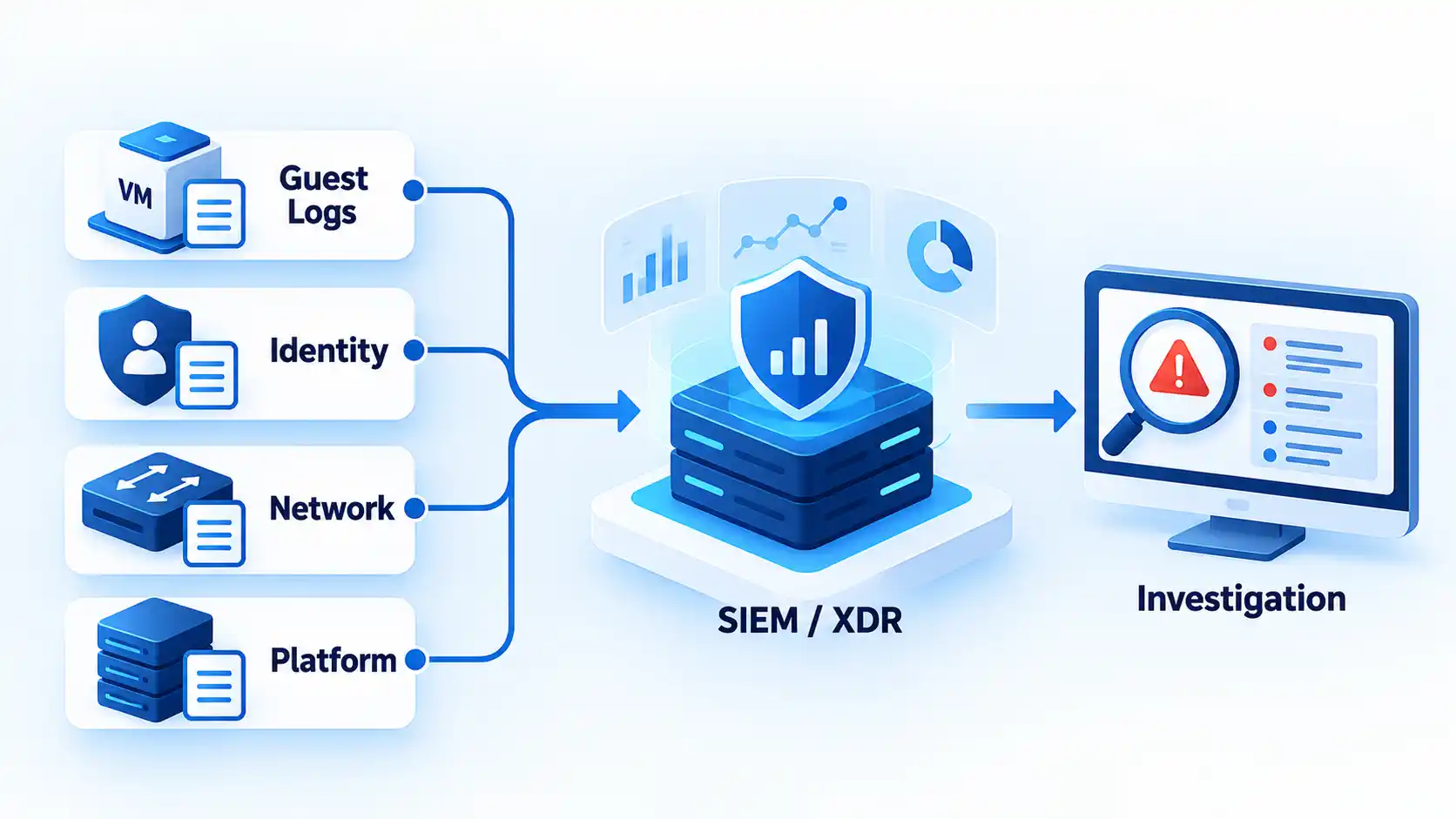
A security information and event management system (SIEM) centralizes and analyzes logs and security events. Extended detection and response (XDR) products typically combine detection signals across several security domains and provide investigation or response functions. The boundary between those product categories varies in practice, so the useful question is which telemetry reaches your analysts and what investigation or response actions the platform supports.
For VMs, useful signals can include endpoint events, authentication and privilege changes, virtual-network telemetry, management-plane audit logs, configuration findings, and infrastructure-level alerts. Detection does not always have to run inside the guest: Google Cloud’s VM Threat Detection scans running guest memory from the hypervisor without requiring a guest agent.
Centralization does not create operational readiness by itself. Someone still has to own alerts, investigate them, preserve useful retention periods, and know what response is permitted. Effective continuous monitoring and incident response depends on people and escalation processes as well as telemetry.
Secure Boot, vTPM, Attestation and VM Shielding
Security software that starts after the operating system boots cannot independently prove that the earlier boot chain was trustworthy. Modern virtualization platforms can add integrity controls below that point.
Secure Boot verifies signatures on boot components and is designed to prevent untrusted components from loading. A virtual Trusted Platform Module (vTPM) gives a VM access to TPM-style security functions, while measured boot records cryptographic measurements of important startup components. Attestation uses evidence about system state to decide whether that state should be trusted.
One current implementation combines Secure Boot, vTPM, measured boot, and integrity monitoring in Google Cloud Shielded VM. Its integrity monitoring compares boot measurements with an established baseline and reports a validation failure when the observed boot sequence no longer matches that baseline.
These controls are platform-dependent rather than universal checkboxes. Guest compatibility matters, and Secure Boot can prevent unsigned or untrusted boot components from loading. Hyper-V also supports Secure Boot for supported guests and shielding for more sensitive environments. Evaluate the implementation available on the platform you actually run instead of assuming identical terminology means identical behavior.
Backup, Replication and Recovery Protection
When a VM is corrupted, encrypted, deleted, or no longer trustworthy, prevention and detection have already failed to keep that workload available. Recovery tooling determines whether the organization can return to a known usable state.
A snapshot preserves VM state at a point in time, replication copies data or workloads elsewhere, and backup systems retain recoverable copies according to their own policies. These mechanisms can overlap, but they are not automatically interchangeable. A recovery copy controlled through the same compromised administrative path as production can be exposed to the same attacker.
For critical workloads, examine where recovery copies live, which credentials can alter or delete them, how long they are retained, and whether restores are tested. NIST backup guidance emphasizes that backups should be conducted, maintained, and tested so they remain useful and available when needed. A successful backup job alone does not prove that the required VM configuration, application data, dependencies, and credentials can actually be restored.
Backups also do not prove that an incident was limited to availability. If an attacker copied sensitive information before damaging a VM, a successful restore fixes the availability problem but not the possible data exposure. Recovery planning therefore belongs beside investigation and containment rather than replacing them.
How the VM Security Layers Work Together
No single category below is a substitute for the others. The useful comparison is which layer each control protects, which failure it primarily addresses, and which neighboring control it still depends on.
| Tool or control layer | Primarily protects | Typical failure addressed | Does not replace |
|---|---|---|---|
| Configuration management | Hosts, VM settings, templates, and platform posture | Misconfiguration and configuration drift | Patch management or runtime detection |
| Patch and vulnerability management | Host and guest software | Known vulnerabilities and missing updates | Behavioral detection or access control |
| IAM and PAM | Management-plane and administrative access | Excessive privilege and credential abuse | Guest or network protection |
| Virtual network controls | VM-to-VM and management traffic | Lateral movement and unwanted connectivity | Endpoint or identity security |
| Endpoint protection and EDR | Guest operating systems | Malicious files, processes, and runtime behavior | Hypervisor and control-plane security |
| SIEM and XDR | Cross-layer security telemetry | Fragmented detection and investigation | Preventive controls or recovery |
| Boot integrity and shielding | VM startup and trusted system state | Bootloader, kernel, or low-level tampering | Application and workload security |
| Backup and recovery | Workload and data recoverability | Destructive compromise, corruption, or loss | Prevention, detection, or investigation |
The table also shows why adding more tooling to one layer does not necessarily fix a missing control in another. Two endpoint agents do not create network segmentation. A sophisticated SIEM does not patch a vulnerable host. Strong backups do not stop a stolen administrator credential from being abused.
What to Verify in Your Own VM Environment
Use these questions to find missing layers rather than treating them as ordered deployment steps. A small environment may satisfy several of them with built-in platform capabilities, while a larger estate may use dedicated products and teams.
- Does every production VM have an identified owner, purpose, supported operating system, and known hosting platform?
- Are virtualization hosts and guest operating systems patched and tracked as separate maintenance responsibilities?
- Who can administer the hypervisor or cloud VM control plane, and are those privileges narrower than ordinary infrastructure access?
- Can sensitive VM, management, storage, and migration traffic be segmented and monitored appropriately?
- Do guest workloads have endpoint protection and detection controls appropriate to their operating system and role?
- Can administrators investigate platform, identity, virtual-network, and guest telemetry together when an incident crosses layers?
- Are Secure Boot, vTPM, measured boot, attestation, shielding, or equivalent integrity capabilities available where the workload justifies them?
- Can critical VM configurations and data be restored from recovery copies protected from the same administrative compromise as production?
A gap does not automatically require another commercial product. Native cloud controls, hypervisor features, operating-system protections, centralized security platforms, and operational processes can all supply parts of the model. Identify the unprotected layer and the failure you need to prevent, detect, or recover from, then choose a control that closes that gap without assuming it replaces the protections around it.

💬 Comments