When choosing a VPN, focus first on how the provider handles your data, how the connection is protected, what happens if the VPN fails, and whether its performance and device support fit your needs. Server counts, long feature lists, and broad claims such as “fast,” “secure,” or “no logs” matter only when you can tell what they actually mean.
Quick Take
A good VPN should have clear privacy practices, credible evidence behind important claims, modern protocols, protection against connection failures, acceptable speed, useful server locations, support for your devices, and clear subscription terms. Features such as multi-hop or a dedicated IP can be useful, but they are not essential for everyone.
Start With What You Need the VPN to Do
A person who mainly wants extra protection on hotel or airport Wi-Fi may care most about reliable apps and connection-failure protection. Someone who travels frequently may put more weight on server locations. A household protecting several phones, laptops, and televisions may care more about device support and simultaneous connections.
That is why there is no single feature that makes a VPN suitable for everyone. Start with your actual use case, then use the criteria below to decide which claims and features matter. It also helps to understand the different types of VPN and when they are used, because a consumer VPN subscription is different from a business remote-access or site-to-site VPN.
The table gives you a quick overview before each factor is explained in more detail.
| Criterion | Why it matters | What to check |
|---|---|---|
| Privacy policy | The VPN provider becomes an important part of your network path. | Data collected, retention periods, sharing, and account information. |
| Independent evidence | Marketing claims are not proof by themselves. | Named audits, transparency material, and other specific published evidence. |
| Protocols and encryption | They determine how the protected VPN connection is established. | Modern, documented protocols rather than vague security slogans. |
| Failure protection | A dropped VPN connection can allow traffic to use the normal network path. | Kill-switch behavior and relevant leak-protection controls. |
| Speed and latency | A VPN changes the network path and can affect performance. | Performance on the locations and devices you actually use. |
| Server locations | Distance and capacity can affect usefulness and performance. | Relevant countries, nearby locations, and available capacity. |
| Device support | A subscription has little value if it does not cover your equipment. | Operating systems, router support if needed, and simultaneous connections. |
| Use-case support | Not every provider supports every workload or location requirement equally. | P2P policy, travel needs, network restrictions, and other required functions. |
| Usability and support | Privacy controls are less useful if you cannot understand or configure them. | App controls, documentation, updates, and support options. |
| Price and terms | A low advertised monthly figure can hide a longer commitment or higher renewal. | Total cost, billing period, renewal price, refund terms, and plan limits. |
| Optional features | Specialist tools can solve particular problems but may add cost or complexity. | Dedicated IP, split tunneling, multi-hop, and whether you actually need them. |
1. Privacy Policy and Data Collection
A VPN changes who occupies an important position in your internet connection. For traffic sent through the VPN, your device first sends that traffic through infrastructure controlled by the VPN provider before it continues toward its destination.
That means choosing a VPN also means deciding which provider you are willing to trust with that role. The Federal Trade Commission notes that using a VPN can place considerable trust in its operator because the service can sit in the path of your internet traffic.
Do not stop at a large “no logs” badge. Read what the provider says it collects and separate different types of information. A service may avoid recording browsing destinations while still keeping an email address, subscription information, diagnostic records, connection metadata, or other account data.
The Federal Trade Commission recommends researching a VPN, reviewing its permissions, checking whether it encrypts traffic, and examining whether it shares information with third parties. Those checks tell you more than a privacy slogan alone.
Warning
A VPN does not make you completely anonymous. It shifts an important part of network trust to the VPN provider, while websites and online accounts can still identify you through information you provide and other tracking methods.
2. Independent Evidence and Provider Transparency
A provider can make strong claims on a product page. Better evidence helps you judge how much confidence to place in those claims.
Look for specific information such as a named independent assessment, the scope and date of an audit, published transparency material, clear technical documentation, or open-source applications where relevant. Evidence should tell you what was actually examined rather than simply repeating the provider’s marketing language.
An audit can strengthen a claim, but it is not a permanent guarantee. It normally covers particular systems, controls, versions, or dates. An audit completed two years ago does not automatically prove how every server or future app version behaves.
This distinction is especially important for logging claims. A deeper check of a VPN’s no-logs claims should examine the audit scope, date, auditor, stated exceptions, and the information the provider still says it retains.
3. Modern VPN Protocols and Encryption
A VPN protocol is the set of rules the VPN app and server use to create and protect their connection. You do not need to memorize cryptographic formulas to evaluate one. The practical question is whether the provider supports current, documented protocols instead of relying only on vague phrases such as “military-grade security.”
WireGuard is one example of a modern protocol with a publicly documented design. Its protocol documentation identifies the cryptographic components used for encryption, authentication, key exchange, hashing, and key derivation.
A provider may also offer OpenVPN or IPsec-based options. Exact support differs by service and operating system, so check the applications you intend to use rather than assuming every protocol is available everywhere.
Do not confuse encryption with the number of VPN servers that traffic passes through. A normal single-hop VPN can protect traffic between your device and its VPN endpoint. Sending traffic through two VPN locations is a separate routing choice, not a requirement for dependable encryption.
4. Kill Switch and Leak Protection
Imagine that your laptop moves from hotel Wi-Fi to a phone hotspot and the VPN connection drops during the change. Without suitable failure protection, new traffic may return to the normal internet connection even though you expected it to remain inside the VPN.
A kill switch is designed to block traffic that should remain protected when the VPN connection unexpectedly fails. The practical question is not simply whether the feature name appears on a sales page. Check whether it exists on your operating system and what it does after a tunnel failure.
A VPN disconnect can either leave affected traffic blocked or allow it to fall back to the normal connection, depending on the application’s policy and configuration. The difference between a VPN disconnect, a kill switch, and a traffic leak matters because those events are related but not identical.
Also look for clear information about Domain Name System (DNS) handling. DNS is the system that translates a name such as example.com into the network information needed to reach the site. If a DNS query or other traffic that should follow the VPN uses an unintended route instead, it may reveal information that you expected the VPN configuration to protect.
A provider advertising a kill switch or leak protection does not by itself prove that every failure case on every operating system is handled perfectly.
5. Real-World Speed and Latency
Every VPN changes the route your traffic takes, so some performance difference is normal. What matters is whether that difference is acceptable on your connection, device, and usual server locations.
Latency means the delay between an action and the response. For example, high latency can make a webpage, game, video call, or remote desktop feel slow even when the connection still has substantial download capacity.
Cloudflare explains that longer network paths can increase latency and that VPN server load can create additional delays. It describes physical distance as an important source of latency and notes that an overloaded VPN server may queue or drop requests.
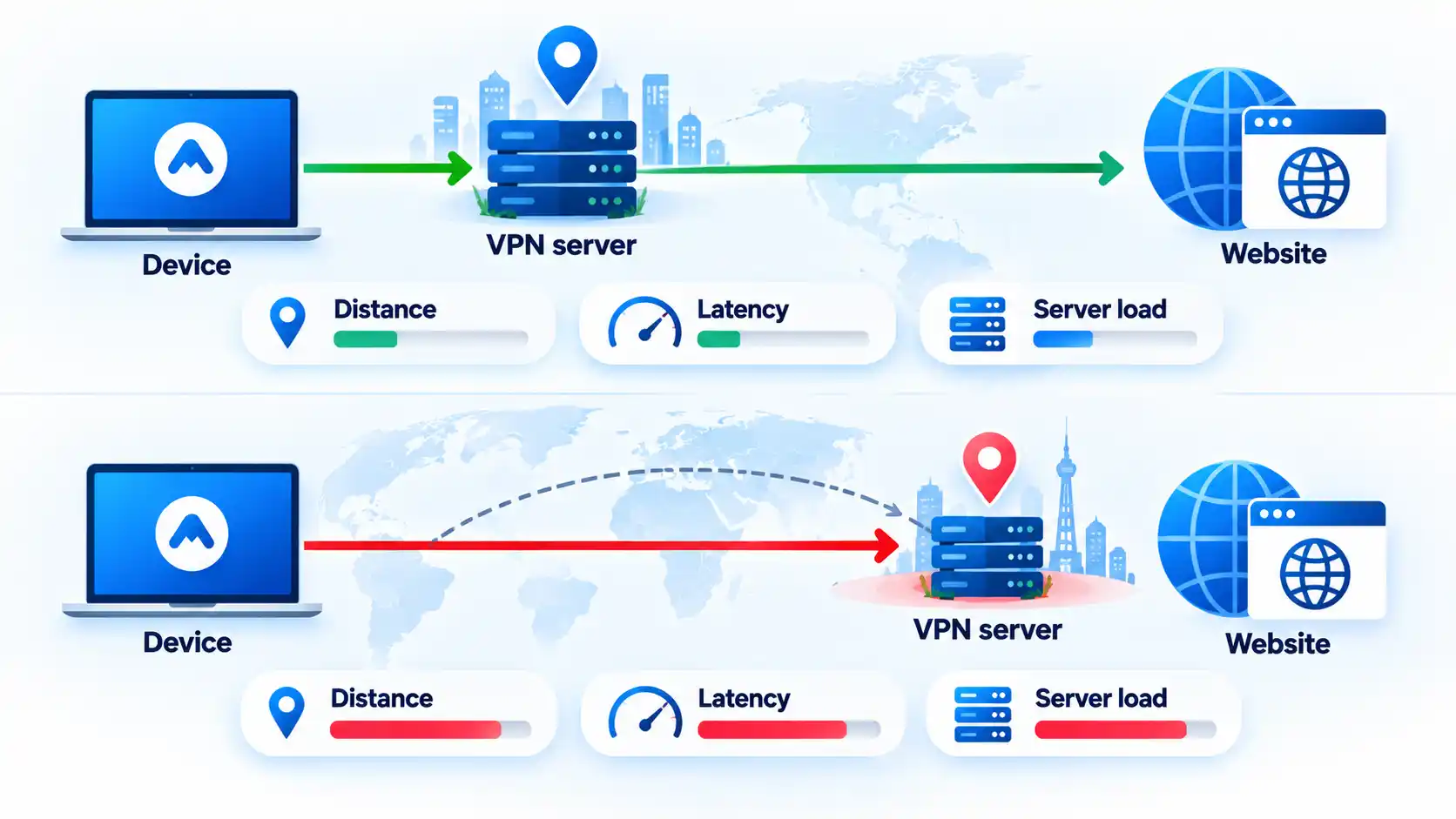
That is why a provider’s total server count is less useful than knowing whether its network performs well in the locations you actually need.
Be careful with universal speed claims. Results depend on the underlying internet connection, physical distance, congestion, protocol, device, VPN server, and route to the destination.
If performance becomes a problem after installation, VPN slowdown is easier to diagnose by first comparing the same connection with the VPN off and on, then changing one variable at a time.
6. Server Locations and Network Capacity
A huge server number can look impressive, but it does not answer the most useful question: are there suitable servers near you and in the countries you actually need?
Distance can affect performance because traffic has farther to travel. Mozilla’s VPN support documentation notes that connecting to a geographically distant VPN server can affect internet speed.
A nearby location is therefore often a sensible starting point when you do not need a particular country. It is not a guarantee of the fastest route because internet routing and congestion can vary, but it avoids adding unnecessary distance.
Also separate the number of servers from network quality. Capacity, routing, and congestion can matter as much as the advertised total. A smaller network can still suit you better if the locations you need perform reliably.
7. Device Support and Simultaneous Connections
Count the devices you actually expect to protect. A laptop and phone may be enough for one person, while a household may also have tablets, televisions, and several computers.
Check whether the VPN provides supported applications for your operating systems and whether one account can keep enough devices connected at the same time. Router support may matter if you need VPN coverage for equipment that cannot run a normal VPN application itself.
Look at the exact platform list rather than assuming that “multi-device” means every device you own. For example, the sponsored Surfshark VPN apps destination currently provides downloads for Windows, macOS, Linux, Android, iOS, and several browser extensions. Apply the same compatibility check to any provider you are considering.
8. Support for Your Specific Use Case
A VPN can be technically sound and still be a poor fit for what you need it to do.
If you use peer-to-peer (P2P) applications, check whether the provider allows that traffic and whether any location or server restrictions apply. P2P is a method that lets devices communicate directly with peers. Whether a particular activity is lawful depends on what is being shared and the applicable law, not simply on the use of P2P technology.
If you travel, check whether the service is available and usable in the places where you expect to need it. Network restrictions and local rules can vary, so a subscription should not be treated as a guarantee of access from every country or network.
If changing your destination-facing IP location matters, check whether the provider has the countries you need instead of choosing it simply because it advertises the largest global server total.
If your main need is selective routing for one browser or application rather than broader device traffic, the practical differences between a proxy and a VPN may matter more than another VPN feature. A proxy is primarily an intermediary for selected traffic, while a VPN normally adds a protected tunnel for traffic routed through the VPN connection.
9. App Usability and Customer Support
A security feature has limited value if you cannot find it, understand it, or tell whether it is active.
Look for an app that clearly shows connection status, the selected location, and important controls. Settings such as the kill switch or split tunneling should be explained in language that makes their effect understandable rather than forcing you to guess.
Documentation matters too. Useful support material should cover installation, common connection failures, operating-system differences, and account management. If you expect to depend on the VPN for frequent travel or work, check which support channels are available and when they operate.
Ease of use should not mean having no controls. The useful balance is an app that handles normal connections simply while still making important privacy and routing options understandable when you need them.
10. Price, Renewal Terms and Refund Conditions
Do not compare VPNs using only the large monthly figure on a sales page. That number may be the effective monthly cost of a long prepaid subscription rather than the amount you can actually pay month by month.
Check the total amount charged, subscription length, renewal price, refund conditions, and which features belong to the plan you are considering. A cheap first term can become less attractive if its renewal price or required commitment does not suit you.
Free VPN services also deserve more careful treatment than simply assuming that “free” means unsafe. A reputable free service can sometimes meet a limited need, while another service may have unsuitable data practices or restrictions. The important questions remain what data is collected, how the service is funded, what limits apply, and what evidence supports its privacy claims.
A free VPN versus paid VPN comparison should therefore separate privacy evidence from capacity, server access, connection limits, features, and billing rather than treating price as a security score.
11. Optional Features You Actually Need
Extra features can be useful, but they should solve a problem you really have.
A dedicated IP gives one customer a VPN-facing address reserved for that account instead of using an address shared with many customers. It can be useful when a workplace, server, or online service requires a consistent allow-listed IP, but most ordinary VPN users do not need one.
If a fixed address is part of your requirement, comparing a dedicated IP with a shared VPN IP can clarify the trade-off between consistency and sharing.
Split tunneling lets selected applications or destinations bypass the VPN while other traffic continues through it. This can be useful when a local device, work application, or other service does not behave well through the VPN. It also means you need to understand which traffic is using the VPN and which traffic is not.
Multi-hop sends traffic through more than one VPN location. That changes the route, but extra routing is not automatically better for every user. Mozilla states that using its multi-hop feature can slow internet speed, increase mobile battery use, and reduce the number of available country choices.
Treat these features as tools for specific needs rather than a scorecard where the provider with the longest feature list automatically wins.
A Quick VPN Evaluation Checklist
Before paying for a VPN, turn the claims you have read into checks that you can confirm.
Verify the result
- The privacy policy clearly states which activity, connection, account, diagnostic, and payment information the provider collects or retains.
- Important privacy or security claims have specific evidence rather than only marketing language.
- The service supports a current VPN protocol on each operating system you intend to use.
- Kill-switch and relevant leak-protection controls are available on the devices where you need them.
- The provider has useful server locations near you or in the places your use case requires.
- Supported apps and simultaneous-connection limits cover the devices you plan to protect.
- Any special requirement such as P2P, split tunneling, or a dedicated IP is explicitly supported where you need it.
- The total price, billing period, renewal conditions, and refund rules are clear before payment.
What a VPN Cannot Guarantee
A VPN protects a particular part of your network connection. It is not a complete security or anonymity system.
It does not stop you from identifying yourself by signing in to an account, entering an email address, or sharing personal information. The FTC also notes that websites can continue using information you provide even when you are using a VPN.
A VPN also does not replace malware protection, software updates, strong passwords, multi-factor authentication, or careful handling of phishing messages. If malware already controls a device, routing that device’s traffic through a VPN does not remove the malware.
For privacy situations where dependence on one VPN operator is an important concern, VPN and Tor use different routing and trust models. A conventional VPN concentrates an important part of trust in one provider, while Tor routes traffic through multiple relays. Neither should be reduced to a promise of complete anonymity.
Final Takeaway
The most useful VPN features are the ones that address a real risk or practical need. Start with the provider’s data practices and evidence, then examine connection protection, performance, useful server locations, device support, and commercial terms.
Optional tools such as multi-hop, split tunneling, and dedicated IP addresses can be valuable, but they should not outweigh the basics. A shorter feature list backed by clear policies and credible evidence can tell you more than a long page of security slogans.

It was these functions described in the article that I relied on when choosing a VPN. Chose this one – Private Internet Access.