AI-assisted optical character recognition (OCR) can reduce manual data entry by reading documents and turning useful information into digital text and structured fields. It does not make every document automatically correct or ready for a business system, so reliable workflows still need extraction rules, quality checks, and human review where mistakes matter.
What AI OCR Means for Digital Data Entry
Imagine receiving an invoice that shows a supplier name, invoice number, date, and total of $428.50. A person could type those details into a spreadsheet one field at a time. OCR removes the first part of that work by reading text inside the scanned page or image and converting it into machine-readable text.
Modern document OCR can recognize printed and supported handwritten text, along with details such as words, lines, positions, and confidence scores. Microsoft’s current Document Intelligence Read model, for example, extracts printed and handwritten text from scanned documents and supplies information about where the recognized text appears on the page.
That still does not mean OCR understands what every piece of text represents. Recognizing the characters $428.50 is different from deciding that the number belongs in an Invoice Total field. This is where document-processing systems add another layer.
Services designed for document extraction can identify structures such as tables, key-value pairs, checkboxes, and specific business fields. Google Cloud’s Form Parser, for example, can extract key-value pairs, tables, selection marks, generic fields, and text. Microsoft’s document-analysis models similarly separate basic text reading from layout, key-value, and prebuilt field extraction. A simple one-off OCR tool may only need to convert an image to editable text, while an automated data-entry workflow usually needs to identify which extracted values belong in specific fields.
In this article, structured data means information that has been assigned a defined place or label. Instead of receiving a block of text containing an invoice, a system might receive values such as Invoice number: 8175, Date: 2026-10-05, and Total: $428.50. Those fields are much easier to send to a spreadsheet, database, accounting system, customer relationship management (CRM) system, or enterprise resource planning (ERP) system.
How AI OCR Turns Documents Into Structured Data
AI-assisted document processing normally involves more than one operation. The exact features depend on the product, but the useful data-entry path can be understood as a sequence from the original document to accepted digital fields.
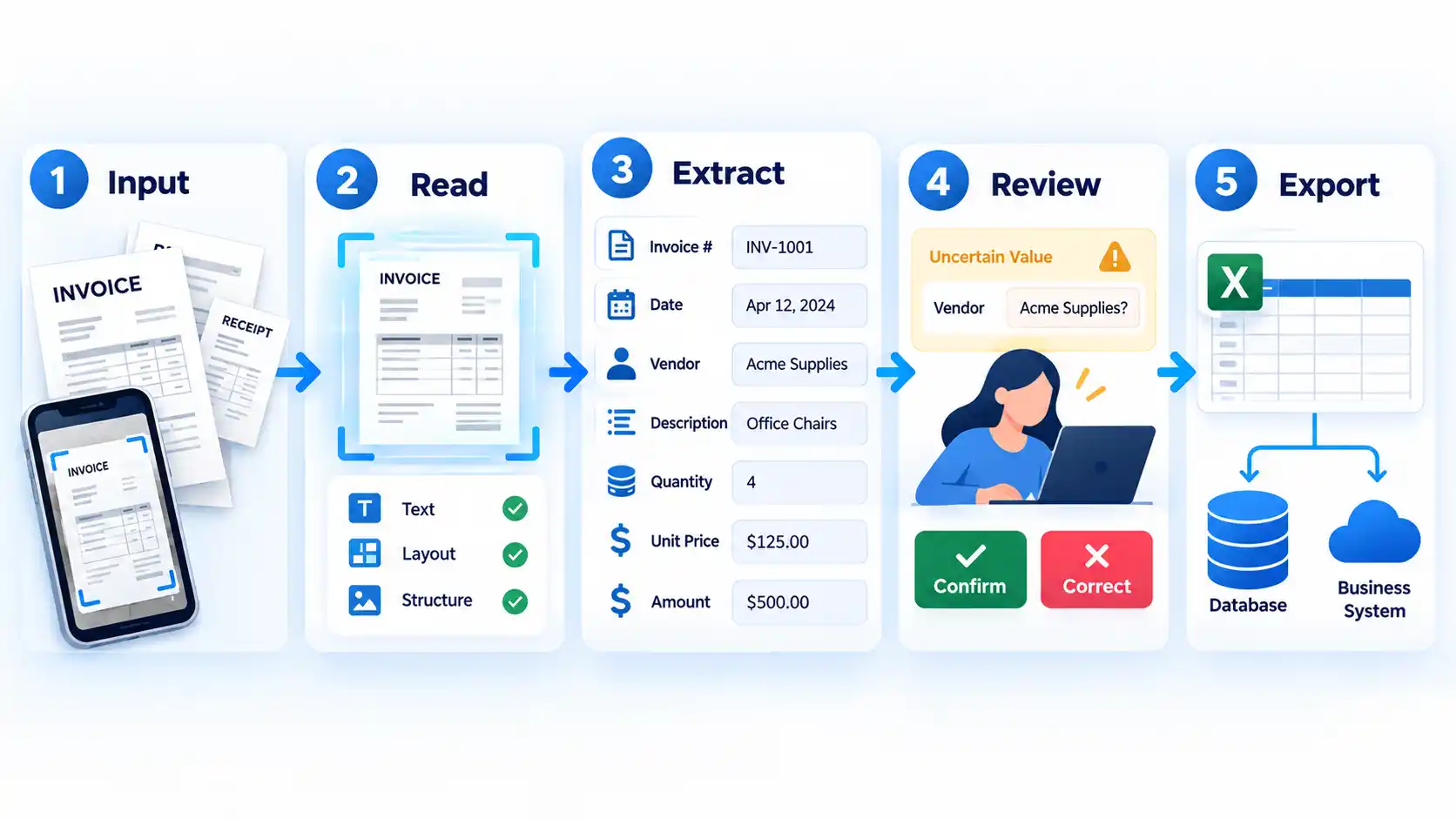
First, the system reads the document. OCR detects text and its location on the page. Some document OCR services also correct rotation or analyze image quality before or during extraction. Google Enterprise Document OCR, for example, can deskew documents and return an image-quality score that can help with document routing.
Next, the workflow identifies useful structure. Instead of treating the page as one large text block, document-analysis tools can detect tables, fields, labels, selection marks, and document layout. For an invoice, that could mean separating the vendor name from the invoice date and distinguishing line items from the final total.
The extracted values may then be normalized or checked. A date written as 5 Oct 2026, for example, may need to be stored in a consistent date format. A purchase-order number might be compared with an existing record, or a total might be checked against expected business rules. Intelligent document processing (IDP) can extend OCR into classification, extraction, validation, and downstream processing rather than stopping at character recognition. AWS describes IDP workflows as moving through document classification, extraction, validation, and further processing. These additional stages are what turn recognized text into workflow-ready information.
Finally, the workflow decides what happens to each result. Accepted fields might be written into a spreadsheet, database, accounting platform, or another application. Values that are uncertain or especially important can instead be routed to a person for review before they enter the system of record.
Traditional OCR vs AI-Assisted Document Processing
The difference between basic OCR and more advanced document processing matters because not every data-entry task needs the same level of automation. Converting old reports into searchable text is a different problem from extracting invoice fields and sending them into an accounting workflow.
| Feature | Basic OCR | AI-Assisted Extraction | Full IDP Workflow |
|---|---|---|---|
| Primary job | Recognize text in an image or document | Identify text plus useful fields, tables, or document structure | Classify, extract, validate, route, and integrate document data |
| Typical output | Machine-readable text | Named fields, tables, key-value pairs, or structured entities | Validated structured data sent into a wider business process |
| Understands document structure | Limited or product-dependent | Usually a central capability | Used together with classification and workflow rules |
| Validation and routing | Usually outside the OCR step | May support confidence-based handling or additional logic | Normally part of the end-to-end workflow |
Microsoft’s current Document Intelligence lineup shows the same practical separation: its Read model focuses on printed and handwritten text, its Layout model adds tables and document structure, and other models extract defined business fields. The available models separate text reading from structured business-data extraction.
Basic OCR can therefore be enough when the goal is searchable archives or editable text. If documents vary in layout and the output must become named business fields, AI-assisted extraction is more relevant. When documents also need classification, validation, routing, and integration with other systems, the problem has moved closer to full OCR vs intelligent document processing.
Where AI OCR Helps Most in Data Entry
AI OCR is most useful when people repeatedly copy information from documents into another digital system. The value comes from reducing retyping, not from replacing every decision around the data.
Invoices and receipts
An invoice can contain supplier details, dates, totals, tax values, purchase-order references, and line items. Document extraction can turn those items into named fields instead of forcing an employee to retype them. Current document platforms provide prebuilt or general extraction capabilities for invoices and receipts, although the exact fields and supported formats vary by service.
Forms and applications
Forms are well suited to structured extraction when labels and values have recognizable relationships. For example, a form might contain Name, Address, and Application date. Google Form Parser specifically supports key-value pairs, tables, generic fields, and selection marks, which can reduce the amount of information that must be copied manually from conventional forms.
Purchase orders and other business documents
The same approach can be used for purchase orders, reports, statements, and similar records when the workflow knows which information it needs. The output might be a supplier ID and order total rather than the full page text.
Scanned tables
Table extraction can be helpful when a document contains rows and columns that need to become spreadsheet data. For one-off table capture, OCR can also turn image-based tables into spreadsheets, although the extracted cells still need to be checked against the source.
Handwritten and mixed documents
Some modern OCR services support handwriting as well as printed text, but support and quality vary by language, document style, and service. Handwriting should therefore be tested with representative samples rather than assumed to work equally well for every document.
These examples share the same pattern: a source document contains information, OCR makes the content machine-readable, an extraction layer identifies the fields that matter, and the accepted output is sent somewhere useful.
What AI OCR Does Not Guarantee
Automation becomes risky when recognized text is treated as unquestionably correct. OCR and document-extraction systems make predictions, and the quality of those predictions can change with the document, scan quality, layout, handwriting, and model.
A confidence score is one way a system expresses how certain it is about a prediction. It is not independent proof that the business value is correct. Microsoft recommends using confidence to decide whether a prediction can be accepted automatically or should be flagged for human review when accuracy is critical.
Warning
A high confidence score does not prove that a business value is correct. Important amounts, identity details, legal fields, or medical information may still need validation before the data is accepted.
Confidence thresholds also involve trade-offs. Raising a threshold can make accepted predictions more selective, but it can also cause more correct predictions to be rejected for review. Google Document AI’s evaluation guidance explains that higher confidence thresholds generally increase precision while reducing recall. The right threshold therefore depends on what an error would cost in the specific workflow.
Document quality matters too. Rotated pages, poor scans, unusual layouts, and complicated tables can make extraction harder. AWS notes that table results may become inconsistent when cells are merged across columns or when rows and columns differ significantly within the same table. Its Textract guidance also recommends setting confidence thresholds according to the sensitivity of the application and routing lower-confidence results for greater human scrutiny. The appropriate confidence threshold depends on the use case.
Security is another separate question. OCR itself does not guarantee that documents are private, encrypted, retained for a particular period, or protected by access controls. Those properties depend on the product, deployment, account configuration, data-handling policy, and surrounding infrastructure. Sensitive documents therefore require a separate document AI privacy and security review.
Accuracy should also be measured on the documents that matter to your workflow. A generic accuracy claim from a provider does not tell you how well your own invoices, forms, languages, handwriting, scans, and edge cases will perform. A representative OCR accuracy evaluation is more useful than assuming one percentage applies to every document.
What to Check Before Using AI OCR for Data Entry
Before automating a document workflow, examine the documents and the consequences of a wrong value. The goal is not simply to confirm that software can read a page. It is to determine whether the complete extraction-and-review process is reliable enough for the data you plan to store.
- Use representative documents. Test the layouts, scan qualities, languages, vendors, and document variations that appear in real work rather than relying on one clean sample.
- Separate printed text from handwriting requirements. Confirm that the selected service supports the type of handwriting and language your documents actually contain.
- Check layout variation. A fixed form and a collection of invoices from hundreds of suppliers may need different extraction approaches.
- Test tables and difficult structures. Pay particular attention to merged cells, irregular rows, multi-page tables, checkboxes, and fields placed in unusual positions.
- Identify high-consequence fields. Totals, account numbers, identity details, medical information, and legally important fields may need stricter thresholds or mandatory review.
- Decide how low-confidence results are handled. A workflow should know when to accept, reject, or send a field to a person instead of silently storing an uncertain prediction.
- Confirm the required output. Check whether you need plain text, named fields, tables, JSON, spreadsheet rows, database records, or direct integration with another application.
- Review privacy and security separately. Confirm where sensitive files are processed and stored, who can access them, and what retention and compliance requirements apply to the deployment.
Testing should use labeled examples where possible so predicted fields can be compared with known correct values. For systems that provide processor evaluation, precision measures how many predictions match the test annotations, while recall measures how many annotated values were found. Google Document AI also reports an F1 score that combines those two measures, which gives a more useful picture than a vague claim that a processor is simply “accurate.”
The most useful question is therefore not “Does this tool have AI?” It is “Can this workflow consistently extract the fields we need, identify uncertain results, and stop bad data before it reaches the system that depends on it?”
Conclusion
AI OCR can remove a large amount of repetitive retyping when information already exists in invoices, forms, receipts, tables, and other documents. Basic OCR makes text machine-readable, while more advanced document processing can identify fields, tables, and structure and feed accepted information into other systems.
The important boundary is validation. A document-processing workflow is most useful when it combines extraction with appropriate checks and sends uncertain or high-consequence values for review instead of assuming that every recognized field is correct.

💬 Comments