Android app development can be profitable for an enterprise when the app creates measurable business value that exceeds its full development, integration, deployment, security, and maintenance costs. Android’s broad reach and enterprise-management tools can strengthen that business case, but neither the platform nor its open-source foundation guarantees a positive return.
Quick Take
Android is a strong enterprise option when the intended employees or customers actually use Android devices, the app improves a measurable workflow or revenue opportunity, and the organization can support its security, integrations, device testing, deployment, and ongoing maintenance. The decision should be based on total lifecycle economics rather than development cost alone.
What “profitable” means for an enterprise Android app
For an enterprise, profitability is not the same as getting many downloads or building an app cheaply. The useful question is whether the app produces enough measurable value to justify everything the organization must spend to build, operate, secure, support, and improve it.
A practical business case compares value gained or costs avoided with total lifecycle cost. The value side might include faster field work, fewer manual transactions, lower error rates, additional completed purchases, reduced support demand, or less duplicated hardware. The cost side includes much more than programmer salaries.
It may include product design, Android engineering, backend work, application programming interface (API) integrations, identity systems, testing, enterprise mobility management (EMM), security review, support, analytics, infrastructure, and years of maintenance.
A useful enterprise mobile app ROI model should compare measurable value with full lifecycle cost rather than development spending alone.
This distinction matters because two companies can build technically similar Android apps and receive very different financial results. A warehouse app that removes several minutes from a frequently repeated task has a different value model from a customer app that simply duplicates functions already available on the company’s website.
Why Android can create a strong enterprise business case
Android can support a profitable project for several reasons, but each advantage matters only when it matches the enterprise’s users and operating model. Reach, device choice, managed deployment, and integration flexibility are inputs to the business case, not evidence that an investment will automatically pay back.
Broad mobile reach
Android gives enterprises access to a large mobile audience. Statcounter reported Android at 67.61% of worldwide mobile operating-system usage in August 2026. That figure describes Statcounter’s measured mobile OS usage, not enterprise device share or the makeup of any particular company’s customers.
The distinction is important. If most of a company’s field workforce already carries managed Android hardware, Android reach may be highly relevant. If its intended customers are concentrated in a market where another platform is more common, the worldwide figure is much less useful.
Before choosing Android because of global market share, an enterprise should examine its own device analytics, workforce inventory, customer data, geographic markets, and support requirements.
Managed employee and BYOD deployments
Android also supports enterprises that allow employees to use personal phones for work. Bring your own device (BYOD) means an employee uses a personally owned device to access approved business systems.
With Android Work Profile, managed work apps and data can be separated from personal apps and data. Organizations can control approved work apps and their settings, and administrators can remotely remove the work profile without wiping the employee’s personal profile.
That separation can make one-device programs practical in organizations that would otherwise issue separate personal and work devices. It does not prove that BYOD is cheaper. EMM licensing, support workload, compliance requirements, reimbursement policies, and help-desk complexity still belong in the cost model.
Private enterprise app distribution
An internal enterprise application does not have to be listed publicly for every Google Play user. Google allows organizations to publish applications as private apps through Managed Google Play.
Google’s private-app distribution guidance states that private apps can be distributed through associated enterprise mobility management systems, remotely installed on users’ devices, or listed in users’ managed Play stores. Distribution can also be restricted to specified organizations.
This is useful for applications built for employees, contractors, franchise operations, field technicians, or other controlled user groups. IT can manage access without turning an internal business tool into a public consumer product.
Custom workflows and enterprise integrations
The strongest financial case often comes from what the application changes inside the business rather than from Android itself.
A field-service application might pull work orders from a central system, let technicians record parts and signatures at the job site, and send completed records back without manual re-entry. A warehouse application might connect barcode scanning to inventory systems. A sales application might combine customer records, order data, and approvals in one mobile workflow.
The Android client is only one part of those systems. The app may also depend on identity providers, enterprise resource planning software, customer relationship management platforms, payment services, databases, cloud services, and internal APIs.
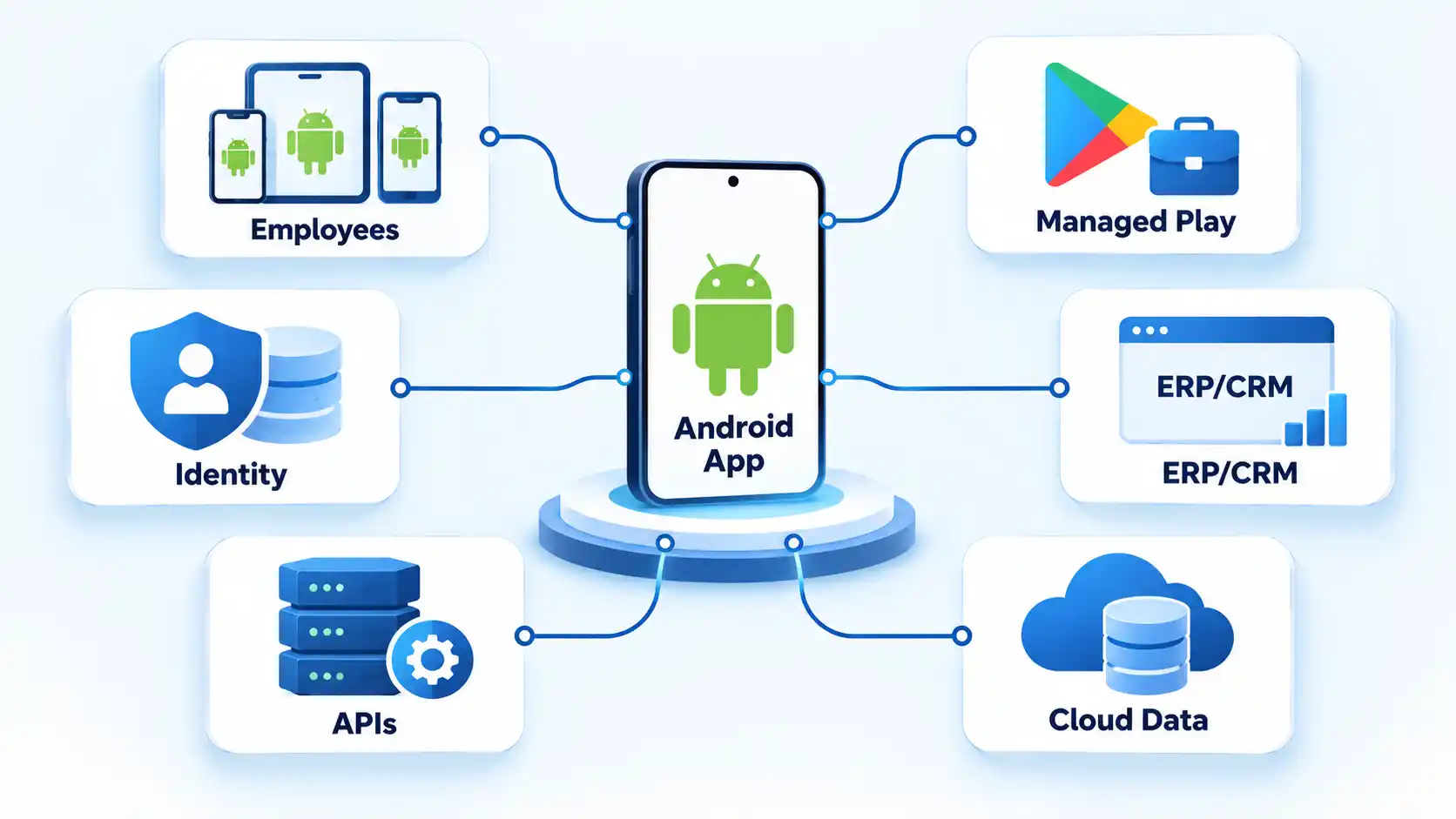
Those integrations can create substantial operational value, but they can also become some of the most expensive parts of a project. An enterprise should estimate integration work before treating the visible Android interface as the size of the entire development effort.
The costs that determine whether Android actually pays off
The initial build price is only the first cost. A better estimate follows the application through its expected operating life and includes the systems and people required to keep it useful, secure, and supported.
The table below shows the main factors to measure before deciding whether the financial case is credible.
| Factor | Why it matters | What to measure |
|---|---|---|
| Development | Covers initial product, design, engineering, quality assurance, and release work. | Internal engineering time, contractor or agency cost, design effort, and project management. |
| Backend and integration | Enterprise apps frequently depend on existing business systems rather than operating alone. | API development, identity integration, data migration, middleware, legacy-system changes, and infrastructure. |
| Device and form-factor testing | The supported Android estate may contain different screen sizes, hardware capabilities, and configurations. | Supported device matrix, operating-system versions, rugged hardware, peripherals, and test effort. |
| Security | Business data, credentials, and internal services require controls beyond ordinary interface development. | Authentication, authorization, secure storage, encrypted communication, dependency management, testing, and review. |
| Deployment and management | Employee devices may require managed configuration, private distribution, enrollment, and policy administration. | EMM licensing, IT administration, provisioning, app configuration, and support. |
| Maintenance | The application continues to incur costs after its first production release. | Bug fixes, Android compatibility work, library updates, backend changes, monitoring, support, and release management. |
| Business benefit | This determines whether the spending has an economic justification. | Time saved, transactions completed, errors prevented, revenue gained, support reduced, or other agreed business outcomes. |
Device diversity is useful, but it increases the test surface
Android applications can run across phones, tablets, foldables, ChromeOS devices, car displays, and other form factors. Google’s Android app architecture guidance explains that applications must account for multiple form factors, configuration changes, process lifecycle behavior, resource constraints, and adaptive layouts.
For an enterprise project, device choice should therefore be intentional. Supporting three approved corporate devices is a different testing problem from promising support for a broad employee-owned Android population.
A wider device matrix may improve hardware flexibility, but it can also increase quality-assurance effort. The business case should define the supported device policy rather than treating “Android” as one uniform device.
Enterprise integrations can dominate project cost
A mobile app may look simple while depending on difficult backend work. Authentication, old databases, incomplete APIs, inconsistent data models, unreliable networks, and approval workflows can consume more engineering effort than the visible mobile screens.
This is especially important when estimating an application intended to replace a paper process or desktop workflow. The mobile front end cannot remove a bottleneck if the systems behind it cannot exchange accurate data reliably.
Security is an implementation responsibility
Android includes security mechanisms, but secure outcomes still depend on architecture and implementation. Google’s Android security checklist covers areas such as authentication, secure networking, permissions, app integrity, input handling, key management, and keeping software dependencies current.
For an enterprise, security work should also address the sensitivity of the data, how users authenticate, what happens when devices are lost or compromised, which internal systems the app can reach, what data is cached locally, and how credentials or tokens are protected.
That work has a cost. Leaving it out does not make the project more profitable; it leaves part of the project’s risk and likely remediation effort outside the original estimate.
Maintenance continues after launch
Enterprise software rarely remains unchanged. Business rules evolve, backend systems are replaced, libraries receive updates, device fleets change, and operating-system behavior changes over time.
A project that appears attractive only when maintenance is excluded is not being evaluated on its real lifecycle economics. Budgeting should include a reasonable operating horizon and an owner for post-launch engineering, monitoring, support, and release decisions.
Security and manageability are stronger than the old Android stereotype
It is too simplistic to treat Android as unsuitable for enterprise use because of security. Android Enterprise provides managed-device and work-data controls designed for business environments. The more useful question is whether the proposed device, management model, and application architecture satisfy the organization’s actual security requirements.
For supported employee-owned and company-owned configurations, Work Profile can separate managed business apps and data from personal apps and data. Administrators can control approved work apps and remotely remove the work profile while leaving personal content separate.
Device selection also matters. Google’s current Android Enterprise Recommended requirements define minimum criteria for participating device categories and enterprise management services. Current Android 16 requirements include default device encryption and require manufacturers to publish security-update support information and guaranteed operating-system upgrade information.
Those requirements should not be read as proof that every Android device has the same security characteristics or support lifetime. Procurement teams still need to examine the specific model, manufacturer’s published support period, operating-system version, management compatibility, and organizational policy.
Application-level controls remain separate from device management. A well-managed phone cannot repair an app that exposes sensitive components, stores secrets carelessly, uses weak authentication, or exchanges confidential information insecurely.
Before deployment, an Android enterprise app security checklist should cover authentication, authorization, sensitive-data storage, network communication, permissions, dependency updates, logging, device-loss scenarios, and access to internal services.
Enterprise Android app distribution options
How an app reaches users affects administration, security, release control, and support. An employee-only application usually needs a different distribution model from an app intended for consumers through the public Play Store.
Public Google Play distribution
Public distribution makes sense when the application is intended for a broad customer or partner audience and should be discoverable through Google Play. That creates a different release and support model from a controlled internal deployment.
Managed Google Play private apps
For internal applications, Managed Google Play supports private apps that are available only to approved organizations. Google’s Managed Google Play private-app overview states that private apps are not visible in the public Play Store and can be remotely installed or listed in an organization’s managed Play store.
Organizations can also publish through supported EMM consoles. Google’s current private-app publishing instructions recommend Android App Bundles (AABs) for this workflow while still supporting Android Package files (APKs) in the managed Play publishing interface.
This route can simplify controlled employee deployment, but the enterprise still needs to decide who owns the publishing process, app-signing arrangement, source code, release approvals, and long-term maintenance. Those details matter because the publishing method can affect account ownership and signing-key handling.
Internal team or external development partner
The organization must also decide who builds and maintains the application. An internal Android team may offer close knowledge of business systems and long-term ownership, while an external development team can add capacity or specialist skills when those resources are unavailable internally.
If the organization lacks the required engineering capacity, a custom Android app development company can provide development resources, but the business case should still compare outsourcing cost, integration responsibility, source-code ownership, maintenance, and long-term internal capability.
The staffing model should follow the expected lifespan and strategic importance of the product. A short pilot, a customer-facing revenue product, and a mission-critical field application may justify very different combinations of internal ownership and external support.
How to decide whether an Android app will be profitable for your enterprise
You do not need a precise long-term forecast before making a first decision. You do need a measurable baseline, a realistic lifecycle-cost estimate, and a way to test whether the expected value appears after people actually use the product.
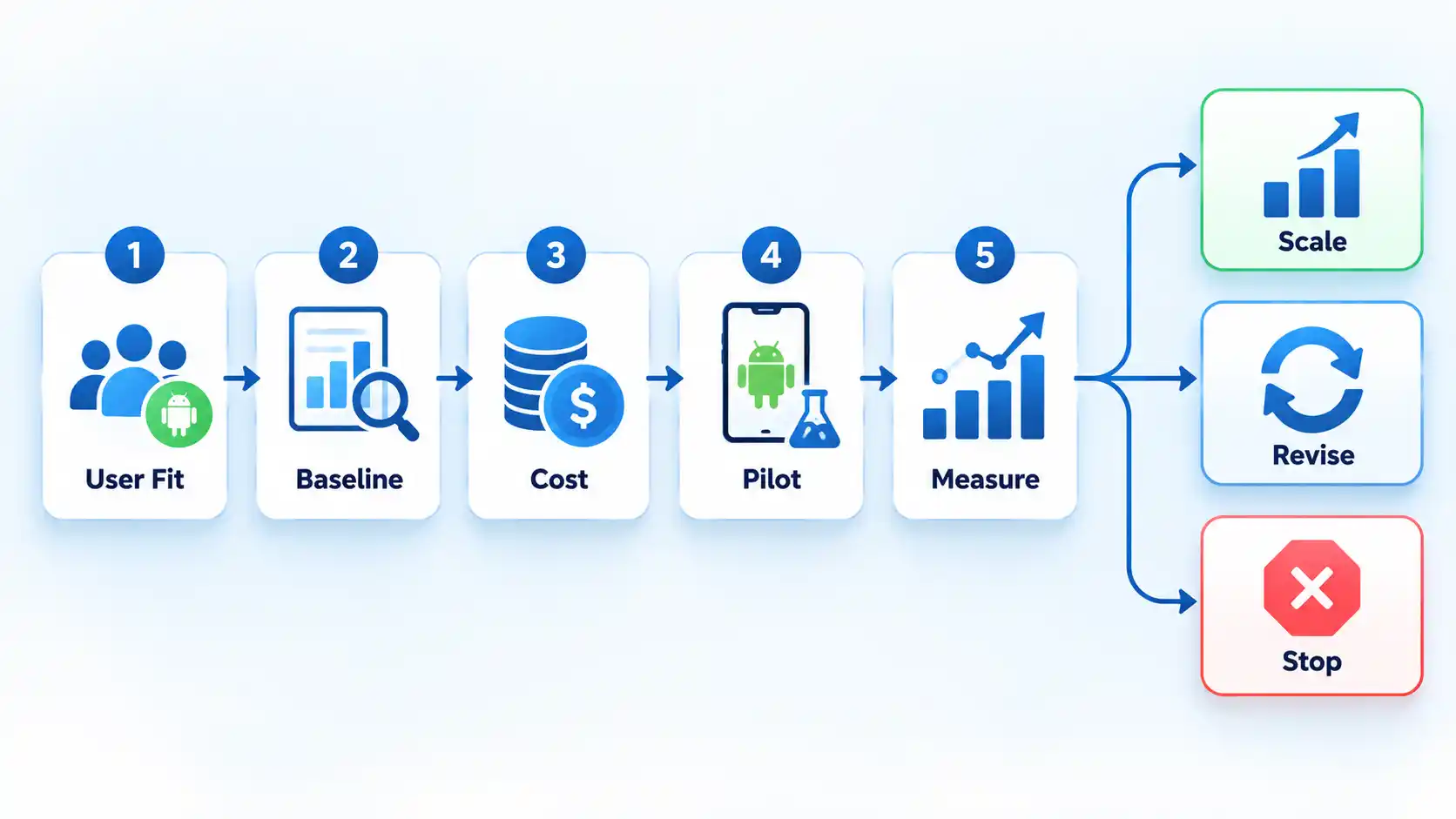
- Identify the users and devices. Determine who will use the application, where they work, what devices they already have, and how much of that population is realistically reachable through Android. Separate customer assumptions from employee-device data.
- Choose the business process to improve. Name the specific workflow, transaction, or customer action the app is expected to change. Replace broad objectives such as “improve digital transformation” with observable operational outcomes.
- Measure the current baseline. Record how the process performs before the app exists. Depending on the use case, this may include time per task, transaction completion, error rate, support contacts, equipment cost, conversion, or another metric tied to economic value.
- Estimate the full lifecycle cost. Include product work, design, Android engineering, backend changes, integrations, testing, security, EMM, infrastructure, support, analytics, maintenance, and future releases. Document major assumptions rather than hiding uncertainty inside one development-price figure.
- Estimate expected value conservatively. Calculate what realistic improvements to the baseline would be worth to the business. Use internal data where possible. A small recurring efficiency gain across thousands of monthly tasks can matter more than a feature that sounds impressive but is rarely used.
- Run a controlled pilot. Release the application to a representative group large enough to expose workflow, device, integration, training, and support problems without committing the entire organization to the rollout.
- Compare measured results with the baseline. Check whether the expected time saving, transaction improvement, error reduction, revenue effect, or other outcome appeared in practice. Include new support or administration costs revealed by the pilot.
- Scale, revise, or stop based on the result. Expand the deployment when measured benefits and strategic value justify the expected lifecycle cost. Change the product when the pilot identifies fixable constraints. Stop or narrow the project when the economics no longer support the original case.
Verify the result
- The target user population and supported Android devices are documented rather than assumed from global market share.
- The business process has a pre-launch baseline and one or more measurable outcome metrics.
- The cost estimate includes integration, security, deployment, support, infrastructure, testing, and maintenance as well as initial development.
- A pilot has tested the application with representative users, devices, networks, and enterprise systems.
- Measured post-pilot results can be compared with the original baseline and forecast.
- The organization has a named owner and budget for post-launch maintenance, support, security updates, and future releases.
When Android may be a weaker business choice
Android does not have to be a bad platform to be the wrong investment for a particular enterprise. Platform choice should follow the users, workflow, risk profile, and economics.
Your users are concentrated on another platform
Global Android usage is not enough reason to build an Android product when the intended users do not resemble the global market. Customer analytics, employee device inventory, or an approved corporate hardware fleet should carry more weight than worldwide percentages.
A responsive web application already solves the problem
A native Android application has stronger justification when the workflow needs mobile-specific capabilities, managed deployment, offline operation, device hardware, or a user experience that the existing web product cannot provide adequately.
If the workflow is occasional, browser-based, and already works well across the required devices, a separate Android application may add maintenance without creating enough new value.
Integration cost overwhelms the expected benefit
An application can be inexpensive at the interface layer and still require extensive work in identity, legacy databases, middleware, APIs, data quality, or backend modernization. Those costs belong in the Android decision even when much of the code does not run on Android.
The organization cannot support the required security model
A sensitive enterprise workflow may require strong identity controls, device management, audit capability, secure backend access, and reliable incident response. If those capabilities are unavailable, launching the mobile client first can create risk without solving the underlying security problem.
A second mobile platform changes the economics
An Android-only application is not the same investment as maintaining separate Android and iOS applications. If both are required, native Android vs cross-platform development becomes a separate cost and maintenance decision that should be evaluated before committing to two independent native codebases.
Does Android’s open-source foundation make development cheaper?
Android’s open-source foundation removes one misconception but does not answer the profitability question. The Android Open Source Project states that the majority of the Android platform is licensed under Apache 2.0, while some components use other licenses.
That licensing model can support platform flexibility, but “open source” does not mean an enterprise application is free to create. The organization still pays for people, systems, infrastructure, testing, security, integration, support, and maintenance.
The useful financial comparison is therefore not “Android licence fee versus no Android licence fee.” It is the total cost and expected value of the complete solution compared with realistic alternatives.
Final assessment
Android app development can be profitable for enterprises, but the platform itself is not the source of the profit. The return comes from solving a valuable business problem for the right users at a lifecycle cost the organization can justify.
Android has characteristics that can strengthen that case: wide mobile reach, device choice, work-profile management, private enterprise distribution, and support for varied business applications. Those advantages become financially meaningful only when they reduce costs, improve a workflow, enable revenue, or create another measurable outcome.
The strongest decision process starts with the enterprise’s own users and baseline data, estimates the complete cost of ownership, tests assumptions through a controlled pilot, and measures the result before a full rollout. If the economics still hold after integration, testing, security, deployment, support, and maintenance are included, Android can be a sound enterprise investment.

💬 Comments