Low-code platforms can improve a digital workplace by helping organizations build suitable internal applications, workflows, and process changes faster than conventional development alone. Their value is strongest when the workload fits the platform and the organization still applies sound integration, security, testing, ownership, and lifecycle controls.
Quick Take
Low-code can shorten development cycles, make some application work accessible to a wider group of employees, and help teams automate repetitive workplace processes. It does not automatically make software cheaper, more secure, easier to maintain, or suitable for every workload, so governance and technical fit still matter.
What Low-Code Means in a Digital Workplace
A low-code development platform lets people create applications and automated processes through visual models, reusable components, configuration, and prebuilt integrations while reducing the amount of conventional hand-written code required. It does not necessarily eliminate code. More demanding applications may still need custom logic, application programming interfaces (APIs), scripts, database work, or other professional development.
That distinction matters in a digital workplace. An employee request form, equipment-tracking tool, approval workflow, field inspection app, or departmental dashboard may not justify the same development approach as a large customer-facing transaction system. Low-code gives organizations another way to deliver smaller and medium-sized applications that sit between off-the-shelf software and fully custom development.
Low-code is also different from no-code. No-code tools generally aim to let users create applications or automations without writing code, while low-code platforms usually leave more room for developers to extend an application when visual tools reach their limits. The line between the two categories is not always sharp, but the distinction becomes important when an application needs custom integrations, complex logic, unusual interface behavior, or deeper control over its technical architecture.
A digital workplace can also include dedicated workplace software such as the Modo Workplace app, while low-code platforms serve a different role by helping teams create or automate custom applications and processes.
Where Low-Code Creates Workplace Value
The main advantage of low-code is not that it removes software engineering. It reduces some of the repetitive work involved in delivering applications and can give teams a faster path from a workplace problem to a usable digital process.
Faster Delivery of Internal Apps and Workflow Changes
Consider a department that manages equipment requests through email and spreadsheets. A conventional application might require developers to build the interface, data handling, authentication, workflow logic, notifications, and integrations individually. A suitable low-code platform may already provide visual form controls, identity integration, workflow building blocks, and connectors for common business systems.
A 2026 systematic review in the Journal of Systems and Software analyzed 226 studies and found sufficient evidence that low-code development speeds up software development. The same review found mixed and context-dependent outcomes for quality and complexity and said open questions remain around cost and security. The systematic review of low-code viability therefore supports faster delivery without supporting a universal percentage reduction in coding time.
For a digital workplace, that can matter when processes change frequently. An approval chain may need another reviewer, a form may require a new field, or a departmental application may have to connect to a different data source. Visual models and reusable components can make some of those changes less labor-intensive, provided the application has not accumulated extensive custom dependencies.
Automating Repetitive Handoffs and Manual Steps
Many workplace processes are slow not because they are technically difficult, but because information moves through email, spreadsheets, chat messages, repeated data entry, and manual status checks.
A low-code application can bring those steps into one process. A request can enter through a structured form, move to an appropriate reviewer, write approved information to a business system, notify the requester, and leave a record of the workflow. The practical benefit comes from reducing unnecessary handoffs and duplicate entry rather than simply replacing a paper form with a screen.
Automation still needs boundaries. A process that contains ambiguous business rules, frequent exceptions, sensitive decisions, or poor-quality source data can become harder to manage if the organization automates it before understanding it. A stronger candidate has clear inputs, ownership, decision rules, and an identifiable reason for changing the process.
Bringing Business Knowledge Closer to Application Development
People who perform a process every day often understand its exceptions better than a development team receiving requirements second-hand. Low-code can give those subject-matter experts a more direct role in shaping prototypes, workflows, forms, and departmental applications.
This approach is often described as citizen development: employees outside professional software-engineering roles participate in creating digital solutions within approved organizational tools and controls. A 2025 systematic literature review covering 40 primary studies describes low-code and no-code development as extending software creation beyond professional engineers and examines both benefits and challenges of citizen-development adoption. Its review of low-code, no-code, and citizen development places that participation within digital transformation rather than presenting it as a replacement for IT.
That is the more useful model for a workplace program. Business users can contribute domain knowledge and build within appropriate guardrails, while technical teams remain responsible where architecture, identity, security, integration, testing, data design, performance, or operational support requires deeper expertise.
Extending Existing Workplace Systems Instead of Replacing Everything
A low-code project does not have to become a new system of record. It can act as an application layer around services the organization already uses.
A connector is a packaged way for one application to communicate with another service or data source. More specialized integrations may use an API, which is a defined interface through which software exchanges requests and data. Depending on the platform and systems involved, an internal app may be able to read approved information from an existing database, start a workflow, write a result to another service, and present an employee with one task-focused interface.
This incremental approach can be useful in a broader digital transformation roadmap because organizations do not need to replace every established system before improving a specific process. The important question is whether the proposed low-code layer simplifies the workflow or merely creates another application that IT must own and support.
Iterating on Changing Processes More Quickly
Internal processes rarely stay fixed. Policies change, teams reorganize, new data becomes necessary, and employees discover exceptions that were not obvious during the first release.
Low-code can make iteration more practical when a change stays within the platform’s visual models and supported integration patterns. A team might alter validation rules, add a workflow branch, update a form, or reuse a component without rebuilding the entire application.
The benefit becomes less predictable as customization grows. If an application depends on extensive custom code, complicated external integrations, unusual performance requirements, or a large web of downstream workflows, a visually simple change can still have wide technical consequences. Low-code reduces some development effort; it does not eliminate dependency management or regression testing.
A Benefit Is Not the Same as a Guarantee
Faster development is useful, but it does not prove that an application will also be cheaper, safer, simpler, or easier to maintain throughout its life.
A team may build a prototype quickly and assume production will therefore be inexpensive. That conclusion can change once the organization accounts for production licensing, premium connectors, integration work, testing, identity requirements, administration, support, data storage, monitoring, and future migration.
The 2026 systematic review separates claims with stronger support from those that remain uncertain. It found sufficient evidence for faster development, but quality and complexity varied by context while cost and security remained open questions. A blanket statement such as “low-code always reduces development cost” would therefore go beyond the research.
Complexity can also move rather than disappear. A visual workflow may be easier to create than equivalent conventional code, but the organization still has to understand which systems it touches, who can change it, what happens when an integration fails, and how dependent applications respond to a changed data model.
The same applies to vendor dependence. Reusable proprietary components and managed services can accelerate delivery precisely because the platform handles work the organization would otherwise build itself. That convenience can also make migration difficult if business logic, data models, connectors, or deployment practices become tightly tied to one ecosystem. Before an important application becomes dependent on a platform, examine what can be exported, which elements are proprietary, and what would have to be rebuilt after a future platform change.
These trade-offs are why low-code technical debt deserves the same attention as delivery speed. A quickly created application can still become an expensive operational problem if nobody owns its architecture, dependencies, testing, or retirement.
Governance Determines Whether Low-Code Scales Safely
Giving more people the ability to create software increases the need to decide who may build, what data applications may use, where they may run, and who remains responsible after the original maker moves on.
Governance is the combination of policies, roles, technical controls, and operating practices used to answer those questions. It should not mean blocking every business-led project. Good governance makes the permitted path clearer while reserving stronger review for applications with higher risk or wider impact.
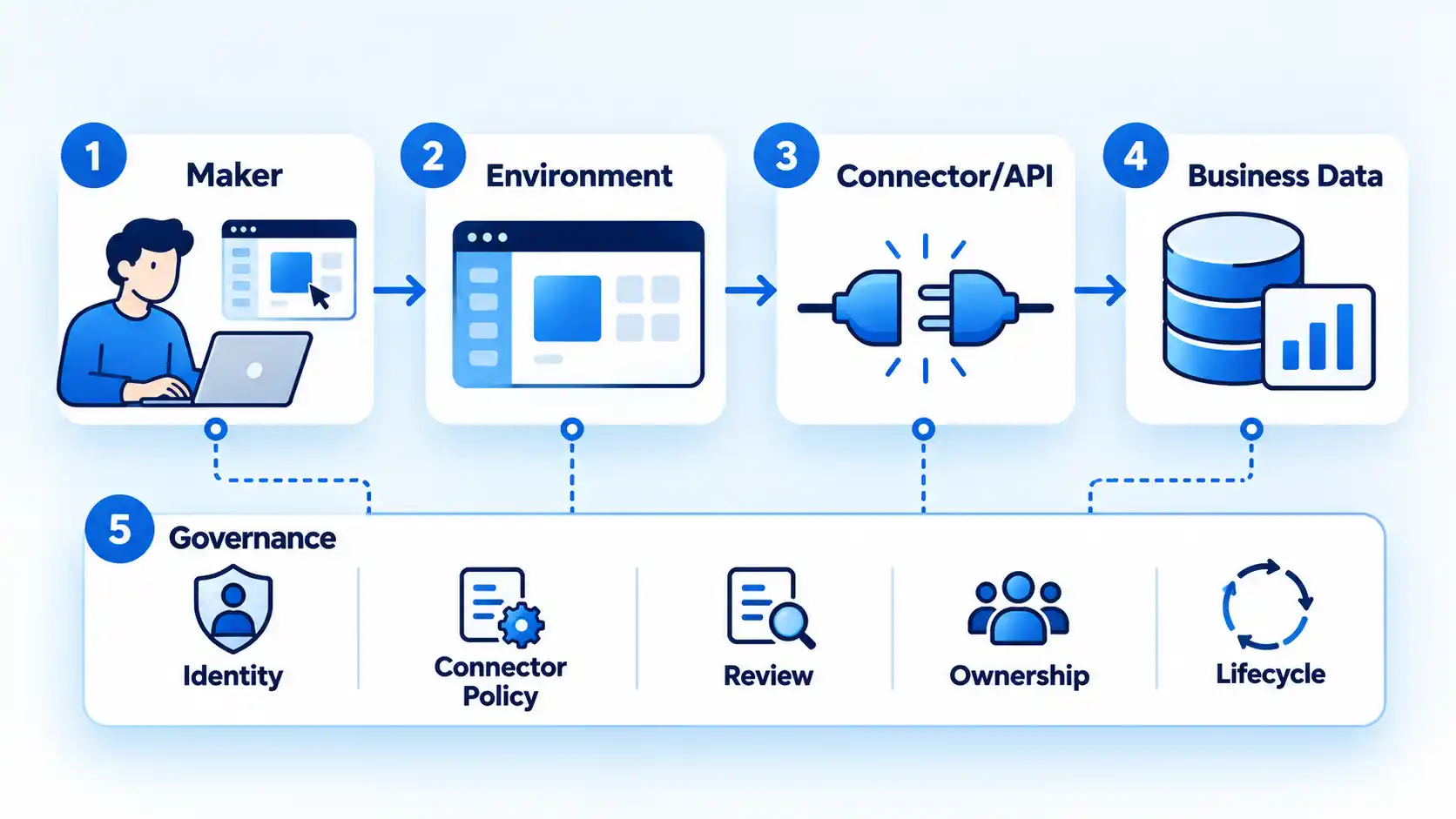
Microsoft’s Power Platform provides a concrete example. Its current governance guidance describes governance as policies, practices, and tools for managing the platform and recommends dedicated administration, management at scale, and an environment strategy. Those controls are specific to Power Platform, but the underlying questions apply more broadly: where applications are created, who administers them, how production differs from experimentation, and how unused resources are retired.
Data access needs similar attention. Power Platform data policies can control which connectors are available and which groups of connectors may be used together. Microsoft’s data-policy overview explains that violating apps, flows, or chatbots can be placed into a suspended or quarantine state and connections can be disabled when a connector is blocked. Microsoft also notes that policy enforcement is not instantaneous and can take up to 24 hours in extreme cases.
Warning
Low-code governance is not a substitute for security engineering or regulatory analysis. Platform controls can help enforce organizational rules, but the organization still has to define those rules, review higher-risk applications, manage identity and data access, and verify that its implementation meets applicable requirements.
A mature low-code program also needs clear ownership. Every production application should have an accountable business owner, an understood technical support path, documented dependencies, appropriate access controls, and a plan for what happens when the application is no longer needed. Testing should reflect impact. A small team utility and an application that changes payroll, customer, financial, or safety-related data should not receive the same level of review.
For organizations expanding beyond isolated experiments, low-code governance becomes part of application lifecycle management rather than an administrative afterthought.
Where Low-Code Fits, and Where It Does Not
Low-code is easiest to justify when an application’s requirements align with what the platform already does well. The further a project moves away from supported components, integrations, deployment models, and operating limits, the more carefully teams should compare low-code with conventional development.
| Workload | Why low-code may fit | What to check | When custom development may be preferable |
|---|---|---|---|
| Internal forms and approval workflows | Visual forms, workflow logic, identity integration, and notifications can reduce repetitive implementation work. | Approval complexity, data sensitivity, connector availability, audit needs, and ownership. | When rules are highly specialized or the process requires capabilities the platform cannot express cleanly. |
| Departmental operational apps | Teams can build focused interfaces around existing business processes and data. | User scale, permissions, data model, integrations, maintainability, and production licensing. | When the application needs unusual architecture, extensive custom behavior, or deep control over infrastructure. |
| Prototypes and process experiments | Teams can test an interface or workflow before committing to a larger implementation. | Whether prototype assumptions match production requirements and whether testing data is appropriate. | When the prototype would provide little evidence about the eventual production architecture. |
| Applications built around supported enterprise services | Prebuilt connectors and platform integrations may shorten integration work. | Connector limits, authentication, failure handling, data policies, API quotas, and portability. | When core integrations require extensive custom middleware or unsupported protocols. |
| Highly specialized or performance-sensitive systems | Low-code may still handle supporting workflows or administrative interfaces. | Latency, throughput, deployment control, observability, custom algorithms, and technical constraints. | When the platform prevents the engineering team from controlling requirements that determine system correctness or performance. |
This is a workload decision rather than a contest between “modern” and “traditional” development. A low-code platform can be a strong fit for one application and a poor fit for another inside the same organization.
If the workload appears suitable, compare actual low-code development platforms by the systems they integrate with, who will build and maintain the application, governance capabilities, extensibility, deployment model, and production licensing rather than choosing from headline feature counts alone.
How to Evaluate Low-Code for Your Digital Workplace
A useful evaluation starts with the process you want to improve, not with the fact that a platform offers visual development. Define the workplace problem first, then test whether low-code is a practical way to solve it.
Start with the application itself: what must it do, who will use it, who will maintain it, and which systems or data sources must it reach? Then examine whether the platform supports those requirements through ordinary components and documented integrations or whether the project immediately depends on custom workarounds.
Next, examine the data and access model. Identify the information the application will read or change, how users authenticate, which roles need access, where the data resides, which external services receive it, and how access is removed when responsibilities change.
Then test how far the application may need to grow. A simple first version may eventually require custom APIs, reusable components, source control, separate development and production environments, automated deployment, monitoring, or more formal testing. A platform that works well for the first form is not automatically the right foundation for a portfolio of business applications.
Cost analysis should use the expected production design rather than the prototype. Include licenses for actual users and makers, required connector or platform tiers, data or capacity charges where applicable, integration work, administration, support, testing, training, and maintenance of custom extensions. Current research does not justify assuming that low-code is always cheaper merely because the first application is faster to assemble.
Finally, examine the exit path. Ask how data can be exported, which application logic is portable, what happens to integrations if the vendor or architecture changes, and how difficult a critical application would be to replace. That question belongs in a broader digital transformation strategy because delivery speed has limited value if the organization cannot govern, sustain, or eventually replace what it builds.
The same evaluation also clarifies low-code versus no-code. The right choice depends less on the label than on how much extensibility, professional-development control, integration depth, and long-term application ownership the workload requires.
The Practical Takeaway
Low-code can make a digital workplace more responsive by shortening development cycles for suitable applications, reducing repetitive implementation work, bringing business specialists closer to solution design, and helping organizations automate processes around systems they already use.
The strongest current research support is for faster development. Cost, security, quality, complexity, maintainability, and scalability depend on the application, platform, implementation, and governance model rather than on the low-code label alone.
Treat low-code as an application-development approach, not as a shortcut around software engineering. When teams choose appropriate workloads, define ownership, control data and integrations, test according to risk, and plan for the application’s full lifecycle, faster delivery is more likely to remain useful after the first release.

💬 Comments