Flutter can lower the cost of a mobile app, and it can just as easily raise it.
For a booking app, a field-service tool, or an internal workflow where iOS and Android users do the same things, one Dart codebase removes real duplicated work.
Quick Take
- Fits Flutter: startup or MVP products with near-identical flows on both stores, moderate native integration, and a team that can own Dart plus platform QA.
- Fits native: apps whose value sits in deep OS or hardware behavior, platform-specific interaction design, or background execution that must not be interrupted.
- Fits mixed: a shared Flutter shell with a handful of native modules wired in through platform channels.
- Check before signing: prototype the riskiest native flow, measure release-build size in Play Console and Xcode, and test Android back and background behavior on real hardware.
- One rule: price the project from what the prototype and the release build actually cost you, never from a headline savings percentage.
How Flutter and Native Compare on the Same Bill
The useful comparison puts both options against identical criteria, then asks what you can measure on your own product. Anything short of that turns into a feature list, and feature lists do not pay invoices.
| Criterion | Flutter | Separate native iOS and Android | What to measure on your project |
|---|---|---|---|
| Shared implementation | One Flutter codebase compiles to native machine code for both stores; business logic and UI are reused where requirements overlap. | Two codebases; shared behavior is specified, built, and tested twice. | Count screens and rules that are identical across platforms. |
| Platform look and feel | Material and Cupertino widget sets; platform behavior comes from the framework or from code you write. | System components by default; platform behavior arrives with the OS. | List the interactions users expect to feel native: back gestures, swipe navigation, text selection, pickers, permission prompts. |
| Native integration | Platform channels, Pigeon, FFIgen, JNIgen, and platform views; native code is still written per platform. | Direct SDK access with no bridge layer. | Inventory Bluetooth, camera, payments, maps, background location, health data, and hardware SDKs. |
| Rendering | Own rendering engine; Impeller precompiles shaders and is the only supported engine on iOS and enabled by default on Android API 29+. | Platform renderers supplied by the OS. | Profile your heaviest screens on the oldest devices you support. |
| App size | Self-contained package; store dashboards and Xcode reports give the real numbers. | Smaller baseline because system frameworks ship with the OS. | Compare download and install size on the device classes your users actually hold. |
| Background and back behavior | Android restrictions and predictive back need explicit handling inside the shared codebase. | Same platform rules, implemented directly against platform APIs. | Test scheduled jobs, foreground services, and back navigation on current Android versions. |
| Release cadence | One feature branch can reach both stores in the same window. | Two release trains, scheduled separately. | Compare store review lead times against your marketing calendar. |
| Team model | One Dart team with platform review capability. | Swift and Kotlin engineers, or one team carrying both skill sets. | Cost the team you can actually hire and retain in your market. |
| Long-term upkeep | Plugin health, framework upgrades, and OS-update tracking sit in one backlog. | Two upgrade paths, each tied to its own OS release. | Budget annual upgrade work in engineering days, not percentages. |
| Sources: Flutter Impeller documentation, platform channels documentation, and app size documentation. | |||
Read down the third column and the decision usually announces itself. When most rows land on “identical,” the single codebase carries the budget. When most rows land on “platform-specific,” you are paying for two builds no matter which framework you pick, and the framework choice becomes a question of team and timeline.
Here is how that column reads on a real brief. Take a fictional ExampleCo clinic app: appointment booking, secure messaging, document scanning, and card payments on both stores. Most screens are identical, payments and camera need native work, and the only background job is a reminder schedule. That spread puts the shared codebase in front of the budget, with a small native module around payments if the SDK turns awkward. Add Bluetooth diagnostic devices in every clinic and the balance moves: the Bluetooth flow gets prototyped first, and the architecture decision waits for that result.
What Flutter Shares, and What It Does Not
The saving behind code sharing is real: near-identical screens get built once instead of twice. Everything the shared build still needs on the native side (design hours, QA passes, store releases, bridges) stays on your own bill.
Flutter renders with its own engine instead of calling system widgets. That architecture buys visual consistency across platforms, and it creates a fidelity job: framework-maintained widgets track Apple and Google design changes, and your team decides how closely each screen should match local expectations.
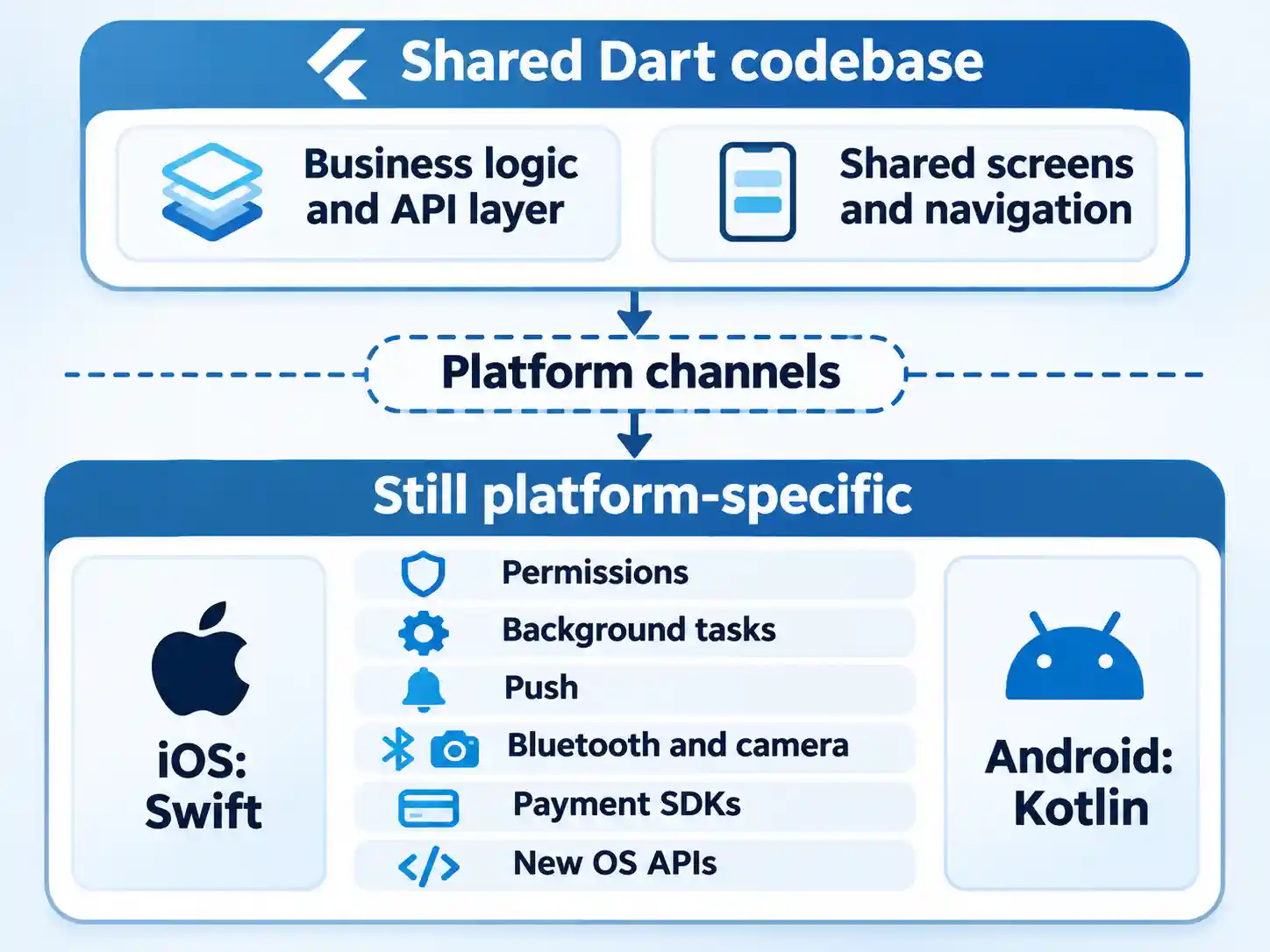
The shared portion typically covers API calls, state handling, business rules, navigation structure, and the majority of screens. It stops at permissions, background execution, push delivery, Bluetooth and camera pipelines, payment SDKs, and any brand-new OS API that has not yet reached a plugin. Platform channels pass messages between your Dart code and host code in Kotlin or Swift, and the native side of that channel is ordinary app code you would have written anyway.
Where the Hidden Costs Appear
Warning
Code sharing discounts one line item: duplicate implementation. Design, QA across OS versions, store operations, app-size management, and native bridges stay on the invoice under any framework.
These seven items tend to surface after the first sprint:
- Platform-specific UI polish. Two design languages rarely converge on one widget. A screen that looks right on Android often needs spacing, motion, and navigation work on iOS, and that work is hand-built.
- Native integrations. Every hardware SDK, payment provider, and wearable adds a channel, a plugin, or both. You are writing Kotlin and Swift, just inside a Flutter project.
- QA across OS versions. The device matrix does not shrink. Older Android versions fall back to legacy rendering paths, and each major iOS release can shift system behavior your app touches.
- App size. Flutter packages are self-contained, so debug builds mislead and store upload packages mislead again. Measure the real download and install size in Play Console and in an Xcode App Size Report before you set download-size expectations.
- Android back and background rules. Predictive back and background execution both sit outside the shared layer’s defaults.
- Plugin health. A popular package can go quiet. When it does, the replacement work lands on your team, in native code.
- OS-update tracking. Someone has to watch Apple and Google announcements and decide when the framework, the plugins, and the native modules need to move.
None of this makes Flutter a bad choice. It makes the savings question concrete: how much of your build sits above the line, and how much sits below it. It also rules out borrowed benchmark percentages, because none of them describes your screens, your integrations, or your QA matrix.
Performance and UX: Where Flutter and Native Diverge
Flutter’s Impeller engine precompiles shaders at engine-build time so they do not compile at runtime, and builds all pipeline state objects upfront. That design targets predictable performance rather than a fixed frame rate. Impeller is the only supported rendering engine on iOS, is enabled by default on Android API 29 and above, and falls back to legacy OpenGL on lower Android versions or devices that do not support Vulkan.
What that does not settle is the frame rate your own checkout screen reaches on a five-year-old Android phone. Target devices, screen complexity, and third-party views decide that, and only profiling your app produces the answer. Anyone quoting a universal 60 or 120 frames per second across all apps and devices is describing a ceiling.
Native code stays the right tool when the product depends on low-level behavior: heavy 3D scenes, custom camera and machine-learning pipelines, background work that must survive app suspension, and hardware drivers. Android’s background task guidance is blunt about the cost of picking wrong: an incorrect API choice can drain battery, degrade the device, and in some cases prevent your app from being listed on Play. Periodic location on Android 10 and later needs background location permission on top of the correct scheduling API.
Back navigation is the other platform detail that quietly adds work. Android’s predictive back gesture previews the destination screen, is enabled by default on current releases, and requires apps to update their activity setup or use the platform callback. On iOS, navigation gestures and permission prompts deserve their own device testing too, rather than an assumption that one widget library covers both platforms.
Release Velocity Without the Sprint-Acceleration Myth
The velocity case for Flutter is structural. One feature branch feeds both stores, Hot Reload shortens the loop between a design change and a running screen, and product decisions land in one codebase instead of two conversations.
The gains show up as synchronized releases. When marketing plans a launch date, both apps can carry the same feature, the same copy, and the same analytics events. With two native teams, that alignment needs scheduling, and small teams feel it most.
What does not accelerate is the part you still owe each platform: two QA passes, two store review processes, two sets of screenshots and release notes, and two device matrices. Expect the shared work to shrink and the release work to hold. For more on trimming that overhead, these tips to build apps faster while keeping costs down apply to either build model.
Build In-House or Hire a Partner?
This decision changes your cost profile more than the framework does, and neither model removes risk. The honest comparison is control, ramp-up, continuity, and how much knowledge you keep when the engagement ends.
In-house gives you direct control of the roadmap and keeps product knowledge in the company. Hiring Dart developers takes time in most markets, and one departure can stall a small team. Partner-led builds start faster and bring domain patterns you have not solved yet. The trade-off is dependency: scope changes, handovers, and code quality depend on a relationship you have to manage, and the learning leaves with the vendor unless you plan for it.
Compare bids on the same scope document, including maintenance for two OS release cycles, the measurement work described below, and named ownership of plugin upgrades. A quote that covers only feature delivery is not comparable to one that covers the first year of upkeep. Teams that lack Dart depth often evaluate Flutter app development services alongside in-house hiring, and the best bid is the one that survives your measurement plan, even when another quote carries a smaller headline number.
Maintenance and Total Cost of Ownership
The first release is the cheap part. What follows is a steady cycle of dependency updates, framework upgrades, and OS-response work that nobody puts in the launch budget.
Plan for four recurring jobs. Plugin and package health needs a quarterly review, with a named owner and a fallback plan for anything abandoned. OS updates need a standing watch, since platform-channel code is how your app reaches new system APIs. Architecture needs review as the app scales, because a shared codebase that grows without structure becomes harder to test than two smaller ones. And bug fixes travel through app-store review on both platforms, so release discipline matters more when one shipping train carries your entire product.
Record these as engineering days per year in your model. A number grounded in your own backlog is more useful than any percentage borrowed from a vendor page.
Switching Costs and Migration Traps
Whichever way you move, the presentation layer gets rewritten. Business rules, API contracts, and data models usually survive the trip in concept, and they still need re-implementation in the destination stack.
Three traps catch teams mid-project. The first is rewriting everything at once: a native app moving to Flutter can keep a working native screen behind a platform view while the shared shell grows around it. The second is plugin debt carried into a new build without an owner, which simply postpones the replacement cost. The third is trusting debug builds or store upload packages for size and performance planning, which produces numbers that never match what users download.
The compatibility question deserves an early answer too. Native modules reach new OS features through channels and platform code, which means your iOS and Android skill requirement never fully disappears. Budget for it from the start, even in a Flutter-first plan.
Which Option Fits Your Product?
Startup or MVP with one shared workflow
Watch for: a roadmap that already depends on hardware or background tracking. Prototype that flow before you commit the architecture.
Business app with shared internal workflows
Watch for: authentication, document scanning, and offline sync, each of which hides native work behind a simple-sounding requirement.
Native-heavy or OS-sensitive product
Watch for: a Flutter quote that treats those features as plugin configuration. Ask which SDKs the team has actually integrated and how they tested them.
Mixed model: shared shell, native modules
Watch for: the boundary drifting. Every module you leave native adds a second skill set and a second test path.
Build a Cost Comparison You Can Defend
Run this sequence before you sign a build contract or approve a hire. Each step produces a number or a decision that feeds the next.
- List every platform touchpoint before anyone estimates.Write down target platforms, minimum OS versions, must-have integrations, and store constraints. Include Bluetooth, camera, payments, maps, background location, health data, and any hardware SDK.This list decides how much of the build sits outside shared code, so it belongs in the brief rather than the backlog.
You should be able to name an owner for each integration when the list is finished.
- Prototype the riskiest native flow first.Build the single flow most likely to need native code, such as device pairing, background tracking, or a payment SDK, and run it through a platform channel or plugin.Measure how much Kotlin or Swift the flow required and where the plugin fell short. That gap is your real integration estimate.
A successful prototype runs on a physical device and handles the happy path and the failure case.
- Build a release candidate and measure its size.Produce an app bundle and an iOS archive, then read the numbers from Play Console’s app size report and Xcode’s App Size Report.Debug builds inflate size for debugging overhead, and store upload packages are not what users download, so neither figure belongs in a business case.
Record download and install size for each device class you support and keep the figures with the cost model.
- Test back navigation and background work on real Android hardware.Exercise predictive back on current Android versions and confirm your screens preview and exit correctly. Then run scheduled jobs and any foreground service through a suspend and resume cycle.These two behaviors account for a large share of platform-specific QA surprises, and both have documented rules you can test against.
The test passes when no navigation state is lost and no background task is silently dropped.
- Price every build model against the same scope.Give in-house leads and agency partners the same scope document, the prototype findings, the measured app size, and a two-cycle maintenance requirement.Compare continuity and ramp-up alongside cost, since a slightly higher quote with named ownership of plugin upgrades can be the safer number.
The winning bid should be the one that survives your measurement plan and can explain its assumptions in engineering days.
The Verdict: Pick the Model That Matches Your Screens
Flutter earns its place when a product’s value lives in shared workflows: the same screens, the same rules, and a launch calendar that wants both stores moving together. The single codebase removes duplicate implementation, and the savings hold as long as native integration stays bounded and the team can handle platform QA.
Native development earns its place when the product’s value lives in the platform itself: hardware control, uninterrupted background execution, OS-sensitive behavior, or interaction design users would notice losing. In that world, a second codebase is the cost of doing the job properly.
Most teams land somewhere between the two, sharing the shell and keeping a few native modules behind channels. That is a legitimate architecture, provided someone owns the boundary and tests it on real hardware.
Whichever way you go, the decision belongs to your own measurements rather than a vendor’s average: what the prototype actually cost, what the release build actually weighs, how the platform behaviors perform on real hardware, and how many engineering days a year the upkeep demands. Settle those and the framework becomes a detail inside a business case you can defend. If you want to see how the platform itself is evolving before you commit, this look at Flutter’s future in cross-platform app development is a sensible next read.

💬 Comments