If a call or email looks suspicious, do not treat the displayed phone number, sender name, or email address as proof of identity. Stop interacting with the message, verify the claimed sender through a contact method you already trust, and then block, report, or begin recovery based on what happened.
Quick Take
- A familiar caller ID or sender name can be faked.
- Do not verify a suspicious request by calling a number, following a link, or replying through the same message.
- Open the company’s official app, type its known website yourself, use a number printed on a card or statement, or contact the person through a saved channel.
- If you already shared credentials, payment information, a one-time code, money, or device access, move from verification to recovery immediately.
What Spoofing Means and Why the Displayed Identity Can Mislead You
Spoofing means making communication appear to come from a different source. The FBI defines spoofing as disguising an email address, sender name, phone number, or website address so that it appears to come from a trusted source.
That is why the name shown on your phone or at the top of an email should be treated as a claim rather than proof. A caller can make a legitimate-looking number appear on caller ID, and an email can use a misleading display name, a look-alike domain, or another method that makes the message resemble a trusted organization.
Do not authenticate a suspicious call or email using information supplied by that same communication. If a caller tells you to call another number, or an email gives you a link to “verify” your account, use an independently known contact method instead.
Spoofing and phishing are related but not identical. Spoofing is the falsification or imitation of identity. Phishing is the attempt to trick you into taking an action such as revealing a password, sending money, opening a malicious attachment, or signing in to a fake website. Phishing frequently uses spoofing to make the request more convincing.
The same family of attacks also includes voice phishing, often called vishing, and SMS phishing, commonly called smishing. The broader distinctions between spoofing, phishing, smishing, and vishing matter because the delivery channel changes, while the underlying verification principle remains much the same.
Do Not Use Reverse Lookup as Proof of Who Contacted You
Searching an unfamiliar number can sometimes provide useful context, but it cannot establish who placed a spoofed call. This is the central weakness in using Google searches, people-search sites, or reverse-phone databases as an authentication method.
The Federal Trade Commission explains that scammers can use fake names and numbers and even engage in “neighbor spoofing,” where the displayed number resembles numbers in your area. The FTC also notes that a spoofed number can belong to a real person who has no idea their number is being misused.
For example, suppose your caller ID shows a local business owner’s real phone number. A reverse search might correctly identify that business owner. It still would not prove that the business owner made the call. The attacker may simply have caused that number to appear on your screen.
Use reverse lookup only as contextual information. Do not use it to accuse someone, decide that a payment request is genuine, or conclude that you have identified the person behind a spoofed call.
What to Do When a Suspicious Call or Email Arrives
The safest response is to separate the claim from the channel carrying it. You do not need to prove that a message is fraudulent before taking a safer route to verify it.
- Stop the interaction. Do not click a link, download an attachment, disclose a password or security code, approve a login, transfer money, install software, or provide remote access while the request is still unverified. If it is a call, end the call when necessary rather than allowing urgency or threats to keep you on the line.
- Identify what the sender is claiming. Work out which real person, company, bank, government office, delivery service, employer, or account the message claims to represent. Also identify the requested action, such as paying an invoice, resetting a password, confirming a card, sending a one-time code, or calling another number.
- Verify through an independent channel. Open the organization’s official app yourself, manually type a website address you already know, use the telephone number printed on a bank card or statement, or contact a known person through a saved number or existing conversation. The FBI recommends looking up the company’s contact information independently rather than using a number supplied by a suspected scammer.
- Check the trusted account directly. If the message claims there is a payment, security alert, delivery problem, password reset, or account restriction, sign in through the legitimate app or site and investigate the claim there rather than through the suspicious message.
- Block, report, preserve, or continue based on what you find. If the request is false or remains suspicious, use the provider’s spam-reporting tools and block the contact where useful. Preserve screenshots, headers, transaction details, or other evidence when money, account compromise, threats, or repeated abuse may need to be reported.
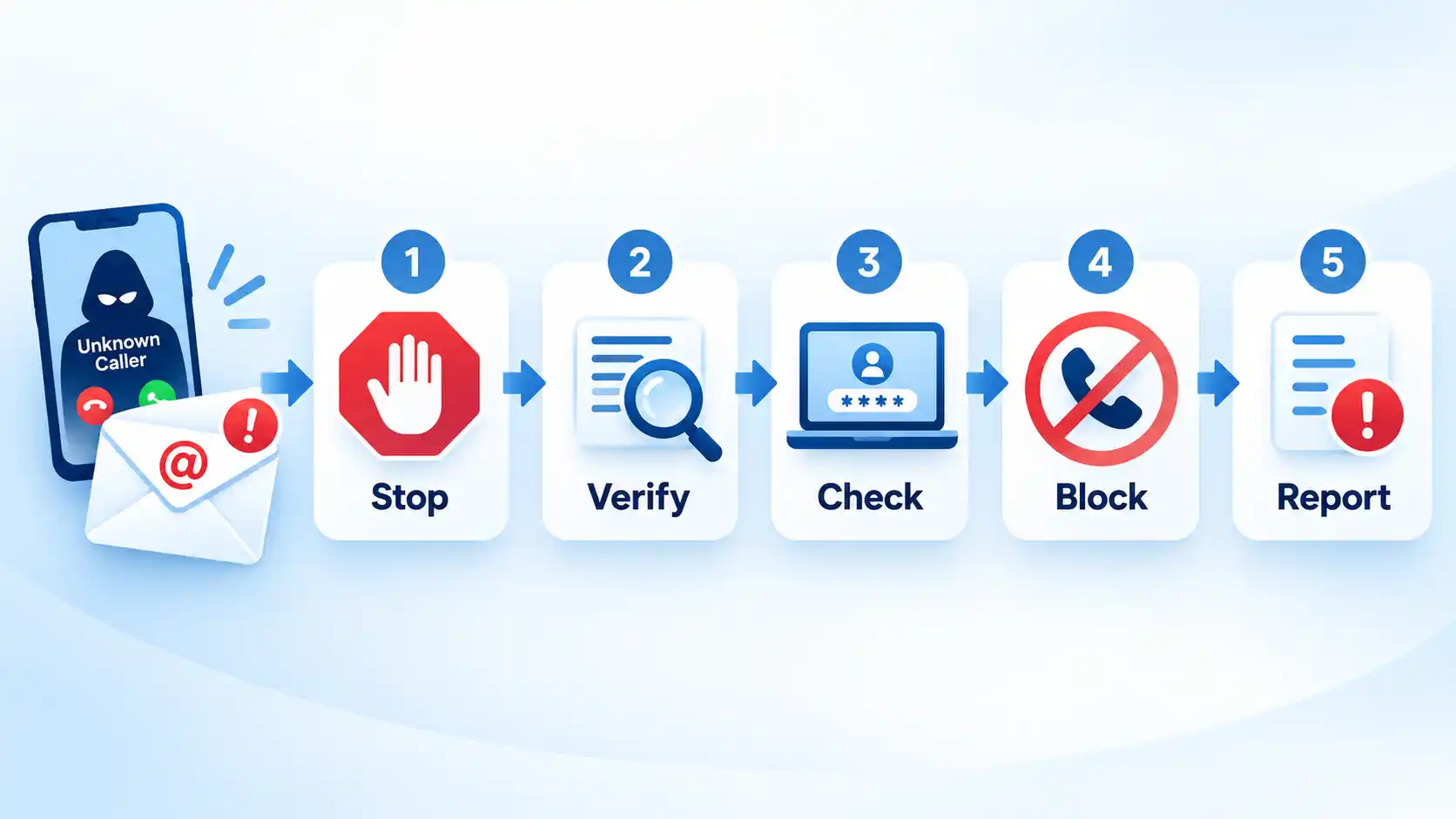
Consider a call that appears to come from your bank and claims that your account is being drained. The safer response is not to debate the caller or call the displayed number back. End the call, open the bank’s official app or use the telephone number printed on your card, and ask whether the claimed transaction or security event is real.
This approach is useful beyond spoofing because it interrupts many phishing and social-engineering attacks before the attacker can turn urgency into access, money, or credentials.
How to Check a Suspicious Email Without Trusting the “From” Line
An email can look convincing without being trustworthy. Check its identity progressively, starting with what is visible and moving to technical authentication only when that extra detail is useful.
- Expand the sender details. Look past the display name and inspect the complete email address. A message labeled “Bank Security” may actually come from an unrelated address or a look-alike domain with an added word, different spelling, or different domain ending.
- Do not use the message’s link as your verification route. A phishing message may link to a convincing copy of a real login page. If you need to check an account, open the organization’s legitimate app or enter its known address separately instead.
- Confirm the request outside the email. If the email claims to come from an employer, colleague, bank, supplier, or other known sender, contact that party through a communication channel you already trust. This is particularly important for unusual payment instructions, password-reset requests, bank-detail changes, gift-card requests, or urgent requests for confidential information.
- Inspect authentication when the decision still is not clear. In Gmail, expand the sender information to review authentication details. Google’s Gmail documentation explains that authenticated messages may display the sending and signing domains, while full message headers can expose results such as SPF and DKIM authentication.
- Treat authentication as evidence, not a guarantee. A failed authentication check deserves caution, but a pass does not prove that the message’s request is safe. Google notes that spammers can also authenticate mail, and a legitimate account or domain can itself be abused or compromised.
Sender Policy Framework, or SPF, lets receiving servers check whether mail came from a server authorized by the sending domain. Google’s SPF documentation describes this authorized-server check. DomainKeys Identified Mail, or DKIM, adds a cryptographic signature that receiving systems can verify using the domain’s public key, as explained in Google’s DKIM documentation.
Domain-based Message Authentication, Reporting and Conformance, or DMARC, uses SPF or DKIM authentication together with alignment to the domain shown in the message’s From header. Google’s DMARC guidance explains that alignment compares the visible From domain with the domain authenticated through SPF or DKIM. A deeper explanation of SPF, DKIM, and DMARC email authentication is useful when you manage domains or need to investigate message headers regularly.
The table below summarizes what common trust signals can and cannot establish. The important distinction is between a useful signal and actual proof that the request is legitimate.
| Signal | What it can tell you | What it does not prove |
|---|---|---|
| Caller-ID name or number | Shows the identity information presented with the call. | It does not prove that the displayed person or organization originated the call. |
| Spam or scam label | Shows that a carrier, device, or filtering service detected characteristics associated with unwanted calling. | An unlabeled call is not automatically legitimate, and legitimate calls can occasionally be labeled incorrectly. |
| STIR/SHAKEN caller-ID authentication | Lets participating voice providers authenticate and verify caller-ID information transmitted with a call. | It does not prove that the person speaking is honest or that the requested transaction is legitimate. |
| Visible email sender | Shows the display name and address presented to your mail client. | A familiar name, logo, or similar-looking address does not prove control by the expected person. |
| SPF or DKIM pass | Shows that a particular email-authentication check succeeded. | It does not prove that the message content, requested transaction, or human sender is trustworthy. |
| DMARC alignment | Helps receiving systems evaluate whether an authenticated sending domain aligns with the visible From domain. | It does not prevent a compromised legitimate account or attacker-controlled domain from sending harmful messages. |
How to Reduce Spoofed and Scam Calls
No phone setting can guarantee that spoofed calls will stop, but filtering can reduce interruptions and make suspicious calls easier to recognize. Use spam-call or unknown-caller controls provided by your mobile operating system, carrier, or telephone service when those controls suit how you use your phone.
Blocking a number can help when repeated calls really are coming from the same source, but blocking is weaker against spoofing because the displayed number can change. The FTC notes that not every scam call is flagged and that scammers often present fake or spoofed caller-ID information.
The U.S. National Do Not Call Registry can reduce legitimate sales calls from companies that follow telemarketing rules, but it is not a technical firewall against criminals. The FTC explicitly warns that being registered does not stop scammers from making illegal calls.
Telephone networks also use caller-authentication technologies such as STIR/SHAKEN. The Federal Communications Commission describes STIR/SHAKEN as a framework for authenticating and verifying caller-ID information as calls move through participating networks. That authentication improves confidence in caller-ID signaling, but it does not evaluate whether the person speaking is honest or whether a requested payment or account action is safe. The technical difference between caller ID spoofing and STIR/SHAKEN authentication is therefore useful context, not a reason to skip independent verification.
The broader goal is to combine filtering with safer habits. Strong, unique passwords, multifactor authentication, current software, careful link handling, and independent verification also help with threats that arrive outside the phone network. These habits are covered more broadly in practical online-safety guidance.
If You Already Clicked, Replied, Paid, or Shared Information
If you have already interacted with the sender, stop focusing only on whether the original message was spoofed. The more important question becomes: What did the sender obtain or what action did you take? Recovery should match that exposure.
I replied, but I did not send sensitive information
Stop the conversation and do not provide additional details. Be alert for follow-up attempts that use information from your reply to appear more convincing. Mark the message as spam or phishing where appropriate, and independently verify any underlying claim before acting on it.
I gave the sender a username or password
Change the compromised password immediately through the real service. If that password was reused anywhere else, change it there as well. Turn on two-factor or multifactor authentication where available. Give priority to your primary email account because access to email can help an attacker reset passwords for other services. The FTC’s current scam-recovery guidance recommends changing an exposed password and turning on two-factor authentication.
I gave the sender card, bank, or payment information
Contact the bank, card issuer, payment app, transfer provider, or other payment company through its official app, website, or known support number. Report the fraudulent payment or exposed account information and ask what reversal, refund, or protective options apply. The FTC advises contacting the relevant payment provider promptly because recovery options differ by payment method.
I shared a one-time verification or security code
Treat the relevant account as potentially exposed. Sign in through the legitimate service, change the password, review recent security activity and active sessions where those controls exist, remove access you do not recognize, and contact the provider if you cannot secure the account yourself. Do not approve another code or authentication request sent by the suspicious party.
I opened a suspicious attachment, installed software, or gave remote access
If an active remote-control session is still running, end it before continuing. Update the device’s security software, run a security scan, and remove anything the scan identifies as a problem. Then change important passwords and turn on two-factor authentication. These steps follow the FTC’s guidance for people who gave a scammer access to a computer or phone.
I sent an ID document or other identity information
Preserve evidence and secure any accounts connected to the incident. The required response depends on what was exposed and whether the attacker also obtained a selfie, Social Security number, credentials, payment data, or account access. For a more specific response path, follow the steps for protecting yourself after uploading an ID to a scam website.
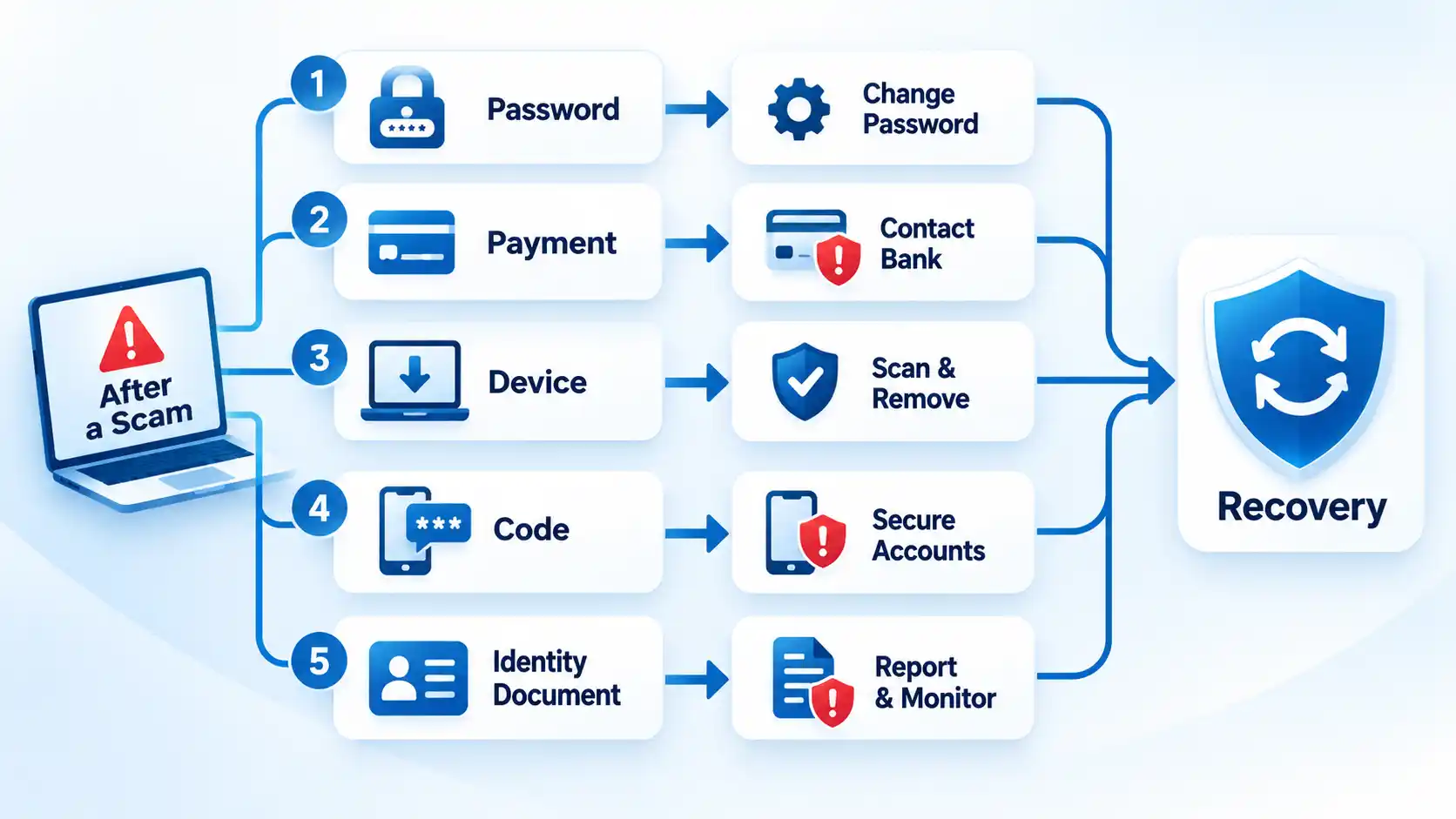
If money has already been sent, do not assume it is automatically recoverable, but contact the relevant provider quickly. The FTC advises people who paid scammers to contact the company used to send the money and ask whether the payment can be reversed or refunded.
Be cautious about anyone who contacts you afterward claiming to have recovered the money and asking for another fee. The FTC warns that people who have already lost money can be targeted by refund and recovery scams.
Where to Report Spoofed Calls and Emails in the United States
Reporting routes serve different purposes. A nuisance spoofed call is not the same as an incident in which an attacker obtained account credentials or persuaded someone to transfer money.
- FTC / ReportFraud: Report scams and fraud through ReportFraud.ftc.gov.
- FCC: The FCC accepts complaints about unwanted calls, texts, and caller-ID spoofing. The FCC states that it does not resolve individual unwanted-call complaints, but complaint information may support policy and enforcement work.
- FBI Internet Crime Complaint Center: Cyber-enabled fraud, scams, and related internet crime can be reported through the IC3 complaint form. IC3 states that complaints are analyzed and may be referred to law-enforcement or partner agencies for possible investigation.
- Your bank or payment provider: Contact the relevant institution directly when money, payment credentials, or financial accounts are involved. Do not wait for a general fraud complaint before protecting an affected account.
- Your carrier or email provider: Use built-in spam, phishing, and unwanted-call reporting controls when available.
If there are credible threats of immediate physical harm, use the appropriate emergency or local law-enforcement channel rather than relying only on an online fraud-reporting form.
Before deleting a message that may be relevant to fraud, preserve useful information such as the date and time, displayed telephone number or email address, screenshots, transaction references, and the original email where possible. The IC3 complaint process specifically allows technical incident details such as email headers and advises retaining relevant evidence for possible law-enforcement use.
The Most Important Rule: Verify the Request, Not the Displayed Identity
A spoofed call or email succeeds when appearance is mistaken for identity. Caller ID, logos, familiar names, email authentication, and spam labels can all provide useful context, but none should override an independent check when a message asks for money, credentials, sensitive information, software installation, or urgent account action.
Use a trusted path to the real person or organization, confirm the request there, and let what actually happened determine your next step. If nothing was exposed, filtering and reporting may be enough. If credentials, money, identity information, or device access were involved, move directly into recovery.

💬 Comments