If you entered your password on a phishing site, treat that password as exposed even if you have not seen any suspicious activity yet. Leave the fake page, open the real service independently, and secure the account before checking what else may have been affected.
Quick Take
Change the exposed password through the real service, replace the same password anywhere else you used it, end unfamiliar sessions where the service allows it, check recovery details, and enable two-factor authentication. If you are already locked out, use the provider’s official account-recovery process instead.
What to Do After Entering Your Password on a Phishing Site
Start with the account whose password you entered. The exact menus differ between services, so use the provider’s real website or app rather than returning through the phishing message or page.
If you also installed suspicious software, gave someone remote access to the device, or followed instructions that may have compromised the device itself, deal with that device exposure before relying on it for sensitive account recovery. The FTC’s response for computer or phone access puts security-software updates and a scan before password changes.
Do not go back to the phishing page to change your password, confirm your identity, enter another code, or follow a supposed security link. Reach the real service independently.
- Leave the phishing page and open the real service. Close the suspicious page or message. Open the service from an app you already trust, a saved bookmark you know is genuine, or an address you verify independently. This prevents the attacker from collecting another password or verification code while you try to recover.
- Change the password if you can still sign in. Create a new password that you have not used on another account. We advises people who gave a scammer their account credentials and can still log in to replace the compromised password. Do not simply add a character to the exposed password or switch back to an older password that you have used before.
- Use official account recovery if you are locked out. If the real password no longer works, or the recovery phone number or email has been changed, use the provider’s own account-recovery process. Google, for example, directs users to its account recovery process if someone changed the password or recovery phone number, or if the user cannot sign in for another reason.
- Replace the same password on your other accounts. Password reuse turns one exposed credential into a risk for several services. We specifically advises changing the password on any other account where you used the same password. Prioritize your primary email and other important accounts because access to one service can sometimes help an attacker reach others.
- End sessions you do not trust. Many services provide a security page showing signed-in devices or active sessions. Review the controls your provider offers and remove access you do not recognize. Google, for example, lets users inspect recently signed-in devices and sign out unfamiliar devices or sessions. Changing a password and signing out active sessions address different routes an attacker may use to remain connected.
- Check your recovery information and account settings. Confirm that recovery email addresses, phone numbers, and other recovery methods still belong to you. If the affected account is email, also inspect forwarding rules and filters for settings you did not create. I will recommend checking recovery information after regaining control and removing email-forwarding rules you did not set up.
- Turn on two-factor authentication. Two-factor authentication, often shortened to 2FA, means the account requires two different kinds of proof when you sign in rather than relying on the password alone. The FTC notes that even someone who knows the username and password cannot complete a protected sign-in without the second authentication factor. Use a method the service supports and that you can recover safely if you lose your usual device.
Check for Signs the Account Was Used
Typing a password into a phishing page makes that password unsafe, but it does not by itself prove that the attacker successfully signed in. After securing the credential, look for evidence that somebody actually used the account.
- Unfamiliar devices or sessions: review the provider’s security or sign-in activity for devices, browsers, or sessions you do not recognize. Check the surrounding details before removing access because one physical device can sometimes create more than one session.
- Unexpected security alerts: look for notices about sign-ins, password resets, new devices, recovery changes, or other security events you did not initiate.
- Changed recovery details: confirm that recovery phone numbers, email addresses, security methods, and similar account controls still belong to you.
- Messages or posts you did not send: check sent mail, social-media messages, posts, and other outgoing activity. Unauthorized messages are a practical sign that someone may have used the account.
- Email forwarding or filtering you did not create: an attacker with email access may create rules that forward messages elsewhere or hide security and password-reset emails from your normal inbox.
- Purchases or service activity you do not recognize: check account-specific history where relevant, such as orders, subscriptions, payment activity, cloud files, or profile changes.
Google’s device history is one example of why account activity needs context: several sessions can belong to the same device, so inspect the details before deciding whether an entry is unfamiliar. If you find unauthorized activity, follow the provider’s security or recovery process and remove access where that control is available.
Broader signs that someone logged into your account can include security-setting changes, unfamiliar devices, and actions performed without your permission. If you need to investigate beyond the affected account, these signs your data has been compromised provide a wider audit of account, email, financial, and breach indicators.
What If You Shared More Than a Password?
A phishing incident can collect more than one type of information. Do not automatically perform every recovery action below. Identify what the site actually received or what you did on the device, then follow the matching branch.
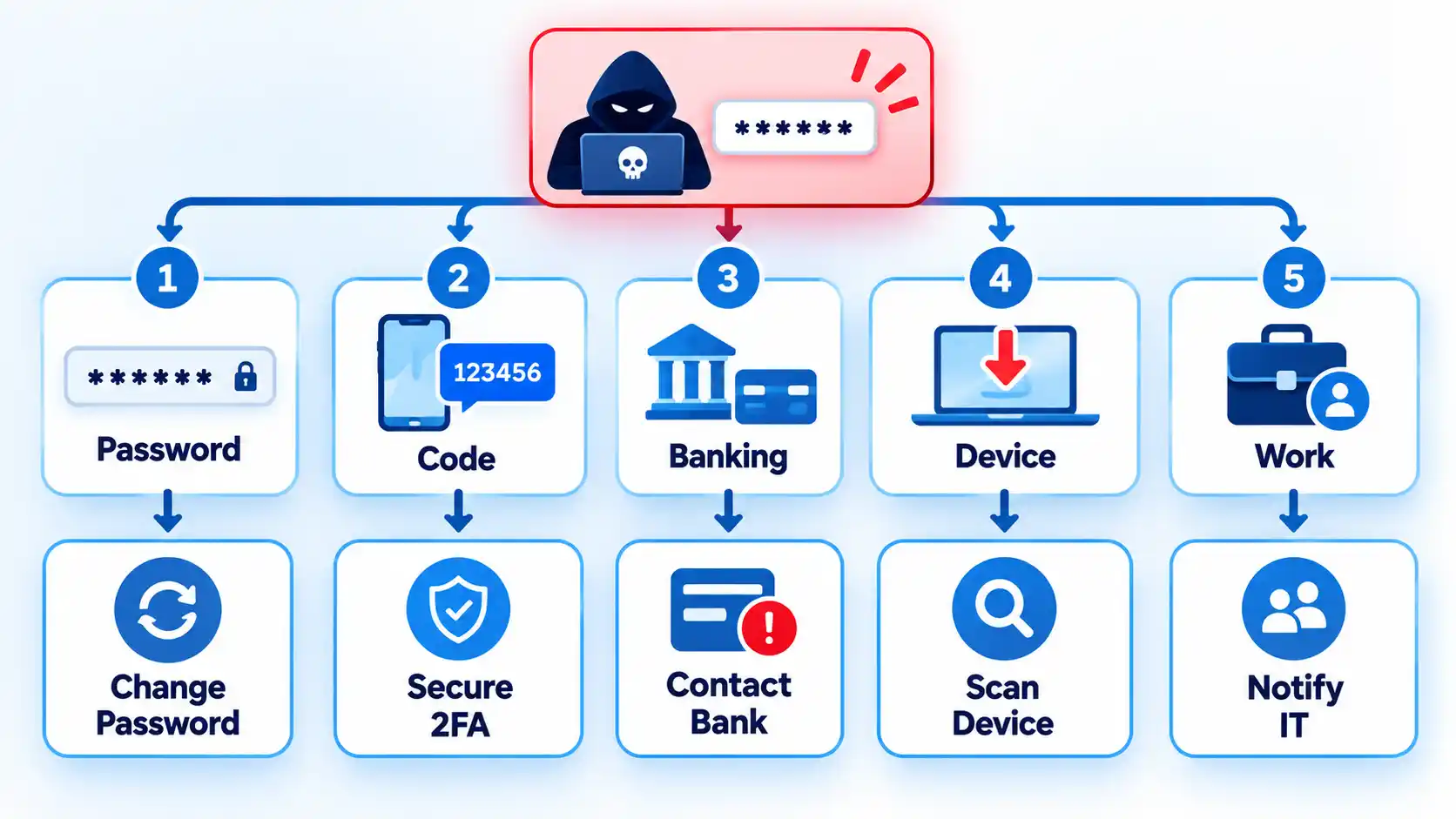
| What was exposed | What it changes | First response |
|---|---|---|
| Password only | The password may be used against that account or other accounts where you reused it. | Complete the account-recovery procedure above, including password replacement, session review, recovery checks, and stronger authentication. |
| One-time code or sign-in approval | The attacker may have obtained the additional proof needed for a sign-in or another protected account action. | Review recent security activity immediately, remove unfamiliar access where possible, and use the provider’s recovery or security process if you see activity you did not authorize. If you shared a phishing verification code, do not assume that changing the password alone reverses whatever the code may have authorized. |
| Bank or card details | The incident may also involve financial fraud rather than only account access. | Contact the bank immediately through a channel you obtain independently from the phishing message or page. |
| Government ID or other identity document | An identity document cannot be protected by changing an online password. | If you uploaded an ID to a scam website, preserve evidence and follow the document-specific recovery steps for the ID and any other information the site received. |
| Downloaded file, installed software, or device access | The device itself may be at risk in addition to the account. | If you installed suspicious software or gave someone access to the device, update trusted security software and run a scan before relying on the device for further sensitive work. I recommend scanning a computer or phone after giving a scammer access. These steps for situations where you downloaded or ran suspicious software cover the broader malware response. |
| Work or school account or device | The incident may affect organization-managed email, files, applications, or other resources as well as the individual account. | If the phishing happened on a work device, contact the organization’s IT team and explain what happened. Also follow your employer’s or school’s incident-reporting process when one exists. |
A password-only incident does not automatically mean your device has malware, your bank details were stolen, or your identity documents were exposed. The response should expand only when the phishing interaction or later evidence shows another type of exposure.
How to Know the Account Is Secure Again
The immediate account-recovery phase is complete when you have addressed the realistic routes an attacker could still use. That does not prove nobody viewed or copied information while the password was exposed.
Verify the result
- The affected account now uses a new password that is not reused on another service.
- Every active account that used the exposed password has been changed or otherwise secured.
- You can access the genuine account normally, or you have entered the provider’s official recovery process if access has not yet been restored.
- Recovery email addresses, phone numbers, and other recovery methods are yours and have not been replaced by unfamiliar details.
- Unfamiliar sessions or devices have been signed out where the provider gives you that control.
- Unauthorized forwarding rules, filters, messages, posts, or other account changes found during your review have been removed or corrected.
- Two-factor authentication is enabled where the account supports it, and you can still access the recovery method for that second factor.
- If the incident also involved suspicious software or device access, that device has entered the appropriate scan or remediation process before you rely on it for sensitive activity.
- Any other exposure, such as banking information, an ID document, a verification code, or work credentials, has moved into its appropriate recovery process.
Continue watching security notifications and account activity after the immediate cleanup. If new unauthorized activity appears, use the provider’s official security or account-recovery process rather than returning to the phishing message.

💬 Comments