Pick the app that closes the handoff you keep losing hours on, then stop shopping. That rule saves more freelance income than any top-ten list, because the expensive part of a one-person business is usually the gap where one tool ends and the next begins.
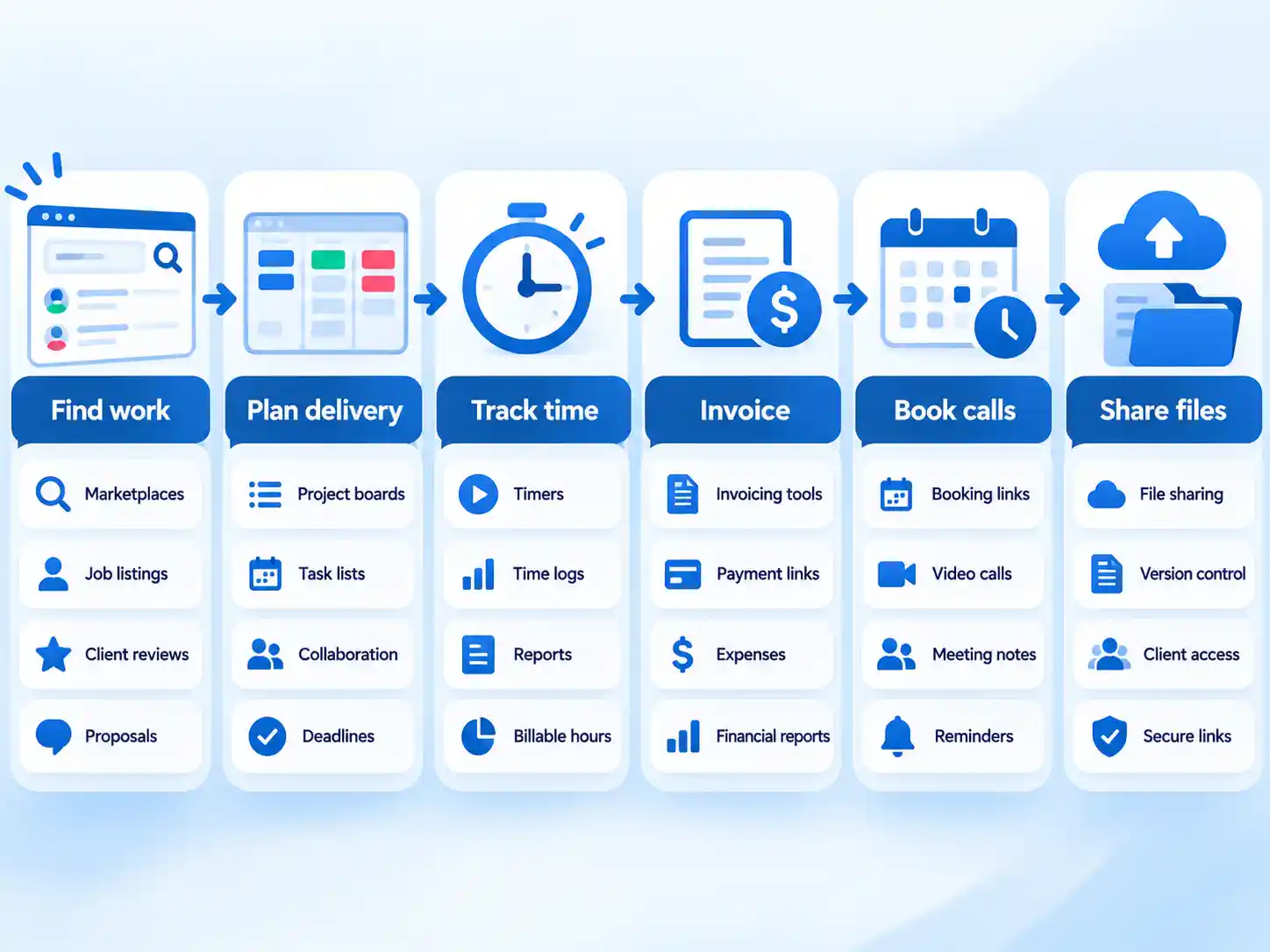
Run the week in your head. You find work in a marketplace, agree scope in a document, plan delivery on a board, capture hours in a timer, invoice from an accounting tool, book calls through a link, and push final files somewhere a client can grab them. Each is a separate job with its own failure mode. A scheduling link cannot take payment, and a file-transfer service cannot issue an invoice. Compare tools only inside the job they perform.
What follows compares options inside six workflow jobs, flags where mobile access and free plans fall short, and leaves you with a decision rule instead of a champion. Plan limits and prices change, so confirm the current terms on the vendor’s pricing page before you commit.
Quick Take
- Finding work: Upwork if you want volume plus hourly contracts backed by desktop-logged time; Toptal if a narrower, screened network suits your positioning better.
- Planning client work: Trello for one board per client and near-zero learning curve; Notion if the deliverable is documents; ClickUp only if you will spend the setup hours.
- Tracking time: Toggl Track for one-click billable timers; RescueTime if you want activity captured automatically and focus blocks enforced.
- Paperwork and money: Bonsai for the proposal → contract → invoice chain; FreshBooks for accounting depth; Wave when a free accounting floor matters more than automatic bank feeds.
- Scheduling: Cal.com if you need several meeting types on a free plan; Calendly if clients already expect the link.
- Documents and files: Google Workspace for email, docs, meetings and storage in one place; WeTransfer for one-off large-file handoffs.
All-in-one suites vs specialist apps: the trade that decides everything else
Every freelancer software decision reduces to one trade. A suite gives you a wide surface in a single login and charges you in setup time, per-user pricing, and migration commitment. A specialist stack is cheap to start and easy to swap, and it multiplies the number of places where work can fall through. Agiled’s freelancer-tools guide puts the trade plainly: breadth means initial setup takes a weekend.
If you cannot give a suite a weekend of configuration, the switching cost will exceed whatever you save on subscriptions, at least for the first quarter.
| Dimension | All-in-one suite | Specialist stack |
|---|---|---|
| What you get | CRM, proposals, projects, time, invoices, scheduling and a client portal in one data model | One narrow tool per job, connected by exports, integrations or manual re-entry |
| Strongest at | Removing app-switching and keeping a signed proposal attached to its invoice | Being cheap to start, fast to understand, and replaceable when a better option appears |
| Setup burden | High — configuration, templates and import before it earns anything back | Low per tool, accumulating with every new login you add |
| Cost pattern | One subscription that rises with seats, clients or automation tiers | Several small subscriptions, often with generous free floors |
| Failure mode | You pay for a wide surface and use two modules | A handoff breaks silently and an invoice goes out late |
| Choose if | Your bottleneck spans several jobs at once and you can invest a weekend | One specific handoff is bleeding hours and everything else works fine |
The 2026 freelancer app map, by workflow
The fastest way to stop shopping by brand is to look at the whole map once, then pick your column. The table below puts each job beside the tools compared in this article and the constraint most likely to bite a solo operator first.
| Workflow job | Tools compared | Platform access documented | Free-plan or entry constraint |
|---|---|---|---|
| Find work | Upwork, Toptal | Upwork has desktop and mobile apps; Toptal offers mobile job access | Upwork’s hourly payment protection depends on hours logged in the desktop app |
| Plan delivery | Trello, Asana, Notion, ClickUp | Trello has iOS and Android apps; the others vary by vendor | Free plans cap boards, collaborators or features; check the ceiling before you build |
| Track time and focus | Toggl Track, RescueTime | Toggl starts from browser, desktop or phone | Toggl’s free tier has a user cap; RescueTime is a paid product with a trial |
| Paperwork and invoicing | Bonsai, FreshBooks, Wave | Browser-based tools; check each vendor | FreshBooks’ entry tier caps clients; Wave’s bank import sits on its paid plan |
| Schedule calls | Cal.com, Calendly | Booking links work from any browser | Cal.com’s free plan is generous on event types; Calendly charges for routing and team features |
| Meet and hand off files | Google Workspace, WeTransfer | Google Workspace app and web; WeTransfer mobile app | Google Workspace runs a trial; Starter has a modest pooled storage allowance |
Warning
Mobile access deserves a real check. Upwork’s own guidance describes the desktop app as essential for time tracking and logging hours to your work diary so hourly contracts qualify for payment protection, while the mobile app is pitched for finding clients, managing contracts and responding from your phone. Trello ships iOS and Android apps, Toggl starts timers from a phone, and WeTransfer has mobile access, but that does not mean every tool behaves the same way on a phone. When you carry client files and messages onto a phone, treat that convenience as a security decision too; the basics of mobile security and VPNs apply just as much to a solo operator as to a team.
How to compare freelancer apps on the same criteria
Six questions separate a tool that fits your business from one that fits someone else’s. Ask them in this order and most of the shortlist resolves itself before you reach a pricing page.
| Criterion | What it asks | How to check it |
|---|---|---|
| Workflow fit | Does the tool own the job end to end, or stop halfway? | Map your last client project onto it. If you still need a spreadsheet at a specific point, note where. |
| Platform access | Does the job happen on the device you actually use? | Confirm what the mobile app does versus the desktop app, and whether a phone-only workflow costs you a protection or feature. |
| Free-plan ceiling | How many clients, boards, teammates or users before you pay? | Read the limits page, not the marketing page, and compare the cap against your current client load. |
| Handoff friction | How many manual steps between two tools? | Count the copy-pastes between finishing work and getting paid. Every step you cannot automate is a recurring tax. |
| Setup and switching cost | How long before the tool saves time? | Estimate configuration hours, template building, import, and how long your old tool stays read-only. |
| Client-facing friction | What does the client have to learn? | Send the link or board to one real client. Confusion there is a permanent cost. |
Finding work: Upwork vs Toptal
Marketplaces sell different deals, even when their feature lists look similar. One gives you volume and a documented hourly protection mechanism; the other sells selectivity and asks you to accept a smaller pool of work.
| Dimension | Upwork | Toptal |
|---|---|---|
| Access model | Broad marketplace covering hourly and project-based work across many categories | Vetted network with a thorough screening process and fewer job options than broad marketplaces |
| How work is structured | Hourly and fixed-price engagements; hourly contracts qualify for payment protection when hours are logged in the work diary | High-end project work, with on-site and remote options described in marketplace roundups |
| Mobile app | Finding clients, managing contracts, responding to clients and applying to jobs from a phone | On-the-go access to opportunities and availability updates |
| Subscriber extras | Freelancer Plus adds 100 Connects a month, the ability to view competitor bids and unlimited Uma | No comparable subscription detail in this comparison |
| Choose if | You want a large volume of listings and will keep the desktop tracker running on hourly work | You prefer a screened, curated pool and can wait for fewer, higher-value listings |
The practical distinction is operational. If your income depends on hourly contracts, your tracking habit decides whether you get paid smoothly; the desktop app is where that habit lives. If you would rather be screened once and approached less often, the trade is a smaller pipeline against a stronger signal per opportunity.
Planning client work: Trello vs Asana vs Notion vs ClickUp
Project management is an easy place to buy more tool than a solo business needs. With a small handful of active engagements, visual clarity can matter more than configurability, but the free-plan ceilings are where these four separate.
| Tool | Best at | Free-plan ceiling | Setup and learning | Choose if |
|---|---|---|---|---|
| Trello | One kanban board per client that a client understands without a walkthrough; iOS and Android apps notify on deadlines and comments | Up to 10 team boards per workspace on the free plan | Near zero; custom fields and automation sit on paid tiers | You run a handful of visual, deadline-driven projects |
| Asana | Complex workflows across lists, boards and calendars, with subtasks and dependencies | Free Personal plan limited to 2 teammates, with some older accounts retaining up to 10 | Moderate; more structure to configure before it helps | Client visibility matters on multi-stage projects and you work solo or with one collaborator |
| Notion | A docs-first workspace holding briefs, notes, portfolios and trackers in one place | Free plan covers most solo workloads | Blank-canvas time; you build the structure | Your deliverables are documents and knowledge, and deadlines live elsewhere |
| ClickUp | One highly configurable workspace for tasks, docs and time in a single tool | Free Forever tier; paid unlimited tier and AI as an add-on | Setup takes hours | You will invest the setup time and want everything under one roof |
Two limits deserve a hard look before you commit. Asana’s free personal plan caps collaborators quickly, so a freelancer who shares boards with three collaborators is already a paying customer. Trello’s board ceiling sounds generous until you keep an archive board and a personal board alongside eight client boards. Notion has no native time tracking or billing, which means your delivery workspace and your money workflow stay separate.
Tracking time and focus: Toggl Track vs RescueTime
These two solve different problems, and mixing them up produces months of data you never bill against. Toggl captures hours you deliberately start. RescueTime records activity automatically and gives you focus tools.
| Dimension | Toggl Track | RescueTime |
|---|---|---|
| Capture method | One click or keyboard shortcut from browser, desktop or phone; forgotten hours can be added later | Automatic activity tracking, with focus tools that block distractions |
| What it answers | How many billable hours went to this client, ready for an invoice | Where did my attention actually go, and how much time landed on projects and clients |
| Free and paid reality | Free tier reported to cover up to five users; confirm current paid tiers on the vendor’s plan page | Checked October 31, 2026: RescueTime’s pricing page lists Focus at $7/month billed annually ($84 USD/year), Timesheets + Focus at $12/month billed annually ($144 USD/year), and team plans from $10 per user per month billed annually. |
| Commitment terms | Check the vendor’s current plan page | All paid plans include a 14-day free trial; no sales tax or VAT charged; cancelling reverts you to a free Lite plan; invoice billing only for teams of 100 or more |
| Billing handoff | Reports travel to your invoicing tool | Produces the time data; invoicing still happens elsewhere |
| Choose if | You bill hourly and need client-ready reports from a timer you will actually press | You want hours captured without remembering to start anything, and distraction blocking earns its keep |
RescueTime publishes its own plan structure, which makes budgeting straightforward: two personal tiers, two team tiers, one trial length, and a documented fallback if you cancel. Toggl’s appeal is narrower but sharper — a timer with so little friction that the data exists in the first place.
Paperwork and money: Bonsai vs FreshBooks vs Wave
The paperwork chain is the highest-value handoff in a freelance business because every break in it delays your own pay. The three options here start at different points on that chain.
| Dimension | Bonsai | FreshBooks | Wave |
|---|---|---|---|
| Core chain | Proposal converts to an e-signed contract, then auto-invoices with late-payment reminders | Branded invoices, online payment, bank expense import and billable-hours tracking | Free core accounting, invoicing and expense tracking |
| Where it stops | Built around the client paperwork chain, not full bookkeeping | Contract and proposal chain sits outside it | Automatic bank import, reconciliation and receipt scanning moved behind the paid Wave Pro plan |
| Pricing shape | Paid subscription; confirm current tier | Lite is the entry paid tier, with a 5-client cap | Free Starter tier; Pro unlocks automatic bank work |
| The cap that bites | Seat costs can stack if you add a subcontractor or VA | The client cap on Lite arrives sooner than most freelancers expect | Manual import or an upgrade once automatic feeds matter |
| Choose if | Your bottleneck is the proposal → contract → invoice sequence | Your bottleneck is knowing what you earned and what you spent | You want a free accounting floor and can tolerate manual bank work |
Entry prices here move with plan names and regions; confirm the current tier on each vendor’s pricing page. If expense capture is the specific pain — and it usually is once a Wave-style tool pushes receipt scanning up a tier — receipt scanning apps that track expenses can close that gap without a full accounting migration.
Scheduling calls: Cal.com vs Calendly
A booking link removes a specific recurring annoyance: the five-email exchange about a Tuesday afternoon. The difference between these two is what sits behind the free tier.
| Dimension | Cal.com | Calendly |
|---|---|---|
| Free-tier flexibility | Free individual plan with no meeting-type limit, plus a self-hosting option | Free booking link with limited features |
| What sits behind paid tiers | Advanced workflows | Routing logic and team features |
| Paid entry | Check the vendor’s current pricing page | Charges for routing and team scheduling |
| Client recognition | Less familiar to clients, more configuration freedom | The default link most clients have already used |
| Choose if | You run discovery calls, paid consults and weekly check-ins as separate event types | You need one reliable link and clients recognize the brand |
For a solo operator, unlimited meeting types on a free plan is the more valuable feature, because discovery calls, paid consultations and retainer check-ins need different durations, buffers and questions. A familiar link wins when the booking page is client-facing marketing as much as scheduling.
Documents, meetings and large files: Google Workspace vs WeTransfer
Info
These tools belong to different categories. Google Workspace is a workspace suite: email, documents, meetings and storage under one account. WeTransfer is a file-transfer utility that moves a large file from you to a client. One replaces your operating environment; the other replaces a file that bounced out of email.
| Dimension | Google Workspace | WeTransfer |
|---|---|---|
| Job it does | Custom business email, documents, video meetings and pooled cloud storage | Large-file delivery with password protection, encryption options, client comments, approval and download tracking |
| Entry tier facts | 14-day trial; Starter includes 30 GB pooled storage per person, custom business email, Gemini in Gmail, and meetings for up to 100 participants | File transfer described for large deliverables with client-side review features and mobile app access |
| Tier ladder | Standard adds 2 TB storage, meeting recording and noise cancellation, 150 participants, appointment booking pages and eSignature; Plus adds 5 TB, 500 participants, Vault and eDiscovery | Confirm current storage ceilings and plan names on the vendor’s own site |
| Platform | App and web access | Mobile app access in addition to browser uploads |
| Choose if | You want one account for client email, shared docs and meeting links | Clients repeatedly need a file too large for email and want to review or approve it in place |
For a solo operator, the Google tier ladder is really about storage and meeting size. Starter’s pooled storage allowance is workable for text-heavy work and tight if you hand over video deliverables, and the larger meeting capacities only start to matter when clients bring their own teams onto the call.
What each tier of stack actually costs in 2026
Free plans have ceilings. Here is what each level of a small freelance stack tends to cost, with the entry prices that are worth checking before you commit.
| Tier | Indicative cost | What it buys | Suits this workload |
|---|---|---|---|
| Free floor | No subscription cost | Trello free boards, Asana free with a collaborator cap, Toggl free tracking, Cal.com free individual scheduling, Wave free core accounting | Solo, one to three active clients, no subcontractors, low file volumes |
| One paid specialist | Checked October 31, 2026: RescueTime Focus from $7/month billed annually; Toggl and invoicing tools have paid tiers at current vendor rates | Reliable time capture or automatic bank reconciliation and receipt handling | Hourly or retainer work where unbilled hours and manual data entry cost real money |
| Freelance-shaped suite | Checked October 31, 2026: Agiled Starter at $24/month for 1 seat, billed annually | Proposal, contract, project, time and invoice in one data model | Five or more active clients, recurring invoices, paperwork as a genuine bottleneck |
| Workspace suite | Varies by tier and region — confirm on Google’s pricing page | Business email, docs, meetings, storage, eSignature at higher tiers | Client-facing documents and meetings as a daily activity |
Info
A low entry price can become the wrong purchase once a client or collaborator cap forces an upgrade mid-project. Check the ceiling before the monthly fee.
Decision cards: match the stack to your actual constraint
You rebuild invoices by hand every month
Start with: Bonsai if the chain from proposal to signature to invoice is where the hours go; FreshBooks if the real gap is tracking what you earned and spent.
Skip if: your client count is already above the entry tier’s cap — a starter client limit becomes a forced upgrade.
First test: run one finished project through proposal, signature and invoice without retyping client details.
You finish the week unsure where the hours went
Start with: Toggl Track for billable hours you control; RescueTime if you want automatic capture plus distraction blocking.
Skip if: you bill only fixed-price projects and never audit your effective hourly rate — the data will not change a decision.
First test: track one full client project with the tool and compare the output against your invoice.
Client work lives in your head and three documents
Start with: Trello for one board per client; Notion if the work itself is documents and knowledge.
Skip if: you would need more than the free board ceiling or more collaborators than the free plan allows — those caps push you into paid tiers fast.
First test: share one board or page with a real client and watch whether they need instructions.
Booking calls eats an afternoon a week
Start with: Cal.com if you need several meeting types on a free plan; Calendly if clients already expect the brand.
Skip if: you need routing rules or team scheduling — those sit on paid tiers.
First test: send one link to a new client and confirm the meeting lands on your calendar with the right duration and buffer.
Files keep bouncing out of email
Start with: WeTransfer for one-off large handoffs with password protection and download tracking; Google Workspace if the same clients also need shared docs and meeting links.
Skip if: the files are small and the real problem is that nobody knows which version is final.
First test: send your largest typical deliverable to one client and confirm they can download, comment and approve it.
How to choose your freelance stack in four steps
Work through these in order. Each step narrows the shortlist before the next one can distract you with features.
- List the handoffs you repeat every week. Write the six workflow jobs — finding work, planning delivery, tracking time, invoicing, scheduling and sharing files — and mark the one where you most recently lost an hour to retyping, chasing or searching. That mark is your starting point.
- Check the ceiling before the feature list. Read the free-plan limits for boards, teammates, clients and users, and compare them against your current client load. If the cap sits below your business today, price the paid tier before you invest time in setup.
- Pilot one workflow for one full client cycle. Run the new tool from first inquiry through final payment while your old tool stays read-only in the background. One complete cycle exposes the handoffs a demo never shows.
- Write the exit route before you commit. Note what your client data would export as, who else holds access, and how long a move would take. A tool you can leave in an afternoon is a tool you can try without risk.
Verify the result
- Every workflow job on your list has exactly one named owner tool.
- Your free or entry-plan ceiling sits comfortably above your current client and collaborator count.
- The piloted workflow produced an invoice, booking or file handoff without manual re-entry.
- You can describe, in one sentence, how you would export your data if you left.
Switching-cost and constraint audit
Warning
Migrating two workflows in the same month is the most reliable way to lose billable time. Move one job, run it for a full client cycle, then decide whether the second move is still worth it.
- Setup time is a real line item. Suites with wide breadth expect a weekend of configuration, and configurable project workspaces can take hours before the first task is useful. Budget that time against the hours you expect to save.
- Client and teammate caps arrive earlier than you think. A starter client cap, a collaborator cap and a board cap all look generous until a busy quarter.
- Features migrate behind paywalls. Wave moved automatic bank import, reconciliation and receipt scanning to its paid plan, so a workflow that was free in an older tutorial may now cost money.
- Mobile parity is uneven. Upwork’s hourly protection is built around desktop hour logging, and other tools split mobile and desktop capabilities differently. Test your actual device before you rely on it.
- Client-facing friction persists. A board a client cannot read, or a booking page with too many options, costs you time on every project, forever.
The smallest stack that fits beats the most complete one
No single app in this comparison wins for every freelancer. The decision that holds up is narrower: identify the handoff costing you the most hours, choose the tool that closes it with the least setup, and check the free-plan ceiling against your real client count before you sign up.
That produces different answers for different businesses, and it should. A designer billing hourly and juggling six retainer clients gets more from reliable time capture and a paperwork chain than from a configurable workspace. A consultant whose product is documents gets more from a docs-first workspace and a scheduling link than from an accounting suite. Both are correct stacks — they close different gaps.
Start with one workflow, pilot it through a real client cycle, and add a second tool only when the first has demonstrably bought back the time it cost. Then verify the pricing and plan limits on the vendor’s own page, because the only stack worth keeping is the one that still fits your business as it changes.

💬 Comments