A VPN protects your mobile device by encrypting the connection between your phone and the internet, which closes off the single biggest hole in everyday mobile security: unsecured Wi-Fi. It does nothing, though, for threats that don’t involve your network connection — a malicious app, a weak lock screen, or a phone that’s already compromised — which is why treating a VPN as complete mobile security is the most common mistake people make.
Quick Take
Mobile security is the sum of several separate defenses: device-level protection (lock screen, OS updates, app permissions), app-level protection (what you install and what it’s allowed to touch), and connection-level protection (what happens to your data in transit). A VPN only covers that third layer. It’s a genuinely important layer – most opportunistic mobile attacks target the network connection, not the device itself — but it’s one piece of a stack, not the whole stack. If you remember one thing from this article, make it that distinction.
What “Mobile Security” Actually Covers
Your phone carries more sensitive material than most people keep in a filing cabinet: banking logins, health information, work email, private messages, and a location history stretching back years. That concentration of value is exactly why phones are targeted so heavily. Verizon’s 2025 Mobile Security Index found that 85% of organizations reported attacks on mobile devices that year, a sharp jump from the year before.
Those attacks arrive through a handful of distinct channels, and it matters which one you’re defending against:
- Malicious or over-permissioned apps — software that either hides malware outright or simply asks for more access (contacts, microphone, location) than it needs, then shares that data with advertising partners.
- Unsecured network connections — public Wi-Fi in particular, where an attacker positioned on the same network can intercept traffic passing between your phone and the sites you visit.
- Physical access — a lost or stolen phone with a weak or absent lock screen, which bypasses every other protection almost instantly.
- Outdated software — unpatched operating system or app vulnerabilities that stay exploitable until you update.
Of these, only the second one — unsecured network connections — is something a VPN actually addresses. That’s worth sitting with, because it explains both why VPNs get recommended so often for mobile security and why they’re so often oversold as a complete fix.
What a VPN Does, Mechanically
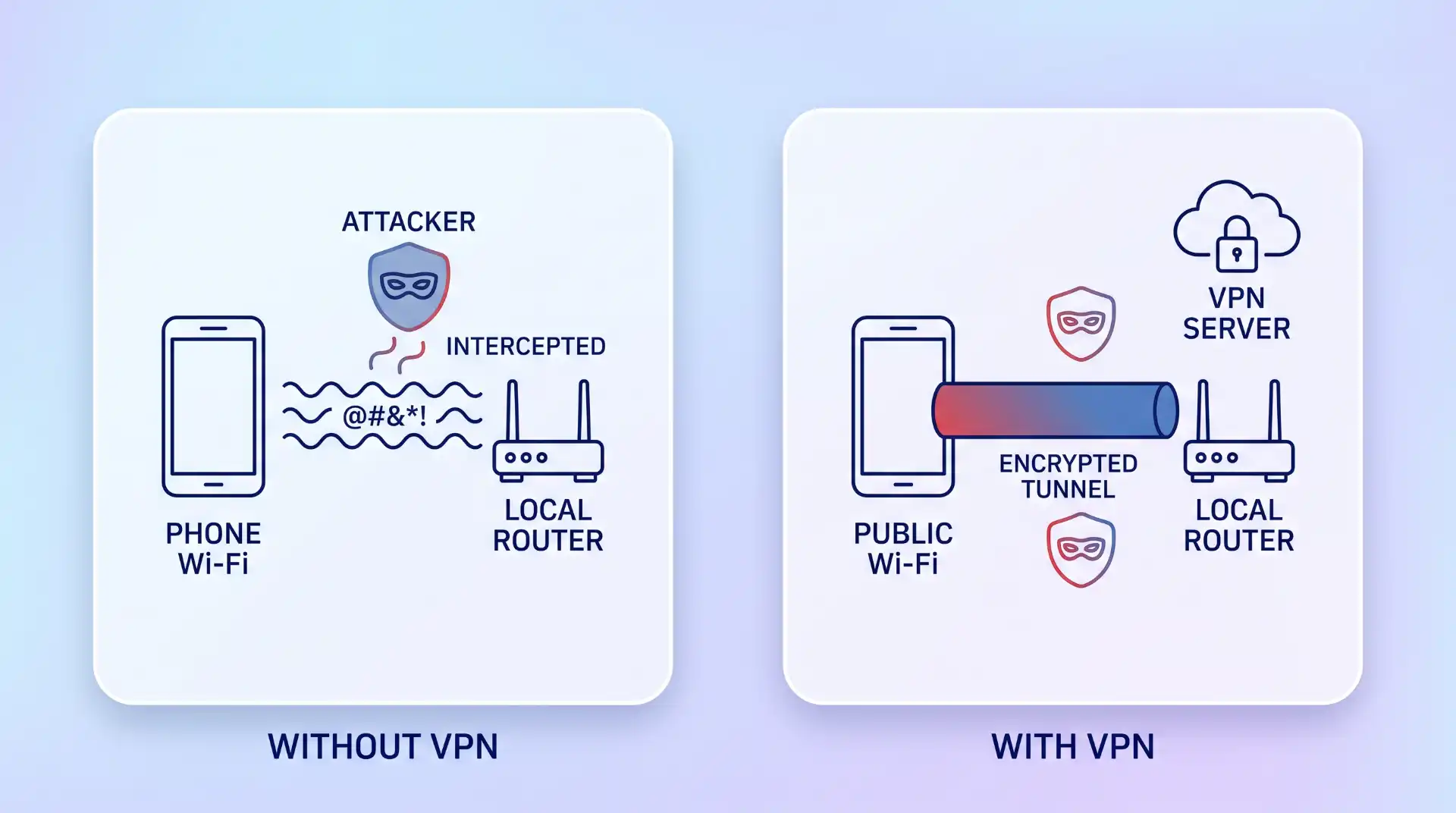
A VPN, or virtual private network that lets you connect to the internet privately and securely, works by wrapping your phone’s outgoing and incoming traffic in an encrypted tunnel before it touches the local network. Two mechanisms do most of the work:
- Encryption — your data is scrambled using an algorithm (commonly AES-256, currently the industry standard among reputable providers) before it leaves your device, so anyone intercepting it on the local network sees unreadable noise rather than your actual traffic.
- Routing through a remote server — instead of your traffic going straight from your phone to the destination site, it’s relayed through a VPN provider’s server first. That server, not your device, is what the destination site and the local network see, which is what masks your IP address and rough location.
To establish that tunnel, your phone and the VPN server perform a handshake — a brief exchange that sets up the shared encryption keys — and then send periodic keep-alive signals to hold the connection open. That overhead means a VPN typically increases the amount of mobile data your connection consumes, which matters if you’re on a capped plan or roaming internationally, though the added usage is generally modest next to the security benefit.
Where the Two Actually Connect
The connection between mobile security and VPNs is narrower and more specific than most marketing copy suggests: a VPN protects the data in transit between your phone and whatever network it’s currently attached to. On a network you don’t control — a cafe hotspot, an airport lounge, a hotel router — that protection matters a lot. Researchers identified more than 5 million public, unsecured Wi-Fi networks worldwide since the start of 2025, with roughly a third of users connecting to them, and each one is a plausible spot for an attacker to sit between you and the internet.
In that setup, known as a man-in-the-middle attack, an intruder positions themselves between your device and whatever you’re communicating with, then reads or alters the traffic passing through. Without a VPN and without HTTPS (the padlock icon in your browser), that traffic — logins, messages, card numbers — can be visible in plain text. With a VPN active, the traffic is encrypted before it ever reaches that intercepted point, so even a successful interception yields nothing usable.
This is also why the advice to use a VPN specifically on mobile devices carries extra weight compared to a desktop on a home network: phones move between untrusted networks constantly — cafe Wi-Fi, transit hubs, a friend’s router — in a way most desktops never do.
What a VPN Does Not Fix
This is the part that gets skipped in most VPN marketing, and it’s the part that actually matters most for your overall security. A VPN encrypts your connection; it doesn’t inspect what’s running on your phone, and it doesn’t decide what an app is allowed to access.
| Threat | Does a VPN help? | What actually helps |
|---|---|---|
| Interception on public Wi-Fi | Yes — this is its core job | A reputable, audited VPN |
| A malicious or over-permissioned app already installed | No | Reviewing app permissions and the Play Store’s data-safety disclosure before installing |
| Phishing links and fake login pages | No | Checking the URL and sender before entering credentials |
| A lost or stolen, unlocked phone | No | A strong PIN or biometric lock, plus remote-wipe enabled |
| Unpatched OS or app vulnerabilities | No | Prompt software updates |
The most common mistake here is installing a VPN, feeling covered, and then skipping the app-permission and update habits that address everything in that second column. A VPN that’s actively connected while a malicious app already has microphone access does nothing to stop that app — the VPN secures the pipe, not what’s already inside the house.
There’s a second, quieter failure mode worth naming: not every VPN is trustworthy. Reputable providers use AES-256 encryption as standard, and only a minority of tested services have actually passed independent no-logs audits from firms like Deloitte or KPMG. A free VPN with no audit trail and an unclear business model can itself become the thing collecting and reselling your traffic — which is a worse outcome than not using one at all, since it comes with a false sense of security attached.
Choosing and Using One Without the Marketing Noise
A few decision points that actually change the outcome, rather than cosmetic ones:
- Independently audited no-logs policy — a provider’s own claim isn’t verification; look for a named third-party audit.
- Kill switch — blocks all traffic if the VPN connection drops, so you don’t fall back to an unencrypted connection without noticing.
- Protocol support — modern protocols (WireGuard, IKEv2/IPsec) generally reconnect faster after your phone switches between Wi-Fi and cellular, which matters more on mobile than on a stationary desktop.
- Server load and location spread — fewer, overloaded servers mean slower connections at exactly the moments (travel, events) you’re most likely to need the VPN.
None of this replaces the basics either. If you’re building out a fuller device-hardening routine alongside your VPN choice, a permission-and-update checklist for Android covers the layers a VPN can’t touch, and if you travel internationally, the practical setup differs slightly when you’re relying on unfamiliar networks abroad.
Where This Approach Has Limits
A VPN won’t help if the app you’re using is malware — the connection to that app’s servers will simply be encrypted malware traffic. It won’t help against a targeted attack that already has physical access to your device, or against a phishing message that convinces you to hand over credentials directly. It also won’t meaningfully speed up or fix a phone that’s already compromised; at that point the fix is removing the offending software first, not adding a VPN on top of it. And if you’re on a strict mobile data cap, running a VPN continuously will use it faster, so it’s worth checking your provider’s real-world data overhead if that’s a constraint.
Key Takeaways
- A VPN secures your connection in transit; it does not secure the device, the apps on it, or your login habits.
- Public Wi-Fi is the scenario where a VPN provides the clearest, most direct benefit.
- An unaudited or free VPN can introduce the same risk it’s meant to prevent — check for an independent no-logs audit.
- Mobile security is a stack: device lock and updates, careful app permissions, and connection encryption all need to be in place together.
Frequently Asked Questions
Does a VPN stop hackers from getting into my phone?
No — a VPN encrypts the data moving between your phone and the internet, but it doesn’t scan for malware or block someone who already has physical or app-level access to the device. Those need separate protections, like a strong screen lock and careful app permissions.
Can my mobile carrier see what I’m doing if I use a VPN?
Your carrier can see that you’re connected to a VPN server and roughly how much data you’re using, but not the content of your traffic once it’s inside the encrypted tunnel. What it can see is closer to “a sealed envelope was sent,” not what’s written inside it.
Do I need a VPN if I mostly use mobile data instead of Wi-Fi?
Cellular data is harder to intercept than open Wi-Fi, but it isn’t risk-free, and a VPN still hides your IP address and browsing activity from your carrier and from the sites you visit. The urgency is lower than on public Wi-Fi, but the case for it isn’t zero.
Is a free VPN good enough for mobile security?
Treat that with caution. Many free VPN services fund themselves by logging and reselling user traffic data, which works directly against the reason you’d use one. If cost is the constraint, a low-cost provider with a published, independently audited no-logs policy is a meaningfully safer choice than a free option with no audit trail.

💬 Comments