Most stores lose roughly seven out of every ten shoppers who add something to a cart. That is the baseline you are working against, and it is why conversion-rate work pays off so quickly when you aim it at the right place. The single highest-leverage fix for most online stores is the checkout itself, followed by page speed, honest measurement, and disciplined testing. Everything else, from remarketing to returns transparency to traffic tactics, supports that core.
Quick Take
If you can only touch one thing this quarter, touch the checkout. It is where the strongest evidence and the most fixable problems live. After that, get your store fast enough to pass Core Web Vitals, make sure your analytics actually records conversions, and run controlled experiments instead of redesigning on instinct. Remarketing and clear returns policies help at the margins; they do not rescue a broken checkout.
Why conversion rate is the number worth fixing first
Cart abandonment sits at a documented average of 70.22% across 50 studies, with individual studies ranging from roughly 57% to 84% (Baymard Institute). That spread matters: your store’s number depends heavily on your category, pricing, and audience. But the headline is unavoidable: most people who show buying intent still leave.
Here is the part that should change how you spend your time. Baymard’s 14 years of checkout usability testing has consistently found that the design and flow of checkout is frequently the sole cause of abandonment. Shoppers leave because a field confuses them or the process frustrates them, not because they changed their mind. And the benchmark is brutal: of 344 top-grossing US and EU sites scored against 110+ checkout guidelines, only 2% rated “good,” while 65% were “mediocre” or worse (Baymard checkout usability research).
The average site has 32 unique improvements to make in its checkout. Baymard’s own test sessions suggest that fixing them could unlock up to roughly a 35% conversion increase. Treat that as a directional estimate from vendor research, not a promise. The practical takeaway is simpler: there is almost certainly low-hanging fruit sitting in your checkout right now.
Info
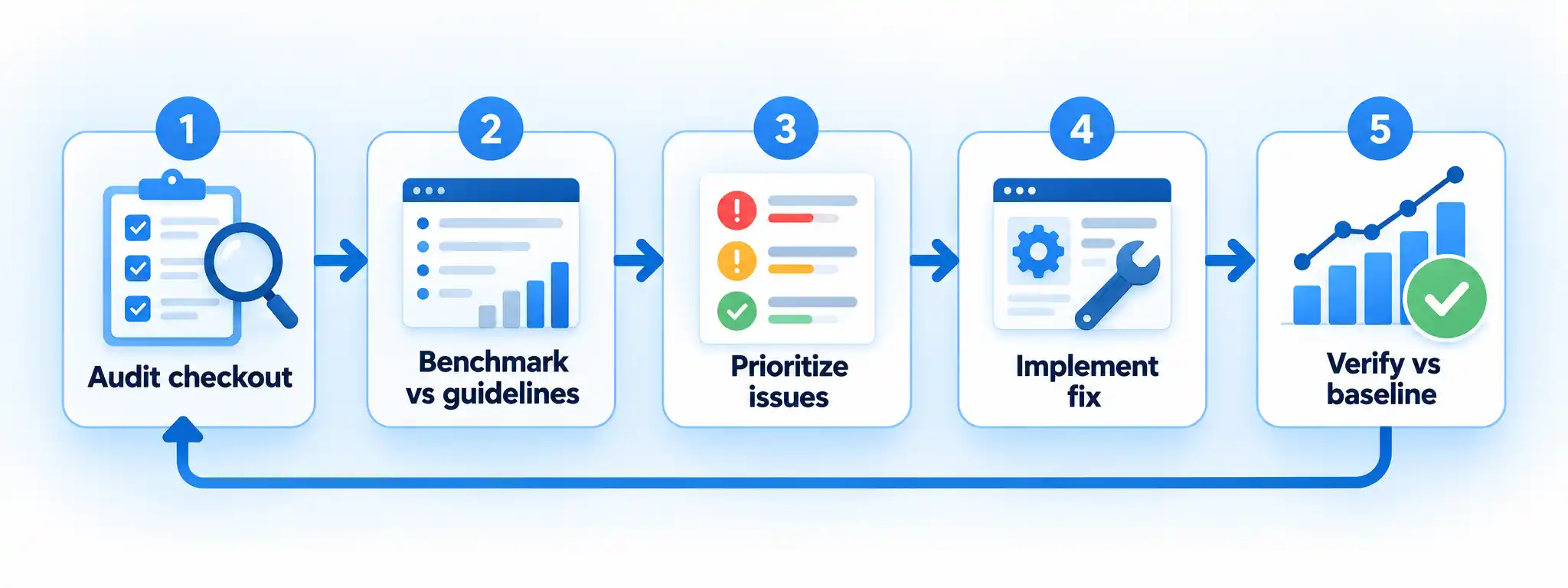
Conversion-rate improvement is a loop, not a one-time project. Audit, fix, measure, test, and repeat. Stores that treat it as a single redesign usually plateau fast.
Set up before you change anything
You cannot improve what you cannot see. Before touching your checkout or performance, confirm you have a reliable baseline and working measurement. Skipping this step is the most common reason teams “improve” a store and then cannot prove it worked.
Prerequisites
- Analytics installed and collecting events across the full purchase path, including add-to-cart and purchase.
- A documented baseline: current conversion rate, cart abandonment rate, and checkout completion rate over at least a few weeks.
- Access to your storefront and checkout code, or a developer who does.
- A way to roll back changes, using version control or a staging environment.
- Enough traffic to reach a statistically meaningful sample before you run experiments.
Run a checkout audit and fix the biggest issues
This is the highest-return sequence for most stores. Work through it in order and verify at each stage rather than redesigning everything at once.
- Walk your own checkout as a first-time buyer Complete a purchase on mobile and desktop using a fresh account and a real card (or test mode). Note every field, surprise cost, forced account creation, and confusing step. This surfaces the obvious friction before you look at benchmarks.
- Benchmark against established checkout guidelines Compare your flow to recognized checkout usability guidelines covering form design, guest checkout, cost transparency, and error handling. Baymard’s benchmark of 344 sites against 110+ guidelines is a useful reference point for what “good” looks like.
- Prioritize the issues by impact Rank fixes by how many shoppers they affect and how much friction they remove. Guest checkout, upfront shipping costs, and clear error messages usually outrank cosmetic tweaks.
- Implement one group of fixes at a time Ship a coherent batch, keep a rollback ready, and avoid changing five unrelated things at once so you can attribute any change in results.
- Verify against your baseline Compare checkout completion and abandonment against the baseline you captured earlier. If results move, keep it; if not, investigate before layering on more changes.
Verify the result
- A first-time buyer can complete checkout without creating an account.
- Shipping and tax costs are visible before the final payment step.
- Form errors explain exactly what to fix, in plain language.
- Checkout completion rate is measured and compared to your baseline.
Make your store fast enough to convert
Speed is not a vanity metric. It is a conversion input, especially on mobile where most shopping happens. Google’s Core Web Vitals give you three concrete targets to hit, measured at the 75th percentile of page loads and segmented by mobile and desktop (web.dev).
| Metric | Measures | Good threshold |
|---|---|---|
| Largest Contentful Paint (LCP) | Loading performance | 2.5 seconds or less (web.dev) |
| Interaction to Next Paint (INP) | Interactivity | 200 milliseconds or less |
| Cumulative Layout Shift (CLS) | Visual stability | 0.1 or less |
Diagnose and fix performance against the thresholds
Measure first, then fix the metric that is failing. Do not optimize blindly.
- Measure your current field data Check LCP, INP, and CLS at the 75th percentile for both mobile and desktop. Field data reflects real users; lab tools are a starting point only.
- Identify the failing metric Compare each result to the thresholds above. A slow LCP points to loading issues; a high INP points to heavy interactivity; a high CLS points to layout shifts.
- Fix the biggest offender first Address the failing metric on your highest-traffic pages, especially product and checkout pages, before chasing smaller wins elsewhere.
- Re-measure after deployment Confirm the metric now meets the threshold for most users, and keep monitoring so regressions get caught quickly.
Measure conversions properly with key events
If your analytics does not clearly record the actions that matter, every decision downstream is guesswork. In Google Analytics, any event can be marked as a key event, which then appears in reports and can be attributed across channels and imported into Google Ads as a conversion (Google Analytics help).
Mark your important events as key events
This turns raw event data into the conversion signals you will optimize against.
- Identify the events that matter List the actions that represent business success, typically purchase, add-to-cart, and begin-checkout.
- Confirm the events are firing Verify in your analytics that each event is collected before you promote it.
- Mark each as a key event Use the key-event setting so the action is reported and attributed across the channels that lead to it.
- Connect to advertising if relevant Create a conversion in Google Ads from the key event so ad measurement and analytics stay consistent.
Verify the result
- Purchase and add-to-cart appear as key events in your reports.
- Key-event counts match what you expect from real orders.
- Any Google Ads conversion imports show consistent numbers with analytics.
Test changes instead of guessing
A/B testing compares a control version of a page against a variation, splits traffic randomly between them, and uses statistical analysis to decide which performs better for your conversion goals (Optimizely glossary). It is how you turn “we think” into “we know.”
Warning
Google Optimize and Optimize 360 were sunset on September 30, 2023, and are no longer available (Google Optimize sunset notice). If a tutorial tells you to set up experiments in Optimize, it is out of date. Use a current testing tool instead.
Run a controlled A/B test
Keep each test focused so the result is attributable and trustworthy.
- Form a single hypothesis State what you expect to change and why, for example that removing a forced account step will raise checkout completion.
- Build control and variation Keep the control as your current page and change one meaningful element in the variation.
- Split traffic randomly and set a duration in advance Decide the sample and run time before you start, and resist stopping early on a promising early result.
- Analyze the result statistically Determine whether the variation had a positive, negative, or neutral effect against the control.
- Roll out only confirmed winners Treat a single test as evidence for that change, not proof of a permanent win, and re-test major changes over time.
Re-engage cart abandoners with remarketing
Once you have fixed the obvious friction, remarketing brings back shoppers who stalled. Google Ads lets you target people who added something to a cart but did not complete the transaction, and there is no extra cost to use Google’s auction (Google Ads help). Note that Google now refers to “remarketing” as “your data.”
- Build a segment of users who added to cart but did not purchase.
- Set a clear, honest message and a sensible frequency cap so you do not overwhelm the same shopper.
- Respect consent and opt-outs in every region you advertise in.
- Measure recovered conversions against your key-event data so you know the campaign is working.
Make your returns policy transparent
Trust closes sales, and returns clarity is part of that. If you sell to EU consumers, the law sets a floor: for distance contracts you must offer a 14-day cooling-off period, during which the buyer can cancel without justification, and the buyer generally pays return postage unless you offer to cover it or failed to inform them beforehand (Your Europe). Some categories, including perishables, personalized goods, and unsealed digital content, are excluded.
Decision rule: If you sell to EU consumers, state the 14-day right and who pays return postage clearly before purchase. If you sell outside the EU, do not copy that rule as if it were universal. Check your local requirements and disclose your actual policy plainly.
When things go wrong: failure modes and recovery
Conversion rate dropped after a checkout change
Roll back to the previous checkout version immediately, then compare completion and abandonment against your baseline to isolate which change caused the drop before re-shipping anything.
Analytics shows conversions that do not match real orders
Your key events are likely misconfigured or double-firing. Audit which events are marked as key events, fix duplicates, and re-verify counts against actual orders before trusting any report.
An A/B test looks like a winner after two days
Early results are unreliable. Let the test run to the sample and duration you set in advance, then analyze statistically. Stopping early is a common source of false positives.
Performance improved in the lab but not for real users
Lab tools do not reflect field conditions. Measure Core Web Vitals at the 75th percentile of real page loads, segmented by device, and fix the metric that is actually failing for your users.
Where to go next
Work the levers in order: checkout first, then speed, then measurement, then testing. If you are still setting up your store, our guide on how to successfully create an online store with these easy steps covers the foundation. When you are ready to build out your measurement and testing stack, see our roundup of must-have tools for e-commerce businesses.
And if traffic is your bottleneck rather than conversion, a provider of eCommerce SEO can help you reach more qualified shoppers, though better traffic only pays off once your checkout and speed are in order.
Key Takeaways
- Checkout UX is the best-evidenced starting point, and most stores have dozens of fixable issues.
- Hit the Core Web Vitals thresholds on mobile before chasing smaller optimizations.
- Mark your important events as key events so every later decision rests on real data.
- Test one change at a time, run to a pre-set duration, and roll out only confirmed winners.
- Remarketing and clear returns policies support conversion but do not replace fixing the basics.
Improving eCommerce conversion is less about finding a clever trick and more about removing friction in a disciplined order. Fix the checkout, make the store fast, measure and test before you commit. Do that loop consistently and the numbers follow.