CRM integration connects your customer relationship management system with the tools your business already uses for email, scheduling, marketing, support, sales, finance, commerce, collaboration, and reporting. The most useful integrations reduce repeated data entry and make relevant customer information available where teams actually need it.
The goal is not to connect every application simply because a connector exists. A useful integration has a clear purpose: you know which information should move, which system owns the authoritative record, who needs access, and what should happen when synchronization fails.
What CRM Integration Actually Means
Customer relationship management, or CRM, refers to the processes and systems a business uses to manage relationships and interactions with prospects and customers. CRM software typically keeps records such as contacts, accounts, opportunities, activities, and service history in an organized system. If you need more background on the underlying platform, this explanation of how CRM software supports business operations provides additional context.
CRM integration connects that system with another application or data source so information or workflow events can move between them. IBM’s current CRM integration overview identifies application programming interfaces (APIs), integration platform as a service (iPaaS), middleware, and prebuilt connectors as common ways to make those connections.
An API is a defined way for software systems to exchange requests and data. An iPaaS is a hosted integration platform that can connect multiple applications and coordinate workflows between them. A native connector is usually an integration provided directly by one of the applications or through an officially supported partner.
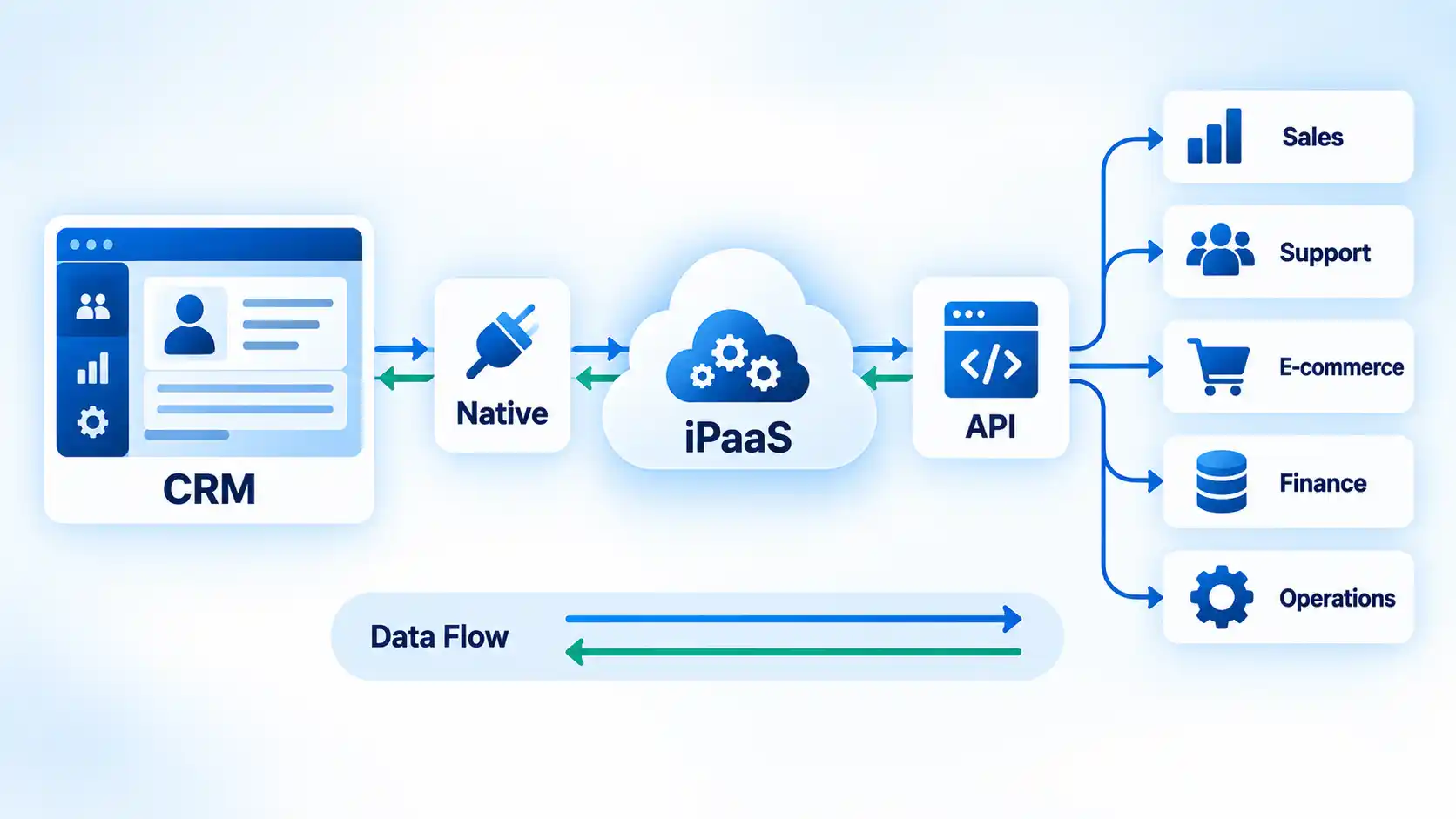
The connection can also be one-way or two-way. A website form might send a new lead into the CRM without receiving anything back. A calendar integration might synchronize selected events in both directions. Two-way synchronization is more complex because both systems can potentially change the same information. Before enabling it, decide which application has authority over fields such as names, account status, billing information, or appointment details.
11 Ways to Integrate CRM With Business Operations
The following integrations belong on this list because each connects CRM data to a distinct business process. They are informational items, not ranked choices, and a business does not necessarily need all eleven. The useful combination depends on where customer information enters the organization, which teams use it, and where repeated manual work or fragmented records cause problems.
1. Connect Email to Your CRM
Email is one of the most practical CRM integrations because a large part of customer and prospect communication still happens in the inbox. Connecting email and CRM can make it easier to associate relevant correspondence with the correct contact, company, lead, or opportunity instead of relying on employees to copy information manually.
The exact behavior depends on the products involved. Microsoft, for example, documents how its Sales agent can connect Outlook users to supported Dynamics 365 or Salesforce CRM environments so they can work with CRM information from Outlook. Its current Outlook CRM connection documentation also makes clear that users must connect to the appropriate CRM environment for the richer CRM-backed capabilities.
That convenience needs boundaries. Decide which emails should be logged, whether shared mailboxes need different rules, and who can see recorded correspondence. Automatically storing every message can create clutter or expose information to people who do not need it.
2. Sync Calendars and Scheduling
Calendar integration connects customer appointments, sales meetings, demonstrations, follow-ups, and similar events with CRM records. Instead of checking a calendar separately and then updating the CRM by hand, the relevant activity can be associated with the contact or opportunity.
A useful example is a sales meeting that appears in the employee’s calendar while also contributing to the activity history for the customer. This gives colleagues more context without requiring duplicate entry.
Before using two-way synchronization, decide which application can create, edit, cancel, or reschedule an event. Otherwise, a user can end up with duplicated appointments or changes that are overwritten by the other system.
3. Integrate Marketing Automation
CRM and marketing automation serve different but closely related parts of the customer journey. Marketing systems can record campaign participation and engagement, while the CRM can supply information such as lifecycle stage, account ownership, sales status, and prior interactions.
Connecting them allows workflows to use information from both sides. For example, a qualifying action from a prospect could update a CRM record or create a follow-up for the responsible salesperson. A change in CRM status could also alter the marketing workflow applied to that contact.
Depending on the CRM, these workflows may be built into the platform or connected through a separate sales automation tool, marketing platform, or integration service.
The important technical question is field ownership. If both the marketing system and CRM can change lifecycle stages, email addresses, consent fields, or contact status without clear rules, the integration can create conflicting records. Automation should reduce repetitive work rather than hide an unclear process. Related workflow automation can be useful when repetitive actions have an explicit trigger and outcome.
4. Send Website Forms and Lead Capture Into CRM
A CRM can also receive information directly from website forms. Contact forms, quote requests, event registrations, lead magnets, and other inbound forms can create or update records without someone manually transferring every submission.
A typical workflow might look like this: a visitor submits a form, the integration searches for an existing contact, updates or creates the appropriate CRM record, assigns ownership, and creates a follow-up activity. This describes a possible data flow rather than a universal setup procedure because each form platform and CRM uses different configuration controls.
Good matching rules matter here. If every submission creates a new person regardless of email address, phone number, company, or another identifier, the CRM can quickly accumulate duplicates. Form validation and spam filtering also belong before or alongside the CRM connection so bad input is not automatically treated as useful customer data.
5. Connect Social Media Interactions
Social media integration can bring selected customer interactions into sales, marketing, or service workflows. For example, supported messages or inquiries may be associated with a customer record or routed to a team responsible for responding.
The useful principle is context, not collecting every possible social signal. A customer-service representative may benefit from seeing that a support request began through a social channel, while a marketing team might use permitted interaction data for campaign analysis. General social media marketing activity remains a separate discipline from CRM integration itself.
Do not assume that every social network exposes the same profile, engagement, or message data. Access depends on each platform’s API, permissions, account type, and current policies. An integration should therefore be designed around the information that is actually available rather than a theoretical complete view of a customer’s social activity.
6. Integrate Customer Support and Help-Desk Systems
Connecting customer-support software to CRM can give service teams useful account context while giving sales or account teams visibility into relevant service activity. IBM’s CRM integration guidance identifies customer-service and help-desk systems as common integration categories and explains that support teams can work with information such as contact details, inventory, shipping, billing, sales history, and prior interactions when the connected systems make that data available.
For example, an agent handling a ticket might see the customer’s recent purchase or account status without asking another department to retrieve it. A salesperson might see that an important account has an unresolved support issue before beginning an unrelated sales conversation.
Access still needs to follow job responsibilities. Integrating systems does not mean every CRM user should automatically receive unrestricted access to every ticket, private note, billing record, or support transcript. Businesses handling customer information should also establish sensible customer-data protection practices around the expanded information flow.
7. Connect Calling and SMS
Phone and text-message integrations can attach customer communications to the CRM rather than leaving them isolated in a separate calling or messaging application. Depending on the systems involved, users may be able to initiate communications from a CRM interface, associate activity with the correct record, or save notes and outcomes after the interaction.
For service teams, this can complement the wider mix of channels used by a virtual call center or contact-center operation. For sales teams, logged communication can make the customer timeline easier to understand when several people work with the same account.
Do not treat calling and SMS as unrestricted communication channels simply because they are integrated. Consent, retention, recording, messaging, and other requirements can vary by location and use case. The CRM integration should preserve whatever controls the organization needs rather than bypass them.
8. Connect Team Collaboration Tools
CRM information often needs input from people who spend much of their day in a collaboration platform rather than inside the CRM. Integrating the two can reduce application switching and put relevant customer context next to team conversations.
Microsoft documents that its Dynamics 365 and Teams integration can expose supported Dynamics 365 records in Teams chats or channels and connect conversations, calls, and other collaboration features with CRM workflows. Microsoft also documents platform and tenant limitations, so those capabilities should not be treated as universal across every Dynamics environment.
Salesforce provides another example. Its Salesforce for Slack documentation describes specific system permissions, app permissions, and record-access controls required before users can work with Salesforce information through Slack.
Those examples illustrate an important rule: collaboration integration should preserve CRM permissions. Making records convenient to discuss should not accidentally make them visible to people who were not authorized to view them in the source system.
9. Integrate E-Commerce and Order Data
An e-commerce integration can connect customer and order activity from an online store with CRM records. This can give sales and support teams useful context about purchases without requiring them to search the storefront or manually enter order details.
For example, a new purchase might create or update a customer record, while relevant order information becomes available for later service interactions. IBM’s CRM integration documentation notes that website and e-commerce interactions can update CRM data automatically, reducing manual entry.
Be careful about system ownership. Product availability, inventory, fulfillment state, refunds, tax calculations, and authoritative order totals may belong in an e-commerce or enterprise system rather than the CRM. Copying useful information into CRM is different from letting the CRM overwrite operational records it does not own.
10. Connect Accounting and ERP Systems
Accounting and enterprise resource planning systems handle financial and operational processes that usually extend beyond CRM. Enterprise resource planning, or ERP, commonly covers functions such as finance, procurement, inventory, production, and fulfillment, while CRM concentrates more heavily on customer-facing relationships and commercial activity.
Connecting them can reduce re-entry between front-office and back-office workflows. For example, a completed sales process in CRM may hand relevant information to an order or invoicing workflow. Appropriate payment or order status can then become visible to CRM users without giving them direct control over the accounting ledger.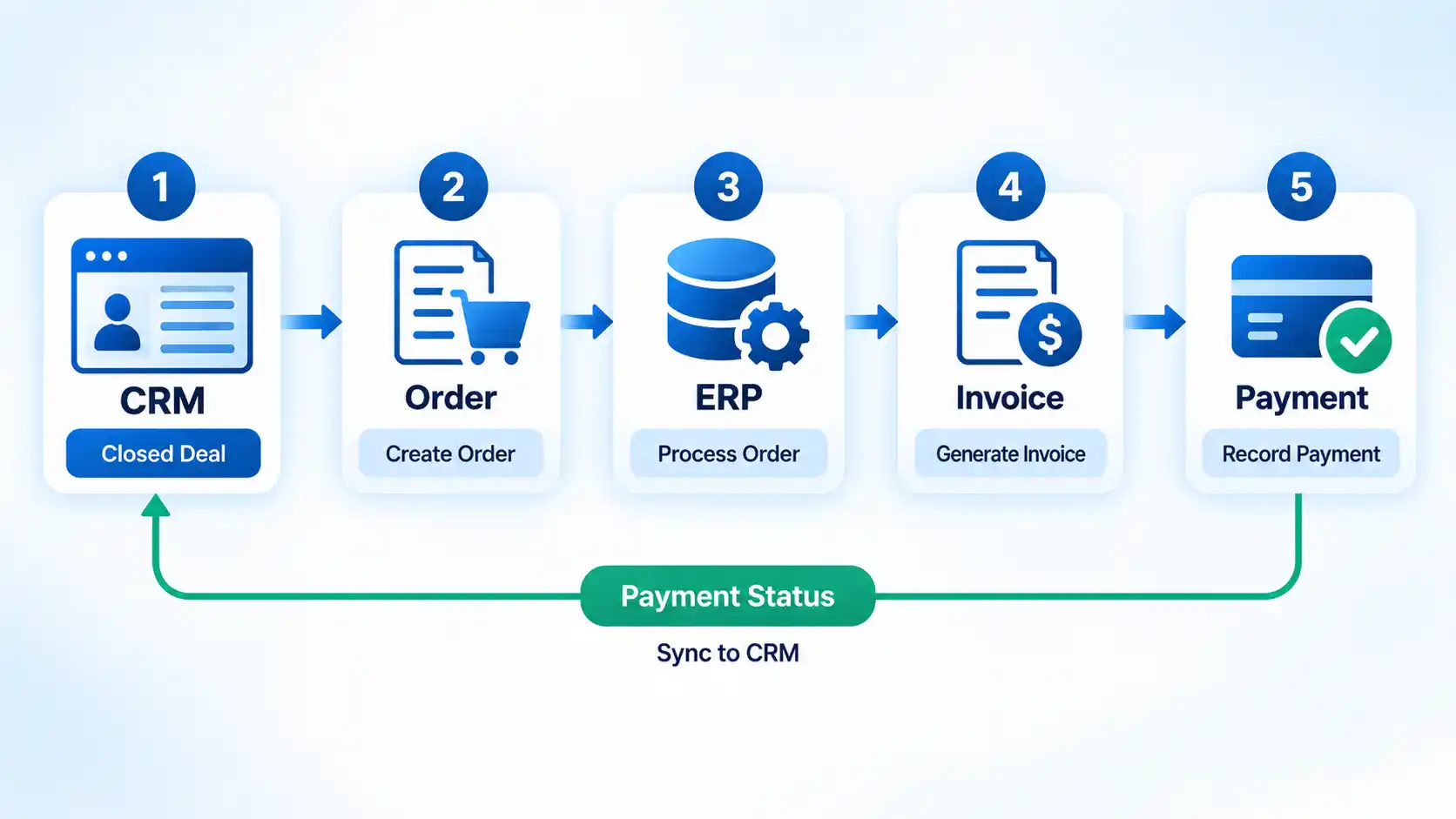
The important design decision is the system of record. Financial values, inventory levels, invoice state, and customer account information should not be allowed to overwrite one another unpredictably across two systems. The broader difference between CRM and ERP responsibilities becomes especially important when deciding which platform owns each field.
11. Connect Analytics and Business Intelligence
CRM reports are useful for customer and pipeline activity, but many business questions require information from several systems. Business intelligence and analytics tools can combine relevant CRM data with finance, service, commerce, or other operational sources for wider analysis.
For example, a reporting environment could compare CRM pipeline information with recognized revenue, service volume, or customer-retention measures from systems that own those records. That produces a broader view than forcing every piece of business data into CRM.
Integration does not automatically make the analysis trustworthy. Teams still need consistent definitions for measures such as lead, customer, qualified opportunity, closed deal, or active account. They also need to know how frequently each source refreshes. A polished dashboard can still produce misleading conclusions when its underlying fields mean different things in different systems.
Choose the Integration Method Before Connecting Everything
There is no single technical method that fits every CRM connection. A native or prebuilt connector is often the simplest choice when it supports the required fields and workflow. It typically reduces the amount of integration code the business has to maintain.
A third-party connector or iPaaS can be useful when several applications need to exchange information or when a direct native integration does not provide the required workflow logic. These platforms can coordinate triggers, transformations, routing, and connections across multiple systems.
A custom API integration gives developers more control over the data model and business logic, but that control creates maintenance responsibility. Authentication methods, API versions, field definitions, limits, and vendor behavior can change over time. Someone therefore needs to own monitoring and updates after launch.
The practical decision is based on requirements rather than technical prestige. If a supported native connector handles the required email synchronization, custom development may add unnecessary complexity. If an order workflow crosses CRM, e-commerce, ERP, and accounting systems with special business rules, a managed integration platform or custom implementation may be more appropriate.
Before choosing among native CRM integrations, APIs, and iPaaS connections, document the required data flow, frequency, permissions, error handling, and system ownership. That makes the architecture follow the business requirement instead of the other way around.
Integration Checks That Prevent Bad CRM Data
A connection is not proven simply because its setup screen reports success. Verify what happens to representative records after the integration is active, including cases where data already exists or a user lacks permission.
Verify the result
- A representative new record arrives in the intended destination with the expected required fields populated.
- Updating a field that is supposed to synchronize changes the correct destination field without overwriting unrelated information.
- Submitting information for an existing customer updates or matches the intended record rather than creating an avoidable duplicate.
- Users who should not see restricted CRM information remain unable to access it through the connected application.
- A failed or rejected synchronization produces an observable error, log entry, or other signal that the responsible team can investigate.
- Records continue synchronizing as expected after the initial test instead of succeeding once and silently failing later.
These checks are particularly important for two-way integrations. IBM notes that CRM integrations can introduce problems such as conflicting records, security concerns, automation complexity, and additional training or management requirements. Testing representative records gives the business a chance to find those failures before relying on the connection as a source of operational truth.
If records begin duplicating, fields repeatedly overwrite one another, or synchronization stops without a clear error, treat that as an integration defect rather than compensating with more manual editing. Duplicate CRM records, sync conflicts, and missing data usually need the underlying matching, ownership, permissions, or error-handling logic investigated.
Final Thoughts
The best CRM integrations solve a specific information or workflow problem. Start with processes where employees repeatedly re-enter the same data, lack useful customer context, or switch between systems simply to complete one customer-related task.
Then decide what information needs to move, which system owns it, who can access it, and how failures will be detected. Email, marketing, support, commerce, finance, collaboration, and analytics connections can all be useful, but adding more integrations is not automatically better. A smaller set of well-governed connections is more valuable than a large network of synchronizations whose ownership and behavior nobody can clearly explain.

💬 Comments