To make YouTube videos that sell products, structure content around a direct problem-first hook in the first 15 seconds, demonstrate clear visual proof in the midsection, tag native YouTube Shopping products, and place friction-free call-to-action (CTA) links in the video description and pinned comment. Aligning video pacing with viewer buying intent turns casual views into measurable ecommerce conversions.
Quick Take: Key Pillars of a High-Converting YouTube Video
Converting YouTube traffic into paying customers requires balancing audience retention with clear direct-response marketing. The table below outlines the core strategic pillars for building sales-focused video assets:
| Strategic Pillar | Primary Implementation Action | Expected Conversion Impact | Ideal Video Format |
|---|---|---|---|
| 15-Second Problem Hook | Address the viewer’s core pain point immediately before introducing the brand or logo. | Prevents early audience drop-off; increases viewer retention through the first call-to-action. | Product Reviews, Comparisons, Tutorials |
| Active Visual Proof | Show live B-roll footage of the product solving a specific real-world problem. | Overcomes purchase skepticism and reduces pre-purchase hesitation. | Unboxings, Field Tests, Case Studies |
| Native Shopping Tagging | Tag up to 30 products directly on-screen via native YouTube Shopping integration. | Reduces checkout friction by letting viewers purchase without navigating away. | Long-Form Demos, YouTube Shorts Teasers |
| Description Link Hierarchy | Place targeted UTM destination links within the first 3 lines of the description box. | Captures high-intent clicks from mobile and desktop viewers. | All Video Formats |
| Mid-Roll Micro-CTAs | Deliver verbal and visual graphic callouts at peak retention intervals (30% and 60% marks). | Captures conversions from viewers who leave before the end screen. | In-Depth Tutorials, Listicle Walkthroughs |
Tip 1: Hook Viewers in the First 15 Seconds with a Problem-First Script Structure
The vast majority of audience drop-off occurs during the initial seconds of playback. Recent data highlighted in Hootsuite’s YouTube growth analysis confirms that viewers decide whether to stay within the first 10 to 15 seconds. High-converting sales videos bypass lengthy channel intros, animated logos, and generic self-introductions in favor of an immediate problem-first hook.
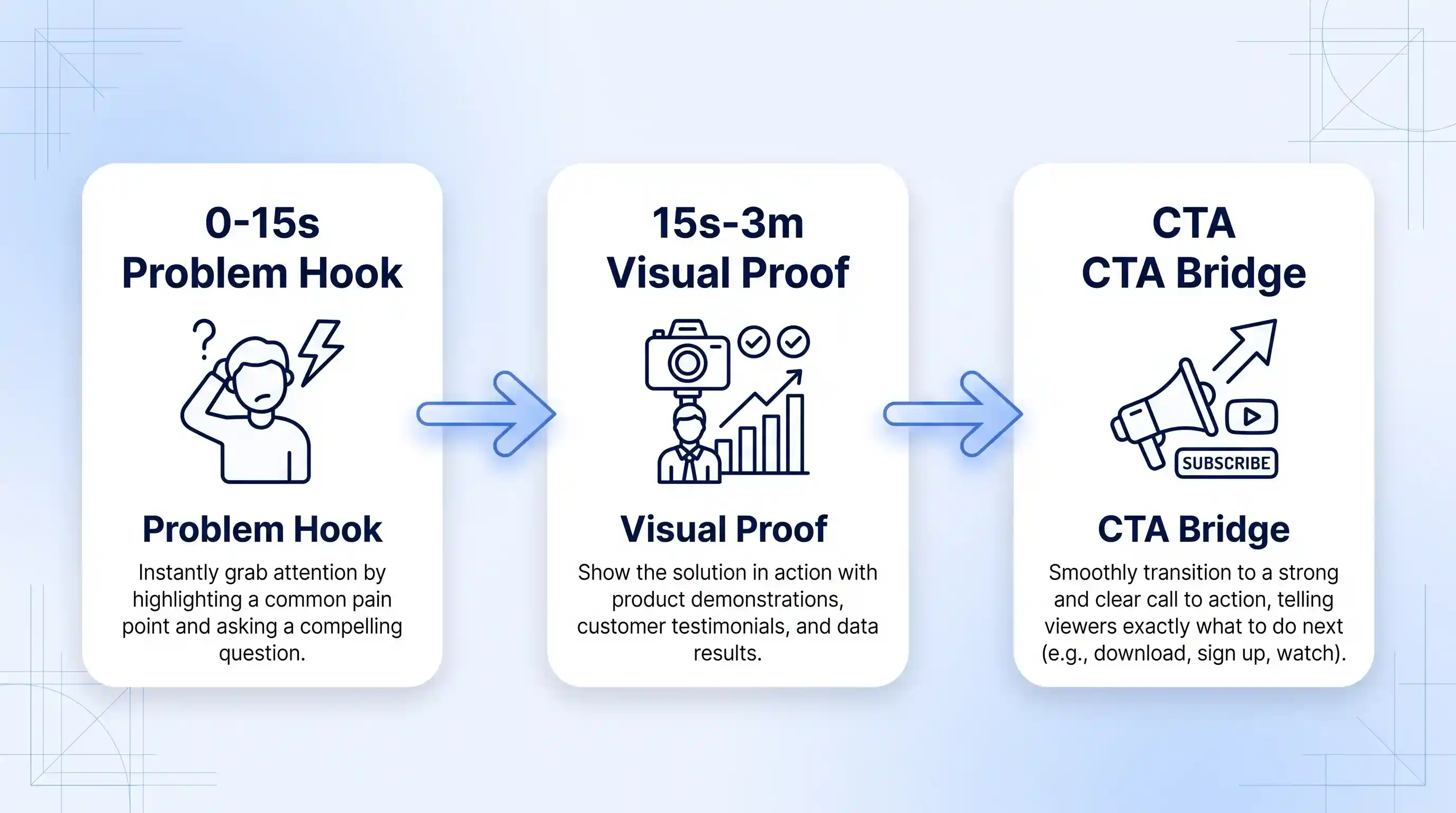
Structure your script around a direct-response three-part framework designed for buyer engagement:
- 0:00 – 0:15 (The Problem Hook): State the exact frustration your target customer experiences daily. State the outcome they want without mentioning product specs yet.
- 0:15 – 3:00 (Visual Agitation & Proof): Show why traditional solutions fail. Introduce your product or service as the logical mechanism that solves the problem.
- 3:00 – End (The Conversion Bridge): Provide a clear, step-by-step directive explaining exactly where and how to purchase the item.
Trade-offs and Limitations: Direct problem-first hooks work exceptionally well for high-intent search queries (“best mic for noisy rooms”). However, for casual discovery content aimed strictly at broad entertainment, overly transactional hooks can feel jarring. Balance the aggression of your hook based on where the viewer enters your sales funnel.
Tip 2: Show Visual Proof Through Active Product Demonstrations
Telling an audience that a product works is rarely enough to close a sale; viewers demand visual verification before handing over payment details. High-converting ecommerce videos prioritize active B-roll demonstration over static talking-head commentary. Detailed strategy benchmarks from the Wix e-commerce video strategy guide show that showing a product in action yields significantly higher conversion rates than unscripted verbal mentions.
To maximize visual trust during production, apply these hands-on filming practices:
- Use Split-Screen Side-by-Side Comparisons: Film the old or competitor method on the left side of the frame and your product solution on the right. This creates immediate contrast.
- Capture Extreme Close-Ups (Macro B-Roll): Show build quality, tactile materials, texture, or software interface details using dedicated close-up camera angles.
- Perform Stress and Real-World Tests: Put the product through challenging environments (e.g., outdoor weather, high-volume stress tests) to demonstrate durability and real-world reliability.
Combining visual proof with natural commentary establishes immediate subject matter authority. To complement your video strategy, evaluate your overall broader digital marketing strategy to ensure your landing pages mirror the exact visual claims made on screen.
Tip 3: Integrate Native YouTube Shopping and Structured Description Links
Once viewer interest is secured, removing friction from the purchasing path is critical. Channel owners enrolled in the YouTube Partner Program can utilize native store connections (such as Shopify, Spreadshop, or Cafe24) to tag products directly within video content. Refer to the official YouTube Shopping documentation for store connection requirements and product eligibility guidelines.
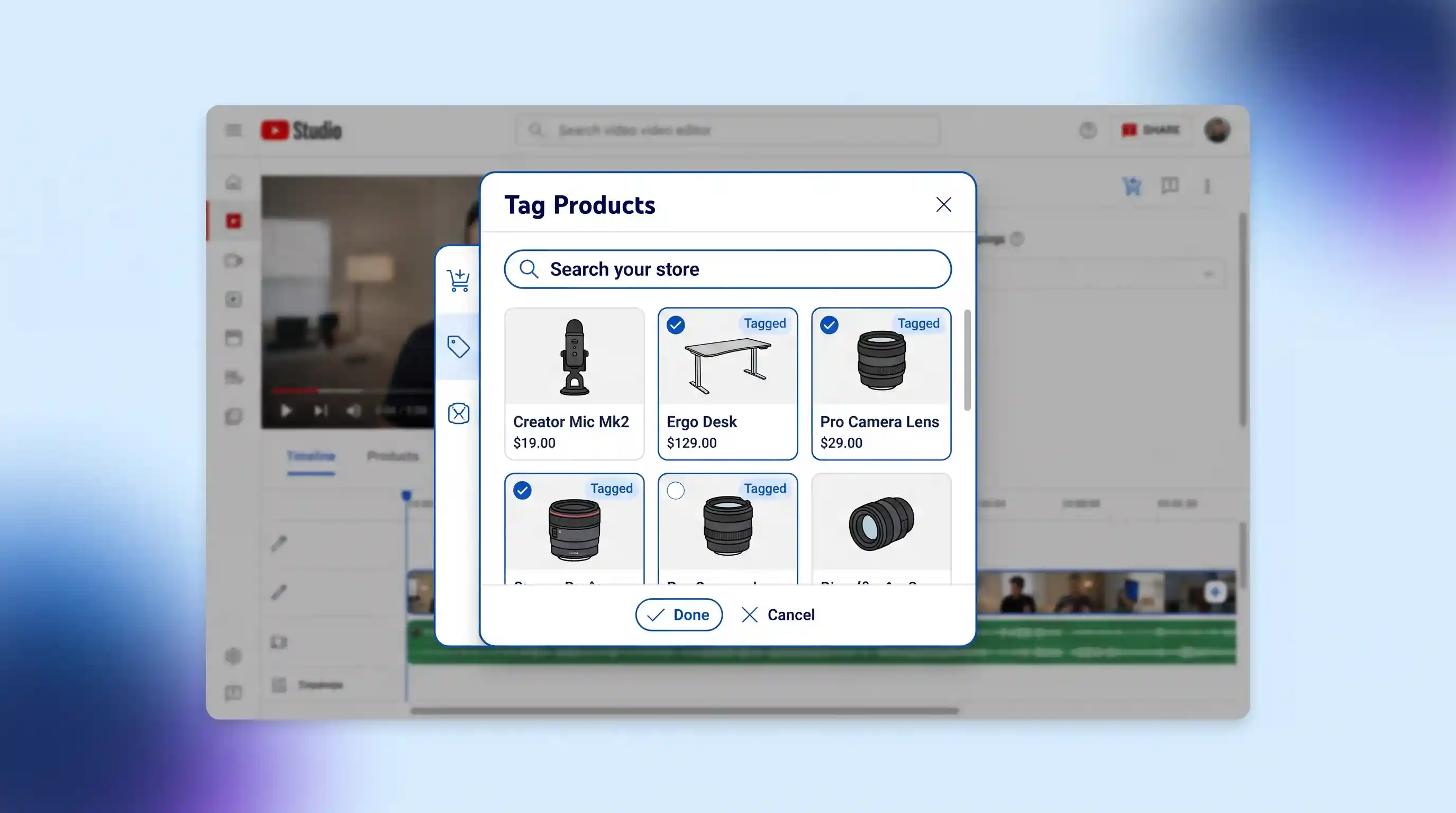
To capture clicks across all device types, build a multi-layered link structure across your video assets:
- Native On-Screen Tagging: Tag up to 30 relevant products per video so that an interactive product drawer appears below or alongside the video player.
- Above-the-Fold Description Links: Place your primary product URL on line 1 or line 2 of the video description box (above the “Show More” fold), formatted with explicit tracking parameters (UTMs).
- Pinned Comment Link: Write a concise call-to-action comment containing your direct checkout link and pin it to the very top of the comment section.
Eligibility Note: If your channel has not yet met YouTube Partner Program monetization thresholds, native Shopping tags will remain locked. In this stage, rely strictly on pinned comments and above-the-fold description links paired with custom landing pages.
Tip 4: Design High-CTR Thumbnails and Titles Tailored to Buyer Intent
A high-converting video cannot sell products if high-intent buyers never click on it. The packaging of your video—specifically the thumbnail image and title—must signal immediate relevance to users actively seeking buying advice. Creator optimization insights published on the YouTube Creator optimization portal emphasize that high-intent titles matched with clear visual focus drive stronger search performance.
When packaging videos for commercial intent, optimize for search clarity rather than broad clickbait:
| Packaging Element | Low-Converting Casual Approach | High-Converting Buyer-Intent Approach |
|---|---|---|
| Video Title | “I Tried This New Desk Setup and It Changed Everything!” | “Ergonomic Standing Desk Review: Worth It After 6 Months?” |
| Thumbnail Visual | Exaggerated facial expression with generic background blur. | High-contrast split-screen showing product in use vs problem state. |
| Thumbnail Text Overlay | “UNBELIEVABLE RESULTS!!!” | “Don’t Buy Until You See This” or “Tested: Model X vs Model Y” |
Leverage YouTube Studio’s native Thumbnail Test & Compare tool to A/B test two distinct visual angles over a 14-day window. Choose the thumbnail design that yields the highest click-through rate (CTR) alongside superior average view duration.
Tip 5: Master Post-Production Workflows with AI Subtitling and Motion Callouts
High quality editing keeps viewers engaged during key sales pitches. Utilizing robust desktop video editing software options allows creators to assemble dynamic, polished sales assets quickly without spending days in post-production. Practical workflow operational breakdowns in the Spreadshop video merch guide demonstrate that clear subtitles and dynamic lower-thirds significantly improve viewer retention on mobile screens.
To maximize editing efficiency when preparing commercial content, incorporate these technical post-production features:
- AI Speech-to-Text Subtitling: Over 70% of mobile YouTube viewers consume content with low audio or muted sound. Auto-generate crisp on-screen subtitles and highlight critical promotional keywords in contrasting colors.
- AI Cutouts and Subject Isolation: Isolate yourself or your physical product from distracting backgrounds without requiring a physical green screen setup.
- Animated Lower-Third Graphic Callouts: Insert clean graphic banners at the exact moment you mention product features, pricing drops, or discount codes.
- Audio Normalization and Noise Suppression: Maintain audio loudness at -14 LUFS (YouTube’s target standard) to prevent sudden volume drops that cause viewer fatigue.
Creators incorporating modern software can also test emerging creative AI advertising tools to quickly iterate on video ad variations and automated scene assemblies for promotional campaigns.
Tip 6: Time Your Calls to Action (CTAs) at Peak Engagement Points
Placing your primary product call to action at the very end of a video is a common structural error. Analytics consistently show that 60% to 80% of initial viewers drop off before reaching the final 30 seconds of a video. Conversely, pitching a product within the first 10 seconds—before demonstrating value—causes viewers to bounce immediately.
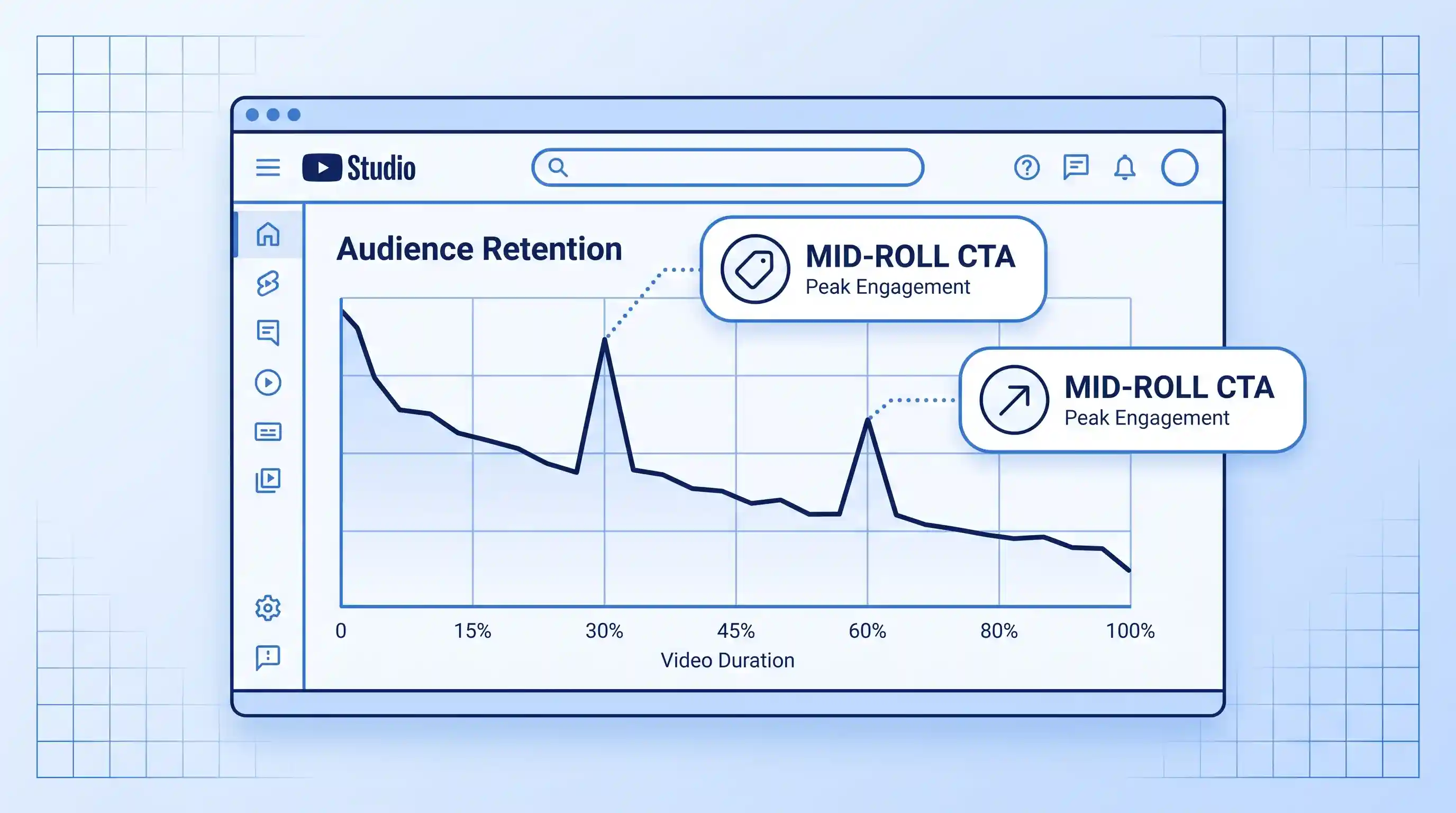
The optimal strategy relies on placing Mid-Roll Micro-CTAs at organic retention peaks throughout the video:
- The Value-First Micro-CTA (30% Mark): After delivering your first major piece of useful insight or visual proof, insert a brief 5-second verbal reminder: “If you want to check the latest specs or current discounts for this setup, I’ve placed direct links in the top line of the description below.”
- The Solution Micro-CTA (60% Mark): Following your main product comparison, remind viewers of any exclusive channel coupon codes or bundled offer bonuses.
- The End-Screen Conversion Bridge (Final 15 Seconds): Direct remaining engaged viewers to a related video review or directly to your store link before playback ends.
Refining these mid-roll callouts ensures that every viewer who consumes meaningful value encounters at least one clear purchasing prompt before exiting.
Tip 7: Pair Long-Form Sales Walkthroughs with YouTube Shorts Teasers
Short-form video is an exceptional discovery mechanism for capturing top-of-funnel traffic. However, closing complex sales often requires the educational depth of a 5 to 10-minute long-form video. Build a integrated multi-format funnel by pairing short 60-second YouTube Shorts with your primary long-form sales content.
Execute this cross-format strategy using the following workflow:
- Extract the Peak Proof Moment: Take a 30 to 45-second clip showing your product solving a dramatic problem (e.g., a stress test or before/after transformation) from your main editing timeline.
- Edit for Vertical Format (9:16): Reframe the video vertically, add bold dynamic auto-captions, and add a punchy text overlay (“Full Test Results Below”).
- Attach the Native Related Video Link: Inside YouTube Studio, use the “Related Video” feature on your Short to link directly to your main long-form sales video. This gives top-of-funnel viewers a single-tap path to your full review.
Creators expanding across short-form channels can also repurpose these vertical teasers into cross-platform Instagram promotion tactics to drive additional off-platform sales traffic back to their core offers.
Tip 8: Track Conversion Signals with YouTube Studio and Custom UTM Links
Optimizing video sales is impossible without accurate attribution tracking. Relying solely on overall store sales metrics leaves creators blind as to which specific video, CTA timestamp, or thumbnail angle drove customer checkouts.
Set up an end-to-end performance tracking system across your channel assets:
- Build Clean Google Analytics UTM Parameters: Append custom tracking tags to every description link (e.g.,
?utm_source=youtube&utm_medium=video&utm_campaign=desk_review_aug2026). - Monitor Audience Retention Drops: Review YouTube Studio’s retention graph to pinpoint exact timestamps where viewers click away. If retention drops sharply right before your pitch, shorten your script transition.
- Analyze Click-Through Rates (CTR): Aim for a minimum impressions CTR of 4% to 8% on search-focused buyer content. A lower CTR indicates your thumbnail or title requires iteration.
Regularly reviewing your channel analytics ensures continuous optimization of future sales scripts, visual hooks, and CTA placements.
How to Choose the Right Video Sales Strategy for Your Business
Different commercial business models require distinct YouTube production styles and call-to-action structures. Use the decision framework below to align your video creation process with your primary revenue goals:
| Business Model / Goal | Recommended Video Format | Ideal Video Length | Primary Call-to-Action (CTA) | Key Post-Production Focus |
|---|---|---|---|---|
| Physical E-Commerce Products | Hands-on Unboxing, Stress Tests, Product Comparisons | 5 to 8 Minutes | Native YouTube Shopping Shelf + Top Description Link | AI Cutouts, B-Roll Close-Ups, High-Contrast Subtitles |
| Digital SaaS & Software | Screen-Recorded Workflow Tutorials, Feature Walkthroughs | 8 to 15 Minutes | Free Trial Signup Link in Pinned Comment | On-Screen Cursor Zooming, Motion Graphics Callouts |
| Consulting & High-Ticket Services | In-Depth Case Studies, Problem-Solving Masterclasses | 12 to 25 Minutes | Strategy Call Booking Link in Description | Clean Studio Lighting, Crisp Audio (-14 LUFS), Professional Lower-Thirds |
| Creator Merch & Digital Downloads | Behind-the-Scenes Vlogs, Design Storytelling Walkthroughs | 3 to 6 Minutes | On-Screen Product Overlays + End Screen Cards | Fast Pacing, Upbeat Background Music, Dynamic Speed Ramping |
For channels exploring third-party software tools, mobile editing solutions, or custom video utility options, evaluating specialized third-party YouTube application features can help refine mobile viewing workflows and cross-device testing routines.
Key Takeaways
- Hook viewers within the first 15 seconds by focusing on a specific user problem rather than vanity channel intros.
- Prioritize active visual proof (split-screens, macro B-roll, real-world tests) over static talking-head explanations.
- Eliminate purchasing friction by combining native YouTube Shopping tags with structured description links and a pinned comment.
- Package videos for high buyer intent using search-optimized titles and focused thumbnail A/B testing in YouTube Studio.
- Utilize desktop video editing software (featuring Filmora or similar NLEs) to add automated AI subtitling, lower-third graphics, and normalized audio.
- Position call-to-action pitches at mid-video engagement peaks (30% and 60% retention marks) rather than relying solely on end screens.
- Attribute incoming sales using custom Google Analytics UTM parameters appended to every video link.
Frequently Asked Questions (FAQ)
What basic equipment is needed to create high-converting YouTube sales videos?
You do not need expensive cinema cameras to produce sales videos that convert. A modern smartphone or mid-range mirrorless camera capable of recording 1080p or 4K video at 30fps is sufficient. Focus your budget on secondary elements: a dedicated lapel or shotgun microphone to capture clear audio, a simple two-point LED softbox lighting kit, and non-linear video editing software to add professional subtitles and lower-third graphics during post-production.
What are the channel requirements to use native YouTube Shopping product tagging?
To access native YouTube Shopping product tagging features, your channel must be approved for the YouTube Partner Program (YPP), have at least 500 subscribers (or 1,000 subscribers depending on regional YPP expanded access tiers), have valid public watch hours, have no active Community Guidelines strikes, and not be marked as Made for Kids. Additionally, your store must be hosted on an approved connected platform such as Shopify, Spreadshop, or Cafe24.
How long should a YouTube video be if the main goal is selling a product?
The optimal length for a YouTube sales video typically ranges between 5 and 12 minutes. This duration provides enough time to establish an immediate problem hook, demonstrate visual proof through B-roll footage, cover product edge cases, and deliver multiple CTAs without diluting audience retention. Avoid inflating video length simply to hit arbitrary watch-time targets; keep pacing tight and value-dense.
Are YouTube Shorts effective for driving direct ecommerce product sales?
YouTube Shorts excel at top-of-funnel brand discovery and product awareness due to their broad reach in the Shorts feed. However, because impulse buying directly from 60-second clips can be low, the most effective strategy is using Shorts as teasers. Attach a native “Related Video” link inside YouTube Studio on your Short to direct interested viewers to your dedicated long-form product review, where they can consume full visual proof and access purchasing links.

💬 Comments