Firmware security vulnerabilities can let attackers or unauthorized code interfere with low-level device functions, the boot process, or hardware behavior. The strongest defense is layered: keep manufacturer-supported firmware updated, accept only trusted updates, use Secure Boot where supported, restrict administrative and physical access, monitor firmware state when possible, and maintain a reliable recovery path.
Firmware deserves separate attention from ordinary applications because it can run before, beneath, or independently of the operating system. That position can make some compromises harder to detect and recover from, although the practical risk depends on the affected component, the weakness involved, and the access an attacker can obtain.
What Is Firmware?
Firmware is software that provides low-level control for hardware and is commonly stored in nonvolatile memory, which retains its contents when power is removed.
A laptop, for example, can contain system firmware as well as firmware in storage devices, network adapters, security controllers, cameras, and other components. Routers, smart TVs, phones, embedded controllers, security cameras, and Internet of Things (IoT) devices also depend on firmware.
BIOS and the Unified Extensible Firmware Interface (UEFI) are important examples of platform firmware, but they are not synonyms for all firmware.
Firmware also does not behave exactly like a desktop application. Some firmware can be updated by users or administrators, some is handled through manufacturer-controlled update processes, and some is rarely changed during the normal life of a device. Update and recovery options therefore vary considerably between products.
Why Firmware Vulnerabilities Can Be Serious
The main security concern is where firmware sits in the system’s trust chain. When a computer starts, its platform firmware helps initialize hardware and prepare the system to load later software. If that foundation is altered without authorization, higher-level security controls may be working from a compromised starting point.
This does not mean every firmware vulnerability automatically gives an attacker complete control. Exploitation may require administrative privileges, physical access, a vulnerable update mechanism, a particular hardware model, or another prerequisite. The effect can also range from a recoverable configuration problem to loss of boot integrity or, in severe cases, a platform that requires manufacturer-assisted recovery.
NIST Special Publication 800-193 treats firmware resilience as three related jobs: protect the platform against unauthorized changes, detect unauthorized changes that occur, and recover securely when protection fails. NIST’s Platform Firmware Resiliency Guidelines also explain that a successful platform-firmware attack can make a system inoperable or require reprogramming.
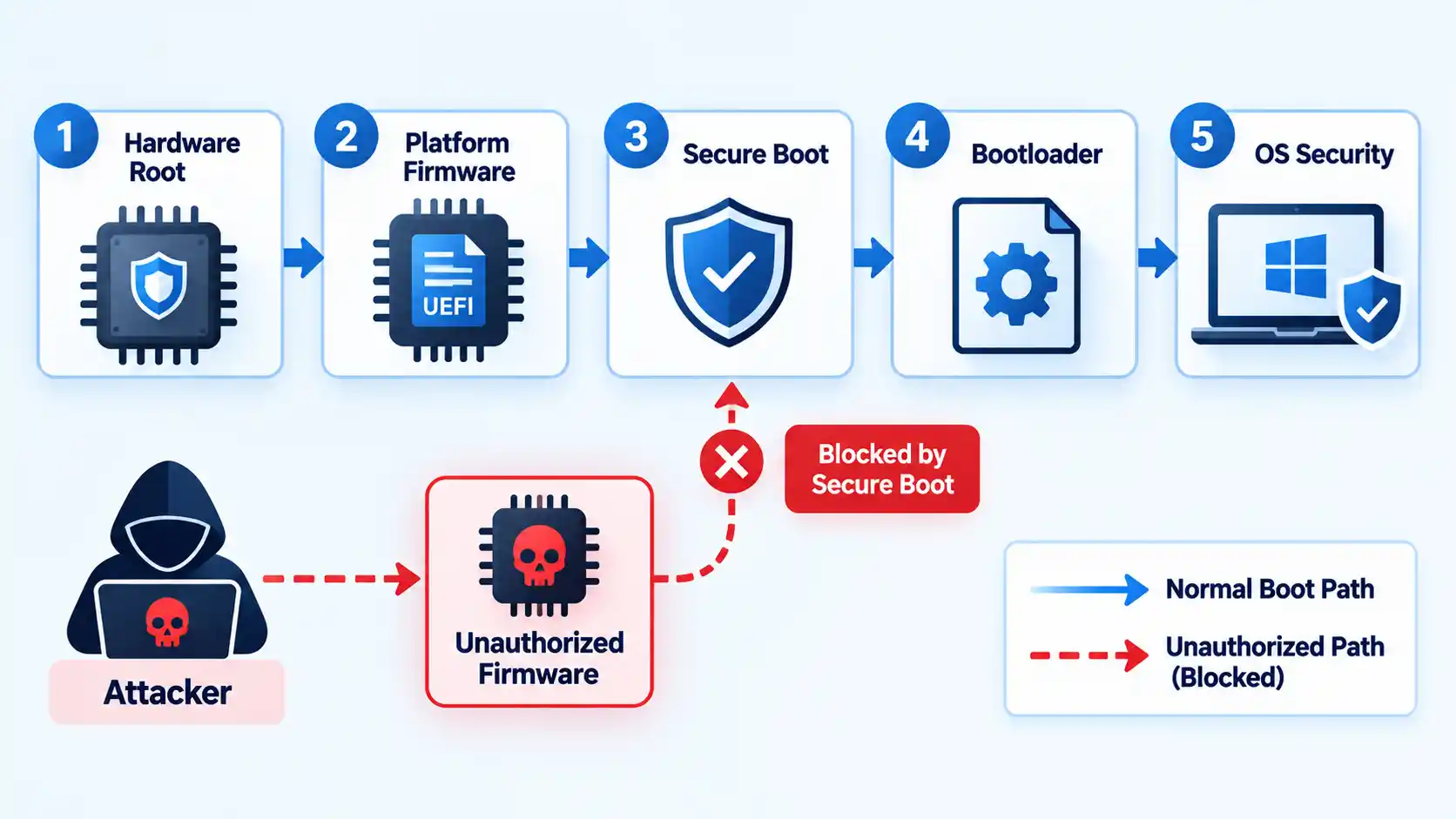
A useful way to understand the difference is that antivirus and endpoint protection normally operate at or above the operating-system layer, while firmware security starts deeper in the device. Endpoint protection is still important, but it works best as one part of layered cybersecurity controls rather than as a substitute for firmware integrity.
Persistence also needs careful qualification. Malware stored in some firmware or boot components can survive actions that only replace files on the operating-system volume, but that does not mean every firmware attack survives a disk replacement or operating-system reinstall. The result depends on which component was altered and how that component stores and verifies its code.
The Main Firmware Security Vulnerabilities and Attack Paths
A firmware vulnerability is a weakness in firmware code, configuration, update handling, trust validation, or surrounding hardware design. An attack path is the route used to reach or abuse that weakness. Keeping those concepts separate avoids the misleading idea that all firmware attacks work in the same way.
Outdated or Vulnerable Firmware
Firmware contains code, and code can contain security defects. Manufacturers may discover flaws after hardware ships and release revised firmware to correct them. Devices that remain on affected releases can stay exposed even when the operating system and applications are fully patched.
This becomes harder to manage across large fleets because administrators cannot remediate firmware they have not identified. NIST’s enterprise patching guidance includes firmware alongside other software and emphasizes inventory, prioritization, testing, deployment, and verification. NIST SP 1800-31 describes that enterprise patch-management process.
Weak or Unauthorized Firmware Updates
An update mechanism becomes a security problem when a device cannot reliably determine who is allowed to change its software or whether an update came from a legitimate source.
Secure update mechanisms may use digital signatures, certificate validation, checksums, access controls, or a combination of methods. The exact implementation varies by product. NIST’s IoT software-update profile recommends allowing updates only through authorized entities and verifying that software updates come from valid sources. NIST lists digital signatures, checksums, and certificate validation as examples of update-verification mechanisms.
The useful security question is therefore not whether firmware is inherently signed or unsigned. It is whether a particular product authenticates updates effectively, protects the credentials or keys involved, restricts unauthorized changes, and provides a trustworthy recovery path when an update fails.
Boot-Chain and Secure Boot Failures
Secure Boot is a UEFI security mechanism that restricts which boot software a device is willing to execute according to its configured trust policy. It helps prevent unauthorized boot components from loading before the operating system, but it does not guarantee that every part of the platform is secure.
The National Security Agency’s 2025 guidance stresses that configuration and lifecycle management matter because Secure Boot depends on trusted certificates, allowed and revoked components, firmware behavior, and policy enforcement. NSA guidance explains how Secure Boot constrains boot software and why correct configuration still matters.
BlackLotus provides a concrete example. The UEFI bootkit used the Secure Boot bypass tracked as CVE-2023-24932, and Microsoft states that exploitation requires physical or administrative access to the device. Current mitigation remains a staged process involving updated Secure Boot certificates, boot components, revocations, and compatibility testing. Microsoft’s current CVE-2023-24932 guidance warns that the revocation changes can affect boot and recovery configurations.
How Secure Boot works depends on both the configured trust policy and the boot components the platform accepts, so an enabled setting alone should not be treated as proof that every boot-security control is current.
Physical Access and Exposed Hardware Interfaces
Physical access changes the threat model. Depending on the device, someone with direct access may be able to alter boot settings, connect unauthorized hardware, use service interfaces, replace components, or attempt firmware modification.
The practical defenses are therefore not purely digital. Sensitive systems may need locked rooms or enclosures, restricted console access, firmware configuration protections where appropriate, controlled removable media, and procedures for unattended equipment.
On managed Windows computers where removable devices create an operational risk, administrators can also restrict USB access. That does not make USB blocking a universal firmware defense, but it can reduce one category of unauthorized local interaction.
Embedded Secrets and Insecure Device Design
Some firmware risk comes from product design rather than a flaw the owner can fix after purchase. Examples include inadequately protected secrets, exposed debug interfaces, weak update authentication, unnecessary privileged services, or a recovery design that cannot restore a known-good state.
When a manufacturer no longer supports a vulnerable device, compensating controls have limits. For a router, camera, appliance, or other network-connected product that cannot receive a necessary security fix, replacement may be safer than indefinitely operating unsupported firmware.
How to Prevent Firmware Attacks
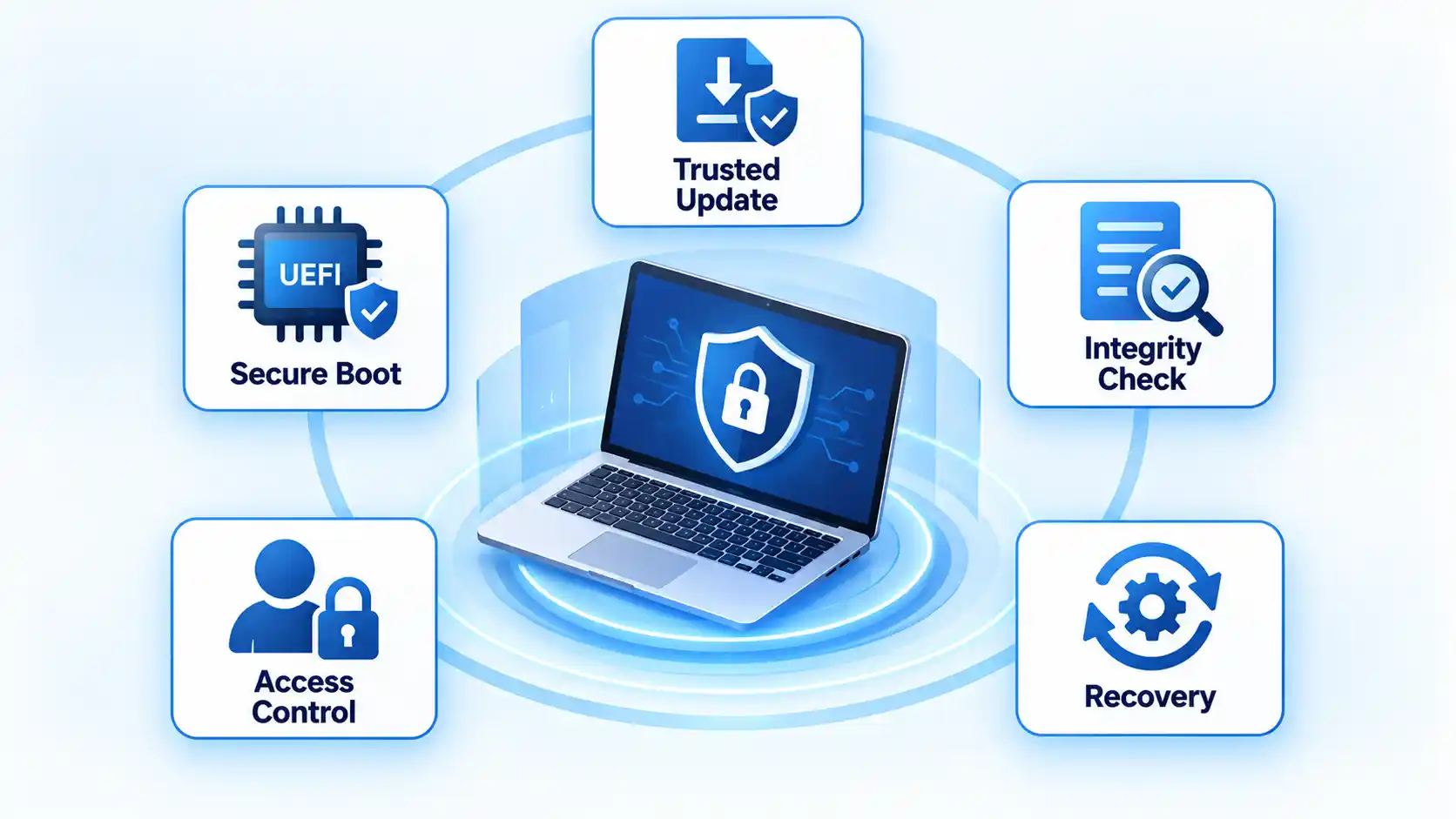
There is no single control that prevents every firmware attack. Effective prevention combines trusted updates, secure boot configuration, access control, inventory, monitoring, procurement decisions, and recovery preparation.
Install Firmware Updates From the Manufacturer
Obtain firmware through the device manufacturer’s official update mechanism or verified support channel. Match the update to the exact model and hardware revision when the vendor distinguishes between them, and review prerequisites or known issues before applying it.
On a personal computer, that may mean using the manufacturer’s update utility or support page. In an enterprise, firmware should be included in hardware and software inventories, vulnerability tracking, maintenance windows, testing procedures, and recovery planning.
Testing matters because firmware changes can affect bootability, hardware initialization, peripheral compatibility, or security settings. NIST notes that patching can introduce operational risks, which is why organizations assess, prioritize, test, deploy, and verify changes instead of treating every update as a risk-free installation. NIST SP 1800-31 provides the broader enterprise patch-management model.
Checking the BIOS or UEFI firmware version before updating helps confirm whether a release actually applies to the device and provides a useful baseline for verifying the result afterward.
Keep Secure Boot Enabled and Verify Its Configuration
On systems that support UEFI Secure Boot, keeping it enabled preserves an important boot-chain defense. Administrators should also verify that the trust configuration is current and that Secure Boot enforcement behaves as expected.
That distinction matters because Secure Boot depends on keys, certificates, trust and revocation databases, firmware implementation, and the boot software presented to the system. NSA’s 2025 guidance specifically recommends checking configuration and verifying policy enforcement rather than assuming the default state is sufficient.
Do not disable Secure Boot casually to make an incompatible driver, operating system, recovery image, or utility start. If an operational requirement appears to require disabling it, first determine whether a signed or supported alternative is available and document the resulting security trade-off.
Restrict Administrative and Physical Access
Administrative privileges can allow security-sensitive changes that ordinary accounts cannot make. Physical access can expose a different set of firmware and boot controls. Restrict both according to the value of the system and the realistic threat model.
For everyday users, that means avoiding unnecessary administrator use and keeping devices under reasonable physical control. For organizations, it can also mean privileged-access management, locked equipment areas, controlled recovery media, documented BIOS or UEFI settings, and change logging.
BlackLotus illustrates why prerequisites matter. Microsoft’s guidance says the attack requires administrative privileges or physical access, so the defensive lesson is not that any remote attacker can automatically defeat Secure Boot. It is that boot security still depends on protecting privileged access and maintaining the platform’s trust configuration.
Use Only Trusted Peripherals and Update Sources
Unknown USB devices and other peripherals can present several different risks, including ordinary malware, unauthorized storage, malicious device behavior, or exploitation of vulnerable drivers and interfaces. Firmware-level compromise is only one possibility.
Scanning files on a USB drive does not establish that the device’s controller or firmware is trustworthy. File scanners inspect accessible content, while device firmware and controller behavior may sit outside their normal visibility.
The same principle applies to firmware files. Do not install an image merely because its filename looks correct. Use the manufacturer’s delivery channel and any integrity or signature checks provided by the update process.
Track Firmware Versions and Vendor Advisories
Individuals should know where important devices such as computers and routers receive firmware updates. Organizations need a more formal inventory that records hardware models, firmware versions, support status, responsible owners, and relevant security advisories.
End-of-support status deserves attention because a device can become a long-term risk when newly discovered vulnerabilities no longer receive security fixes.
This is why patch-management policies should include firmware rather than stopping at operating systems and applications.
Buy Hardware With Security and Recovery Features
Some firmware risk is determined before a device is purchased. Useful procurement questions include whether the product authenticates firmware updates, supports a boot-integrity mechanism where appropriate, documents its security-support period, provides a known-good recovery process, and publishes a vulnerability-reporting channel.
NIST’s 2026 guidance for IoT product manufacturers emphasizes that manufacturers can reduce customer risk by building cybersecurity capabilities into products and providing the information customers need to use those capabilities. NIST IR 8259 Rev. 1 describes that manufacturer-side responsibility for product securability.
How to Detect a Possible Firmware Problem
There is no universal consumer tool that can scan every device and conclusively report whether all of its firmware is trustworthy. Detection depends on the measurement, logging, and verification capabilities exposed by the platform and manufacturer.
Useful evidence can include an unexpected firmware-version change, Secure Boot unexpectedly becoming disabled, a vendor integrity check failing, an attestation failure on managed equipment, a security advisory identifying the installed version as vulnerable, or abnormal boot behavior that begins immediately after a firmware change.
None of those signs proves a firmware compromise by itself. Boot failures can also result from defective hardware, an operating-system update, configuration errors, storage problems, or an unsuccessful legitimate firmware update. Treat symptoms as evidence to investigate rather than proof of an attacker.
Some managed environments can go further by measuring the boot process. A measured boot records cryptographic measurements of boot components so a trusted service or mechanism can evaluate what loaded. Microsoft lists Trusted Platform Module (TPM) 2.0 support for measured boot alongside secure boot, secure update, secure recovery, and other controls in its Azure hardware-security practices. Microsoft’s firmware-security documentation describes these controls in its Azure hardware context.
Secure Boot and measured boot serve different roles: Secure Boot controls which boot software is trusted to execute, while measured boot records measurements that can support later integrity evaluation or attestation.
The important limitation is visibility. If a platform has no trustworthy way to measure or report a firmware component, the absence of an alert does not prove that component is intact.
What to Do If You Suspect Firmware Compromise
Firmware incidents require more caution than ordinary file cleanup because an incorrect recovery action can make a device unbootable or destroy useful evidence.
- Isolate the device when the risk justifies it. Disconnect a potentially compromised network device or system from sensitive networks if continued operation could expose other assets. Avoid unnecessary resets before deciding whether evidence needs to be preserved.
- Record the current state. Note the device model, firmware version, Secure Boot state, relevant alerts, recent updates, and unusual boot behavior. In an organization, preserve the information through the normal incident-response process.
- Check the manufacturer’s advisory and recovery instructions. Determine whether the installed firmware is affected by a known vulnerability and whether the vendor provides a verified recovery or update path.
- Use vendor-approved firmware recovery procedures. Do not flash an image from an unknown source simply because it appears to match the model. Some platforms provide dedicated mechanisms intended to restore trusted firmware.
- Protect credentials that may have been exposed. If the incident could have affected authentication, reset relevant passwords or tokens from a known-clean system rather than relying on the suspected device.
- Escalate high-value incidents before destructive remediation. Managed business systems, servers, or devices involved in a wider intrusion may require forensic handling before reflashing, wiping, or replacement.
- Replace hardware when trust cannot be restored. If the manufacturer no longer supplies supported firmware or there is no credible way to return the platform to a known-good state, replacement can be the safer option.
NIST’s firmware-resilience model treats recovery as a first-class security capability rather than an afterthought. SP 800-193 specifically includes rapid and secure recovery from firmware attacks.
If investigation shows that the problem is conventional operating-system, browser, or file-based malware rather than a firmware compromise, you can also follow the malware removal guides for threat-specific cleanup information.
Disclosure: The VirusPup link above is a sponsored placement.
Firmware Security Is a Shared Responsibility
Users and administrators can reduce firmware risk by installing supported updates, protecting privileged access, keeping Secure Boot correctly configured, controlling untrusted peripherals, maintaining asset inventories, monitoring available integrity signals, and preparing for recovery.
They cannot compensate for every weakness in a product’s design. Manufacturers determine how firmware updates are authenticated, how secrets and debug interfaces are protected, how recovery works, how vulnerabilities are handled, and how long a device receives security support.
That makes firmware security a shared responsibility. The goal is not to assume that low-level code is trustworthy simply because it is hidden from normal view. A stronger approach is to use platforms where firmware changes are controlled, integrity can be checked where practical, and a trustworthy recovery path exists when something goes wrong.

💬 Comments