No single HTTPS indicator, review score, scanner result, or professional-looking page can prove that a website is safe. The better approach is to combine several checks and stop when you find a strong warning such as a deceptive domain, browser danger screen, suspicious payment demand, or unexpected request for sensitive information.
Quick Take
Check the exact domain, respect browser warnings, confirm the connection uses HTTPS, look for independent reputation and business information, and examine how the site asks you to pay. Treat every signal as one piece of evidence rather than proof that the site is trustworthy.
What a Website Safety Check Can and Cannot Tell You
Imagine you open an unfamiliar online shop and see that it uses HTTPS. That is useful, but it answers only one question: whether your connection to that site is protected. It does not tell you whether the person or business operating the site is honest.
A secure Chrome status means the browser has established a private connection with the site. You still need to confirm that the domain is the one you intended to visit before sharing private information. For shopping sites, the FTC likewise warns that HTTPS does not make a site legitimate.
Do not use HTTPS, an old domain, positive reviews, or a clean scanner result as a reason to ignore stronger warning signs elsewhere.
Different checks answer different questions. A website safety checker and a browser warning can both reveal risk, but they do not measure exactly the same thing.
The table below shows what several common checks can reasonably tell you and where their limits begin.
| Signal | What it can tell you | What it cannot prove |
|---|---|---|
| HTTPS | The connection between your browser and the site is encrypted. | That the business or person behind the site is legitimate. |
| Browser danger warning | The browser or its security service has identified a serious known or suspected risk. | That every unsafe site will always be detected before you visit it. |
| Clean reputation scan | The service did not report a listed threat for the checked URL at that time. | That the site cannot be fraudulent, newly malicious, or otherwise unsafe. |
| Domain registration data | Public registration data may provide dates, registrar details, or other information about the domain. | That the current website operator is honest or that the same owner has controlled the domain throughout its history. |
| Reviews | Independent reviews may reveal repeated complaints, delivery problems, or other customer experiences. | That every review or rating is genuine. |
| Contact and policy pages | They show what identity, terms, return rules, or contact routes the site presents to customers. | That the information is genuine merely because it appears on the page. |
A safer decision comes from checking whether different pieces of evidence agree with one another instead of relying on one reassuring feature or a professional-looking design.
How to Check if a Website Is Safe in 10 Steps
Start these checks before you enter a password, upload a document, download software, or make a payment. You do not need every signal to be perfect, but a serious warning should outweigh several weak positive clues.
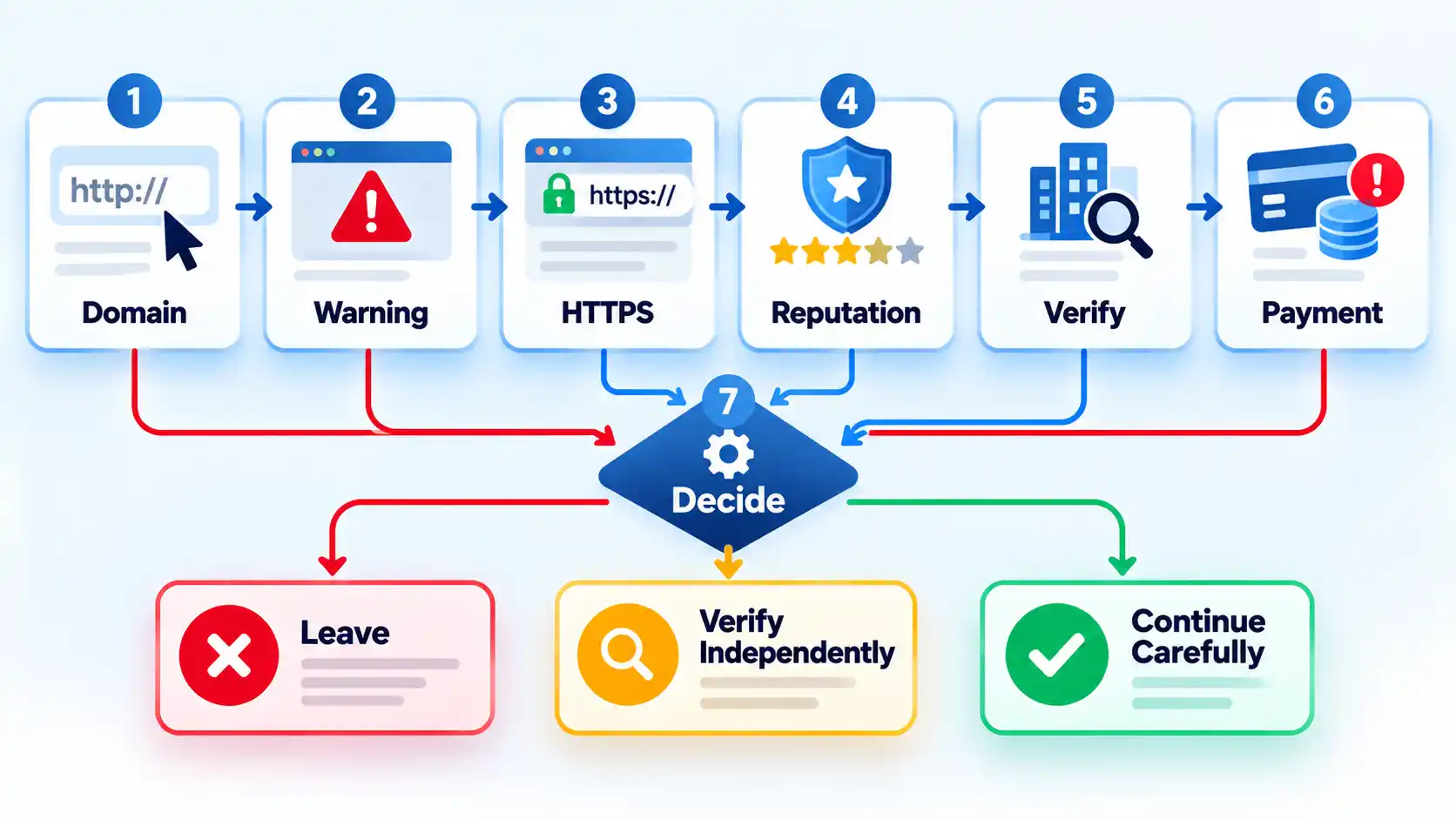
- Check how you reached the site. Be more cautious when the link came from an unexpected email, text message, social post, pop-up, or advertisement. If the message claims to come from a company you already use, open the company’s official app or reach the company through contact details you found independently rather than relying on the message itself. The FTC recommends contacting the organization independently when an unexpected message asks you to follow a link or open an attachment. When you do not trust a URL enough to load it, you can check a suspicious link without opening it instead of visiting the page first.
- Read the exact domain in the address bar. Ignore the logo for a moment and look at the actual site name. A fake page can copy a company’s colors, product images, and branding while using a different domain or a misspelling that is easy to overlook. Pay special attention to added words, swapped letters, unexpected domain endings, and addresses designed to resemble a familiar company. If the address does not match the organization you expected, stop and find the official site independently.
- Treat browser danger warnings as stop signals. If Chrome displays a red “Dangerous site,” phishing, malware, or similar full-page warning, do not bypass it simply to continue your investigation. Google says these warnings may appear for phishing, malware, unwanted software, and social-engineering sites and recommends that visitors do not continue to a flagged site. For an ordinary visitor, the safer response is to leave and verify the organization through an independent route.
- Confirm the connection uses HTTPS. HTTPS helps protect information exchanged between your browser and the site from being read or changed in transit. If the browser reports that the connection is not secure, do not enter passwords, card details, identification numbers, or other private information. If HTTPS is present, continue checking. It is a connection-security signal, not a legitimacy certificate.
- Check the URL with a reputable safety service. You can enter the URL into Google’s Safe Browsing Site Status tool to see whether Google currently reports the address as dangerous. A clean result is supporting evidence, not proof that the website is trustworthy. Chrome’s Standard Protection focuses on sites, downloads, and extensions already identified as dangerous, while Enhanced Protection also checks for potential new dangers.
- Look at domain registration information when the site’s history matters. Search the domain through ICANN Lookup and review whatever registration data is publicly available. Registration dates are most useful when they conflict with the site’s own story. For example, a domain registered recently deserves extra verification if the business claims it has operated from that same website for many years. Registration data may be privacy-redacted, and an older domain is not proof that its current operator is trustworthy.
- Verify the business identity outside the website. Look for the company’s name, physical location where relevant, support routes, return or refund terms, privacy information, and the identity it claims to operate under. Then confirm important details independently. If a page says it represents a bank, courier, government agency, software company, or retailer you know, compare the domain and contact details with a trusted source rather than calling the number printed on the suspicious page. A contact page or policy page should support other evidence, not replace it.
- Search for complaints and reviews beyond the site itself. Search the company or domain name with terms such as “review,” “complaint,” and “scam,” and compare more than one source. Look for repeated descriptions of the same problem rather than judging the site only by its average star rating. The FTC warns that reviews and ratings can be misleading or fake, whether positive or negative.
- Examine the offer and the way the site wants you to pay. Extreme urgency, an implausible price, pressure to leave a marketplace’s normal payment system, or an insistence on one difficult-to-recover payment method should raise the risk level. The FTC also warns about scammers who insist on methods such as bank transfers, wire transfers, cryptocurrency, payment apps, or gift cards and advises consumers to use a credit card when possible because charges can be disputed. Do not make a small test purchase merely to see whether a suspicious site is genuine.
- Make a final stop, verify, or continue decision. Leave immediately if you have a browser danger warning, clearly deceptive domain, suspicious download request, fake identity, or scam-style payment demand. Verify independently before continuing when the evidence is mixed or important details cannot be confirmed. Continue carefully only when the domain, connection, reputation, business identity, reviews, and transaction conditions make sense together. Even then, share only the information the transaction genuinely requires.
What to Do If You Already Used a Suspicious Website
If you discover the warning signs after interacting with the site, the problem has changed. Your next step depends on what the site received or what happened on your device, so do not keep browsing the suspicious page just to collect more evidence.
- If you only opened the page: close it and avoid returning through the same link. Merely seeing a suspicious page does not automatically mean your accounts were compromised.
- If you downloaded or ran something: stop using the affected device for sensitive activity until you have checked it. If the suspicious interaction may have installed harmful software, the we recommend that you update your security software and run a scan. Broader precautions for avoiding malware while browsing can help you check download, update, extension, and browser risks.
- If you entered a password: change that password through the real service rather than through the suspicious page. If you entered a password on a phishing site, treat it as exposed and replace reused copies of the same password on other important accounts. Turn on multi-factor authentication where it is available so a stolen password alone is less useful to an attacker.
- If you gave card or bank information or sent money: contact the bank, card issuer, payment app, exchange, or transfer provider through independently verified contact details as soon as possible. Tell the provider that the transaction may be fraudulent and ask whether it can be stopped or reversed.
- If you submitted an identity document: preserve evidence without sending additional copies of the document. If you uploaded an ID to a scam website, the response should be based on whether the site also received a selfie, password, payment information, verification code, or device access. Contact the document issuer through an official channel before assuming the physical document must automatically be cancelled.
If you are unsure whether the site actually caused harm, secure the highest-risk information first. Email accounts, financial accounts, reused passwords, and devices on which you installed something deserve priority because they can provide a route into other services.
Key Takeaways
Key Takeaways
- Read the exact domain before trusting the site’s name, logo, or design.
- Treat a browser phishing or malware warning as a reason to stop, not as one more weak clue to balance against positive signs.
- HTTPS protects the connection but does not prove that the website operator is legitimate.
- Use reputation scans, domain information, reviews, and business details together because none of them can establish safety by itself.
- Be especially cautious when a site pressures you to pay through a hard-to-reverse method or outside the normal payment system.
- If you already entered sensitive information or installed something, switch from website checking to account, payment, identity, or device recovery.

💬 Comments