Migrating a database from Oracle to PostgreSQL means converting your schema, your data, and your stored code into a format Postgres understands, then checking that nothing broke along the way. Most teams do this in stages: convert the schema first, move the data second, then test everything before switching production traffic over.
Quick Take
A full Oracle-to-Postgres migration can take a few days for a small database or several weeks for a large one with lots of stored procedures. You have four realistic paths: do it by hand, use the free Ora2Pg tool, use a paid GUI converter, or use AWS’s migration services if you’re moving into the cloud. None of these paths is automatically the best choice. The right one depends on your database’s size, your team’s SQL skills, and how much downtime you can accept. The steps below apply no matter which path you pick, though your chosen tool changes how much of the work gets automated for you.
Why Companies Move From Oracle to PostgreSQL
Oracle and PostgreSQL are both mature, capable database systems. The real difference between them is licensing, not raw capability. PostgreSQL is released under the PostgreSQL License, a permissive open-source license similar to BSD or MIT terms. You can run it, change it, and redistribute it without paying anyone.
Oracle works differently. Oracle Database Enterprise Edition charges by CPU core, and add-ons like clustering or advanced security cost extra on top of that. One 2024 breakdown of per-core licensing costs put Oracle Enterprise Edition well above $40,000 per core, before support fees are even added. Prices change and vary by contract, so confirm current numbers directly with Oracle before you budget a migration around a specific figure.
This cost gap is the single biggest reason companies migrate. It isn’t the only reason, and it isn’t always the right call. If your team already knows Oracle well, if you depend on Oracle-specific features like advanced partitioning, or if a compliance requirement locks you into Oracle, staying put can still make sense. If you haven’t fully settled on Postgres yet, the process of choosing a relational database is worth revisiting before you commit, and a general guide to choosing a database management system covers that wider decision. Migrating a stable production database is real engineering work, and it carries real risk if it’s done carelessly.
Prerequisites Before You Start
Do not start converting schema until you’ve handled these first. Skipping any of them is how a routine migration turns into a data-loss incident.
Prerequisites
- Take a full backup of your source Oracle database, and actually test that you can restore from it. A backup you’ve never restored is not a backup you can trust.
- Confirm your exact Oracle version and your target PostgreSQL version. Data type behavior and supported features vary between versions on both sides.
- Set up a separate staging PostgreSQL instance. Never run your first migration attempt against a production target.
- Decide your downtime window in advance, and tell everyone who depends on the database when it’s happening.
- Gather working credentials and network access for both the Oracle source and the PostgreSQL target before you start, not mid-migration.
- List every custom PL/SQL object, procedure, trigger, and view your application actually uses, so nothing gets missed during conversion.
It also helps to keep a broader database migration checklist nearby for the project tasks this guide doesn’t cover, like communication plans and rollback windows. And whatever else you do, back up your database before you touch anything else on this list.
Choose Your Migration Method
You have four realistic ways to do this migration. Each one trades off cost, control, and how much manual SQL work lands on you.
Doing it by hand means exporting Oracle’s DDL yourself, converting every data type and PL/SQL block manually, then writing your own scripts to move the data. It gives you full control and costs nothing but time. It also means you’re responsible for catching every mismatched data type and every broken stored procedure yourself, which is exactly where manual migrations quietly lose or corrupt data.
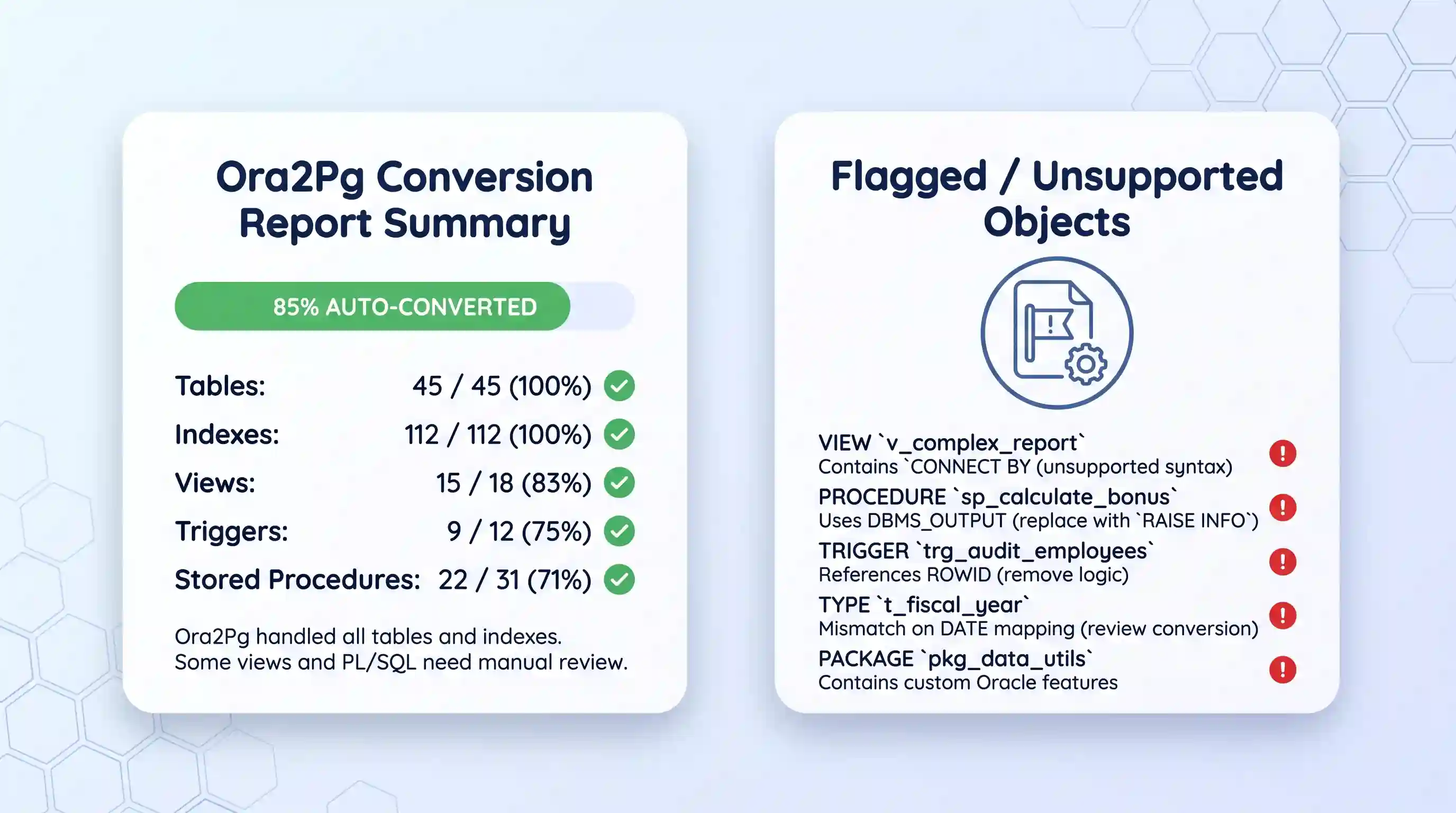
Ora2Pg is a free, open-source tool built specifically for this migration. It connects to your Oracle database, reads the schema, and generates PostgreSQL-compatible DDL, data export files, and converted PL/pgSQL code automatically. It handles most of the tedious conversion work, though you still need to review and fix anything it flags as unsupported.
A commercial GUI tool trades a license fee for a graphical interface and fewer manual steps. The Oracle to Postgres converter from Intelligent Converters, for example, migrates tables, data, constraints, indexes, and foreign keys directly, and lets you filter which rows and columns get migrated using a SELECT-style query instead of writing your own extraction scripts. That filtering works like ordinary SQL: a query such as select title, address from vendors where status=1 pulls only matching rows, and one like select first_name, last_name from people where birthday IS NOT NULL skips incomplete records automatically. Intelligent Converters has been publishing database conversion tools referenced on PostgreSQL.org’s own news archive since at least 2015, which is a reasonable sign of staying power in a fairly small software niche.
If you’re moving into the cloud, AWS offers its own path. AWS Database Migration Service handles table data and keeps source and target in sync during the cutover, while the AWS Schema Conversion Tool handles everything DMS doesn’t move on its own: views, stored procedures, triggers, and sequences. This path only makes sense if you’re already committed to AWS, or at least other cloud database hosting options, as your target platform.
| Method | Cost | Effort | Best for |
|---|---|---|---|
| Manual / DIY | Free (time only) | High, every step done by hand | Very small databases, or teams that want full control |
| Ora2Pg | Free, open source | Medium, automates conversion, you review the output | Teams comfortable with the command line |
| GUI commercial tool | One-time license fee | Low, mostly point-and-click | Teams that want a graphical interface, filtering, and vendor support |
| AWS DMS + SCT | Pay-as-you-go AWS usage | Medium, two tools to configure | Teams already migrating into AWS |
Step-by-Step: Migrating Your Schema and Data
Whichever method you picked, the underlying sequence is the same six phases:
- Export the Oracle schema as DDL statements.
- Convert the DDL, data types, and PL/SQL to PostgreSQL syntax.
- Import the converted schema into PostgreSQL.
- Export Oracle’s data and convert it to a Postgres-friendly format.
- Import the converted data into PostgreSQL.
- Migrate stored procedures, views, and triggers last.
Step 1: Export the Oracle Schema
Export every table definition from Oracle as DDL, short for data definition language. These are the CREATE TABLE, CREATE INDEX, and constraint statements that define your schema’s structure. Ora2Pg and most GUI tools do this automatically by connecting straight to Oracle. Doing it by hand means running Oracle’s own export utilities table by table.
Step 2: Convert Data Types and PL/SQL
Oracle and PostgreSQL don’t share every data type, so this step is where most manual mistakes happen. A few of the common mismatches, based on documented type-mapping guidance for this migration:
| Oracle type | PostgreSQL equivalent | Note |
|---|---|---|
| VARCHAR2 | VARCHAR or TEXT | PostgreSQL doesn’t treat the two differently for performance the way Oracle does |
| NUMBER | NUMERIC or INTEGER | Match precision carefully. A bare NUMBER can silently become NUMERIC with the wrong scale |
| DATE | TIMESTAMP | Oracle’s DATE always stores a time component. Postgres’s DATE type does not |
| CLOB | TEXT | Large text objects generally map cleanly |
| BLOB | BYTEA | Binary objects need an actual format conversion, not just a rename |
| ROWID | No direct equivalent | Postgres has no exposed physical row identifier. Remove any code that depends on ROWID before migrating |
PL/SQL code needs the same care. Oracle’s procedural language, PL/SQL, is not compatible with PostgreSQL’s PL/pgSQL. Loop syntax, exception handling, and built-in functions all differ enough that most stored procedures need real PL/SQL to PL/pgSQL conversion, either by hand or through a dedicated tool, and then individual testing afterward.
Step 3: Import the Schema
Load your converted DDL into the target PostgreSQL database before touching any data. Run it against an empty database first, fix every error it throws, and only then move on. Importing data into a schema with hidden errors just moves the same problem one step downstream.
Step 4: Export and Convert the Data
Export Oracle’s data, usually to CSV format, into temporary storage. Convert dates, escape special characters in text fields, and reformat binary data so PostgreSQL will accept it. This is the step where character encoding mismatches most often surface, especially with older Oracle databases that used a different default character set than UTF-8.
Step 5: Import the Data
Load the converted CSV files into PostgreSQL’s matching tables. Tools with a bulk-insert or direct-connection option are noticeably faster here than row-by-row inserts, which matters once you’re moving millions of rows instead of thousands.
Step 6: Migrate Stored Procedures, Views, and Triggers
Export these as SQL statements and source code from Oracle, rewrite them for PostgreSQL’s syntax, and import them last, after the schema and data are already in place. Test each converted procedure against real data before you consider the migration finished.
Verification: Confirm the Migration Worked
Don’t call the migration done just because the import ran without throwing an error. Confirm it actually worked before you rely on it.
Success
- Compare row counts between every source Oracle table and its matching target PostgreSQL table.
- Spot-check a sample of individual records against the original data, not just the counts.
- Confirm foreign keys, unique constraints, and indexes exist and are actually enforced on the new database.
- Run your application against the new database in staging before pointing production traffic at it.
- Generate realistic test records with a PostgreSQL test data generator to exercise edge cases your production data might not happen to cover.
Troubleshooting Common Migration Errors
These are the mistakes that show up most often on a first Oracle-to-Postgres migration, roughly in the order people tend to hit them.
Sequence values reset to zero.
PostgreSQL sequences don’t automatically inherit Oracle’s current sequence value. Set each sequence’s starting value manually to match the highest existing ID, or new inserts will collide with migrated rows.
Case-sensitive identifiers break queries.
Oracle folds unquoted identifiers to uppercase; PostgreSQL folds them to lowercase. Queries and application code that quote table or column names with mixed case will fail after migration unless you standardize on one case throughout.
NUMBER precision gets rounded or truncated.
A NUMBER column with no defined precision in Oracle can map to the wrong scale in PostgreSQL. Check financial and quantity columns specifically, since silent rounding here causes real data problems.
Character encoding mismatches corrupt text.
Older Oracle databases sometimes use a non-UTF-8 character set. Convert the encoding explicitly during data export instead of assuming a plain copy will work.
Date and timestamp formats mismatch.
Oracle’s DATE type always includes a time. Postgres’s DATE type doesn’t. Decide up front whether each date-like column should become a PostgreSQL DATE or TIMESTAMP, and convert consistently across every table.
Where This Approach Has Limits
The steps above work well for a straightforward, one-time cutover. They don’t hold up in every situation.
If you need near-zero downtime, a batch export-and-import isn’t good enough. Every minute between your data export and the final cutover is data your application keeps writing to Oracle that PostgreSQL doesn’t have yet. For that, you need ongoing change capture, which is what AWS DMS’s continuous replication mode, or a vendor’s dedicated sync product, is actually built for.
If your database is very large, plain CSV export and import can take longer than your downtime window allows. Parallel export, partitioned imports, or a change-data-capture tool become worth the added complexity at that scale.
And if your team eventually needs to move analytics workloads out of PostgreSQL entirely, that’s a separate migration with its own process. Moving Postgres data to BigQuery is a common next step for teams that outgrow a single relational database for reporting. Whichever path you take to get onto Postgres, budget time afterward to tune PostgreSQL’s performance, since Oracle and Postgres don’t optimize queries the same way by default.
Key Takeaways
- The main reason to migrate is licensing cost, not raw capability. PostgreSQL’s open-source license carries no per-core fee; Oracle Enterprise Edition does.
- Pick your migration method based on your team’s skills and budget: manual, Ora2Pg, a GUI commercial tool, or AWS DMS and SCT if you’re moving to the cloud.
- Data type conversion and PL/SQL-to-PL/pgSQL rewrites are where migrations actually go wrong, not the raw data transfer itself.
- Verify row counts, spot-check records, and test your application in staging before switching production over. A migration that runs without errors isn’t automatically a correct one.
- Batch migration works fine for a one-time cutover. If you need near-zero downtime, or you’re migrating a very large database, plan for continuous replication instead.
FAQ
Does PostgreSQL support everything Oracle does?
No, not fully. PostgreSQL is a capable relational database, but it doesn’t replicate every Oracle-specific feature. Things like Oracle’s Real Application Clusters, certain advanced partitioning options, and some PL/SQL package behaviors don’t have a direct PostgreSQL equivalent. Check your application’s actual dependence on these features before you commit to a migration date.
Is Ora2Pg safe to run against a production database?
Run it against a read-only connection or a copy of your database, not live production, especially the first few times. Ora2Pg reads schema and data but doesn’t write back to Oracle, so it’s low-risk by design. The real risk is running an unfamiliar tool against your only copy of production data without a tested backup in place first.
What happens to my Oracle license after I migrate?
That’s a licensing and contract question, not a technical one, so involve whoever manages your Oracle contract early in the project. Oracle licenses typically need to be formally reduced or canceled through your account team, and the timing can affect your contract’s renewal terms. Don’t assume the license cancels itself once you stop using the database.
Can I run Oracle and PostgreSQL side by side during the transition?
Yes, and for anything beyond a small database, you generally should. Running both systems in parallel for a transition period lets you validate PostgreSQL against real traffic before fully committing. The tradeoff is that you need a way to keep both databases in sync during that window, which is what change-data-capture tools and continuous replication modes are for.
Do I need a database administrator to do this migration myself?
It depends on your schema’s complexity, not your database’s size. A handful of simple tables with no stored procedures is manageable for a developer comfortable with SQL. A schema with dozens of PL/SQL packages, custom triggers, and Oracle-specific functions is where bringing in someone with hands-on Postgres migration experience actually pays for itself.

💬 Comments