A VPN or Tor can prevent your internet service provider (ISP) from directly seeing the final websites reached through properly routed traffic, but neither makes you invisible online. Encrypted DNS, private browsing, proxies, and private search engines solve narrower privacy problems and should not be treated as equivalent replacements.
The useful question is not simply whether your browsing history is “hidden.” You need to separate what your ISP can observe on the network from what your browser, VPN provider, websites, search engines, and other services may still know.
What Your ISP Can See Before You Change Anything
Your ISP provides the connection that carries your traffic to the wider internet. That position can expose information about your network activity, but it does not mean the provider automatically receives a readable copy of every page you open.
HTTPS protects the contents exchanged between your browser and an HTTPS website. Your ISP generally cannot read the protected page text, passwords, messages, or the complete HTTPS URL path simply because it carries the connection. However, other network information can still reveal or suggest where traffic is going.
| Information | Typical ISP visibility | What can change it |
|---|---|---|
| Unencrypted HTTP content | Content can be exposed on the network path because HTTP does not provide HTTPS encryption. | Using HTTPS protects the browser-to-website exchange. |
| HTTPS page contents | The encrypted content itself is normally not readable by the ISP. | HTTPS provides this protection independently of a VPN. |
| DNS lookups | Traditional plaintext DNS queries can reveal the domain names your device asks a resolver to find. | Encrypted DNS, such as DNS over HTTPS or DNS over TLS, protects the DNS query between your device and the resolver. |
| Destination network addresses | The ISP still carries connections toward network addresses unless that traffic first goes through another routed service such as a VPN or Tor. | A VPN or Tor changes the network path visible from the local connection. |
| Connection timing and data volume | The access provider can still observe that traffic exists and how much data crosses the connection even when the payload is encrypted. | Encryption protects content, but does not make an active internet connection disappear. |
| History saved in your browser | This is primarily local browser data rather than something your ISP reads from the browser’s history list. | Private browsing can reduce what the browser saves locally, but it does not hide network activity from the ISP. |
DNS is an important part of this picture. A normal DNS lookup translates a name such as example.com into an address the device can connect to. Traditional DNS queries can travel in plaintext, while DNS over HTTPS and DNS over TLS encrypt those queries between the device and DNS resolver.
That still does not make encrypted DNS a complete ISP-hiding tool. It protects the lookup, not every connection that follows it. Cloudflare distinguishes its DNS-only resolver from WARP on the same basis: WARP can encrypt device traffic beyond DNS queries, while the resolver alone cannot.
There is also a Transport Layer Security (TLS) feature called Encrypted Client Hello, or ECH. When a compatible client and server use it, ECH can encrypt the server-name information that older TLS handshakes exposed. The ECH standard also identifies plaintext DNS and visible server IP addresses as separate ways a destination may still be exposed, so ECH should not be treated as complete destination concealment.
ISP data practices also vary by provider and jurisdiction. A Federal Trade Commission study of several major U.S. providers found extensive collection and monetization practices among the companies it examined, including the use of browsing information. The FTC findings covered six major internet service providers, so they support taking ISP privacy seriously without implying that every provider collects or uses data in the same way.
Which Tools Actually Hide Browsing Destinations From Your ISP?
Different tools change different parts of the connection, so it helps to compare the main ways to limit ISP tracking before deciding whether you need a VPN, Tor, encrypted DNS, or only local browser privacy.
VPN
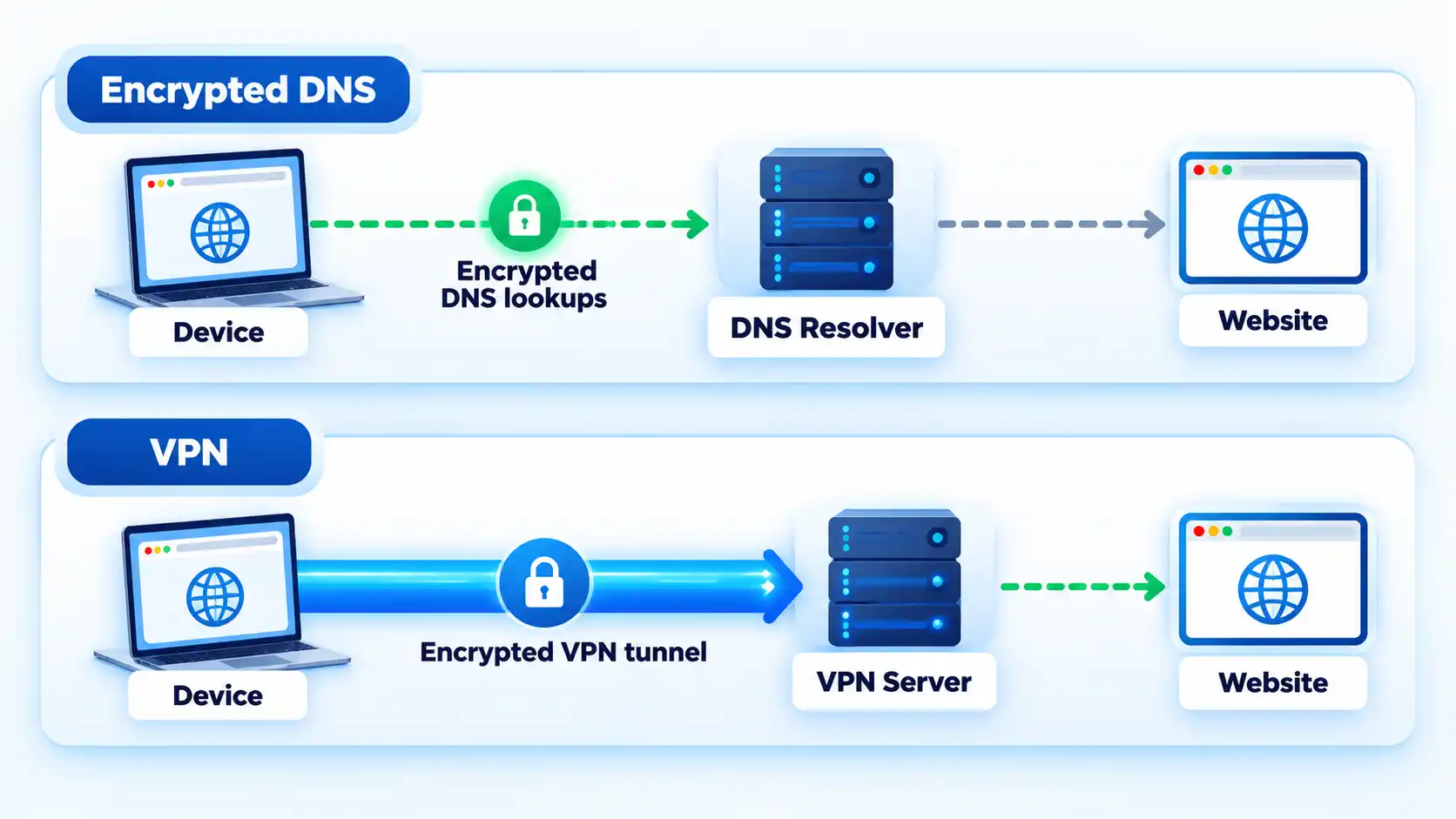
A virtual private network, or VPN, creates an encrypted connection between your device and a VPN server for traffic that the VPN is configured to carry. Your ISP still sees a connection leaving your device, but covered traffic reaches the VPN infrastructure before continuing toward its final internet destinations.
For those connections, the ISP sees the VPN connection rather than directly carrying each covered connection to its final website. Websites will normally receive the VPN server’s public IP address instead of the public address assigned to your normal connection.
A VPN does not make you entirely anonymous. It also shifts substantial trust from the access network to the VPN operator because the provider handles traffic routed through its infrastructure. The VPN provider can occupy a highly trusted position in the connection, so a changed public IP address alone does not prove that a service deserves your trust.
If you need more detail on routing, application coverage, HTTPS, and the trust boundary, the important distinction is what a VPN actually protects, rather than a blanket claim that a VPN hides everything.
Tor Browser
Tor uses a different routing model. Tor Browser sends its browser traffic through multiple Tor relays before ordinary websites are reached. Your ISP or another local network observer can normally tell that you are communicating with Tor infrastructure, but the normal Tor route does not reveal the final website to that observer.
The destination instead sees traffic arriving from the Tor network rather than directly from your normal public IP address. Tor Browser also includes browser-level privacy protections that a normal VPN tunnel does not provide. Because an ordinary browser can introduce additional tracking or information-leak risks, the Tor Project strongly discourages using another browser as a substitute for Tor Browser.
The choice is not simply “which one hides my IP?” because VPN and Tor use different privacy models. A VPN concentrates substantial routing trust in one provider, while Tor distributes route knowledge across several relays.
Encrypted DNS
Encrypted DNS protects the domain-name lookup between your device and the DNS resolver. For example, DNS over HTTPS wraps DNS requests inside HTTPS so an observer between the device and resolver cannot simply read those DNS queries in plaintext.
That is useful, but it does not create a full tunnel around normal browsing traffic. Your device still needs to connect to the website or service after resolving its address. Encrypted DNS should therefore be treated as DNS-query privacy rather than a complete replacement for a VPN or Tor.
Proxy
A proxy is an intermediary that forwards selected traffic on your behalf. A website reached through a proxy may see the proxy’s address rather than your normal public IP address, but the privacy effect depends on the type of proxy, the application using it, and the protocol carrying the traffic.
The key point is that a conventional proxy should not automatically be treated like a VPN. A VPN adds its own encrypted client-to-server tunnel for traffic routed through it, while a proxy does not inherently provide the same protection. If you are deciding between them, compare how proxy and VPN protection differ in encryption and traffic coverage rather than judging both only by the IP address a website sees.
Private or Incognito Browsing
Private browsing is mainly about what the browser keeps on the device after the private session ends. It can be useful on a shared computer when you do not want ordinary browsing history and session data left in the normal browser profile.
It does not change the underlying network route. In Chrome, for example, an ISP may still observe activity during an Incognito session. Incognito therefore should not be treated as an ISP-hiding feature.
Private Search Engines
A privacy-focused search engine may reduce the information given to the search provider compared with another search service, depending on its policies and design. It does not, by itself, create an encrypted tunnel between your device and another network endpoint.
Changing search engines can therefore address search-provider privacy without solving the separate question of what your ISP can observe about network connections.
How to Reduce What Your ISP Can See
Choose the method according to what you are trying to hide. A VPN can change your apparent network location and places substantial trust in the VPN operator. Tor uses a different route through multiple relays, can be slower because of that route, and may trigger CAPTCHAs or other anti-abuse checks on some sites.
- Define the privacy goal. If you mainly want to prevent your ISP from directly seeing the final destinations of ordinary traffic across supported applications, a VPN is the usual general-purpose approach. If you need Tor’s distributed routing and browser privacy model, use Tor Browser. If you only want to protect DNS lookups, encrypted DNS may be enough for that narrower goal.
- Connect through the method you chose. For a VPN, use the provider’s application or your operating system’s configured VPN connection and wait until it reports that the tunnel is connected. For Tor, install Tor Browser from the Tor Project, open it, and use its Connect control before browsing through that browser.
- Check which traffic the protection covers. Review whether your VPN uses split tunneling or application exclusions. An excluded browser or app can continue using the normal ISP route even while the VPN reports that it is connected. Tor Browser routes Tor Browser traffic through Tor; unrelated applications on the device are not automatically protected.
- Check the DNS configuration. If DNS privacy matters, confirm whether your VPN handles DNS inside its intended route or whether you deliberately use an encrypted DNS service. Simply replacing one DNS resolver address with another does not prove that the queries are encrypted.
- Decide what should happen if a VPN disconnects. If you do not want covered traffic to fall back to the normal ISP route, enable the VPN product’s documented kill switch or operating-system fail-closed protection when that feature is available. A reconnect feature tries to restore the tunnel; a kill switch controls whether covered traffic may bypass it while the tunnel is unavailable.
- Verify the route before relying on it. Use the same device, underlying network, browser or application, and harmless public-IP check for the baseline and protected tests. Confirm the protected traffic follows the route you intended before using the setup for activity where the distinction matters.
How to Check That Your Protection Is Working
Test with harmless traffic and keep the underlying internet connection available throughout any VPN failure check. Turning off Wi-Fi, Ethernet, or mobile data cannot tell you whether traffic would have fallen back outside a failed VPN tunnel.
- Record the normal route. Disconnect the VPN only if doing so is safe and no persistent VPN-required policy is blocking ordinary access. Using the browser or application you intend to test, open the same reputable public-IP check you will use later and record the normal public IP result. This is your fallback baseline.
- Connect the VPN and repeat the same check. Keep the same device, Wi-Fi, Ethernet, or mobile-data connection and the same test application. The result should now reflect the VPN route rather than the baseline route for traffic covered by the tunnel.
- Confirm the traffic scope. Check the VPN’s split-tunneling or application-exclusion settings. Make sure the browser or application used for the test is supposed to use the VPN. Traffic deliberately excluded from the tunnel should not be counted as a leak.
- Check DNS only against the configuration you intended. If the VPN or DNS provider supplies a documented DNS diagnostic, use it to confirm that requests follow the expected resolver path. A resolver that differs from the VPN company’s own DNS server is not automatically a leak if you deliberately configured another encrypted resolver.
- Prepare a safe failure test if you rely on a kill switch. Stop sensitive uploads, private messages, financial sessions, file transfers, and other traffic you would not want exposed. Confirm that the kill switch or non-VPN blocking control you intend to test is enabled, and check the provider’s instructions for the type of tunnel interruption that should trigger it.
- Trigger only the supported VPN failure condition. Use the provider’s documented test or interruption method when one is available. Do not assume that pressing Disconnect tests an ordinary kill switch because some products intentionally allow normal networking after a manual disconnect. Do not disable the underlying internet connection as a substitute.
- Observe fallback and recovery. While the tunnel is unavailable but the underlying connection remains active, use only the harmless connectivity check. If your chosen protection is supposed to fail closed, covered traffic should remain blocked rather than returning through the baseline route. Reconnect the VPN, repeat the public-IP check, and stop when the protected result has returned.
A public-IP change confirms one visible routing change, but it does not prove that every application, DNS request, IPv6 connection, browser feature, or split-tunneled route follows the same path. Those are separate checks.
If the behavior is unclear, VPN traffic leaks and kill-switch behavior need to be diagnosed by the specific path involved because DNS, IPv6, split tunneling, browser address exposure, and a complete VPN disconnect can have different causes.
Verify the result
- The public IP result changes from the normal baseline to the expected VPN route for the traffic being tested.
- The browser or application you intend to protect is included in the VPN route rather than deliberately excluded by split tunneling.
- When DNS is part of the privacy goal, its observed resolver path matches the configuration you intended rather than being judged only by whether it belongs to the VPN provider.
- If fail-closed protection is required, covered traffic cannot silently use the ordinary route during the supported VPN failure condition while the underlying internet connection remains available.
- After reconnection, the same harmless public-IP check again reflects the intended protected route.
What a VPN Still Does Not Hide
A VPN reduces what your ISP can directly observe about traffic routed through the tunnel, but your ISP can still see that your connection is active and that you are exchanging data with VPN infrastructure. Encryption does not make the underlying internet connection invisible.
The VPN provider also becomes an important intermediary. Covered traffic reaches its infrastructure before continuing toward the wider internet. That is why the provider’s ownership, privacy practices, technical design, and handling of customer data matter.
A VPN does not stop a website from knowing who you are when you identify yourself. If you sign in to an account, submit your email address, make a purchase, or provide other identifying information, the website can associate that activity with the information you supplied even though your normal public IP address has changed.
It also does not erase browser cookies, prevent every form of browser fingerprinting, block phishing, remove malware, or make an unsafe website trustworthy. Those are separate privacy and security problems.
HTTPS remains important as well. The VPN tunnel protects traffic between your device and the VPN endpoint, while HTTPS can continue protecting the browser-to-website session beyond that point. One should not be treated as a replacement for the other.
Tor has limits too. Tor Browser cannot guarantee perfect anonymity, and signing in to an identifying account or supplying personal information can identify you to that website. A sufficiently capable observer that can watch both ends of a Tor communication may also attempt traffic correlation; Tor does not defend against an observer that can see both ends of the communication channel.
Bottom Line
If your main goal is to stop your ISP from directly seeing the final destinations of ordinary device or application traffic, a properly configured VPN is usually the most practical general-purpose option. If you need Tor’s distributed routing and browser-level privacy protections, Tor Browser serves a different and more specialized role.
Encrypted DNS is useful when the specific problem is exposed DNS queries. Private browsing is useful when you want less browsing data stored locally. A proxy can reroute selected traffic, but it should not automatically be treated as a VPN. A private search engine changes the relationship with the search provider rather than the underlying ISP route.
Match the tool to the observer you are trying to limit, then verify the actual route and traffic scope before relying on the privacy setup.

very nice post i like it very much.
Thanks for writing such a good article