A social engineering attack is a security scam where criminals trick you into sharing private information, sending money, or giving up account access. Instead of finding technical flaws in computer software, attackers exploit human emotions like trust, fear, curiosity, and urgency to steal sensitive data.
Personal data is widely accessible across the modern web. A simple online search can reveal an individual’s home address, phone number, workplace, and social media profiles. Criminals study these public footprints to make their deceptive messages sound convincing.
Quick Take
Social engineering targets human psychology rather than software code. Attackers know it is often easier to fool a person than to break digital encryption. Understanding their methods helps you stop attacks before damage occurs.
- Core Threat: Attackers impersonate trusted people or organizations to manipulate your natural reactions.
- Common Formats: Phishing emails, urgent phone calls, fake tech support alerts, and malicious USB drives.
- Key Warning Sign: High-pressure demands for immediate action or secret information.
- Best Defense: Verify unexpected requests using an independent, trusted contact method before sharing any data.
Why Social Engineering Works: The Human Vulnerability
Computer firewalls and security tools protect networks against unauthorized code. However, technical safeguards cannot stop an authorized user from willingly sharing their password. Attackers target human decision-making because people naturally want to be helpful, resolve problems quickly, and avoid penalties.
The NIST Computer Security Resource Center defines social engineering as any attempt to trick someone into revealing sensitive records or performing actions that compromise security. Criminals rely on specific emotional triggers to bypass logical skepticism:
- Urgency: Setting artificial deadlines forces victims to act quickly without thinking or verifying facts.
- Authority: Impersonating managers, police, bank representatives, or government officials discourages questioning.
- Fear: Threatening account suspension, legal trouble, or financial loss triggers panic.
- Curiosity and Greed: Promising free gift cards, job opportunities, or exclusive files tempts users to click unsafe links.
- Helpfulness: Exploiting normal politeness makes employees share internal directory information or assist a fake coworker.
The 4-Phase Lifecycle of a Social Engineering Attack
Social engineering attacks rarely happen at random. Experienced attackers follow a structured four-stage process to select their targets, earn trust, collect sensitive assets, and escape without detection.
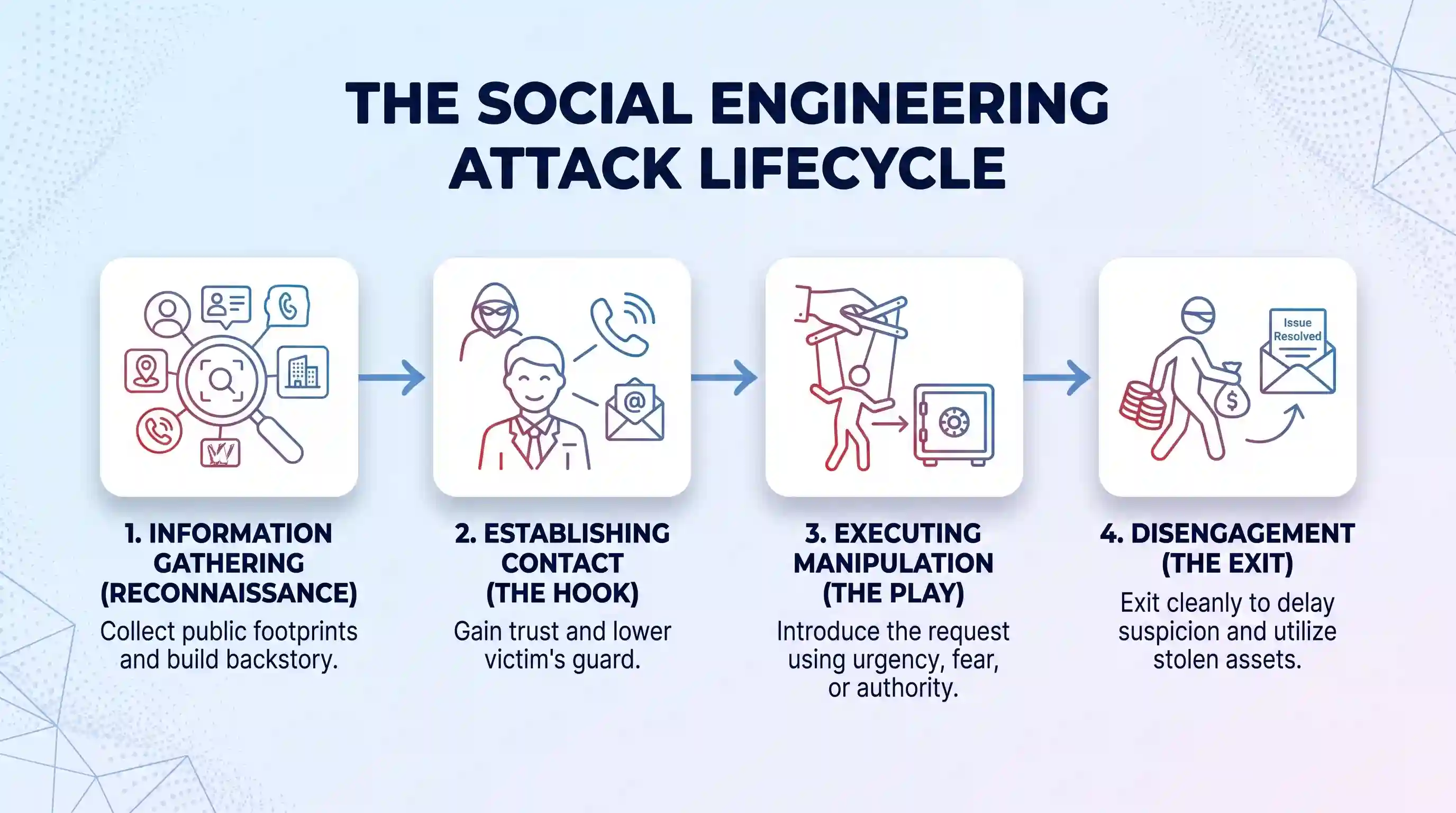
Phase 1: Information Gathering (Reconnaissance)
Attackers begin by collecting background details about their intended target. They study company websites, social media accounts, and press releases. They also look at what’s available in the public record to identify family members, previous addresses, and business relationships. This research helps the criminal craft a believable backstory. If you discover exposed records online, you can take proactive steps to report identity theft risks early.
Phase 2: Establishing Contact and Building Trust (The Hook)
Once the attacker chooses a scenario, they make direct contact with the victim. They may pose as an IT technician, a payroll officer, or a familiar vendor. The criminal presents plausible details gathered during reconnaissance to sound legitimate. This initial interaction aims to lower the victim’s guard and create a false sense of security.
Phase 3: Executing the Manipulation (The Play)
After establishing trust, the attacker introduces a specific request. They might claim an invoice needs immediate payment, an account requires password re-entry, or a critical update needs installation. The attacker uses urgency or authority to push the victim past standard safety checks. The victim then provides login credentials, transfers funds, or downloads a file.
Phase 4: Disengagement and Exploitation (The Exit)
The attacker ends the interaction smoothly to delay suspicion. They may thank the victim, send a fake confirmation number, or state that the issue is resolved. This quiet exit gives the criminal time to use the stolen data, access private networks, or move money before the victim realizes a scam took place.
Common Types of Social Engineering Attacks
Attackers deliver social engineering schemes through digital messages, voice communications, and physical media. Learning these core attack vectors makes them easier to spot.
Phishing, Vishing, and Smishing
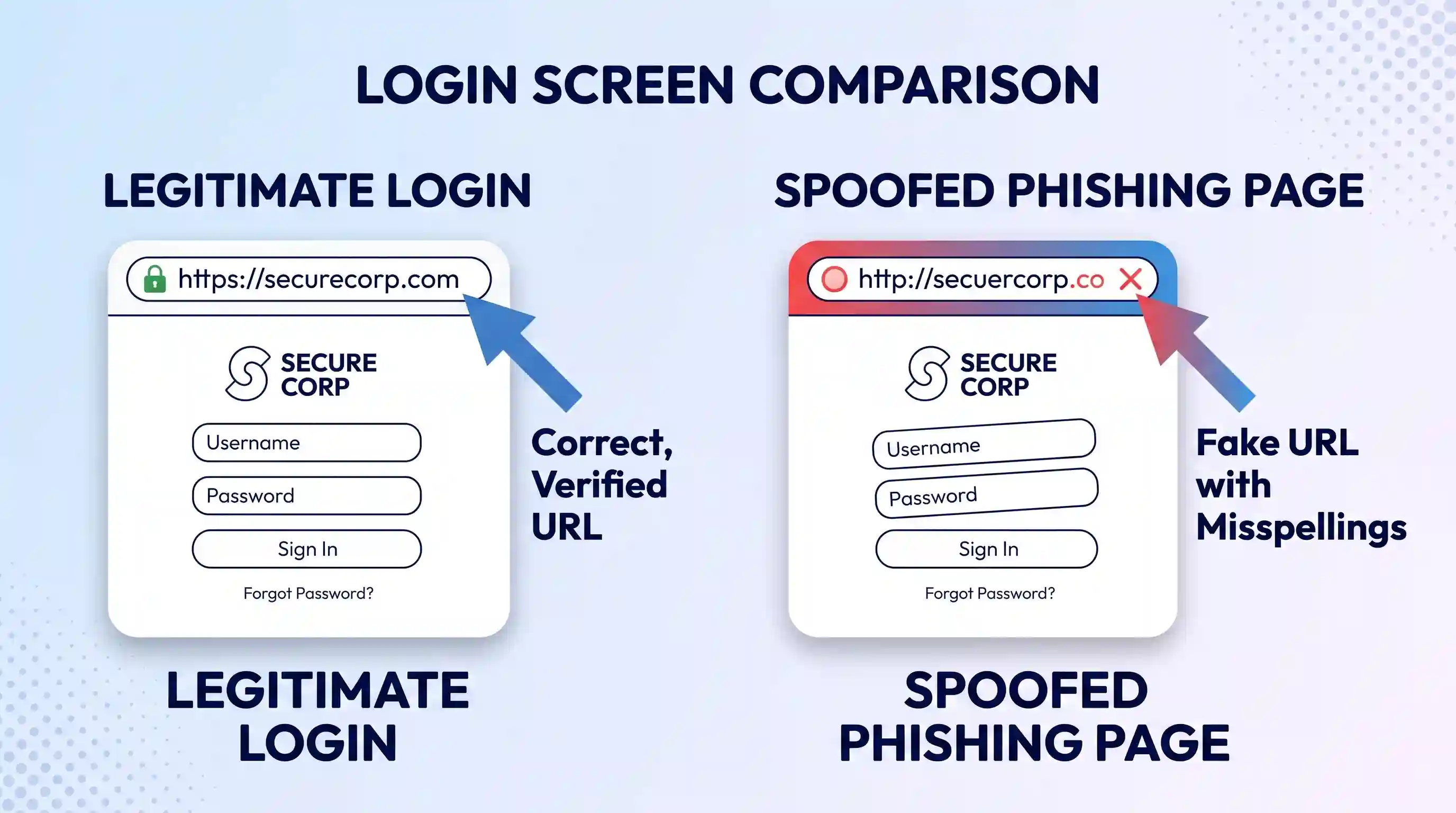
Phishing is the most widespread social engineering method. Attackers send fraudulent emails that look like official messages from banks, retailers, or email providers. Official guidance on avoiding social engineering attacks warns that these messages direct users to fake login pages that capture entered credentials. Knowing how to spot phishing emails helps you identify fake sender addresses and deceptive links.
When attackers use telephone calls instead of email, the attack is called vishing (voice phishing). The scammer often fakes their caller ID to impersonate tax agents or tech support staff. When attackers send fraudulent text messages with malicious links, the technique is called smishing (SMS phishing).
Pretexting
In a pretexting attack, the criminal invents a detailed fictional story (a pretext) to justify why they need private data. According to Federal Trade Commission guidance, scammers often claim they are investigating fraudulent transactions, updating billing systems, or auditing tax files. The attacker uses this role to request Social Security numbers, dates of birth, or bank account details.
Baiting and Physical Media Drops
Baiting attacks tempt victims with an enticing item or digital download. Attackers may post free software downloads, movies, or game mods loaded with hidden malware. In physical settings, attackers leave infected USB flash drives in parking lots, office lobbies, or coffee shops. Curious finders who plug these drives into their computers unknowingly install spyware. Cloudflare threat research shows that physical drops succeed because people naturally want to find the owner or inspect the contents.
Scareware and Tech Support Scams
Scareware uses alarming pop-up windows to convince users their computer has severe virus infections. The pop-up flashes urgent warnings and displays a fake customer support phone number. When the user calls, the fake technician asks for remote computer access and demands payment for useless repair software.
Spear Phishing and Whaling
Standard phishing targets thousands of random people at once. In contrast, spear phishing targets one specific individual or organization. The attacker customizes every sentence using the victim’s job title, project names, and colleague names. When attackers target corporate executives, board members, or finance directors, the attack is called whaling. Organizations often protect their staff by deploying essential business software tools with automated email filtering.
| Attack Type | Delivery Method | Attacker Goal | Primary Warning Sign |
|---|---|---|---|
| Phishing | Steal login details or install malware | Generic greetings, misspelled URLs, urgent action requests | |
| Vishing | Phone calls (spoofed caller ID) | Collect financial information or access codes | Aggressive tone, threats of arrest, requests for one-time codes |
| Smishing | SMS text messages | Prompt clicks on malicious tracking links | Fake parcel delivery alerts, unexpected bank verification links |
| Pretexting | Phone, email, or in-person | Extract sensitive personal or corporate records | Elaborate stories requesting identity verification data |
| Baiting | Free downloads or dropped USB drives | Trigger automatic malware installation | Unsolicited physical media, offers that seem too good to be true |
| Scareware | Browser pop-ups and fake alerts | Sell fake software and gain remote device access | Flashing browser warnings claiming critical system infection |
How to Recognize the Warning Signs
Social engineering attempts share common warning signs regardless of the delivery channel. Watching for these red flags helps you identify a scam before sharing confidential information.
- Artificial Deadlines: The sender claims you must reply within minutes to avoid penalties, account closure, or legal action.
- Mismatched Web Addresses: The visible sender name looks real, but the actual email domain contains extra characters, misspelled words, or unusual domain endings.
- Requests to Bypass Rules: The caller asks you to skip normal security procedures, share login tokens, or process payments outside regular accounting channels.
- Unexpected Attachments: Unsolicited messages contain invoice files, shipping receipts, or document archives with unusual file extensions like .exe, .scr, or .zip.
- Unsolicited Contact Offering Help: A caller claims to be an IT specialist fixing a problem you never reported.
- Overly Generic or Awkward Phrasing: The message uses vague greetings like “Dear Customer” combined with strange grammar or unnatural phrasing.
How to Protect Yourself: Practical Verification and Defense
Defending against social engineering requires combining careful personal habits with strong technical safeguards. Use this practical verification framework whenever you receive an unexpected request.
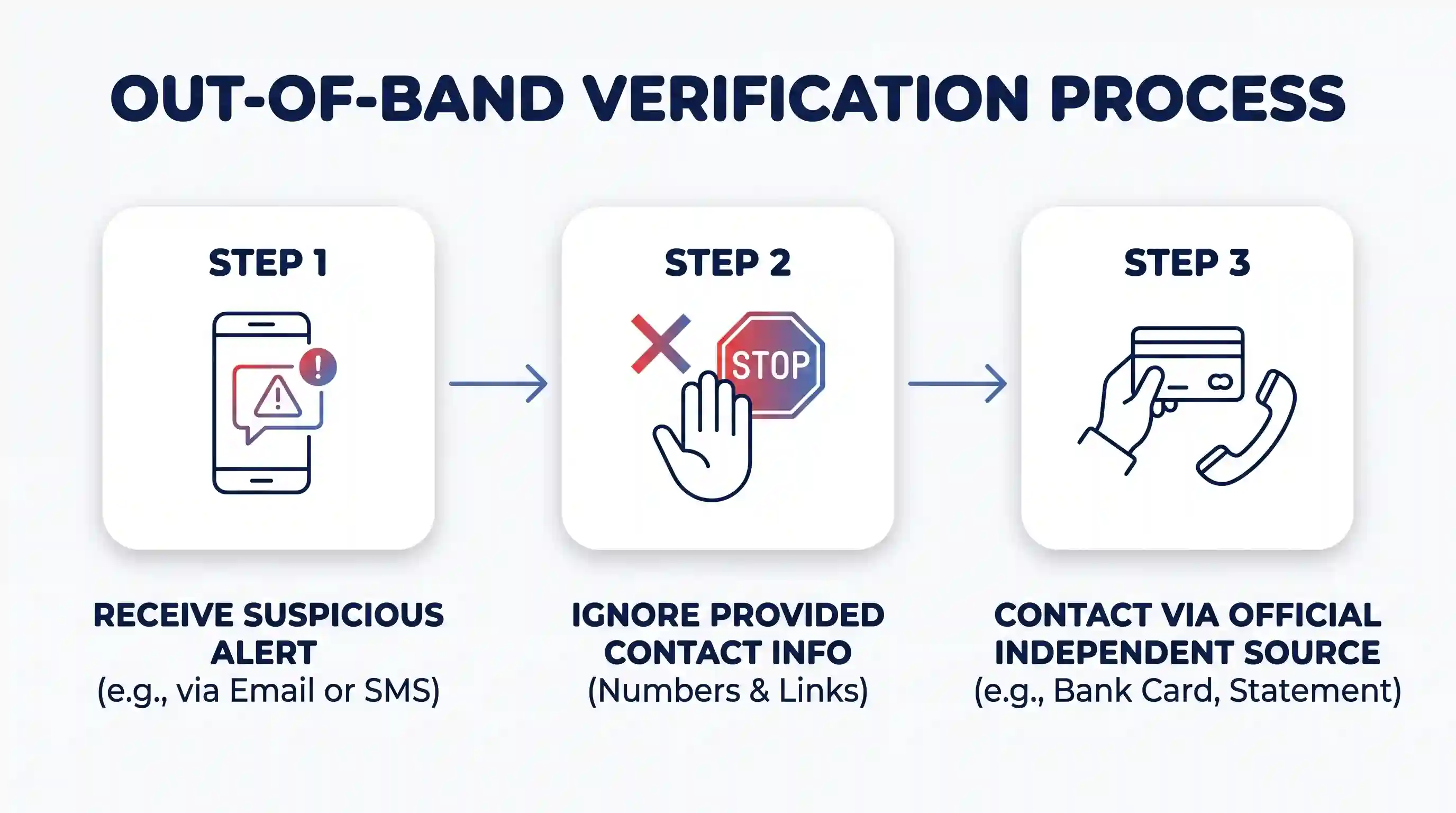
1. Use Out-of-Band Verification
The single most effective defense against impersonation is independent verification. If you receive an urgent message from a bank, vendor, or coworker, never reply directly to that message. Do not call the phone number listed in the email or click links inside the alert.
Instead, contact the sender through a separate, established channel. Look up the organization’s official phone number on your bank card or official billing statement. Call your coworker on their known office extension. Independent verification instantly exposes spoofed requests.
2. Turn on Multi-Factor Authentication (MFA)
Multi-factor authentication adds a critical security layer to your online accounts. When you enable multi-factor authentication, an account requires both your password and a temporary verification code to log in. Even if an attacker tricks you into sharing your password, they cannot access your account without your secondary authentication device.
3. Manage Passwords Securely
Never reuse passwords across multiple services. If an attacker acquires one reused password through a phishing site, they will test it on your email, banking, and shopping accounts. Use a dedicated password manager to generate and store complex, unique passwords for every service.
4. Practice Safe Network and Device Hygiene
Keep all operating systems, web browsers, and applications updated. Turn on automated updates so security patches install as soon as developers release them. When traveling, maintain staying safe on public Wi-Fi networks by using secure connections that protect your browsing data from local snooping.
Install reputable antivirus and antimalware software on all devices. Quality security suites block known phishing domains, scan downloaded attachments for threats, and detect malicious script execution. Review CISA phishing defense recommendations to build consistent reporting habits across your personal and professional accounts.
What Security Software Can and Cannot Do
Security software provides essential protection, but it has distinct limitations against social engineering. Antivirus programs and email spam filters scan incoming files and compare web links against databases of known malicious servers. They excel at catching known malware attachments, blocking spam distribution, and stopping unauthorized background installations.
However, security software cannot stop a user from freely telling a telephone scammer their Social Security number. Antivirus tools cannot prevent an employee from authorizing a fraudulent wire transfer or typing login credentials into a brand-new, unlisted phishing domain. Software protects devices, but human skepticism protects data. A complete defense requires combining technical filters with careful verification habits.
Key Takeaways
- Social engineering attacks manipulate human psychology and emotions rather than exploiting software vulnerabilities.
- Attackers rely on emotional levers like urgency, fear, authority, and curiosity to bypass critical thinking.
- Common attack types include email phishing, telephone vishing, text smishing, pretexting stories, baiting downloads, and scareware alerts.
- Always verify unexpected requests through an independent, official communication channel before sharing information or transferring funds.
- Enforce multi-factor authentication, use unique passwords, apply automatic software updates, and keep security software active on every device.
Frequently Asked Questions
What is the difference between social engineering and hacking?
Hacking focuses on finding technical weaknesses in computer hardware, networks, and software code to gain unauthorized entry. Social engineering focuses on exploiting human trust, habits, and emotional reactions to trick an authorized person into handing over access or data voluntarily.
Can social engineering attacks happen over the phone or in person?
Yes. Social engineering extends far beyond email. Criminals use telephone calls (vishing) to impersonate bank fraud departments or government agencies. In physical settings, attackers use pretexting to pose as delivery couriers, repair technicians, or cleaning staff to walk past security doors (tailgating) and access office workstations.
Why do attackers target individuals and small businesses instead of large corporations?
Individuals and small businesses often have fewer dedicated security defenses, making them easy targets for automated phishing and extortion schemes. Additionally, attackers use compromised personal and small business accounts as stepping stones to launch trusted spear phishing messages against larger partner organizations.

💬 Comments